
Community listing page, reviews here may not be monitored by the author.
ClanCraft Tjifty


No reviews yet
ClanCraft is a Minecraft mod that lets players create clans, claim land shown on Xaero's World Map in clan colors, use server-synced waypoints, and manage an admin panel directly from the map.
Community voices
Reviews
No reviews yet. Be the first to review this project!
Get it on
Available Platforms
Compatibility
Supported Environments
Must be installed on both the client and the server.
About
Project Details
For authors
Embed Badge
If you're the author of this project, you can embed a live badge anywhere that supports HTML or Markdown. It updates automatically whenever ratings change.
Use HTML for any page that supports it, or Markdown for README files and Markdown-based descriptions.
Identifiers
Platform IDs
About
Description
ClanCraft
ClanCraft is a comprehensive Minecraft Fabric mod that seamlessly integrates chunk-based land claiming, clan management, waypoints, ranks, and custom nickname features directly into Xaero's World Map.
🌟 Key Features
-
Clan & Nation Management: Create and manage clans/guilds with customizable names and colors.
-
Visual Chunk Claiming: Claim and unclaim chunks directly inside Xaero's World Map. Claimed areas are dynamically color-coded with your clan's color and display the clan's name.
-
Territory Protection: Protect your clan lands from unauthorized block breaking, block placing, entity attacks, and chest/inventory access.
-
Flexible Claims Settings: Toggle specific settings per clan like PvP status, chest access for outsiders, or temporarily disabling protection.
-
Waypoints: Create, list, and manage private waypoints that anchor securely to their in-game coordinates on the world map.
-
Custom Ranks System: Distinguish permissions and custom claim limits between ranks (Player, King, Admin).
-
Integrated Admin Tools: Toggle "Admin Duty" directly from the map screen to modify claims, teleport by clicking the map, adjust default/player claim limits, and manage nicknames.
-
Language Selection: Automatic multi-language selection prompt (English, Dutch, German, French, Spanish) on first connection.
🛠️ Installation Guide
IMPORTANT
ClanCraft supports multiple Minecraft versions. Simply download the ClanCraft build that matches your Minecraft version, together with the corresponding versions of Fabric Loader, Fabric API, and Xaero's World Map. Players must have this mod installed on both the client and server.
1. Download Dependencies
To run this mod, download the versions of Fabric API and Xaero's World Map that match your Minecraft version.
2. Installation Steps
Download and install the matching Fabric Loader for your Minecraft version.
-
Place the following
.jarfiles in your.minecraft/modsfolder:-
ClanCraft
-
Xaero's World Map
-
Fabric API
-
-
Launch the game.
📢 Need a different Minecraft version?
If you want to use ClanCraft on a different version of Minecraft, join the official Discord server to get help and custom builds:
👉 https://discord.gg/YCQCDJMvFZ
⌨️ Controls & Keybinds
-
Open World Map: Press M (default Xaero keybind).
-
Map Context Menu: Right-click anywhere on the map to open the ClanCraft context menu. From here you can:
Start/Stop claiming mode.
Right-click on claimed chunks to unclaim them.
Create a new waypoint at the clicked block.
Access the Admin Settings Panel (if in Admin Duty).
💬 Chat Commands
👥 Clan Commands
-
/clan create - Create a new clan. Available colors: red, orange, yellow, lime, green, cyan, light_blue, blue, purple, magenta, pink, white.
-
/clan invite - Invite a player to your clan (requires Owner or Admin rank).
-
/clan accept - Accept a pending invite.
-
/clan deny - Deny a pending invite.
-
/clan leave - Leave your current clan (owners cannot leave; use delete).
-
/clan kick - Kick a member from your clan (requires Owner or Admin rank).
-
/clan info [name] - Display information about your clan or the specified clan.
-
/clan list - List all clans registered on the server.
-
/clan delete - Delete your clan and remove all its claims.
🗺️ Claim Commands
-
/claims - Display your clan's claim count and maximum limit.
📍 Waypoint Commands
-
/waypoint add - Add a waypoint at your current coordinates.
-
/waypoint remove - Remove a waypoint by name.
-
/waypoint list - List all your waypoints.
🛡️ Admin & Moderation Commands
-
/rank set - Set a player's rank (player, king, admin).
-
/rank get - View a player's current rank.
-
/rank remove - Reset a player's rank back to player.
-
/nick - Set a player's custom nickname (supports formatting and color codes using & or §).
-
/nick off or /nick reset - Remove a custom nickname.
ClanCraft
ClanCraft is a comprehensive Minecraft Fabric mod that seamlessly integrates chunk-based land claiming, clan management, waypoints, ranks, and custom nickname features directly into Xaero's World Map.
🌟 Key Features
- Clan & Nation Management: Create and manage clans/guilds with customizable names and colors. - Visual Chunk Claiming: Claim and unclaim chunks directly inside Xaero's World Map. Claimed areas are dynamically color-coded with your clan's color and display the clan's name. - Territory Protection: Protect your clan lands from unauthorized block breaking, block placing, entity attacks, and chest/inventory access. - Flexible Claims Settings: Toggle specific settings per clan like PvP status, chest access for outsiders, or temporarily disabling protection. - Waypoints: Create, list, and manage private waypoints that anchor securely to their in-game coordinates on the world map. - Custom Ranks System: Distinguish permissions and custom claim limits between ranks (Player, King, Admin). - Integrated Admin Tools: Toggle "Admin Duty" directly from the map screen to modify claims, teleport by clicking the map, adjust default/player claim limits, and manage nicknames. - Language Selection: Automatic multi-language selection prompt (English, Dutch, German, French, Spanish) on first connection.
🛠️ Installation Guide
IMPORTANT
ClanCraft supports multiple Minecraft versions. Simply download the ClanCraft build that matches your Minecraft version, together with the corresponding versions of Fabric Loader, Fabric API, and Xaero's World Map. Players must have this mod installed on both the client and server.
1. Download Dependencies
To run this mod, download the versions of Fabric API and Xaero's World Map that match your Minecraft version.
2. Installation Steps
- Download and install the matching Fabric Loader for your Minecraft version.
- Place the following
.jarfiles in your.minecraft/modsfolder:
- ClanCraft
- Xaero's World Map
- Fabric API
- Launch the game.
📢 Need a different Minecraft version?
If you want to use ClanCraft on a different version of Minecraft, join the official Discord server to get help and custom builds: 👉 Join Discord Server
⌨️ Controls & Keybinds
- Open World Map: Press M (default Xaero keybind).
- Map Context Menu: Right-click anywhere on the map to open the ClanCraft context menu. From here you can:
Start/Stop claiming mode.
Right-click on claimed chunks to unclaim them.
Create a new waypoint at the clicked block.
Access the Admin Settings Panel (if in Admin Duty).
💬 Chat Commands
👥 Clan Commands
- /clan create - Create a new clan. Available colors: red, orange, yellow, lime, green, cyan, light_blue, blue, purple, magenta, pink, white.
- /clan invite - Invite a player to your clan (requires Owner or Admin rank).
- /clan accept - Accept a pending invite.
- /clan deny - Deny a pending invite.
- /clan leave - Leave your current clan (owners cannot leave; use delete).
- /clan kick - Kick a member from your clan (requires Owner or Admin rank).
- /clan info [name] - Display information about your clan or the specified clan.
- /clan list - List all clans registered on the server.
- /clan delete - Delete your clan and remove all its claims.
🗺️ Claim Commands
- /claims - Display your clan's claim count and maximum limit.
📍 Waypoint Commands
- /waypoint add - Add a waypoint at your current coordinates.
- /waypoint remove - Remove a waypoint by name.
- /waypoint list - List all your waypoints.
🛡️ Admin & Moderation Commands
- /rank set - Set a player's rank (player, king, admin).
- /rank get - View a player's current rank.
- /rank remove - Reset a player's rank back to player.
- /nick - Set a player's custom nickname (supports formatting and color codes using & or §).
- /nick off or /nick reset - Remove a custom nickname.
Screenshots
Gallery
-
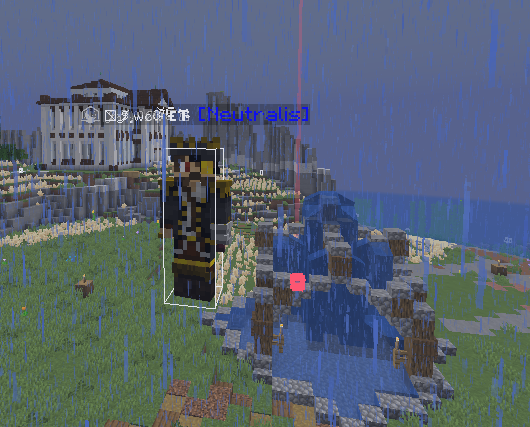 Names and rankes you can have a blured name
 -
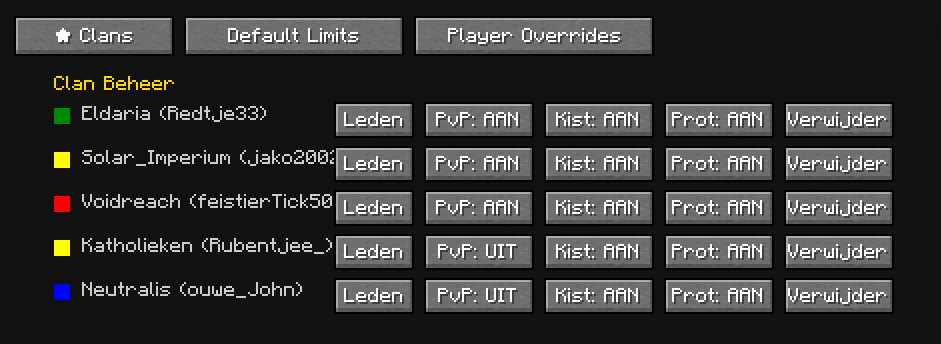 admin panel
 -
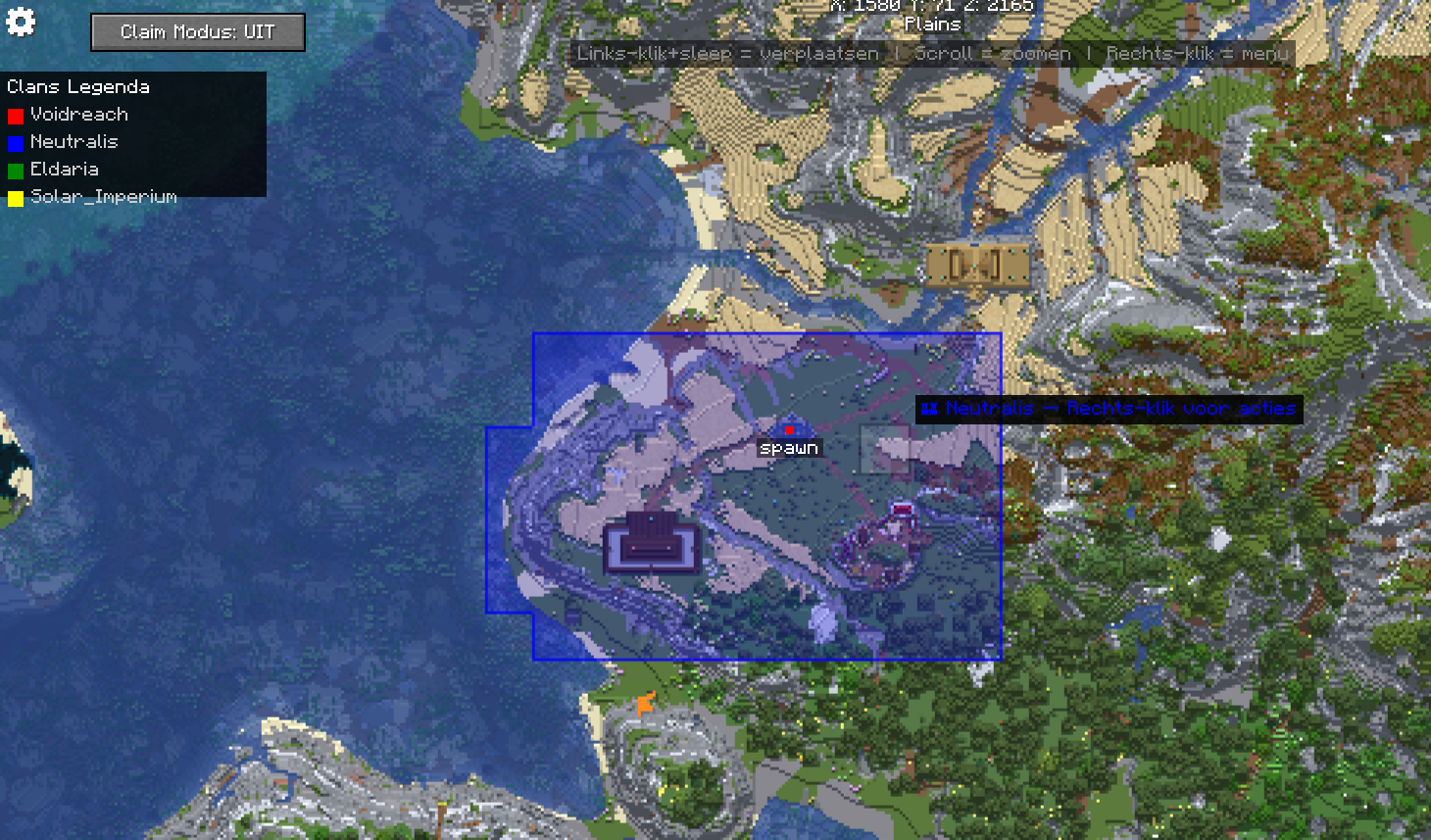 map
map
-
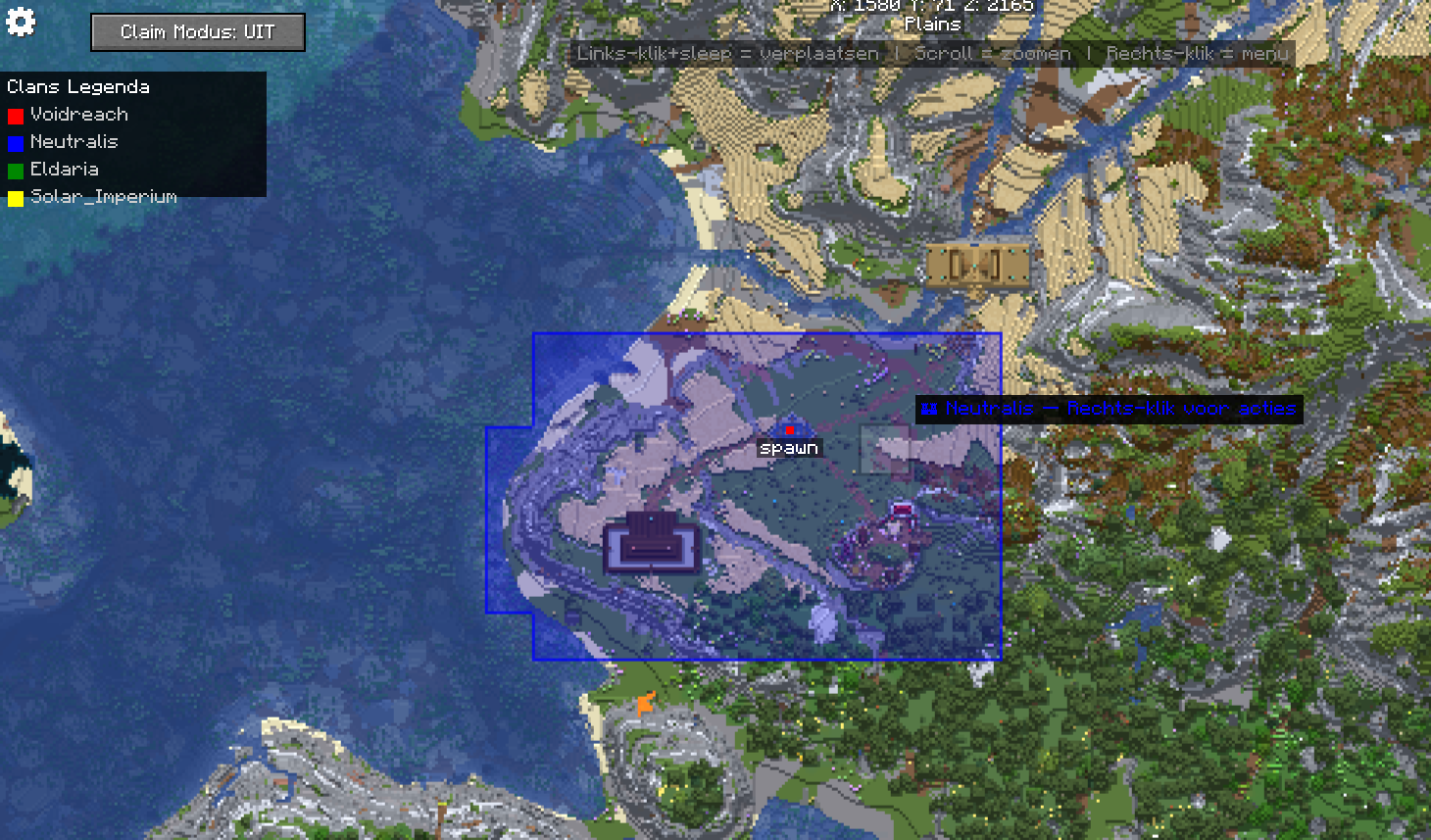 Map
Map -
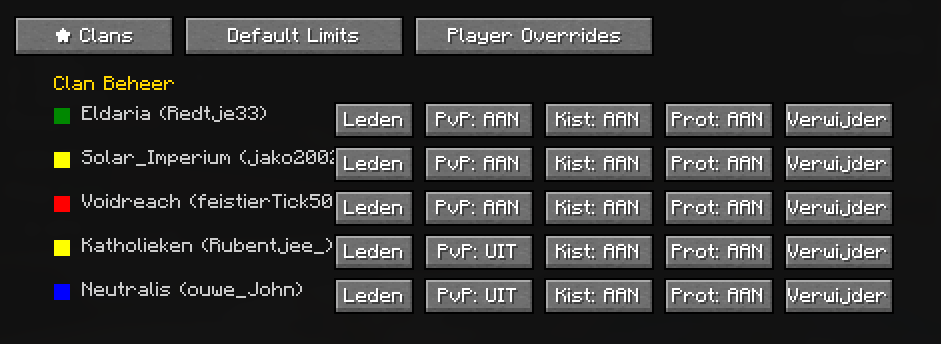 Admin panel Its in dutch, because I selected it in my own language. Kist = chest protection
 -
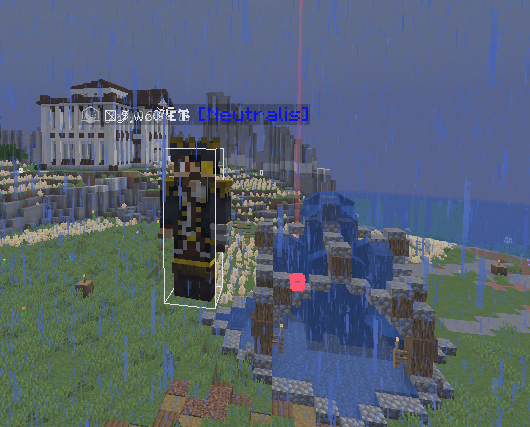 Custome name and rank
Versions
Files
Relations
Project Relations
More like this
Similar Mods
Suggestions use data such as tags, dependencies, dependents, descriptions, titles, and more to rank how much they overlap with this mod.
On ModDex
Community snapshot
By the numbers
Statistics
Want to reach Minecraft players?
We're looking for a server hosting partner to feature here and other parts of the site. Interested? Send us a message!
Get in touchGet it on
Available Platforms
On ModDex
Community snapshot
By the numbers