Community listing page, reviews here may not be monitored by the author.
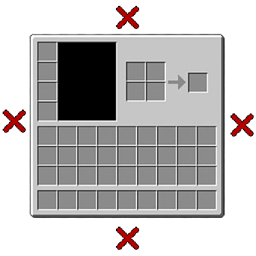
Click Close! ❌


No reviews yet
Close a GUI by clicking the background!

Community voices
Reviews
No reviews yet. Be the first to review this project!
Get it on
Available Platforms
Compatibility
Supported Environments
Runs entirely on the client. Works on vanilla servers.
About
Project Details
For authors
Embed Badge
If you're the author of this project, you can embed a live badge anywhere that supports HTML or Markdown. It updates automatically whenever ratings change.
Use HTML for any page that supports it, or Markdown for README files and Markdown-based descriptions.
Identifiers
Platform IDs
About
Description
Click Close! is a simple but powerful mod for Minecraft Forge 1.20.1. No more reaching for the Esc or E key every time you want to close a chest or crafting table!
- Click to Close: Simply click anywhere on the background (outside the GUI) to close containers, chests, and menus.
- Smart Detection: The mod intelligently detects the size and position of your GUI. It won't close if you click on:
- The main container window.
- Recipe book tabs or the recipe book itself.
- Creative inventory tabs.
- Any other buttons or widgets added by other mods.
- Conditional: Prevents accidental closing if you are holding an item, so you can still drop items by clicking outside the inventory!
Click Close! is fully configurable to suit your playstyle. Check the config file (clickclose-client.toml) for these options:
Define which screens should NOT be closed by this mod. By default, screens like the Main Menu, Options, and Multiplayer screens are ignored.
Choose how you want to be notified that clicking will close the menu:
CURSOR_X(Default): Displays a custom icon (red 'X') at your cursor position.- Option to hide the default Minecraft cursor.
- Adjustable scale for the icon.
- Texture can be changed via Resource Packs! (
assets/clickclose/textures/gui/close_icon.png)
TOOLTIP: Shows a "Close Menu" tooltip.DIM_GUI: Dims the container GUI slightly to indicate it's out of focus.- Adjustable dimming opacity.
NONE: No visual indicator.
- Play a sound when closing the menu (Default: standard button click).
- Disable the sound or change it to any other registered sound event.
Click Close! 🖱️❌
Click Close! is a simple but powerful mod for Minecraft Forge 1.20.1. No more reaching for the Esc or E key every time you want to close a chest or crafting table!
✨ Features
- Click to Close: Simply click anywhere on the background (outside the GUI) to close containers, chests, and menus.
- Smart Detection: The mod intelligently detects the size and position of your GUI. It won't close if you click on:
- The main container window.
- Recipe book tabs or the recipe book itself.
- Creative inventory tabs.
- Any other buttons or widgets added by other mods.
- Conditional: Prevents accidental closing if you are holding an item, so you can still drop items by clicking outside the inventory!
⚙️ Customization
Click Close! is fully configurable to suit your playstyle. Check the config file (clickclose-client.toml) for these options:
- Ignore List
Define which screens should NOT be closed by this mod. By default, screens like the Main Menu, Options, and Multiplayer screens are ignored.
- Visual Indicators
Choose how you want to be notified that clicking will close the menu:
CURSOR_X(Default): Displays a custom icon (red 'X') at your cursor position.- Option to hide the default Minecraft cursor.
- Adjustable scale for the icon.
- Texture can be changed via Resource Packs! (
assets/clickclose/textures/gui/close_icon.png)
TOOLTIP: Shows a "Close Menu" tooltip.DIM_GUI: Dims the container GUI slightly to indicate it's out of focus.- Adjustable dimming opacity.
NONE: No visual indicator.
- Sound
- Play a sound when closing the menu (Default: standard button click).
- Disable the sound or change it to any other registered sound event.
Screenshots
Gallery
Versions
Files
Relations
Project Relations
More like this
Similar Mods
Suggestions use data such as tags, dependencies, dependents, descriptions, titles, and more to rank how much they overlap with this mod.
On ModDex
Community snapshot
By the numbers
Statistics
 (opens in a new tab)
Get it on
Available Platforms
On ModDex
Community snapshot
By the numbers