Community listing page, reviews may not be monitored by the author.
Client Paintings


No reviews yet
A mod that adds fully client side custom paintings without replacing vanilla ones.

Community voices
Reviews
No reviews yet. Be the first to review this project!
Get it on
Available Platforms
Compatibility
Supported Environments
Runs entirely on the client. Works on vanilla servers.
About
Project Details
For authors
Embed Badge
If you're the author of this project, you can embed a live badge anywhere that supports HTML or Markdown. It updates automatically whenever ratings change.
Use HTML for any page that supports it, or Markdown for README files and Markdown-based descriptions.
Identifiers
Platform IDs
About
Description
Client Paintings
Client Paintings is a simple, *fully client-side* mod to add new paintings via resource packs while keeping the vanilla paintings intact. It achieves this by looking at the UUID of the painting entity and applying a pseudo-random algorithm to it to determine which painting to render.
This mod uses a custom resource pack format to add new paintings,
you can use the Client Paintings Pack Generator on my website
to generate such a pack easily. Alternatively, see the resource pack format section below for technical instructions.
Discord: https://discord.gg/WcYsDDQtyR
Features
- Add multiple new sets of paintings via resource packs
- Keep the vanilla paintings intact
- When a vanilla painting is shown, it will match the vanilla painting seen by players without the mod
- Custom paintings shown will match the custom paintings seen by other players with the mod
- Custom paintings are fully persistent between relogs and server restarts
Caveats
- Custom paintings will only match up between players if they both use the exact same painting sets
- Painting sets have to be added via a custom resource pack format, see below for details
Example
With the included default resource pack:

What vanilla players see:

Resource pack format
I wrote a very nice and clean explanation of the resource pack format, but curseforge has some kind of aversion to my markdown, so I'll just link to the github README here:
https://github.com/enjarai/client-paintings#resource-pack-format
Client Paintings 
Client Paintings is a simple, fully client-side mod to add new paintings via resource packs while keeping the vanilla paintings intact. It achieves this by looking at the UUID of the painting entity and applying a pseudo-random algorithm to it to determine which painting to render.
This mod uses a custom resource pack format to add new paintings, you can use the Client Paintings Pack Generator on my website to generate such a pack easily. Alternatively, see the resource pack format section below for technical instructions.
Features
- Add multiple new sets of paintings via resource packs
- Keep the vanilla paintings intact
- When a vanilla painting is shown, it will match the vanilla painting seen by players without the mod
- Custom paintings shown will match the custom paintings seen by other players with the mod
- Custom paintings are fully persistent between relogs and server restarts
Caveats
- Custom paintings will only match up between players if they both use the exact same painting sets
- Painting sets have to be added via a custom resource pack format, see below for details
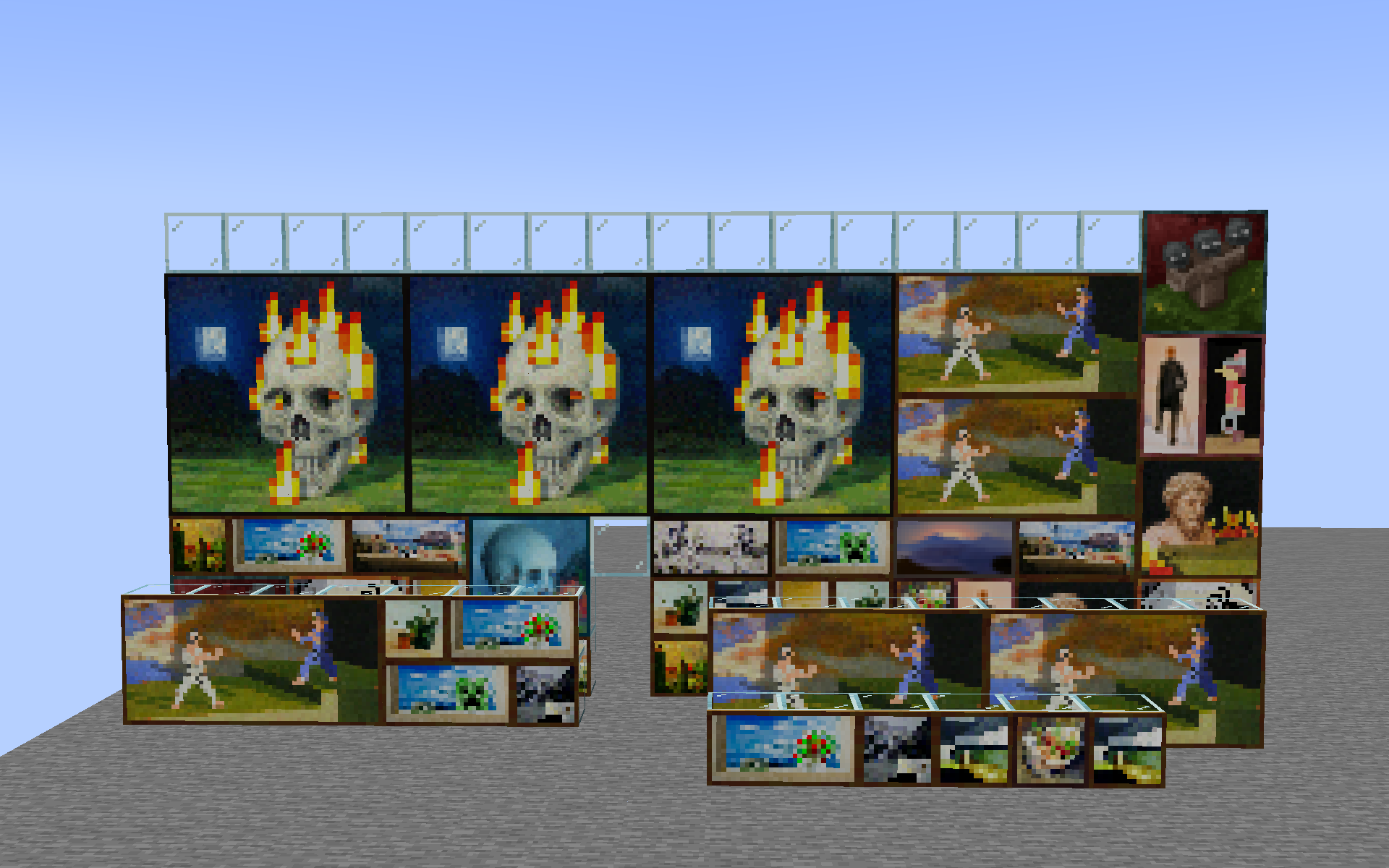
Example
With the included default resource pack:
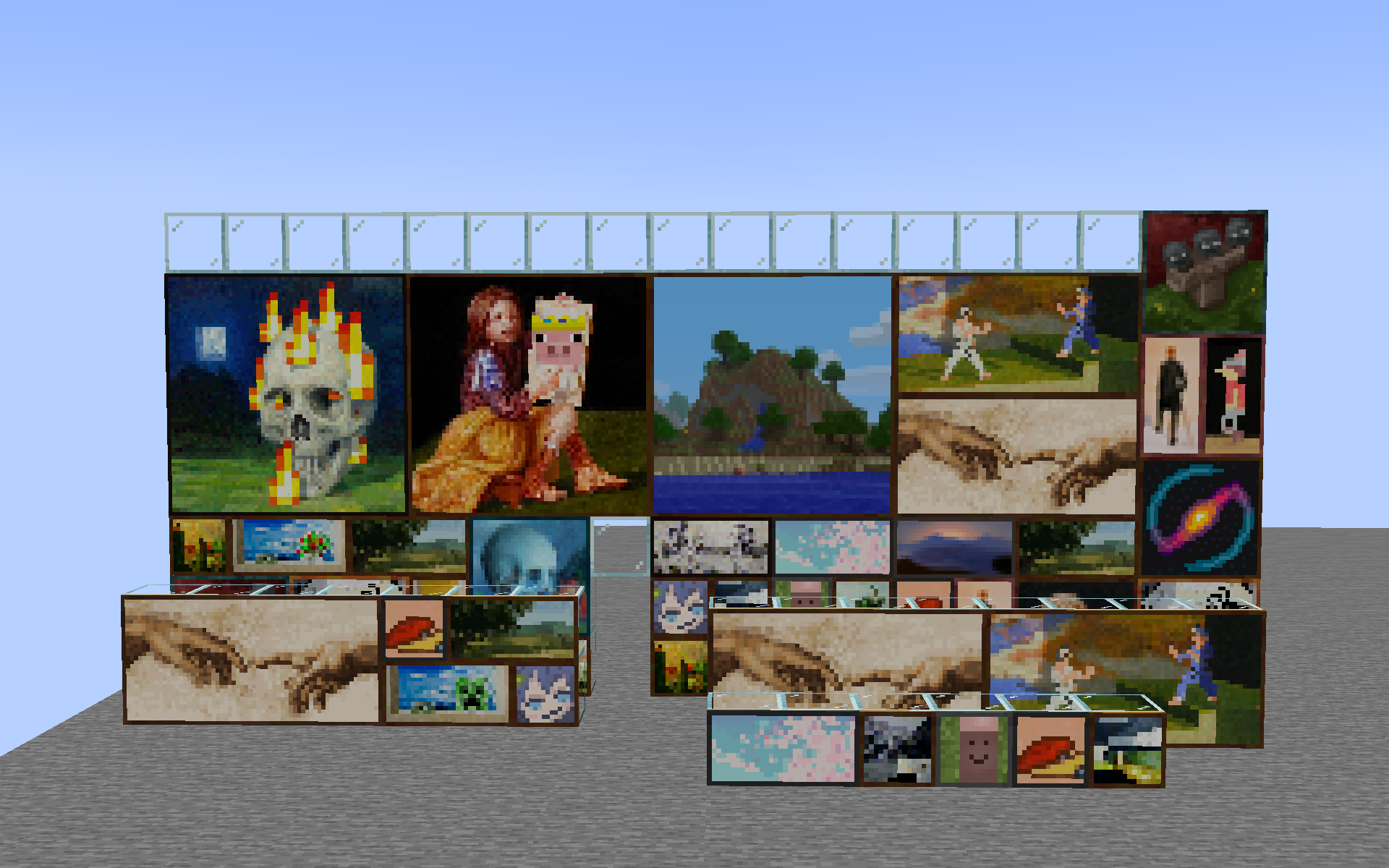
What vanilla players see:
Resource pack format
The resource pack format is very simple. It consists of a single client_paintings folder
located in the root of your resource pack namespace (e.g. assets/<namespace>/client_paintings).
Inside this folder, you can place any number of json files, each representing a custom painting.
Each json file must have the following structure:
{
  "texture": "<namespace>:client_paintings/painting_texture",
  "back": "<namespace>:client_paintings/painting_back_texture",
  "size": [2, 1]
}
textureis the texture of the painting, it must be a png image with a ratio matching thesizefield, with width and height both being a multiple of 16. The texture has to be located within theassets/<namespace>/textures/client_paintingsfolder.backis the texture of the back of the painting, it must be a square png image with similarly, a width and height being a multiple of 16.sizeis the size of the painting in blocks, the first value is the width, the second value is the height. Do note only 1x1, 1x2, 2x1, 2x2, 4x2, 4x4, and 4x3 size paintings are supported due to the need to replace a vanilla painting.
An example resource pack structure would look as follows:
pack.mcmeta
assets
└── namespace
    ├── textures
    │   └── client_paintings
    │       ├── painting1.png
    │       ├── painting2.png
    │       ├── painting3.png
    │       └── backs
    │           ├── back1.png
    │           └── back2.png
    └── client_paintings
        ├── painting1.json
        ├── painting2.json
        └── painting3.json
The source for the default included pack can be easily browsed here.
Screenshots
Gallery
-
With the included default pack
-
What vanilla clients see
Versions
Files
Relations
Project Relations
More like this
Similar Mods
Suggestions use data such as tags, dependencies, dependents, descriptions, titles, and more to rank how much they overlap with this mod.
On ModDex
Community snapshot
By the numbers
Statistics
 (opens in a new tab)
Get it on
Available Platforms
On ModDex
Community snapshot
By the numbers