
Community listing page, reviews may not be monitored by the author.
Cloak Cosmetics

No reviews yet
Custom capes, animated capes, skins, cape physics, and cosmetics visible to other CloakMC players.

Community voices
Reviews
No reviews yet. Be the first to review this project!
Get it on
Available Platforms
About
Project Details
For authors
Embed Badge
If you're the author of this project, you can embed a live badge anywhere that supports HTML or Markdown. It updates automatically whenever ratings change.
Use HTML for any page that supports it, or Markdown for README files and Markdown-based descriptions.
Identifiers
Platform IDs
Resources
External Links
About
Description
# CloakMC
**Custom capes, wings, hats, chains, auras, skins, and more — visible to other CloakMC players on any server.**
CloakMC is a client-side Minecraft cosmetic mod that lets you customize your character with a growing library of cosmetics without requiring anything to be installed on the server.
Equip your favorite cosmetics, build your own look, and take it with you across the servers you already play.
If another player has CloakMC installed, they'll automatically see your equipped CloakMC cosmetics.
## Features
### Capes
Browse the CloakMC cape library and instantly equip a cape from inside Minecraft.
CloakMC supports standard and animated capes, including optional **Flowing Cape** physics for smoother movement while walking, running, swimming, or flying.
### Wings
Equip custom Minecraft-style wings ranging from smaller everyday designs to larger, more detailed wings.
Wings render directly on your character and are visible to other CloakMC players.
### Hats & Head Cosmetics
Customize your character with hats, crowns, horns, halos, ears, and other head cosmetics.
Mix them with your other equipped cosmetics to create your own look.
### Chains
Equip necklaces, chains, and pendants that render around your character's neck and chest.
Chains can be combined with your other CloakMC cosmetics instead of replacing them.
### Auras
Surround your character with animated cosmetic effects.
Auras can include particles, orbiting objects, magical effects, and other animations designed to complement your character without affecting gameplay.
### Custom Skins
Linked accounts can access their CloakMC skin library directly from Minecraft.
Choose a skin and CloakMC will apply it for other CloakMC users to see.
Changes made through your CloakMC account can synchronize back into the game within seconds.
### Mix & Match
CloakMC cosmetics use separate equipment slots, allowing you to combine your cosmetics into a complete loadout.
For example:
**Skin + Cape + Wings + Hat + Chain + Aura**
Create your own combination without having to choose just one cosmetic type.
## In-Game Cosmetic Library
Open CloakMC directly from the Minecraft pause menu or press **N**.
From there you can browse your cosmetic library, preview cosmetics on your character, equip or unequip items, manage favorites, and customize your appearance without leaving Minecraft.
## Linking Your Account
Minecraft accounts can be linked to a CloakMC account directly from the game.
CloakMC uses Minecraft's session authentication to verify ownership.
Once linked, your cosmetics, skins, favorites, account features, and equipped loadout can synchronize between the CloakMC website and Minecraft.
**CloakMC never asks for your Minecraft password.**
## Free
You don't need Premium to use CloakMC.
Free accounts include:
- Access to free and premade cosmetics
- Unlimited cosmetic changes
- Cape, wing, hat, chain, and aura libraries
- Favorites
- 1 linked Minecraft account
- Up to 6 skins
- 1 custom cape upload
- 1 custom wing upload
- 1 custom hat upload
- Cosmetics visible to other CloakMC users
Premium expands the cosmetic experience with additional customization and increased upload/account limits.
## Client-Side
**Servers do not need CloakMC installed.**
Join your normal Minecraft servers and continue using CloakMC.
Other players running CloakMC will automatically be able to see your equipped CloakMC cosmetics.
CloakMC cosmetics are visual only and do not provide gameplay advantages.
## Supported Loaders & Versions
### Loaders
- **Fabric** — Requires Fabric API
- **Quilt** — Uses the Fabric build and requires Fabric API
- **NeoForge** — No additional dependency
- **Forge** — No additional dependency
### Minecraft Versions
- Minecraft 26.3
- Minecraft 26.2
- Minecraft 26.1.2
- Minecraft 26.1.1
- Minecraft 26.1
## How to Install CloakMC
1. Download CloakMC for your Minecraft version and mod loader.
2. Install any required dependency for your loader.
3. Launch Minecraft.
4. Open the pause menu and select the **CloakMC** icon, or press **N**.
5. Link your CloakMC account.
6. Browse the cosmetic library.
7. Build your loadout.
8. Equip your cosmetics and you're ready to go
Screenshots
Gallery
-
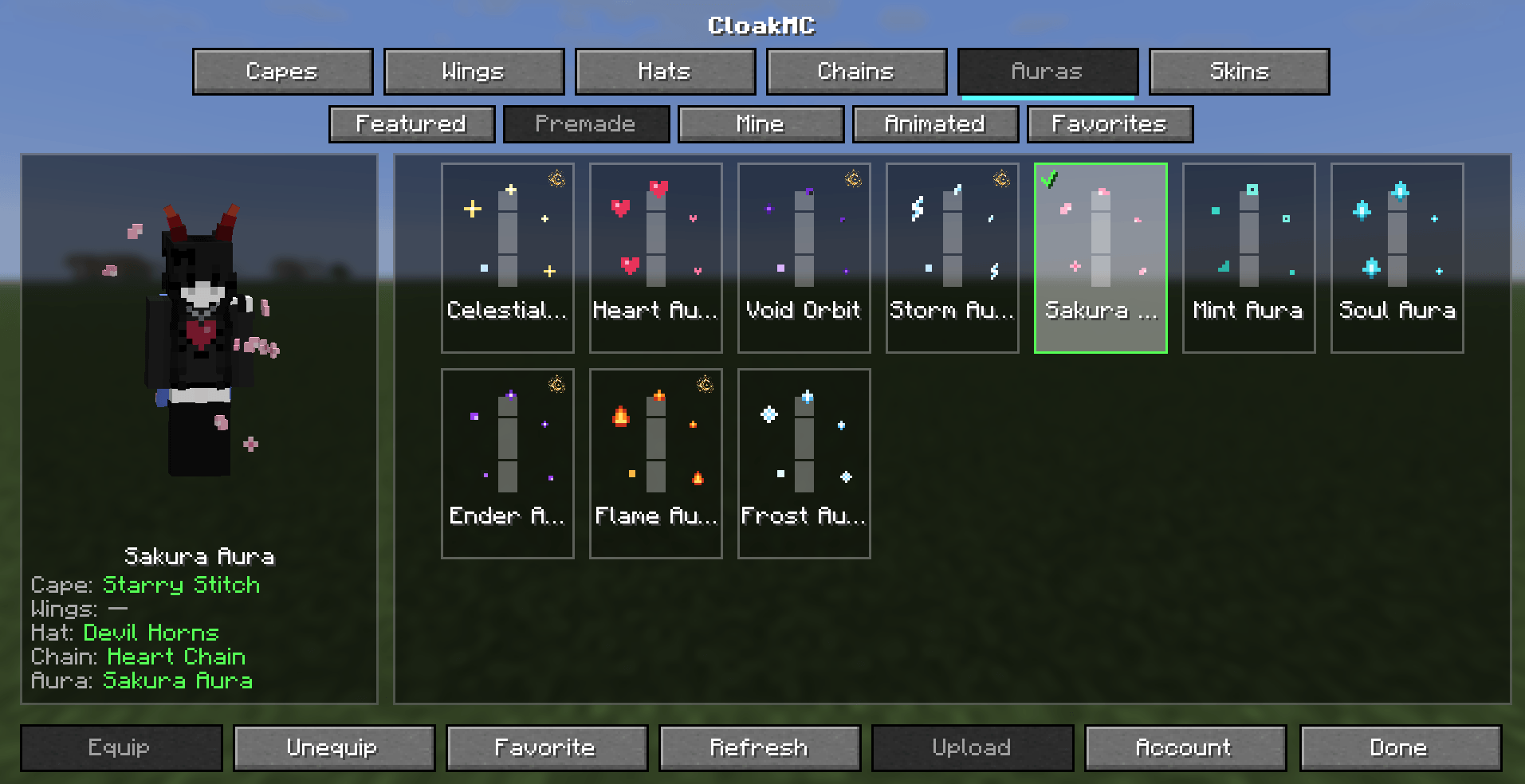 image-attachment_c76b0d23-099b-4f3d-934a-ab0bd535f280.png
 -
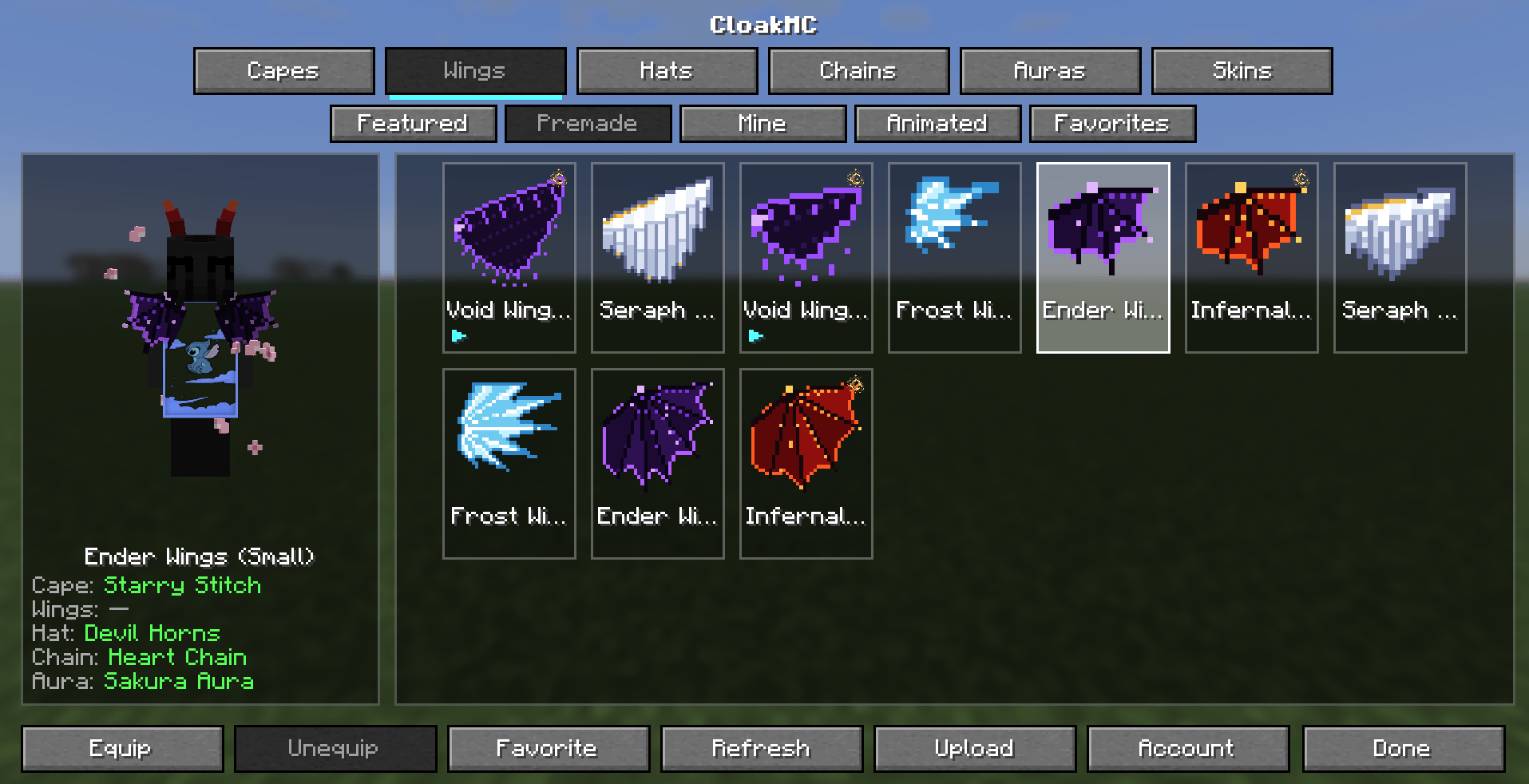 image-attachment_50b6841f-54e3-483b-be49-160e8b917aa8.png
 -
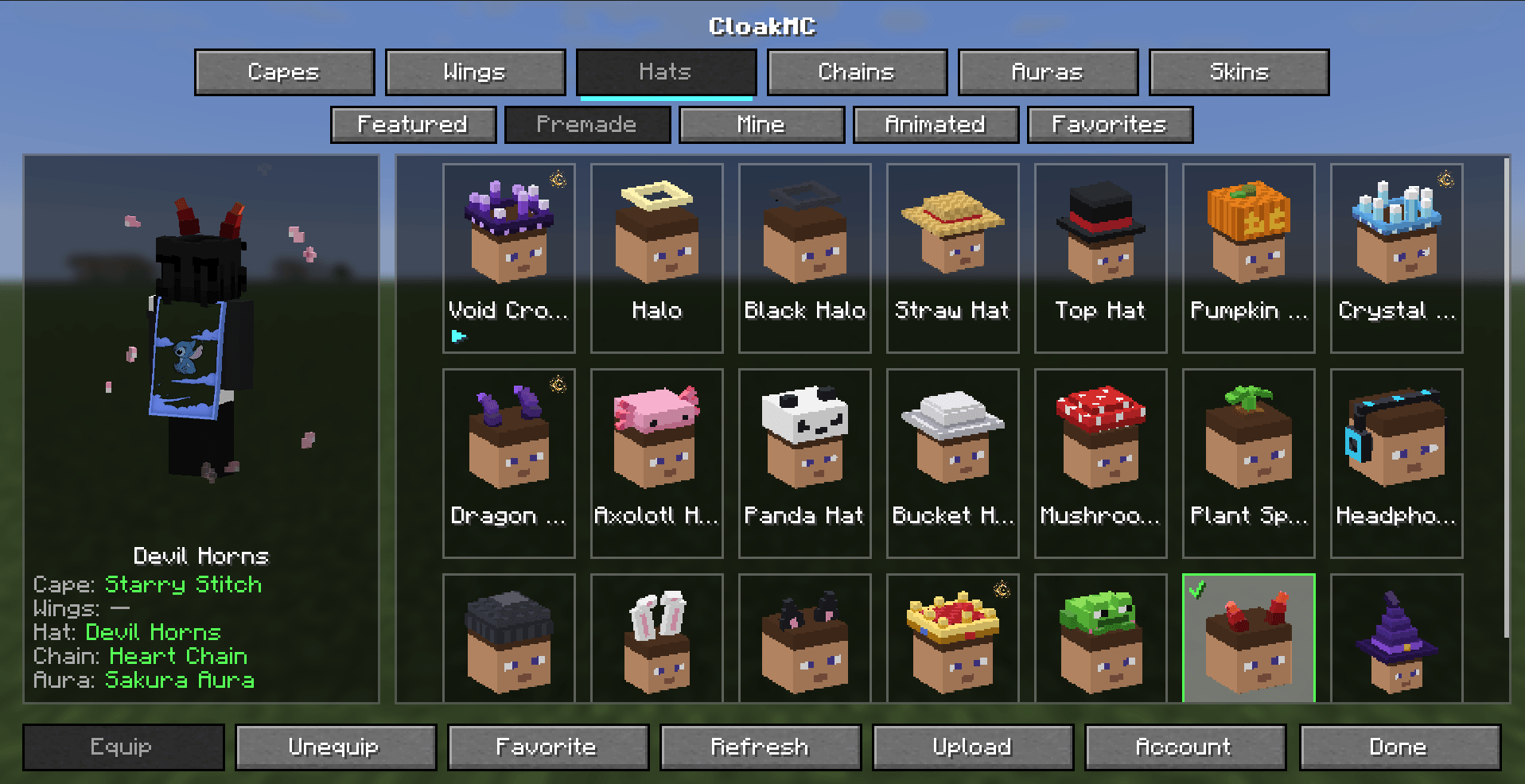 image-attachment_d6c7bde1-2c76-4b69-b73a-bde10b8339ec.png
Versions
Files
Relations
Project Relations
More like this
Similar Mods
Suggestions use data such as tags, dependencies, dependents, descriptions, titles, and more to rank how much they overlap with this mod.
On ModDex
Community snapshot
By the numbers
Statistics

Get it on
Available Platforms
On ModDex
Community snapshot
By the numbers
Statistics
Resources