Community listing page, reviews may not be monitored by the author.



Community voices
Reviews
No reviews yet. Be the first to review this project!
Get it on
Available Platforms
Compatibility
Supported Environments
Must be installed on both the client and the server.
About
Project Details
For authors
Embed Badge
If you're the author of this project, you can embed a live badge anywhere that supports HTML or Markdown. It updates automatically whenever ratings change.
Use HTML for any page that supports it, or Markdown for README files and Markdown-based descriptions.
Identifiers
Platform IDs
Resources
External Links
About
Description
Cobblemon Expeditions
Send your Pokémon on timed expeditions to earn loot, XP, and climb the ranks!
Cobblemon Expeditions is a Fabric and NeoForge mod for Minecraft 1.21.1 that adds an expedition system to Cobblemon. Players interact with tiered Expedition Boards to dispatch their PC Pokémon on timed missions. Choose your team wisely - type matchups, IVs, EVs, and environmental hazards all influence your chances of success.
Required on both client and server.
⚔️ Features
Core Gameplay
- 5 Board Tiers - Copper, Iron, Gold, Diamond, and Netherite. Higher tiers unlock harder expeditions, passive bonuses, and more modes.
- 11 Expeditions - 8 standard expeditions (Forest Forage, Shoreline Survey, Cave Delve, Berry Grove Harvest, Volcanic Survey, Deep Sea Dive, Frozen Ruins, Distortion Rift) plus 3 boss encounters.
- TEP System - Team Expedition Power is calculated from type advantages, IVs, EVs, party size, hazard mitigation, and augment bonuses.
- 4 Outcome Tiers - Expeditions resolve as GREAT, SUCCESS, PARTIAL, or FAIL - each with different loot quantities and quality.
- Pokémon & Player XP - Pokémon gain experience and players earn vanilla XP upon claiming rewards.
- Money Rewards - Expeditions can pay money into CobbleDollars or Impactor, whichever your server runs. Fully configurable, see Economy Support below.
Board Upgrades
- In-Place Upgrades - Upgrade your board from Copper to Netherite using block materials without breaking it. The entire 3×2 multiblock transforms in place.
- Tier Bonuses - Each upgrade grants passive bonuses: extra expedition slots, faster expeditions, better loot, higher great success chances, improved hazard mitigation, and newly unlocked modes.
- Progression Path - Copper → Iron (8 Iron Blocks) → Gold (8 Gold Blocks) → Diamond (8 Diamond Blocks) → Netherite (8 Netherite Blocks).
Boss Expeditions
- 3 Boss Encounters - Legendary Sighting, Titan's Den, and Ultra Wormhole. High-risk, high-reward endgame challenges requiring massive team power.
- Entry Costs - Boss expeditions consume items to start (default: Enchanted Golden Apple). Configurable per expedition.
- Weekly Cooldowns - Boss expeditions have a 1-week cooldown between attempts.
- Exclusive Loot - Master Balls, Ability Patches, Choice items, Life Orbs, Focus Sashes, mints, Nether Stars, and more.
Fatigue System
- Pokémon Fatigue - Pokémon gain fatigue after each expedition, reducing their TEP contribution by 10% per level.
- Exhaustion - At max fatigue (5 levels), Pokémon are exhausted and cannot be sent on expeditions until they rest.
- Natural Recovery - Fatigue recovers at 1 level per hour. Boss expeditions cause double fatigue.
- Anti-Spam - Prevents sending the same Pokémon endlessly, encouraging roster diversity.
Augments
- 5 Purchasable Augments - Buy augments with vanilla items, then toggle them on or off freely. Stack multiple for custom strategies.
- 🪶 Swift Feather (16 Feathers) - Expeditions 15% faster
- 🍀 Lucky Charm (4 Rabbit Feet) - +15% loot quality, +10% loot quantity
- 💎 Power Crystal (16 Amethyst Shards) - +5 TEP per Pokémon, +5% success chance
- 🔔 Soothing Bell (1 Bell) - Reduces fatigue gain by 1 per expedition
- 🔍 Scholar's Lens (1 Spyglass) - +25% rank XP earned
- Data-Driven - Server admins can create custom augments with any item cost and effect combination.
Expedition Modes
- 8 Modes - Each mode alters expedition rules with meaningful tradeoffs. Change freely between expeditions.
- ⚡ Rapid Deployment - 15% faster, but -10% loot
- 🔎 Deep Scavenging - +15% loot, but 15% slower
- 🛡️ Safe Operations - 50% hazard reduction, slightly lower great chance
- 🎯 Specialist Contracting - +12% type bonus (cap 36%), -5% on non-matching Pokémon
- 📦 Bulk Logistics - +1 expedition slot, -12% loot quality
- 🏺 Relic Hunters - +20% rare loot, but 20% slower and success capped at 90%
- 📚 Training Detail - +75% Pokémon XP, -15% loot
- 💊 Field Medicine - 10% hazard reduction, -5% loot
- Tier-Gated - Modes unlock progressively as you upgrade your board, creating a meaningful progression loop.
Hazards
- 7 Hazard Types - Heat, Cold, Toxic, Cave-in, Aquatic, Electric, and Dark.
- Type Mitigation - Each hazard is countered by specific Pokémon types. Unmitigated hazards reduce your TEP score.
- Data-Driven - Custom hazards can be defined with custom type resistances and penalty values.
Rank Progression
- Expedition Rank XP - Earn XP to level up your expedition rank. Higher ranks unlock new board tiers and harder content.
- Additional Slots - Higher ranks grant more concurrent expedition slots.
Quality of Life
- Sound Effects - Rich audio feedback for starting expeditions, claiming rewards, upgrading boards, buying augments, errors, and more.
- 3×2 Multiblock Boards - Beautiful 3-wide, 2-tall craftable blocks with tier-appropriate textures. Diamond and Netherite boards feature animated screen effects.
- Search & Filter - Filter expeditions by type, search Pokémon by name, and auto-select the best team.
- Expedition List Toggles - Hide expeditions your rank hasn't unlocked yet, and flip the sort between highest and lowest power. Rank-locked entries are greyed out and tell you the rank you need up front, instead of after you've picked a team. Both toggles are per-player and remembered between sessions.
- Crafting Recipes - All 5 board tiers are craftable with tier-appropriate materials.
Customization
- Fully Data-Driven - All expeditions, loot tables, modes, hazards, and augments are defined via JSON datapacks and editable in-game.
- In-Game Admin Editor - Operators can create, edit, and delete expeditions, loot tables, modes, hazards, and augments live - no restart required.
- Command Rewards - Loot entries can run a command instead of dropping an item, so any economy or third-party reward system works: tokens, crate keys, permissions, anything. Commands run only for the claiming player, with
{player},{uuid}and{count}placeholders, and are editable in the admin GUI like any other reward. - Highly Configurable - Dozens of config options for TEP calculation, success thresholds, loot scaling, rank progression, fatigue rates, boss cooldowns, anti-abuse, and more.
💰 Economy Support
Expeditions can pay a money reward into CobbleDollars or Impactor. Both are optional, and only one is paid at a time, so the amount shown on the board stays true. Impactor 5.3.5 for Minecraft 1.21.1 is supported on Fabric and NeoForge, and it only needs to be installed on the server. Without either mod, expeditions simply give no money.
Settings are in the pokeDollars section of config/cobblemon_expeditions.json. Run /expedition reload after editing.
| Setting | Values | Default | What it does |
|---|---|---|---|
enabled |
true or false |
true |
false turns off all money rewards. |
provider |
auto, cobbledollars, impactor, none |
auto |
Which economy gets paid. |
scale |
a number, 0 or more | 1.0 |
Multiplies every expedition's money to fit your economy. |
impactorCurrency |
impactor:dollars, dollars, or empty |
empty | Impactor only. Which currency to pay in. Empty uses Impactor's primary currency. |
failMultiplier |
a number | 0.0 |
Share of the money paid on a FAIL. |
partialMultiplier |
a number | 0.5 |
Share of the money paid on a PARTIAL. |
successMultiplier |
a number | 1.0 |
Share of the money paid on a SUCCESS. |
greatMultiplier |
a number | 1.5 |
Share of the money paid on a GREAT. |
Choosing the economy
provider |
Pays |
|---|---|
auto |
CobbleDollars if it is installed, otherwise Impactor. Servers already on CobbleDollars see no change. |
cobbledollars |
CobbleDollars only. |
impactor |
Impactor only. Use this if you run both mods and want Impactor. |
none |
Nobody. No money rewards. |
- Capitals and spaces are ignored. A misspelt value, or a mod that is not installed, pays nothing and prints a warning in the server log at startup.
- Every expedition has its own base amount (
poke_dollars). The money paid is that base, times the outcome multiplier, timesscale, rounded down. - A pokédollar and an Impactor dollar are rarely worth the same, which is what
scaleis for. For example0.01turns the 45000 boss reward into 450 on a SUCCESS.0pays nothing, and a negative or non-numeric value pays nothing and warns. impactorCurrencytakes the full key (impactor:dollars) or just the name (dollars). If two currencies share a name, use the full key. An unknown currency pays nothing and warns.
Example for an Impactor server where money is worth ten times more than a pokédollar:
"pokeDollars": {
  "enabled": true,
  "provider": "impactor",
  "scale": 0.1,
  "impactorCurrency": "dollars"
}
Good to know
- Changes apply to expeditions that finish after the change. Rewards already waiting in a player's inbox keep the amount they had.
- If a payout cannot be delivered (another mod cancelled it, the account is at Impactor's maximum balance, or Impactor cannot be reached), the server log records the player, amount and reason, and the player gets a chat message.
- The board still labels the amount "Pokédollars" whichever economy you use.
🌐 Multi-Server Networks
Running several servers? Expedition data can follow your players between them - rank, XP, running expeditions, reward inbox, fatigue, boss cooldowns, augments and Pokémon locks. A Pokémon away on an expedition stays locked everywhere, and an expedition that finishes while the player is on another server resolves when they next log in.
This is off by default. A single server needs no configuration at all.
Setup (shared directory)
Put every server on the same mod version, with identical expedition, loot table and mode JSON.
Give every server one directory they can all reach - a bind mount, an NFS export, or on a panel like Pterodactyl, a Mount attached to both the node and each server.
On each server, edit
config/cobblemon_expeditions.json:
"storage": {
  "backend": "shared_file",
  "sharedDirectory": "shared/cobblemon_expeditions",
  "autoSaveSeconds": 60
}
sharedDirectory is relative to the server's working directory. Every server must resolve it to the same physical folder and be able to write there.
- Restart every server and check each console prints the same path:
Shared expedition storage at .../shared/cobblemon_expeditions
Expedition storage backend 'shared_file' active; player records load on join
If a server still says 'world' active, it didn't pick up the config or can't see the shared directory - it will silently keep using its own world save.
- Test with one account: start an expedition on one server, hop to another, and confirm the board shows it running with the same rank. There should be exactly one
.datfile per player inshared/cobblemon_expeditions/players/- two files for one person means their UUID differs between servers, usually anonline-modemismatch.
To turn it back off, set "backend": "world" everywhere and restart. Each server returns to its own world save, which still holds whatever it had before.
Already running Redis, Mongo or SQL?
The storage layer is pluggable. Write a small addon mod that implements the ExpeditionDataStore interface, register it during mod init with ExpeditionDataStores.register("mongo") { ... }, and set "backend": "mongo" in the config. Expedition Boards then read and write straight out of the database you already run.
The mod ships no database driver, so nothing extra is bundled for anyone who doesn't need it.
Full integration guide, including a working Mongo implementation you can start from: https://github.com/ZIPender/cobblemon_expeditions_doc/blob/main/storage-api.md
It covers the whole interface, how to serialize a record (it round-trips through NBT, so you never touch the internals), the atomic-claim requirement that stops two servers granting the same reward twice, Redis durability caveats, and a testing checklist.
Good to know
- Switching to a shared backend starts from empty records. There is no automatic import - when progress has already diverged per server, there is no correct answer for which copy wins. Back up your worlds first.
- Expedition, loot table and mode JSON stays per-server. Deploy identical content everywhere and make admin-GUI edits in one place, or they will drift.
- This syncs expedition data, not Pokémon. Party and PC boxes remain your network's own sync layer's job.
🖥️ Board GUI
Right-click an Expedition Board to open the GUI. Browse available expeditions, select Pokémon from your PC, review success chances, manage augments, and send them off!

🛠️ Admin GUI
Operators can open the admin panel to edit expeditions, loot tables, modes, hazards, and augments in real time. All changes are saved to the config/cobblemon_expeditions/ folder instantly.

📋 Commands
| Command | Permission | Description |
|---|---|---|
/expedition check |
Everyone | List your active expeditions with time remaining, Pokémon count, and success chance. |
/expedition rewards |
Everyone | List your pending rewards waiting to be claimed at a board. |
/expedition finish <player> |
OP Level 2 | Force-complete all active expeditions for a player instantly. |
/expedition reload |
OP Level 2 | Reload the config file from disk without restarting the server. Also re-applies the economy setting. |
/expedition xp <player> <amount> |
OP Level 2 | Grant expedition rank XP to a player (triggers rank-ups automatically). |
/expedition admin |
OP Level 2 | Open the in-game Admin GUI to edit expeditions, loot tables, modes, and hazards. |
📦 Installation
Fabric
- Install Fabric Loader (≥ 0.16.0) for Minecraft 1.21.1
- Install Fabric API, Fabric Language Kotlin (≥ 1.13.0), and Cobblemon (≥ 1.7.0)
- Drop the Fabric jar (
cobblemon-expeditions-fabric-*.jar) into yourmods/folder
NeoForge
- Install NeoForge 21.1.95+ for Minecraft 1.21.1
- Install Kotlin for Forge (≥ 5.7.0) and Cobblemon (≥ 1.7.0)
- Drop the NeoForge jar (
cobblemon-expeditions-neoforge-*.jar) into yourmods/folder
Optional, for money rewards: CobbleDollars or Impactor 5.3.5. Impactor only needs to be on the server.
Required on both client and server.
Cobblemon Expeditions
Send your Pokémon on timed expeditions to earn loot, XP, and climb the ranks!
Cobblemon Expeditions is a Fabric and NeoForge mod for Minecraft 1.21.1 that adds an expedition system to Cobblemon. Players interact with tiered Expedition Boards to dispatch their PC Pokémon on timed missions. Choose your team wisely - type matchups, IVs, EVs, and environmental hazards all influence your chances of success.
Required on both client and server.
⚔️ Features
Core Gameplay
- 5 Board Tiers - Copper, Iron, Gold, Diamond, and Netherite. Higher tiers unlock harder expeditions, passive bonuses, and more modes.
- 11 Expeditions - 8 standard expeditions (Forest Forage, Shoreline Survey, Cave Delve, Berry Grove Harvest, Volcanic Survey, Deep Sea Dive, Frozen Ruins, Distortion Rift) plus 3 boss encounters.
- TEP System - Team Expedition Power is calculated from type advantages, IVs, EVs, party size, hazard mitigation, and augment bonuses.
- 4 Outcome Tiers - Expeditions resolve as GREAT, SUCCESS, PARTIAL, or FAIL - each with different loot quantities and quality.
- Pokémon & Player XP - Pokémon gain experience and players earn vanilla XP upon claiming rewards.
- Money Rewards - Expeditions can pay money into CobbleDollars or Impactor, whichever your server runs. Fully configurable, see Economy Support below.
Board Upgrades
- In-Place Upgrades - Upgrade your board from Copper to Netherite using block materials without breaking it. The entire 3×2 multiblock transforms in place.
- Tier Bonuses - Each upgrade grants passive bonuses: extra expedition slots, faster expeditions, better loot, higher great success chances, improved hazard mitigation, and newly unlocked modes.
- Progression Path - Copper → Iron (8 Iron Blocks) → Gold (8 Gold Blocks) → Diamond (8 Diamond Blocks) → Netherite (8 Netherite Blocks).
Boss Expeditions
- 3 Boss Encounters - Legendary Sighting, Titan's Den, and Ultra Wormhole. High-risk, high-reward endgame challenges requiring massive team power.
- Entry Costs - Boss expeditions consume items to start (default: Enchanted Golden Apple). Configurable per expedition.
- Weekly Cooldowns - Boss expeditions have a 1-week cooldown between attempts.
- Exclusive Loot - Master Balls, Ability Patches, Choice items, Life Orbs, Focus Sashes, mints, Nether Stars, and more.
Fatigue System
- Pokémon Fatigue - Pokémon gain fatigue after each expedition, reducing their TEP contribution by 10% per level.
- Exhaustion - At max fatigue (5 levels), Pokémon are exhausted and cannot be sent on expeditions until they rest.
- Natural Recovery - Fatigue recovers at 1 level per hour. Boss expeditions cause double fatigue.
- Anti-Spam - Prevents sending the same Pokémon endlessly, encouraging roster diversity.
Augments
- 5 Purchasable Augments - Buy augments with vanilla items, then toggle them on or off freely. Stack multiple for custom strategies.
- 🪶 Swift Feather (16 Feathers) - Expeditions 15% faster
- 🍀 Lucky Charm (4 Rabbit Feet) - +15% loot quality, +10% loot quantity
- 💎 Power Crystal (16 Amethyst Shards) - +5 TEP per Pokémon, +5% success chance
- 🔔 Soothing Bell (1 Bell) - Reduces fatigue gain by 1 per expedition
- 🔍 Scholar's Lens (1 Spyglass) - +25% rank XP earned
- Data-Driven - Server admins can create custom augments with any item cost and effect combination.
Expedition Modes
- 8 Modes - Each mode alters expedition rules with meaningful tradeoffs. Change freely between expeditions.
- ⚡ Rapid Deployment - 15% faster, but -10% loot
- 🔎 Deep Scavenging - +15% loot, but 15% slower
- 🛡️ Safe Operations - 50% hazard reduction, slightly lower great chance
- 🎯 Specialist Contracting - +12% type bonus (cap 36%), -5% on non-matching Pokémon
- 📦 Bulk Logistics - +1 expedition slot, -12% loot quality
- 🏺 Relic Hunters - +20% rare loot, but 20% slower and success capped at 90%
- 📚 Training Detail - +75% Pokémon XP, -15% loot
- 💊 Field Medicine - 10% hazard reduction, -5% loot
- Tier-Gated - Modes unlock progressively as you upgrade your board, creating a meaningful progression loop.
Hazards
- 7 Hazard Types - Heat, Cold, Toxic, Cave-in, Aquatic, Electric, and Dark.
- Type Mitigation - Each hazard is countered by specific Pokémon types. Unmitigated hazards reduce your TEP score.
- Data-Driven - Custom hazards can be defined with custom type resistances and penalty values.
Rank Progression
- Expedition Rank XP - Earn XP to level up your expedition rank. Higher ranks unlock new board tiers and harder content.
- Additional Slots - Higher ranks grant more concurrent expedition slots.
Quality of Life
- Sound Effects - Rich audio feedback for starting expeditions, claiming rewards, upgrading boards, buying augments, errors, and more.
- 3×2 Multiblock Boards - Beautiful 3-wide, 2-tall craftable blocks with tier-appropriate textures. Diamond and Netherite boards feature animated screen effects.
- Search & Filter - Filter expeditions by type, search Pokémon by name, and auto-select the best team.
- Expedition List Toggles - Hide expeditions your rank hasn't unlocked yet, and flip the sort between highest and lowest power. Rank-locked entries are greyed out and tell you the rank you need up front, instead of after you've picked a team. Both toggles are per-player and remembered between sessions.
- Crafting Recipes - All 5 board tiers are craftable with tier-appropriate materials.
Customization
- Fully Data-Driven - All expeditions, loot tables, modes, hazards, and augments are defined via JSON datapacks and editable in-game.
- In-Game Admin Editor - Operators can create, edit, and delete expeditions, loot tables, modes, hazards, and augments live - no restart required.
- Command Rewards - Loot entries can run a command instead of dropping an item, so any economy or third-party reward system works: tokens, crate keys, permissions, anything. Commands run only for the claiming player, with
{player},{uuid}and{count}placeholders, and are editable in the admin GUI like any other reward. - Highly Configurable - Dozens of config options for TEP calculation, success thresholds, loot scaling, rank progression, fatigue rates, boss cooldowns, anti-abuse, and more.
💰 Economy Support
Expeditions can pay a money reward into CobbleDollars or Impactor. Both are optional, and only one is paid at a time, so the amount shown on the board stays true. Impactor 5.3.5 for Minecraft 1.21.1 is supported on Fabric and NeoForge, and it only needs to be installed on the server. Without either mod, expeditions simply give no money.
Settings are in the pokeDollars section of config/cobblemon_expeditions.json. Run /expedition reload after editing.
| Setting | Values | Default | What it does |
|---|---|---|---|
enabled |
true or false |
true |
false turns off all money rewards. |
provider |
auto, cobbledollars, impactor, none |
auto |
Which economy gets paid. |
scale |
a number, 0 or more | 1.0 |
Multiplies every expedition's money to fit your economy. |
impactorCurrency |
impactor:dollars, dollars, or empty |
empty | Impactor only. Which currency to pay in. Empty uses Impactor's primary currency. |
failMultiplier |
a number | 0.0 |
Share of the money paid on a FAIL. |
partialMultiplier |
a number | 0.5 |
Share of the money paid on a PARTIAL. |
successMultiplier |
a number | 1.0 |
Share of the money paid on a SUCCESS. |
greatMultiplier |
a number | 1.5 |
Share of the money paid on a GREAT. |
Choosing the economy
provider |
Pays |
|---|---|
auto |
CobbleDollars if it is installed, otherwise Impactor. Servers already on CobbleDollars see no change. |
cobbledollars |
CobbleDollars only. |
impactor |
Impactor only. Use this if you run both mods and want Impactor. |
none |
Nobody. No money rewards. |
- Capitals and spaces are ignored. A misspelt value, or a mod that is not installed, pays nothing and prints a warning in the server log at startup.
- Every expedition has its own base amount (
poke_dollars). The money paid is that base, times the outcome multiplier, timesscale, rounded down. - A pokédollar and an Impactor dollar are rarely worth the same, which is what
scaleis for. For example0.01turns the 45000 boss reward into 450 on a SUCCESS.0pays nothing, and a negative or non-numeric value pays nothing and warns. impactorCurrencytakes the full key (impactor:dollars) or just the name (dollars). If two currencies share a name, use the full key. An unknown currency pays nothing and warns.
Example for an Impactor server where money is worth ten times more than a pokédollar:
"pokeDollars": {
  "enabled": true,
  "provider": "impactor",
  "scale": 0.1,
  "impactorCurrency": "dollars"
}
Good to know
- Changes apply to expeditions that finish after the change. Rewards already waiting in a player's inbox keep the amount they had.
- If a payout cannot be delivered (another mod cancelled it, the account is at Impactor's maximum balance, or Impactor cannot be reached), the server log records the player, amount and reason, and the player gets a chat message.
- The board still labels the amount "Pokédollars" whichever economy you use.
🌐 Multi-Server Networks
Running several servers? Expedition data can follow your players between them - rank, XP, running expeditions, reward inbox, fatigue, boss cooldowns, augments and Pokémon locks. A Pokémon away on an expedition stays locked everywhere, and an expedition that finishes while the player is on another server resolves when they next log in.
This is off by default. A single server needs no configuration at all.
Setup (shared directory)
-
Put every server on the same mod version, with identical expedition, loot table and mode JSON.
-
Give every server one directory they can all reach - a bind mount, an NFS export, or on a panel like Pterodactyl, a Mount attached to both the node and each server.
-
On each server, edit
config/cobblemon_expeditions.json:
"storage": {
  "backend": "shared_file",
  "sharedDirectory": "shared/cobblemon_expeditions",
  "autoSaveSeconds": 60
}
sharedDirectory is relative to the server's working directory. Every server must resolve it to the same physical folder and be able to write there.
- Restart every server and check each console prints the same path:
Shared expedition storage at .../shared/cobblemon_expeditions
Expedition storage backend 'shared_file' active; player records load on join
If a server still says 'world' active, it didn't pick up the config or can't see the shared directory - it will silently keep using its own world save.
- Test with one account: start an expedition on one server, hop to another, and confirm the board shows it running with the same rank. There should be exactly one
.datfile per player inshared/cobblemon_expeditions/players/- two files for one person means their UUID differs between servers, usually anonline-modemismatch.
To turn it back off, set "backend": "world" everywhere and restart. Each server returns to its own world save, which still holds whatever it had before.
Already running Redis, Mongo or SQL?
The storage layer is pluggable. Write a small addon mod that implements the ExpeditionDataStore interface, register it during mod init with ExpeditionDataStores.register("mongo") { ... }, and set "backend": "mongo" in the config. Expedition Boards then read and write straight out of the database you already run.
The mod ships no database driver, so nothing extra is bundled for anyone who doesn't need it.
Full integration guide, including a working Mongo implementation you can start from: https://github.com/ZIPender/cobblemon_expeditions_doc/blob/main/storage-api.md
It covers the whole interface, how to serialize a record (it round-trips through NBT, so you never touch the internals), the atomic-claim requirement that stops two servers granting the same reward twice, Redis durability caveats, and a testing checklist.
Good to know
- Switching to a shared backend starts from empty records. There is no automatic import - when progress has already diverged per server, there is no correct answer for which copy wins. Back up your worlds first.
- Expedition, loot table and mode JSON stays per-server. Deploy identical content everywhere and make admin-GUI edits in one place, or they will drift.
- This syncs expedition data, not Pokémon. Party and PC boxes remain your network's own sync layer's job.
🖥️ Board GUI
Right-click an Expedition Board to open the GUI. Browse available expeditions, select Pokémon from your PC, review success chances, manage augments, and send them off!
🛠️ Admin GUI
Operators can open the admin panel to edit expeditions, loot tables, modes, hazards, and augments in real time. All changes are saved to the config/cobblemon_expeditions/ folder instantly.
📋 Commands
| Command | Permission | Description |
|---|---|---|
/expedition check |
Everyone | List your active expeditions with time remaining, Pokémon count, and success chance. |
/expedition rewards |
Everyone | List your pending rewards waiting to be claimed at a board. |
/expedition finish <player> |
OP Level 2 | Force-complete all active expeditions for a player instantly. |
/expedition reload |
OP Level 2 | Reload the config file from disk without restarting the server. Also re-applies the economy setting. |
/expedition xp <player> <amount> |
OP Level 2 | Grant expedition rank XP to a player (triggers rank-ups automatically). |
/expedition admin |
OP Level 2 | Open the in-game Admin GUI to edit expeditions, loot tables, modes, and hazards. |
📦 Installation
Fabric
- Install Fabric Loader (≥ 0.16.0) for Minecraft 1.21.1
- Install Fabric API, Fabric Language Kotlin (≥ 1.13.0), and Cobblemon (≥ 1.7.0)
- Drop the Fabric jar (
cobblemon-expeditions-fabric-*.jar) into yourmods/folder
NeoForge
- Install NeoForge 21.1.95+ for Minecraft 1.21.1
- Install Kotlin for Forge (≥ 5.7.0) and Cobblemon (≥ 1.7.0)
- Drop the NeoForge jar (
cobblemon-expeditions-neoforge-*.jar) into yourmods/folder
Optional, for money rewards: CobbleDollars or Impactor 5.3.5. Impactor only needs to be on the server.
Required on both client and server.
Screenshots
Gallery
-
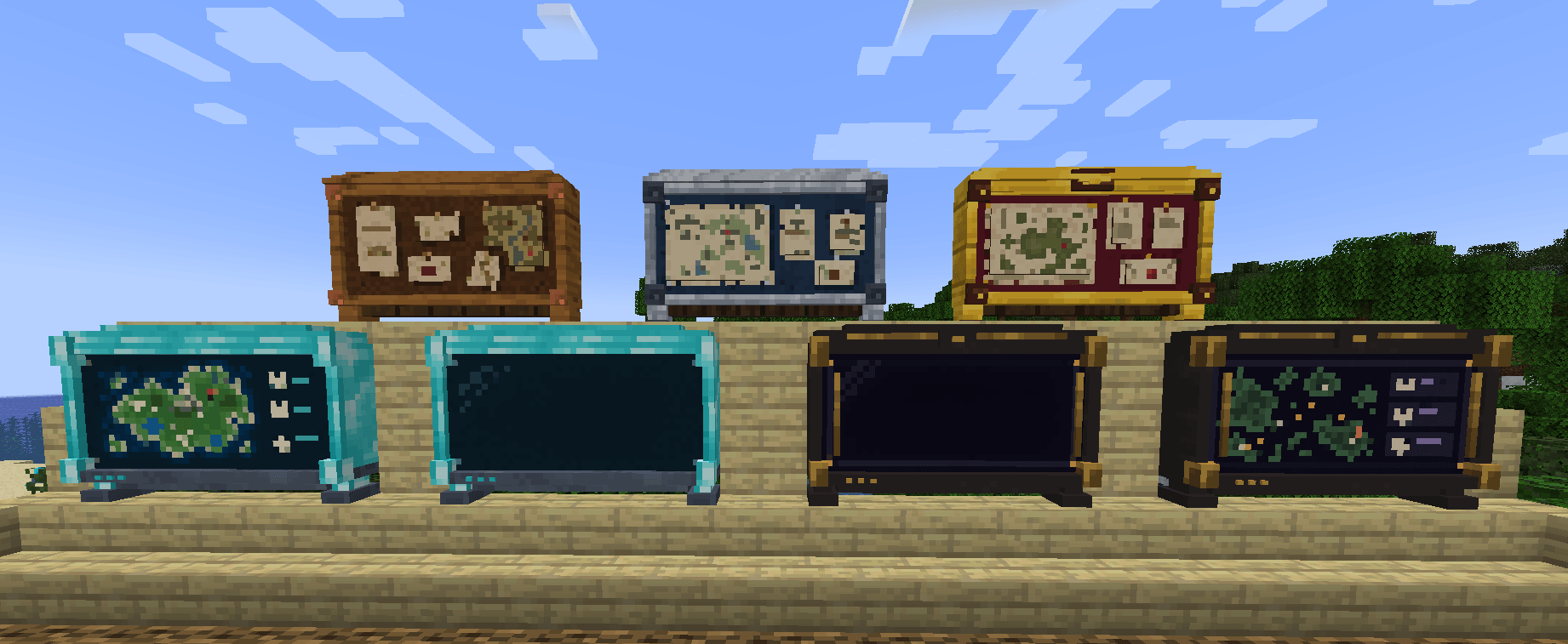 New Textures
 -
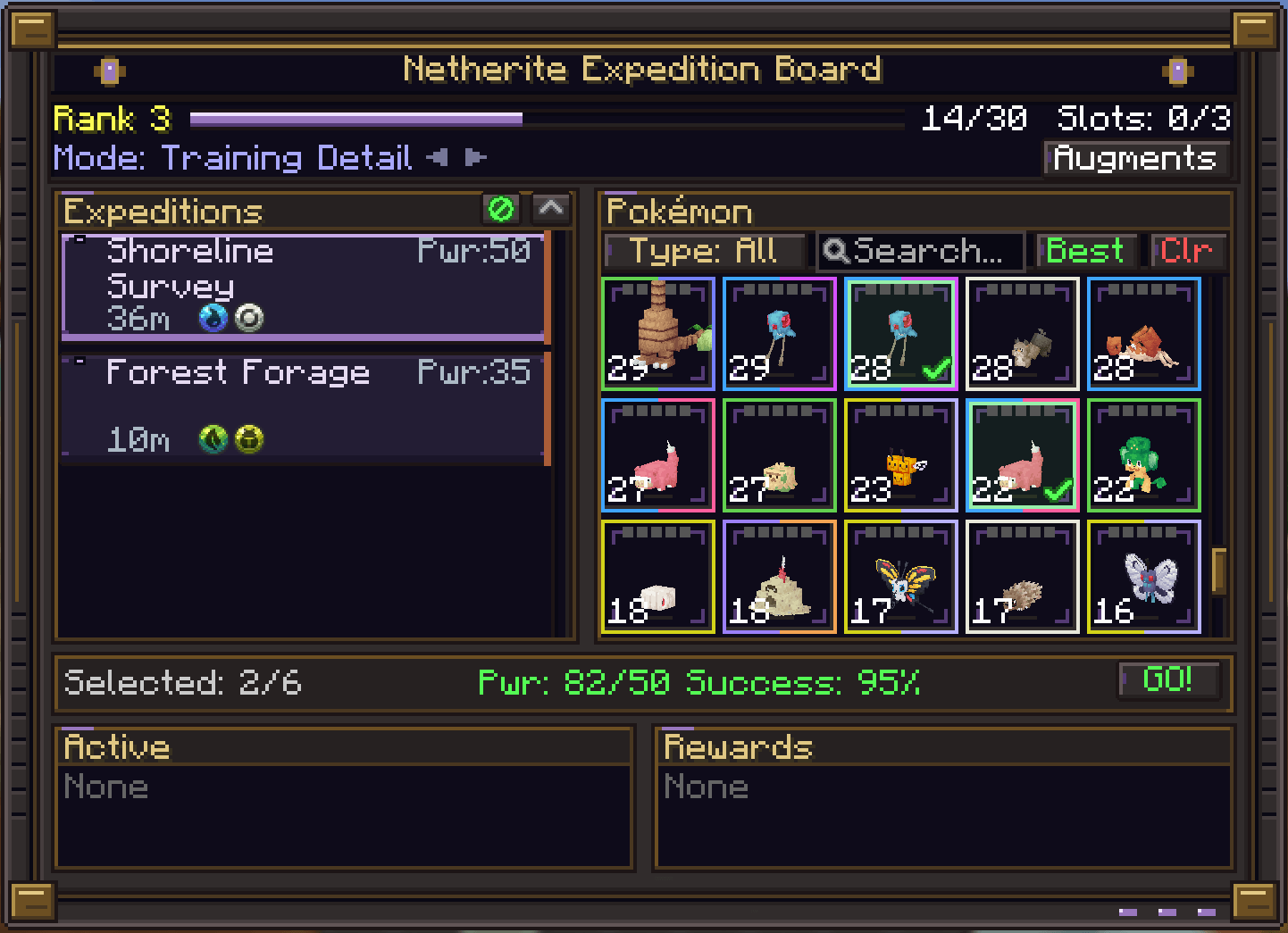 netherite_board.png netherite board interface
-
 New textures from 1.6.4 forward
 -
[NEW UI] Expedition Board
-
[NEW UI] Admin Panel
-
![[OLD MODELS] All board tiers](https://cdn.modrinth.com/data/HtRy1shF/images/7bdcfd977eb684c27a765bd476c84bd0fe4ccdfa.png) [OLD MODELS] All board tiers All board tiers and how they look once placed.
[OLD MODELS] All board tiers All board tiers and how they look once placed. -
![[OLD UI] Admin GUI - Loot Tables - Select new Item](https://cdn.modrinth.com/data/HtRy1shF/images/02b57460dbf7cce5fe55a91642749736335316ce.png) [OLD UI] Admin GUI - Loot Tables - Select new Item This is the Admin only GUI. Inside the Loot Tables tab, we can see a sub menu where the user can see all the items/blocks and select any of those to add to the loot table easily.
[OLD UI] Admin GUI - Loot Tables - Select new Item This is the Admin only GUI. Inside the Loot Tables tab, we can see a sub menu where the user can see all the items/blocks and select any of those to add to the loot table easily. -
![[OLD UI] Admin GUI - Expeditions](https://cdn.modrinth.com/data/HtRy1shF/images/2ac2f1bf96ea56262e95de51fb1b0d3d2f385a72.png) [OLD UI] Admin GUI - Expeditions This is the Admin only GUI. Inside this tab, there is the list of existing Expeditions, with the buttons to save, create a new one, or delete the selected one. on the right side we can see all the editable values of the expedition.
[OLD UI] Admin GUI - Expeditions This is the Admin only GUI. Inside this tab, there is the list of existing Expeditions, with the buttons to save, create a new one, or delete the selected one. on the right side we can see all the editable values of the expedition. -
![[OLD UI] Expedition Board](https://cdn.modrinth.com/data/HtRy1shF/images/a3d55fa1af7ecf951808407ea3d31cdf5d903ac5.png) [OLD UI] Expedition Board We can see the selected pokemons and expedition, the Power requirement is met, we can see the success rate and the "GO!" button is green.
[OLD UI] Expedition Board We can see the selected pokemons and expedition, the Power requirement is met, we can see the success rate and the "GO!" button is green. -
![[OLD UI] Admin GUI - Loot Tables](https://cdn.modrinth.com/data/HtRy1shF/images/e1734cfb36431c7adae95eb271cd1f6f8dc0e3a8.png) [OLD UI] Admin GUI - Loot Tables This is the Admin only GUI. Inside this tab, we can see the Loot tables for the different expeditions, they are categorized in 3 tiers (Common. Uncommon and Rare). We can edit existing loots, remove them or add new ones.
[OLD UI] Admin GUI - Loot Tables This is the Admin only GUI. Inside this tab, we can see the Loot tables for the different expeditions, they are categorized in 3 tiers (Common. Uncommon and Rare). We can edit existing loots, remove them or add new ones.
Versions
Files
Relations
Project Relations
More like this
Similar Mods
Suggestions use data such as tags, dependencies, dependents, descriptions, titles, and more to rank how much they overlap with this mod.
On ModDex
Community snapshot
By the numbers
Statistics

Get it on
Available Platforms
On ModDex
Community snapshot
By the numbers
Statistics
Resources