
Community listing page, reviews here may not be monitored by the author.
CobbleTracker (Cobblemon)


No reviews yet
Never miss a rare Cobblemon spawn — in-world beams, minimap waypoints, announcements, spawn history, and a personal hunt mode for any species you choose.
Community voices
Reviews
No reviews yet. Be the first to review this project!
Get it on
Available Platforms
Compatibility
Supported Environments
Works on the client or the server alone, but does more when on both.
About
Project Details
For authors
Embed Badge
If you're the author of this project, you can embed a live badge anywhere that supports HTML or Markdown. It updates automatically whenever ratings change.
Use HTML for any page that supports it, or Markdown for README files and Markdown-based descriptions.
Identifiers
Platform IDs
About
Description
CobbleTracker
Tells you where the good spawns are — and shows you, in the world itself.
Rare spawns in Cobblemon are easy to miss. CobbleTracker watches every spawn on the server, announces the ones that matter, raises a beacon-style column of light over them, drops a waypoint on your minimap, and keeps a browsable history of everything that has appeared — so a Legendary that turned up while you were down a cave is still findable.
And because Cobblemon spawns no legendaries at all on its own, CobbleTracker takes that job too — thoughtfully, or not at all if you'd rather a datapack did it.
Minecraft 1.21.1 · Fabric and NeoForge · Cobblemon 1.7.3 · Java 21
⭐ Legendary spawns, decided properly
Vanilla Cobblemon never spawns a legendary. Out of the box they only ever come from shrines.
- A context-aware director places them by where the spawn would actually land: biome, time of day, weather, height. Rayquaza on a mountain peak in daylight, Regieleki in a thunderstorm, Regice on a glacier at night. If nothing fits, nothing spawns — no Regice in a desert.
- Interval and chance are yours: one attempt every 30 minutes at 30% by default.
mode: autorespects your datapack. Install a legendary spawn datapack and the director stands down rather than doubling the rate and overriding its careful biome rules. Remove it and the director picks the job back up.- The whole table lives in
legendaries.yml, in the same vocabulary Cobblemon's own spawn files use —#cobblemon:is_mountain,timeRange,isRaining— so there's no second dialect to learn.
🔍 /checklegendary — what can spawn right here
Reads Cobblemon's live spawn pool, so it shows real data, whatever datapack you have installed.
Legendary spawns - overworld, plains, night, thunderstorm
  ✔ Zapdos       ultra-rare · ~0.02% per attempt
  ✔ Regieleki    ultra-rare · ~0.02% per attempt
  6 other legendaries need a different biome, time or weather.
Next attempt: 12m 30s · chance 30%- Only what can appear where you're standing, with an approximate per-attempt chance.
- The countdown to the next attempt, and your own anchor cooldown.
- Also the fastest way to find out a legendary datapack didn't load: it says so in one line.
- Plain chat, so it works without the client mod.
/spawnlegendary spends one attempt immediately, by the same rules — it will politely refuse if nothing fits where you are.
💡 In-world spawn beam
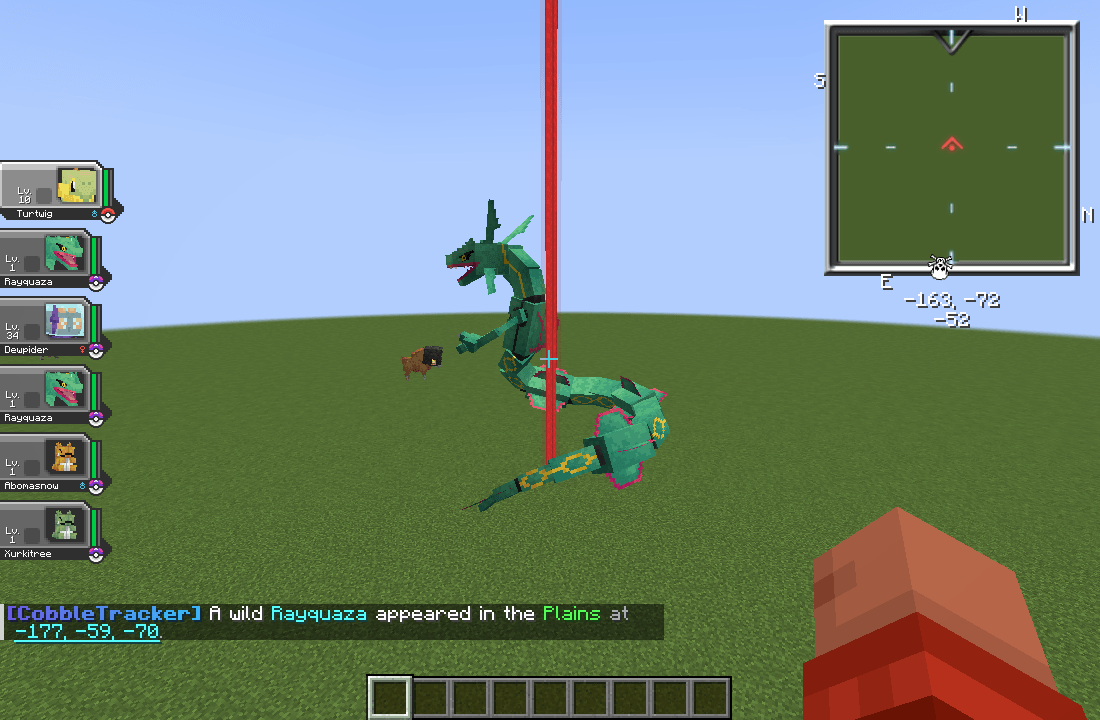
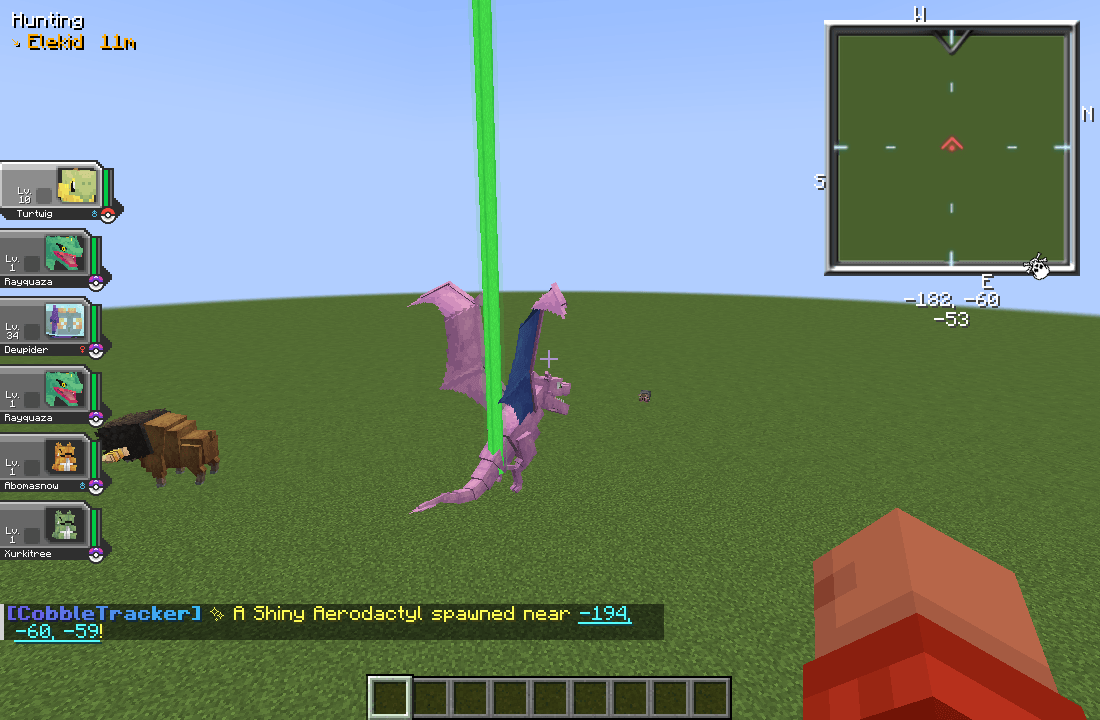
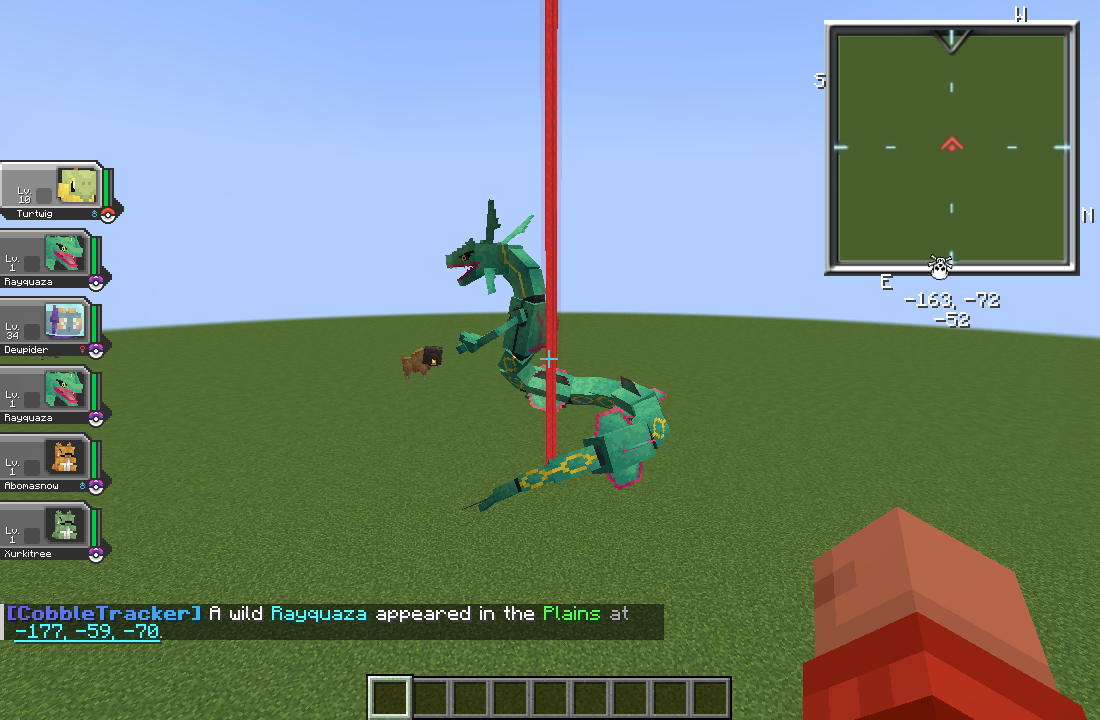
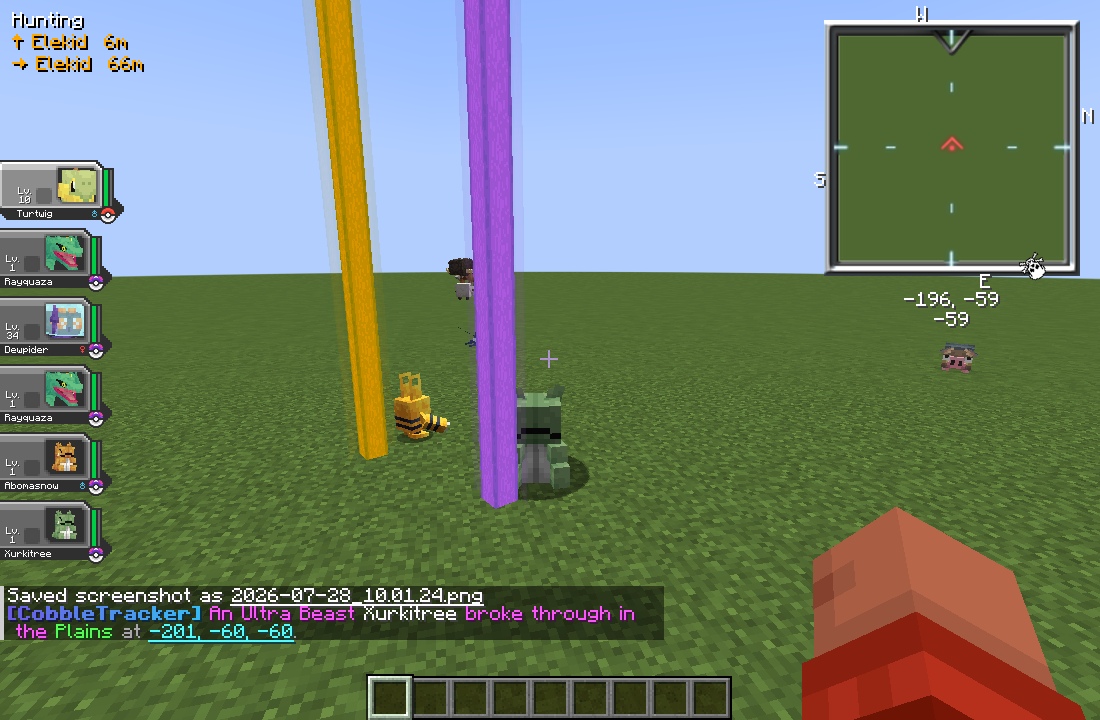
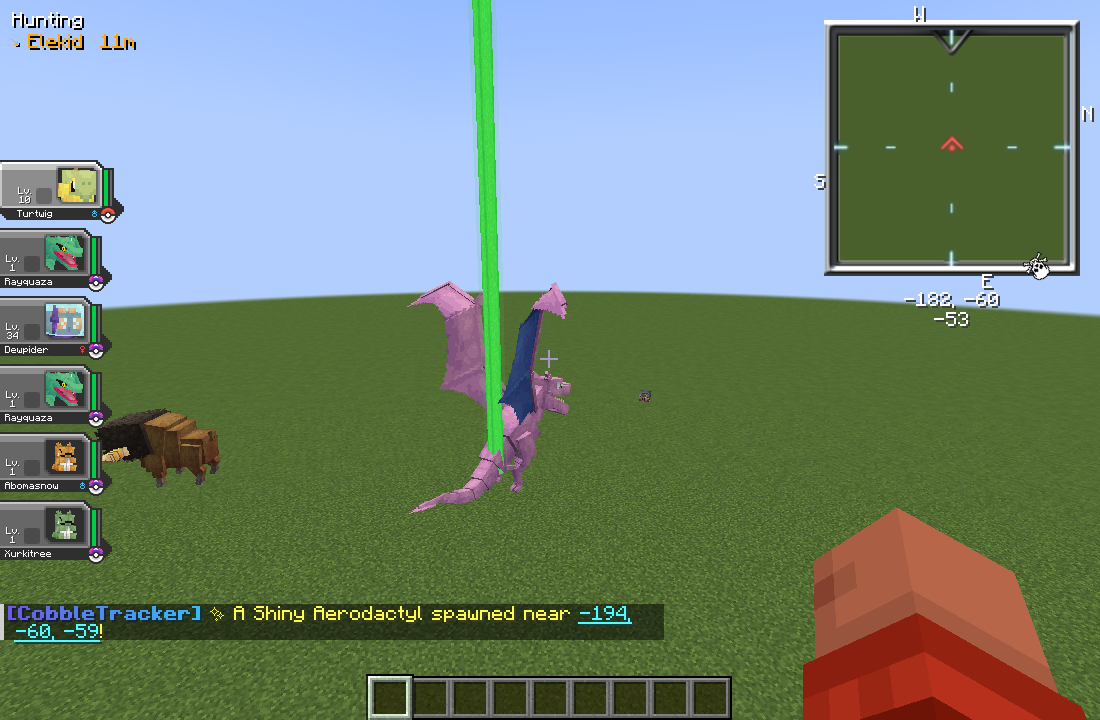
A beacon-style column of light stands over a tracked Pokémon for as long as it is in your loaded chunks — the in-world "it's right here" marker instead of a wall of coordinates in chat.
- Presence-based. It appears whenever you're near, and comes back if you fly off and return.
- Survives a reconnect — relog and the beams over anything still out there come straight back.
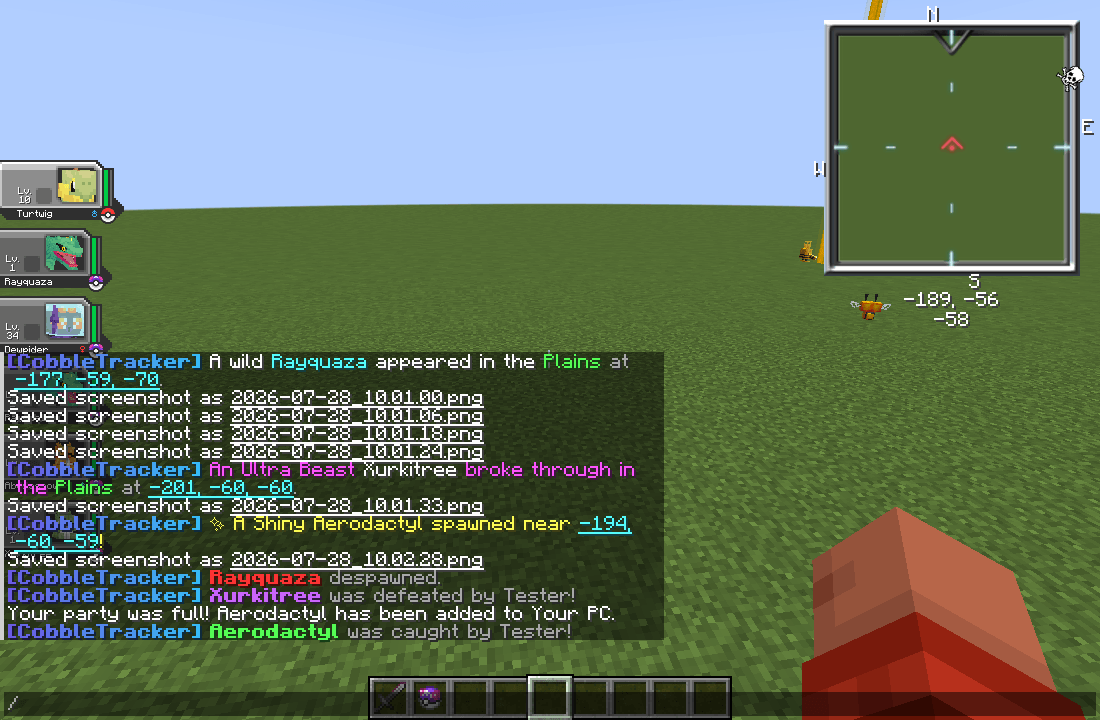
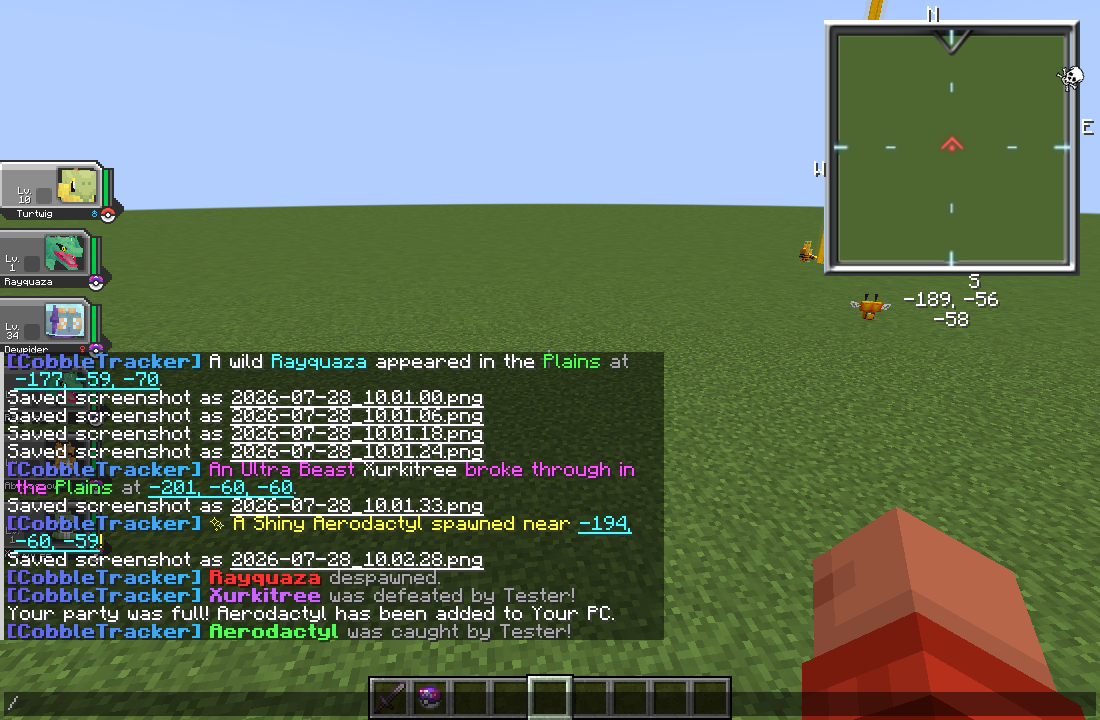
- Removed the instant it's over — caught, defeated or despawned. No ghost beams.
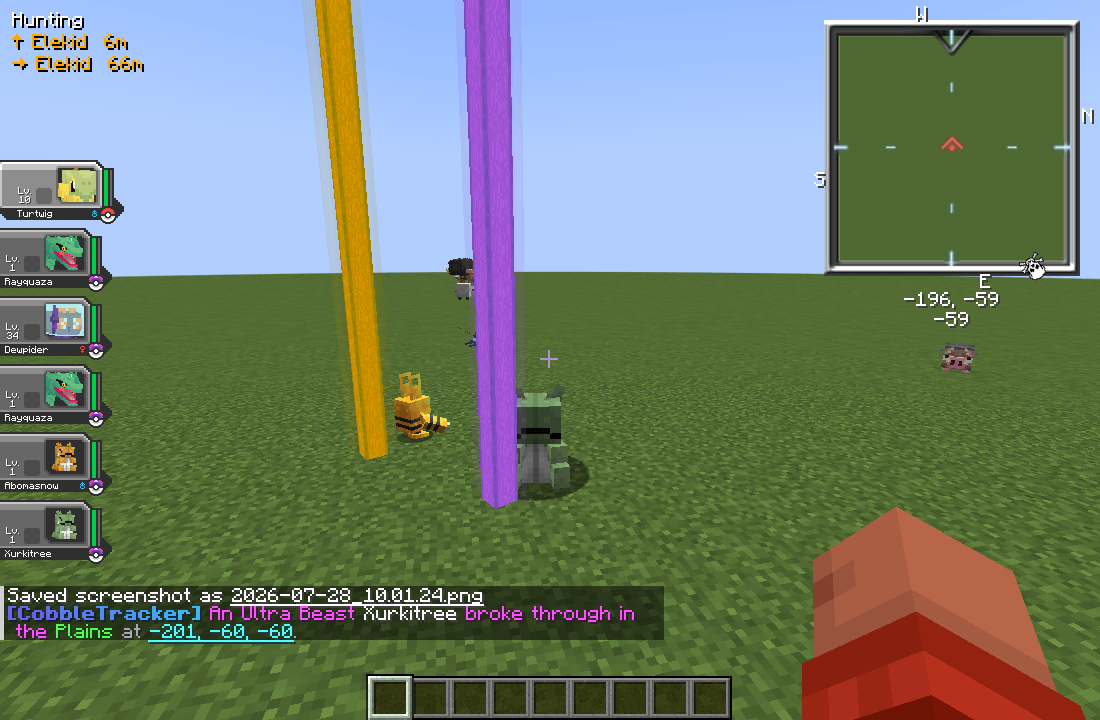
- Tier-coloured, so you can tell a Legendary from a Shiny at a glance.
- Configurable radius (
0= auto, matches your render distance), grace period and column height.
🗺 Minimap integration — Xaero's, VoxelMap, JourneyMap
Every announcement can carry a clickable Create Waypoint link. Click it and the spawn lands on your minimap.
- Your client tells the server which minimap mods you actually have, and the server only ever emits those formats. No minimap mod is required — clients without one just get the beam.
- Waypoints can inherit the beam's tier colour.
- Any format can be switched off server-wide.
- Clicking a card in the history GUI drops a past spawn on your minimap too.
📣 Spawn announcements
Per-category announcements, fully rewritable.
- MiniMessage formatting —
<gold>,<bold>,<#RRGGBB>,<gradient:#a:#b>. Legacy&-codes still work. - Placeholders:
%species%,%biome%,%world%,%x%,%y%,%z%, and%waypoint%for the clickable link. - Channels: chat, on-screen title/subtitle, an action bar line, and a configurable sound with volume and pitch.
- Discord webhook per category — posted off the server thread with a bounded queue, so a slow or unreachable Discord never costs you tick time.
- Broadcast to the whole server, or only to players within N blocks — per category.
hide-exact-positionrounds the beam, the waypoint, the history GUI and the Discord post to the chunk centre, so nothing hands out pinpoint coordinates. Operators still see exact positions.- A category limited to N blocks stays limited: its past spawns only appear in the history of players who are near them.
🔔 Notifications players control
A category used to be on or off for the whole server, so the only answer to "the shiny announcements are spamming me" was an operator switching them off for everyone.
- A NOTIFY tab in the GUI, and
/ct notifyin chat for players without the client mod. - Per category: turn it off for yourself, keep the message but drop the sound, or narrow it to your own radius.
- Silencing a category silences everything for it — chat, sound, title and the beam.
- A personal radius only ever narrows, never widens: it can't be used to see a deliberately local announcement from further away.
- Settings persist, and default to everything on.
📖 Browsable spawn history
/cobbletracker (or /ct, /last, /ll) opens a code-drawn GUI listing everything that has spawned.
- A sidebar tab for ALL, one per tracker category, plus STATS and NOTIFY.
- Scrollable sprite cards showing species, biome, coordinates and time.
- What it actually is, on every card: level, gender, nature, ability and its IVs, with the count of perfect ones called out — EVs too, on anything that has them. That's the difference between "a Rayquaza spawned" and "a Rayquaza worth dropping everything for".
- Cycle the sort: Newest · Distance · Species · Tier · Caught.
- Caught spawns are marked with who caught them.
- History survives restarts, with a per-category cap that evicts the oldest first.
/lastlegendopens straight onto the Legends tab — or prints a plain-chat rundown if you haven't got the client mod.
🏆 Top Hunters leaderboard
The STATS tab ranks players by captures, drawn as a bar chart. Bragging rights, built in.
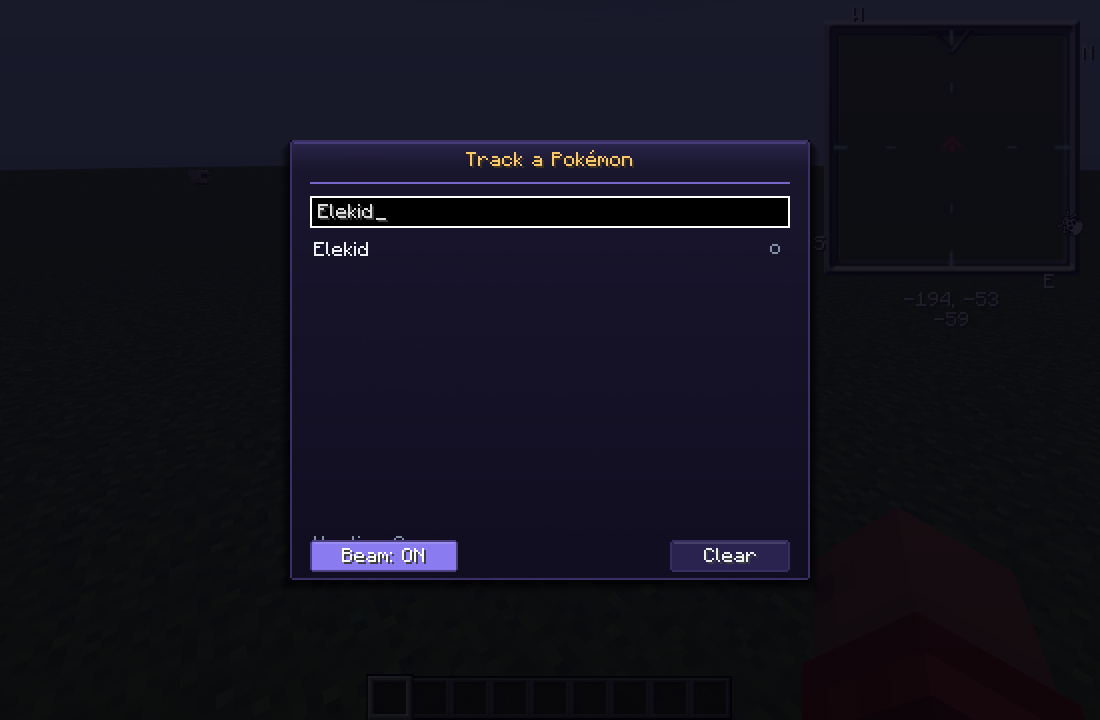
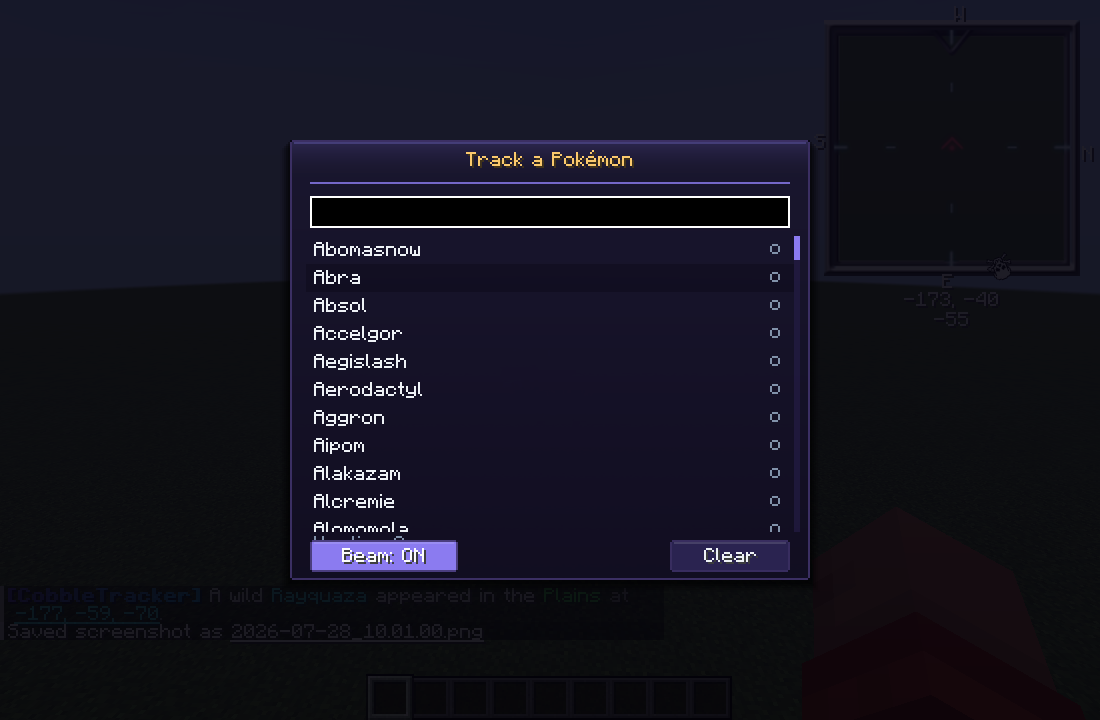
🎯 Personal hunt mode — press \
Your own tracker, entirely client-side, no server support needed.
- Press
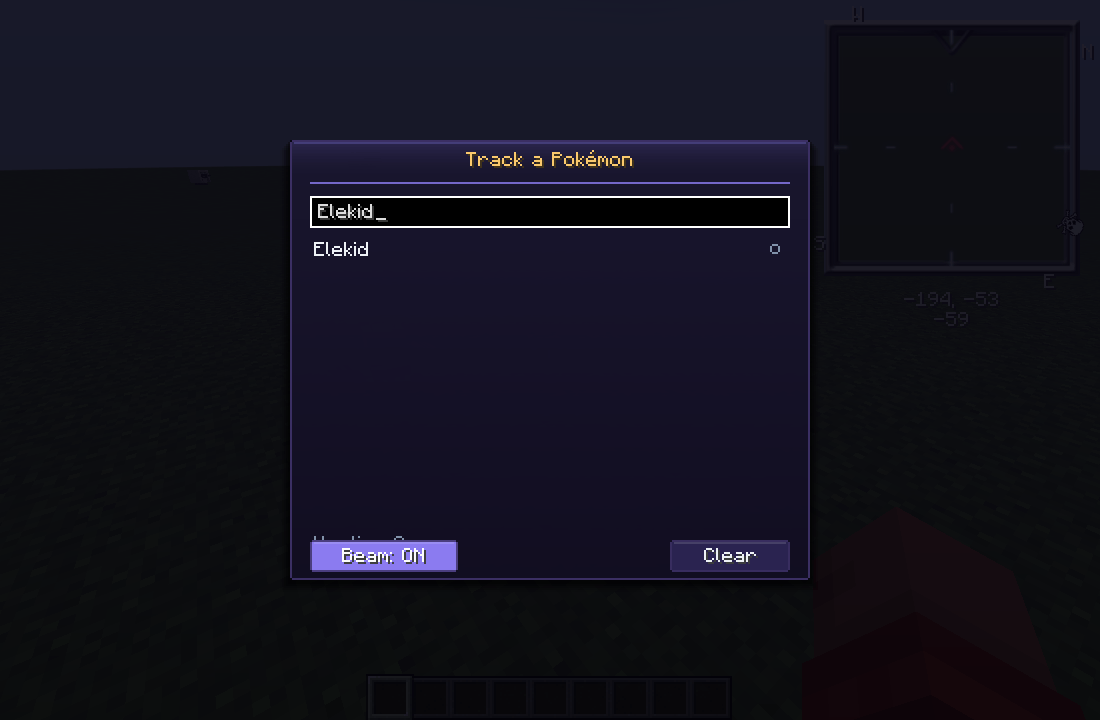
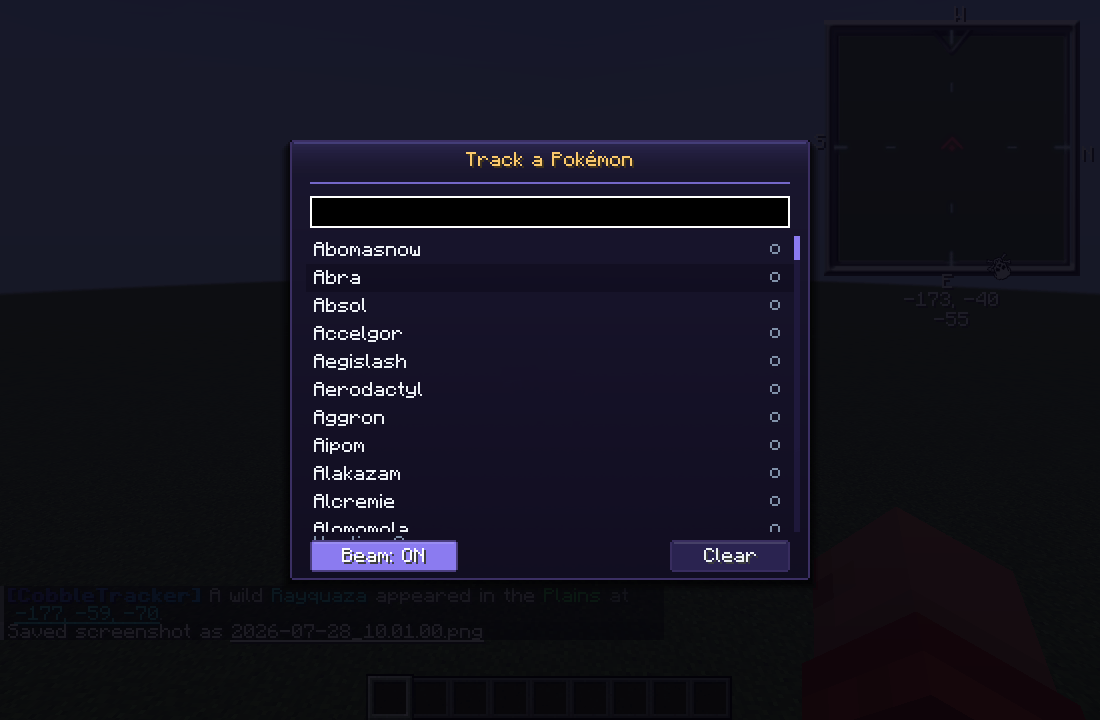
\to open Track a Pokémon and search the full Cobblemon species list. - Click any species to toggle hunting it — hunt as many as you like.
- Your list survives logging out. Shift-click a card in the history GUI to hunt that species too.
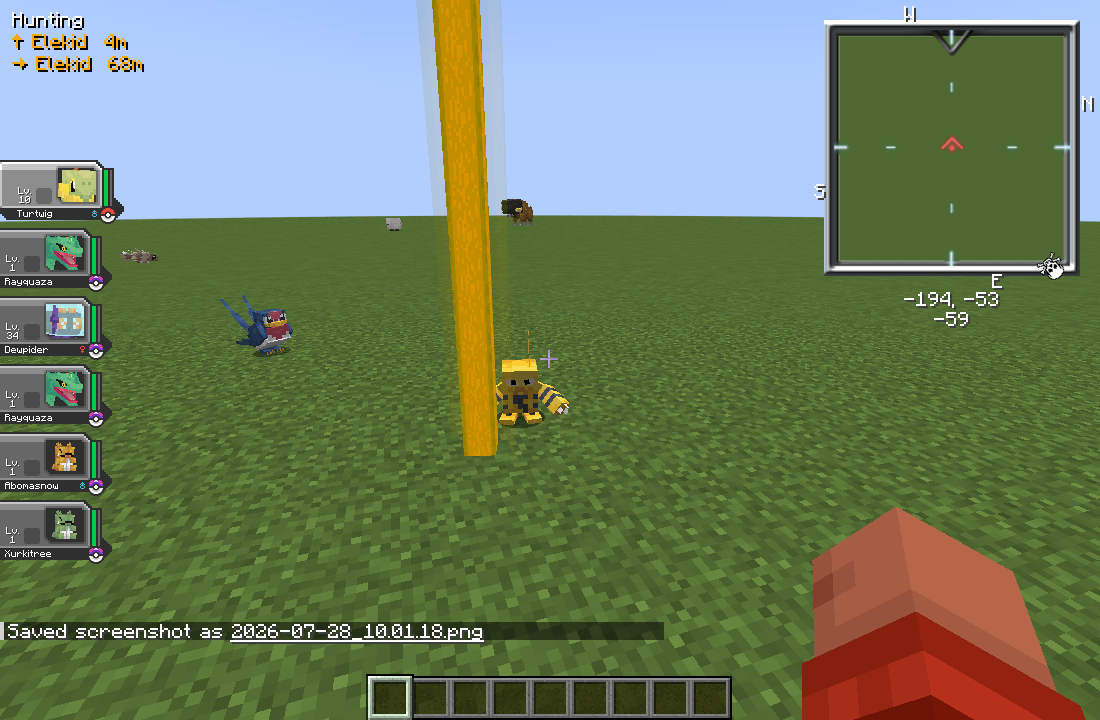
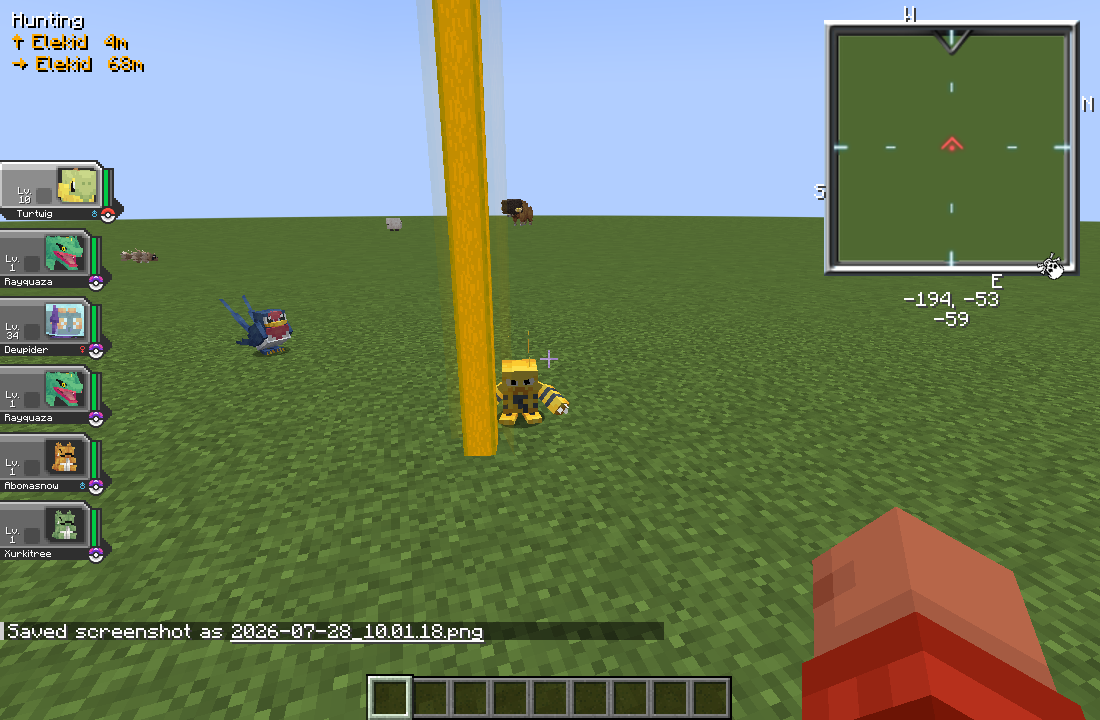
- Matching Pokémon near you get an amber beam, plus directional arrows in the corner of your HUD with live distances to the nearest ones.
- Servers can switch the whole feature off with
hunt.enabled— a player's list is kept, and comes back on a server that allows it.
🧩 Tracker categories you define
CobbleTracker ships with Legends, Shinies, Bosses and Ultra Beasts — but they're just config. Add or remove a block and every subsystem (announcements, history, stats, the spawner, the GUI sidebar) picks it up on the next /ct reload.
Each category has a matcher spec, combined with spaces for AND:
isLegendary      isShiny          isMythical       isUltraBeast    isBoss
species:<id>     label:<x>        aspect:<x>       form:alolan
gender:female    nature:adamant   ability:levitate level:>50
perfectIvs:>=4   ivs:>=150        scale:>1.15
biome:jungle     dimension:<id>   time:night       weather:thunder    y:<0
Prefix any token with ! to negate it, and use | inside a value for or:
spec: "isShiny !species:magikarp"
spec: "isLegendary species:rayquaza|lugia"
spec: "isShiny time:night biome:swamp"
Plus a tier colour, a history cap, a species blacklist, an optional dimension whitelist, and command hooks — on-spawn-commands and on-catch-commands run console commands with %player% / %species%, which is all you need to wire up rewards or an economy with no extra mod.
⚙️ Optional built-in spawner
Want to guarantee rare spawns instead of waiting on luck? Each category can run its own scheduler:
- Attempt interval and per-attempt chance.
- Distribute among players — one server-wide roll per interval picks a random eligible player as the anchor, so the spawn rate doesn't balloon as your player count grows.
- A per-player cooldown so the same person doesn't get every spawn.
- Min/max distance from the anchor, a level range or fixed level, a forced shiny flag, and a custom species pool.
- Respects the category's dimension whitelist — a Nether-only category never places anything in the Overworld.
🎨 Six built-in themes
Every screen is drawn in code, not from a texture atlas — so themes are instant and never clash with your resource pack. Switch with /ct theme <name>:
pokedex (default) · dark · light · blue · midnight · forest
🛠 In-game admin panel
/ct admin opens a live settings panel for operators — switch minimap formats on or off, flip title display and position-hiding. No file editing, no restart.
Each minimap row shows whether you actually have that mod: a format that's on server-side but that nobody has installed reads as "not installed", rather than pretending waypoints will arrive.
Commands
| Command | What it does |
|---|---|
/cobbletracker · /ct · /last · /ll |
Open the spawn history GUI |
/lastlegend |
Recent Legendary spawns — the GUI's Legends tab, or a chat rundown without the client mod |
/checklegendary |
What can spawn where you're standing, and when (no client mod needed) |
/spawnlegendary |
Spend one legendary spawn attempt now (op) |
/ct notify |
Your own per-category announcement settings (no client mod needed) |
/ct theme <name> |
Switch GUI theme |
/ct waypoint <id> |
Drop a stored spawn on your minimap |
/ct reload |
Reload the YAML config (op) |
/ct admin |
Live settings panel (op) |
/ct fakehit |
Fire a test spawn (op) |
🔑 LuckPerms
Every command has a permission node, and LuckPerms drives them when it's installed — no extra setup, no compile-time dependency. Without it, everything falls back to vanilla operator levels exactly as before.
cobbletracker.command.gui        cobbletracker.command.notify
cobbletracker.command.waypoint   cobbletracker.command.theme
cobbletracker.command.lastlegend cobbletracker.command.checklegendary
cobbletracker.command.reload     cobbletracker.command.admin
cobbletracker.command.fakehit    cobbletracker.command.spawnlegendary
A node left undefined falls back to the default; one set to false denies the command even to an operator.
Configuration
- YAML for everything you edit by hand —
config.yml,announcements.ymlandlegendaries.yml, heavily commented. /ct reloadhot-reloads all three. A file that won't parse leaves the running configuration alone and tells you where to look, rather than taking every tracker down over one stray character.- Machine data lives separately in
tracker.jsonandprefs.json. - English and Russian localisation included.
Installing
Drop the jar in mods/ alongside Cobblemon, Fabric API / NeoForge, Fabric Language Kotlin and Architectury API.
Install it on the server for announcements, history, /checklegendary and /lastlegend. Add it on the client as well to unlock the beam, the history GUI, minimap waypoints and personal hunt mode.
If you want to support my work, you can use my PayPal link here: https://www.paypal.com/ncp/payment/XWSP342YCQ52G
CobbleTracker
Tells you where the good spawns are — and shows you, in the world itself.
Rare spawns in Cobblemon are easy to miss. CobbleTracker watches every spawn on the server, announces the ones that matter, raises a beacon-style column of light over them, drops a waypoint on your minimap, and keeps a browsable history of everything that has appeared — so a Legendary that turned up while you were down a cave is still findable.
And because Cobblemon spawns no legendaries at all on its own, CobbleTracker takes that job too — thoughtfully, or not at all if you'd rather a datapack did it.
Minecraft 1.21.1 · Fabric and NeoForge · Cobblemon 1.7.3 · Java 21
⭐ Legendary spawns, decided properly
Vanilla Cobblemon never spawns a legendary. Out of the box they only ever come from shrines.
- A context-aware director places them by where the spawn would actually land: biome, time of day, weather, height. Rayquaza on a mountain peak in daylight, Regieleki in a thunderstorm, Regice on a glacier at night. If nothing fits, nothing spawns — no Regice in a desert.
- Interval and chance are yours: one attempt every 30 minutes at 30% by default.
mode: autorespects your datapack. Install a legendary spawn datapack and the director stands down rather than doubling the rate and overriding its careful biome rules. Remove it and the director picks the job back up.- The whole table lives in
legendaries.yml, in the same vocabulary Cobblemon's own spawn files use —#cobblemon:is_mountain,timeRange,isRaining— so there's no second dialect to learn.
🔍 /checklegendary — what can spawn right here
Reads Cobblemon's live spawn pool, so it shows real data, whatever datapack you have installed.
Legendary spawns - overworld, plains, night, thunderstorm
  ✔ Zapdos       ultra-rare · ~0.02% per attempt
  ✔ Regieleki    ultra-rare · ~0.02% per attempt
  6 other legendaries need a different biome, time or weather.
  Next attempt: 12m 30s · chance 30%
- Only what can appear where you're standing, with an approximate per-attempt chance.
- The countdown to the next attempt, and your own anchor cooldown.
- Also the fastest way to find out a legendary datapack didn't load: it says so in one line.
- Plain chat, so it works without the client mod.
/spawnlegendary spends one attempt immediately, by the same rules — it will politely refuse if nothing fits where you are.
💡 In-world spawn beam
A beacon-style column of light stands over a tracked Pokémon for as long as it is in your loaded chunks — the in-world "it's right here" marker instead of a wall of coordinates in chat.
- Presence-based. It appears whenever you're near, and comes back if you fly off and return.
- Survives a reconnect — relog and the beams over anything still out there come straight back.
- Removed the instant it's over — caught, defeated or despawned. No ghost beams.
- Tier-coloured, so you can tell a Legendary from a Shiny at a glance.
- Configurable radius (
0= auto, matches your render distance), grace period and column height.
🗺 Minimap integration — Xaero's, VoxelMap, JourneyMap
Every announcement can carry a clickable Create Waypoint link. Click it and the spawn lands on your minimap.
- Your client tells the server which minimap mods you actually have, and the server only ever emits those formats. No minimap mod is required — clients without one just get the beam.
- Waypoints can inherit the beam's tier colour.
- Any format can be switched off server-wide.
- Clicking a card in the history GUI drops a past spawn on your minimap too.
📣 Spawn announcements
Per-category announcements, fully rewritable.
- MiniMessage formatting —
<gold>,<bold>,<#RRGGBB>,<gradient:#a:#b>. Legacy&-codes still work. - Placeholders:
%species%,%biome%,%world%,%x%,%y%,%z%, and%waypoint%for the clickable link. - Channels: chat, on-screen title/subtitle, an action bar line, and a configurable sound with volume and pitch.
- Discord webhook per category — posted off the server thread with a bounded queue, so a slow or unreachable Discord never costs you tick time.
- Broadcast to the whole server, or only to players within N blocks — per category.
hide-exact-positionrounds the beam, the waypoint, the history GUI and the Discord post to the chunk centre, so nothing hands out pinpoint coordinates. Operators still see exact positions.- A category limited to N blocks stays limited: its past spawns only appear in the history of players who are near them.
🔔 Notifications players control
A category used to be on or off for the whole server, so the only answer to "the shiny announcements are spamming me" was an operator switching them off for everyone.
- A NOTIFY tab in the GUI, and
/ct notifyin chat for players without the client mod. - Per category: turn it off for yourself, keep the message but drop the sound, or narrow it to your own radius.
- Silencing a category silences everything for it — chat, sound, title and the beam.
- A personal radius only ever narrows, never widens: it can't be used to see a deliberately local announcement from further away.
- Settings persist, and default to everything on.
📖 Browsable spawn history
/cobbletracker (or /ct, /last, /ll) opens a code-drawn GUI listing everything that has spawned.
- A sidebar tab for ALL, one per tracker category, plus STATS and NOTIFY.
- Scrollable sprite cards showing species, biome, coordinates and time.
- What it actually is, on every card: level, gender, nature, ability and its IVs, with the count of perfect ones called out — EVs too, on anything that has them. That's the difference between "a Rayquaza spawned" and "a Rayquaza worth dropping everything for".
- Cycle the sort: Newest · Distance · Species · Tier · Caught.
- Caught spawns are marked with who caught them.
- History survives restarts, with a per-category cap that evicts the oldest first.
/lastlegendopens straight onto the Legends tab — or prints a plain-chat rundown if you haven't got the client mod.
🏆 Top Hunters leaderboard
The STATS tab ranks players by captures, drawn as a bar chart. Bragging rights, built in.
🎯 Personal hunt mode — press \
Your own tracker, entirely client-side, no server support needed.
- Press
\to open Track a Pokémon and search the full Cobblemon species list. - Click any species to toggle hunting it — hunt as many as you like.
- Your list survives logging out. Shift-click a card in the history GUI to hunt that species too.
- Matching Pokémon near you get an amber beam, plus directional arrows in the corner of your HUD with live distances to the nearest ones.
- Servers can switch the whole feature off with
hunt.enabled— a player's list is kept, and comes back on a server that allows it.
🧩 Tracker categories you define
CobbleTracker ships with Legends, Shinies, Bosses and Ultra Beasts — but they're just config. Add or remove a block and every subsystem (announcements, history, stats, the spawner, the GUI sidebar) picks it up on the next /ct reload.
Each category has a matcher spec, combined with spaces for AND:
isLegendary      isShiny          isMythical       isUltraBeast    isBoss
species:<id>     label:<x>        aspect:<x>       form:alolan
gender:female    nature:adamant   ability:levitate level:>50
perfectIvs:>=4   ivs:>=150        scale:>1.15
biome:jungle     dimension:<id>   time:night       weather:thunder    y:<0
Prefix any token with ! to negate it, and use | inside a value for or:
spec: "isShiny !species:magikarp"
spec: "isLegendary species:rayquaza|lugia"
spec: "isShiny time:night biome:swamp"
Plus a tier colour, a history cap, a species blacklist, an optional dimension whitelist, and command hooks — on-spawn-commands and on-catch-commands run console commands with %player% / %species%, which is all you need to wire up rewards or an economy with no extra mod.
⚙️ Optional built-in spawner
Want to guarantee rare spawns instead of waiting on luck? Each category can run its own scheduler:
- Attempt interval and per-attempt chance.
- Distribute among players — one server-wide roll per interval picks a random eligible player as the anchor, so the spawn rate doesn't balloon as your player count grows.
- A per-player cooldown so the same person doesn't get every spawn.
- Min/max distance from the anchor, a level range or fixed level, a forced shiny flag, and a custom species pool.
- Respects the category's dimension whitelist — a Nether-only category never places anything in the Overworld.
🎨 Six built-in themes
Every screen is drawn in code, not from a texture atlas — so themes are instant and never clash with your resource pack. Switch with /ct theme <name>:
pokedex (default) · dark · light · blue · midnight · forest
🛠 In-game admin panel
/ct admin opens a live settings panel for operators — switch minimap formats on or off, flip title display and position-hiding. No file editing, no restart.
Each minimap row shows whether you actually have that mod: a format that's on server-side but that nobody has installed reads as "not installed", rather than pretending waypoints will arrive.
Commands
| Command | What it does |
|---|---|
/cobbletracker · /ct · /last · /ll |
Open the spawn history GUI |
/lastlegend |
Recent Legendary spawns — the GUI's Legends tab, or a chat rundown without the client mod |
/checklegendary |
What can spawn where you're standing, and when (no client mod needed) |
/spawnlegendary |
Spend one legendary spawn attempt now (op) |
/ct notify |
Your own per-category announcement settings (no client mod needed) |
/ct theme <name> |
Switch GUI theme |
/ct waypoint <id> |
Drop a stored spawn on your minimap |
/ct reload |
Reload the YAML config (op) |
/ct admin |
Live settings panel (op) |
/ct fakehit |
Fire a test spawn (op) |
🔑 LuckPerms
Every command has a permission node, and LuckPerms drives them when it's installed — no extra setup, no compile-time dependency. Without it, everything falls back to vanilla operator levels exactly as before.
cobbletracker.command.gui        cobbletracker.command.notify
cobbletracker.command.waypoint   cobbletracker.command.theme
cobbletracker.command.lastlegend cobbletracker.command.checklegendary
cobbletracker.command.reload     cobbletracker.command.admin
cobbletracker.command.fakehit    cobbletracker.command.spawnlegendary
A node left undefined falls back to the default; one set to false denies the command even to an operator.
Configuration
- YAML for everything you edit by hand —
config.yml,announcements.ymlandlegendaries.yml, heavily commented. /ct reloadhot-reloads all three. A file that won't parse leaves the running configuration alone and tells you where to look, rather than taking every tracker down over one stray character.- Machine data lives separately in
tracker.jsonandprefs.json. - English and Russian localisation included.
Installing
Drop the jar in mods/ alongside Cobblemon, Fabric API / NeoForge, Fabric Language Kotlin and Architectury API.
Install it on the server for announcements, history, /checklegendary and /lastlegend. Add it on the client as well to unlock the beam, the history GUI, minimap waypoints and personal hunt mode.
If you want to support my work, you can use my PayPal link here: https://www.paypal.com/ncp/payment/XWSP342YCQ52G
Screenshots
Gallery
-
 2026-07-28_10.01.00.png 2026-07-28_10.01.00.png
 -
 2026-07-28_10.03.07.png 2026-07-28_10.03.07.png
 -
 2026-07-28_10.02.28.png 2026-07-28_10.02.28.png
 -
 2026-07-28_10.01.33.png 2026-07-28_10.01.33.png
 -
 2026-07-28_10.01.24.png 2026-07-28_10.01.24.png
 -
 2026-07-28_10.01.18.png 2026-07-28_10.01.18.png
 -
 2026-07-28_10.01.06.png 2026-07-28_10.01.06.png
Versions
Files
Relations
Project Relations
More like this
Similar Mods
Suggestions use data such as tags, dependencies, dependents, descriptions, titles, and more to rank how much they overlap with this mod.
On ModDex
Community snapshot
By the numbers
Statistics
Want to reach Minecraft players?
We're looking for a server hosting partner to feature here and other parts of the site. Interested? Send us a message!
Get in touchGet it on
Available Platforms
On ModDex
Community snapshot
By the numbers