Community listing page, reviews here may not be monitored by the author.
Combat Metrics


No reviews yet
Combat Metrics is a client-side Fabric mod that tracks your PvP performance and turns your death screen into a detailed analytical dashboard with visual graphs.

Community voices
Reviews
No reviews yet. Be the first to review this project!
Get it on
Available Platforms
Compatibility
Supported Environments
Runs entirely on the client. Works on vanilla servers.
About
Project Details
For authors
Embed Badge
If you're the author of this project, you can embed a live badge anywhere that supports HTML or Markdown. It updates automatically whenever ratings change.
Use HTML for any page that supports it, or Markdown for README files and Markdown-based descriptions.
Identifiers
Platform IDs
Resources
External Links
About
Description
# Combat Metrics (Client-Side PvP Telemetry)
Most Minecraft PvP improvement happens by feel. You lose a duel, blame lag, queue again, and carry absolutely zero data from one fight to the next. The few tools that do exist are server-side plugins that just count kills and deaths. They don't tell you *why* you lost.
**Combat Metrics** changes that. It is a completely client-side Fabric mod designed to watch your combat mechanics the way a coach watches game film: silently during the fight, analytically after it. It modifies zero gameplay, sends no packets to the server, and works identically on public multiplayer networks, LAN duels, and singleplayer practice worlds.
---
## What It Measures
Combat Metrics classifies your fight based on the kit you are holding (Sword, Axe/Shield, or Crystal) and tracks specific, high-fidelity mechanical metrics.
### General Combat Metrics
* **Swing Accuracy:** The exact ratio of confirmed entity hits to total weapon swings. Whiffs count against you; mining blocks never does.
* **Damage Taken:** Total hearts lost during the session.
* **Best Combo:** The longest run of consecutive hits landed without taking damage back.
* **First Hits:** Tracks individual "engagements" (when an opponent gets within 3 blocks and leaves past 5 blocks) and tallies who landed the first blow of that exchange.
### Melee (Sword & Axe) Metrics
* **Attack Discipline:** The percentage of swings thrown with your attack cooldown fully charged. The ultimate diagnostic tool to cure spam-clicking.
* **Crit Rate:** The percentage of your landed hits that were jump/falling critical hits.
* **Average Hit Range:** Measures the eye-to-impact distance of your hits, helping you gauge your spacing.
### Crystal & Anchor Metrics
* **Setup Speed (The Two-Tap):** The delay (in milliseconds) between placing your obsidian/anchor and placing the crystal/glowstone on top of it.
* **Totem Re-equip Time:** Starts counting the frame your totem pops and stops when a new one is successfully in your offhand.
* **Defense Response:** Measures the delay between an opponent's action (like placing a crystal near you) and your defensive counter (raising a shield, placing a block, or popping their crystal).
---
## The Interface
### 1. The Defeat Wrap
When you die in combat, the vanilla death screen is replaced with an elegant analytical wrap. It displays your overall performance grade (**S, A, B, C, or F**), highlights your weakest metrics in red, and provides a single, targeted **Training Drill** to focus on in your next match (e.g., *"Respect the 1.9 cooldown: stop swinging before your crosshair indicator is full"*).
### 2. In-Game Graph Browser
Press the graph keybind to open your fight history. Each fight is visually mapped out:
* **Health-over-time curves** showing exactly where you took damage.
* **First-hit timelines** indicating who controlled the pace of the engagements.
* **Setup-speed charts** showing if your crystal placement slowed down as the fight dragged on.
---
## Is this allowed on competitive servers?
**Yes.** Combat Metrics is entirely visual and diagnostic.
* It does **not** automate shield blocks, totem swaps, or placements.
* It does **not** send any packets to the server.
* It does **not** bypass vanilla client restrictions.
* It simply observes raw client-side inputs and events (like health changes and entity spawns) to calculate metrics post-fight. It is as safe to use on Hypixel, PvP Legacy, or MCCI as a standard FPS overlay.
---
## Keybinds (Configurable)
* **Open History/Graph Browser:** `O`
* **Toggle Live Stats HUD:** `I`
* **Manually Start/End Session:** `U` (Useful for open-ended practice arenas)
---
### Requirements
* **Fabric Loader**
* **Fabric API**
* Compatible with Minecraft **1.20.x - 1.21.x**
Combat Metrics (Client-Side PvP Telemetry)
Most Minecraft PvP improvement happens by feel. You lose a duel, blame lag, queue again, and carry absolutely zero data from one fight to the next. The few tools that do exist are server-side plugins that just count kills and deaths. They don't tell you why you lost.
Combat Metrics changes that. It is a completely client-side Fabric mod designed to watch your combat mechanics the way a coach watches game film: silently during the fight, analytically after it. It modifies zero gameplay, sends no packets to the server, and works identically on public multiplayer networks, LAN duels, and singleplayer practice worlds.
What It Measures
Combat Metrics classifies your fight based on the kit you are holding (Sword, Axe/Shield, or Crystal) and tracks specific, high-fidelity mechanical metrics.
General Combat Metrics
- Swing Accuracy: The exact ratio of confirmed entity hits to total weapon swings. Whiffs count against you; mining blocks never does.
- Damage Taken: Total hearts lost during the session.
- Best Combo: The longest run of consecutive hits landed without taking damage back.
- First Hits: Tracks individual "engagements" (when an opponent gets within 3 blocks and leaves past 5 blocks) and tallies who landed the first blow of that exchange.
Melee (Sword & Axe) Metrics
- Attack Discipline: The percentage of swings thrown with your attack cooldown fully charged. The ultimate diagnostic tool to cure spam-clicking.
- Crit Rate: The percentage of your landed hits that were jump/falling critical hits.
- Average Hit Range: Measures the eye-to-impact distance of your hits, helping you gauge your spacing.
Crystal & Anchor Metrics
- Setup Speed (The Two-Tap): The delay (in milliseconds) between placing your obsidian/anchor and placing the crystal/glowstone on top of it.
- Totem Re-equip Time: Starts counting the frame your totem pops and stops when a new one is successfully in your offhand.
- Defense Response: Measures the delay between an opponent's action (like placing a crystal near you) and your defensive counter (raising a shield, placing a block, or popping their crystal).
The Interface
1. The Defeat Wrap
When you die in combat, the vanilla death screen is replaced with an elegant analytical wrap. It displays your overall performance grade (S, A, B, C, or F), highlights your weakest metrics in red, and provides a single, targeted Training Drill to focus on in your next match (e.g., "Respect the 1.9 cooldown: stop swinging before your crosshair indicator is full").
2. In-Game Graph Browser
Press the graph keybind to open your fight history. Each fight is visually mapped out:
- Health-over-time curves showing exactly where you took damage.
- First-hit timelines indicating who controlled the pace of the engagements.
- Setup-speed charts showing if your crystal placement slowed down as the fight dragged on.
Is this allowed on competitive servers?
Yes. Combat Metrics is entirely visual and diagnostic.
- It does not automate shield blocks, totem swaps, or placements.
- It does not send any packets to the server.
- It does not bypass vanilla client restrictions.
- It simply observes raw client-side inputs and events (like health changes and entity spawns) to calculate metrics post-fight. It is as safe to use on Hypixel, PvP Legacy, or MCCI as a standard FPS overlay.
Keybinds (Configurable)
- Open History/Graph Browser:
O - Toggle Live Stats HUD:
I - Manually Start/End Session:
U(Useful for open-ended practice arenas)
Requirements
- Fabric Loader
- Fabric API
- Compatible with Minecraft 1.20.x - 1.21.x
Screenshots
Gallery
-
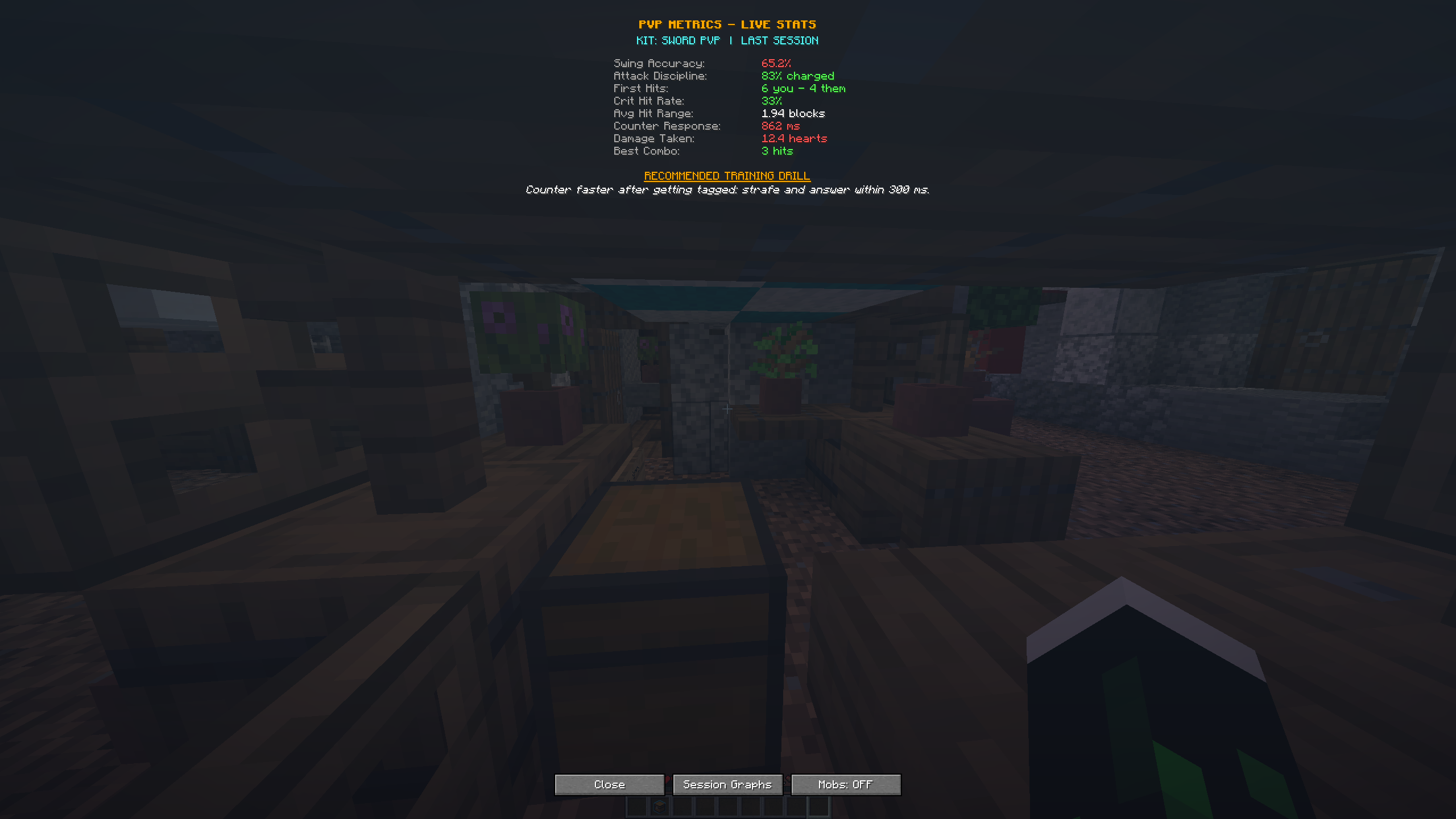 Get your fights stats After a fight, see an analysis of your last combat. It also shows you an advice over what you should work on to get better.
 -
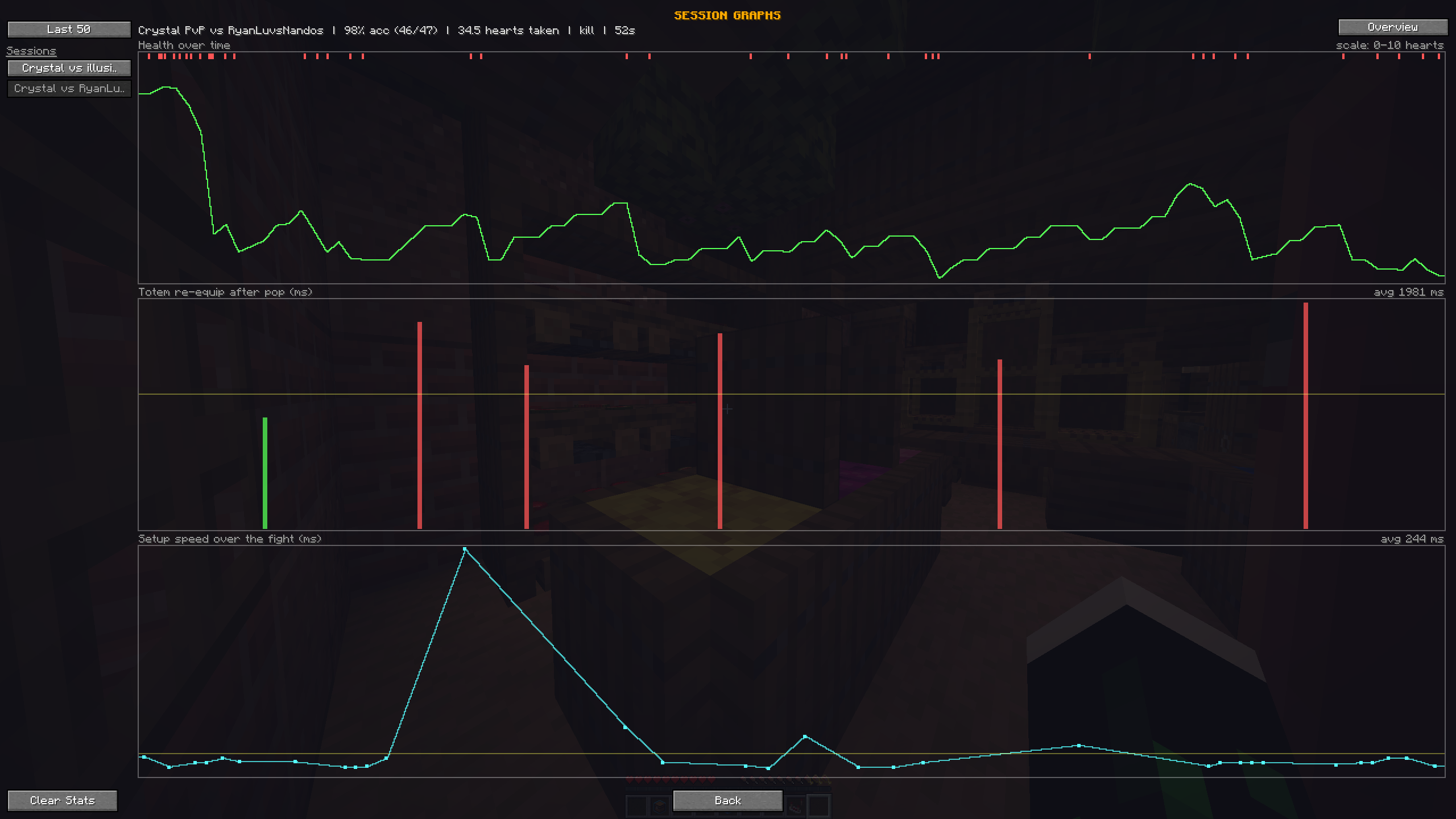 Session graph After a fight get graphs over how you perform during the combat
Versions
Files
Relations
Project Relations
More like this
Similar Mods
Suggestions use data such as tags, dependencies, dependents, descriptions, titles, and more to rank how much they overlap with this mod.
On ModDex
Community snapshot
By the numbers
Statistics
 (opens in a new tab)
Get it on
Available Platforms
On ModDex
Community snapshot
By the numbers
Statistics
Resources