
Community listing page, reviews here may not be monitored by the author.
Combat Tracker

No reviews yet
Combat Tracker mod
Community voices
Reviews
No reviews yet. Be the first to review this project!
Get it on
Available Platforms
Compatibility
Supported Environments
Runs entirely on the client. Works on vanilla servers.
About
Project Details
For authors
Embed Badge
If you're the author of this project, you can embed a live badge anywhere that supports HTML or Markdown. It updates automatically whenever ratings change.
Use HTML for any page that supports it, or Markdown for README files and Markdown-based descriptions.
Identifiers
Platform IDs
Resources
External Links
About
Description
Combat Tracker records how you fight and turns it into a report you can share with others.
Big thanks to @nqouir for commissioning this mod (Nquoir)
Combat Tracker
A client-side Fabric mod for Minecraft 1.21.11 that measures how you fight and turns it into a report you can show people. By builtdoor.
Hit record, play a few fights, and you get charts of your own timing and aim, plus a link you can paste in Discord.
Install
-
Install Fabric Loader (0.19.3 or newer) for Minecraft 1.21.11.
-
Download these and drop them all into your
.minecraft/modsfolder:File Where Needed? combat-tracker-<version>+1.21.11.jarLatest release Yes Fabric API Modrinth ( 0.141.4+1.21.11)Yes Cloth Config Modrinth Yes, builds the settings screen Mod Menu Modrinth Optional, adds the button that opens settings -
Launch Minecraft. You should see a small overlay in the top-left.
Not sure where
.minecraftis? On Windows pressWin+R, type%appdata%\.minecraft, press Enter.
Using it
Press J to show or hide the overlay. That's the only key bound by default. You can rebind it, and bind a recording key under Options → Controls.
The overlay shows your running stats:
| Line | Meaning |
|---|---|
Jump: 12 hit / 5 miss |
Jump resets you landed vs missed |
Rate 70.6% Avg 44 SD 21 |
Success rate, average timing, and SD (how much your timing varies) |
Last JR: HIT +38ms |
Your most recent attempt |
Combo: 3 Last 640ms |
Current combo length, and the gap since the last hit |
Variance 47ms |
How much your combo timing varies |
The Variance line changes colour. It goes red when your clicking barely varies, which is the bot-like pattern, and white when it varies a lot, which is what a human looks like. It stays grey until you've landed enough hits for the number to mean anything. White is good.
A red ● REC 1:24 line appears at the top while you're recording.
There's also a compact layout in the settings if the full overlay is too much.
Recording a fight
- Open Mod Menu → Combat Tracker → Config → Recording tab. (Or bind Start/Stop Recording under Options → Controls.)
- Hit Start Recording and go fight.
- Hit Stop Recording when you're done.
You get a chat message with a file path, and a [Click to copy share link].
Two files land in .minecraft/config/combat_tracker/recordings/:
session-<time>.htmlis the full report. Double-click it, it opens in your browser and needs no internet.session-<time>.jsonis the raw numbers, for anyone who wants to check them.
Open recordings folder in the settings takes you straight there.
Reading your report
Four charts. On all of them you can click a point to see its exact value, scroll to zoom, drag to pan, and double-click to reset.
Jump resets. Every attempt, green for hits and red for misses, plotted as milliseconds from the hit. Look at how much the dots move around. Human timing drifts by tens of milliseconds and never repeats exactly. A macro produces a nearly flat line.
Combo timing. The gap between consecutive hits in a combo. Spread is good. The jitter number in the cards above is that spread, measured. Low jitter looks automated.
Reach. How far the target was on each swing. The dashed line is vanilla's 3.0 block limit. Green dots (hits) should sit at or below it. Red dots (misses) can sit above it, which is normal: that's a swing thrown from too far away, which is why it missed.
Aim placement. Where your crosshair was on the target, with the hitbox drawn to scale. A messy cloud spread over the body is what a human tracking a moving target looks like. Aim assist produces a tight knot at the centre.
Sharing a fight
Stopping a recording prints a click-to-copy link. Copy share link in the settings grabs the last one again.
Open it and you get the same charts, with your username and skin at the top, plus whoever you fought.
Nothing gets uploaded. The whole fight is compressed into the link itself, into the part after the #, which browsers never send to any server. There's no account, no server keeping your fights, and nothing that can go offline or leak later. The page just unpacks the link in your browser.
Links stay under 1800 characters so they fit in a Discord message. If a fight was long, the charts show an evenly spaced sample of it and the page says so. The headline numbers are always calculated from every event.
A shared link names the people you fought. Fine for public PvP, but worth knowing before you post it.
IMPORTANT DISCLAIMER
Treat a report as strong supporting evidence, not a verdict. If you want full proof, make sure to have a corresponding video recording, handcam, and keystrokes along with the recording from Combat Tracker.
Settings
Mod Menu → Combat Tracker → Config.
General, everything about the overlay:
| Setting | Default | What it does |
|---|---|---|
| Show HUD | On | Master switch (same as J) |
| Chat messages | On | One line per jump-reset attempt |
| Compact layout | Off | Shrinks the overlay to three lines |
| HUD scale | 1.00x | Size of the whole overlay (0.5 to 2.0) |
| Background opacity | 56% | Darkness of the box behind it (0 = none) |
| Theme | Yellow | Accent colour: Yellow / Aqua / Green / Pink / Orange / White |
| Move HUD… | Drag the overlay anywhere on screen |
Timing has one setting: the success window (default 0 to 80 ms), which decides what counts as a successful reset. It changes the scoring only, never the measurement.
Everything else about detection is fixed and not adjustable. A wrong value would quietly corrupt the numbers this mod exists to defend, and a report only means something if every copy of the mod measured the same way.
Recording has Start/Stop Recording, Open recordings folder, Copy share link, and Reset stats (clears jump-reset and combo history, click twice to confirm).
Files
.minecraft/config/combat_tracker/
├── config.json        # your settings
├── stats.json         # lifetime jump-reset history
├── combo_stats.json   # lifetime combo history
└── recordings/        # saved session reports (.html) and data (.json)
Links
Licensed MIT.
Screenshots
Gallery
-
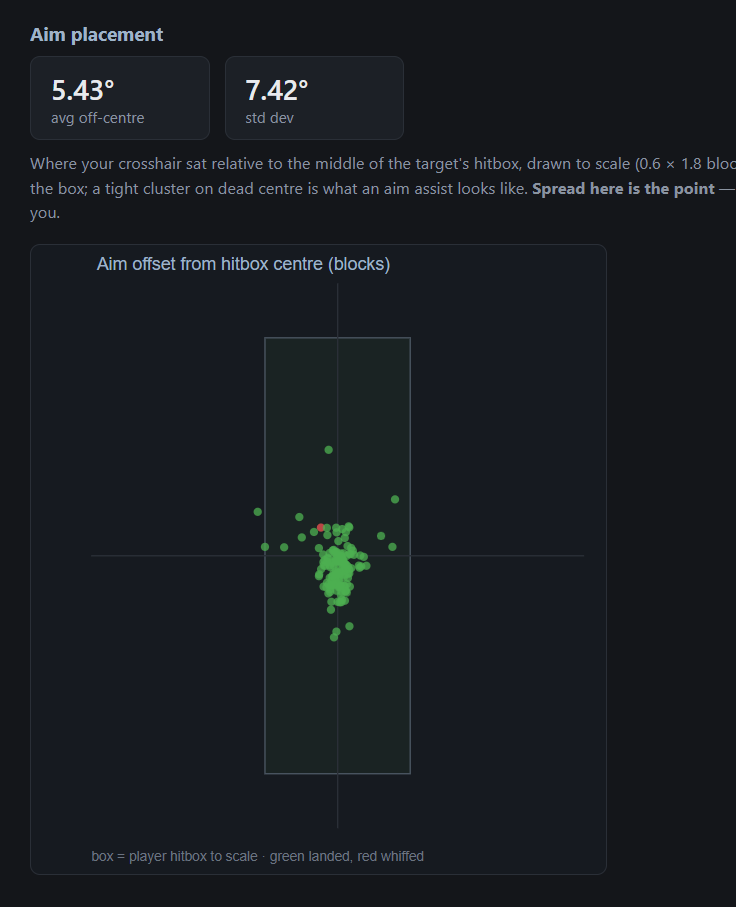 Aim bot
 -
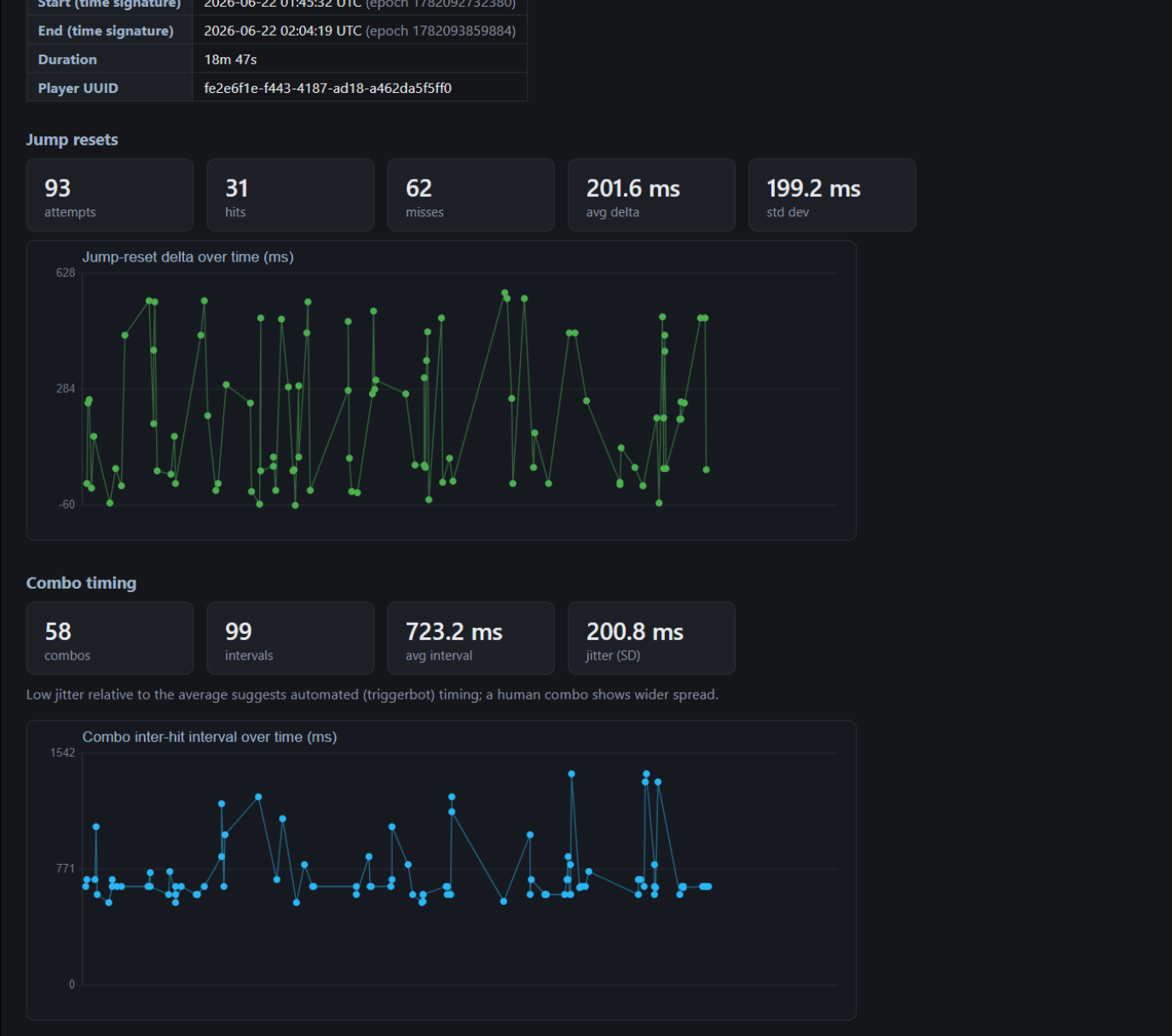 Vanilla example 2
 -
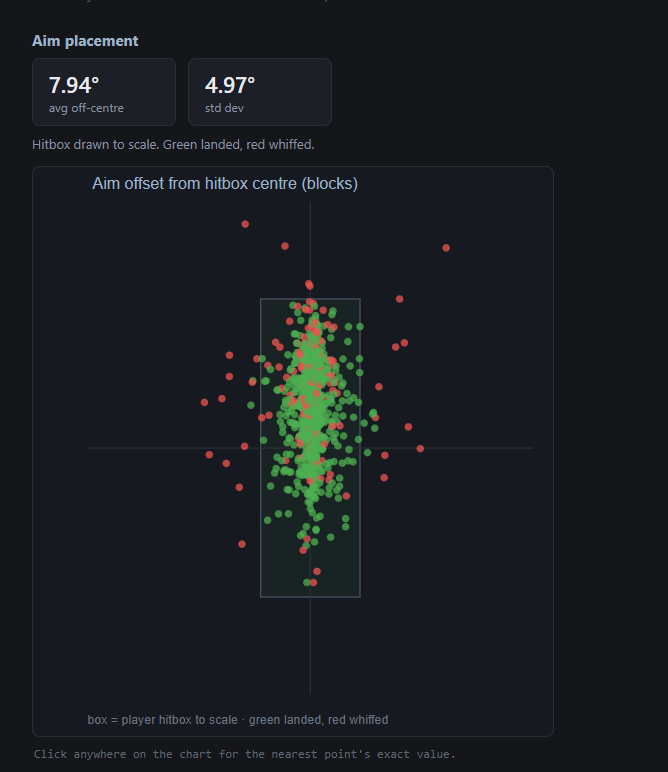 Vanilla
 -
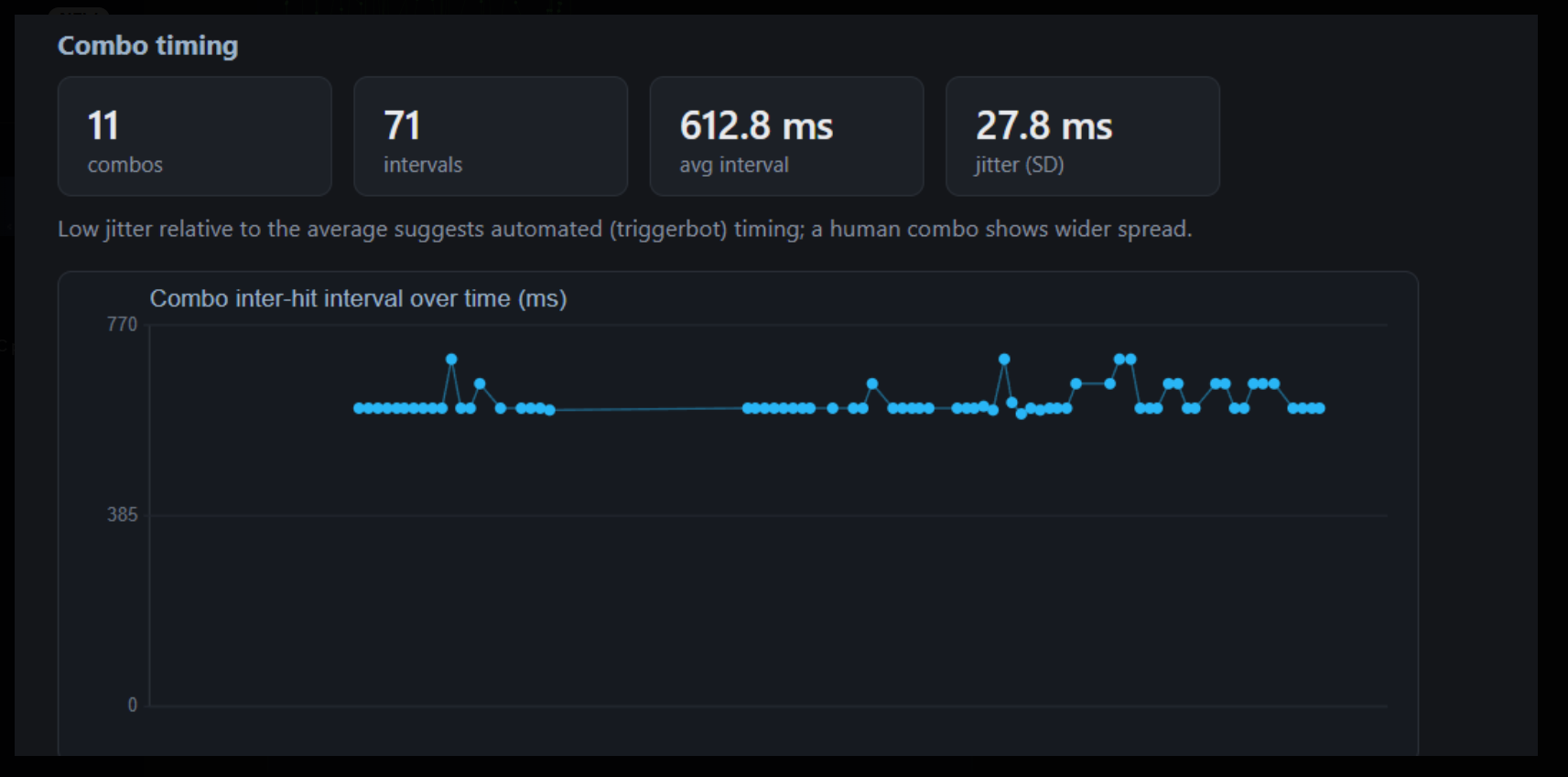 Tbot timings example
 -
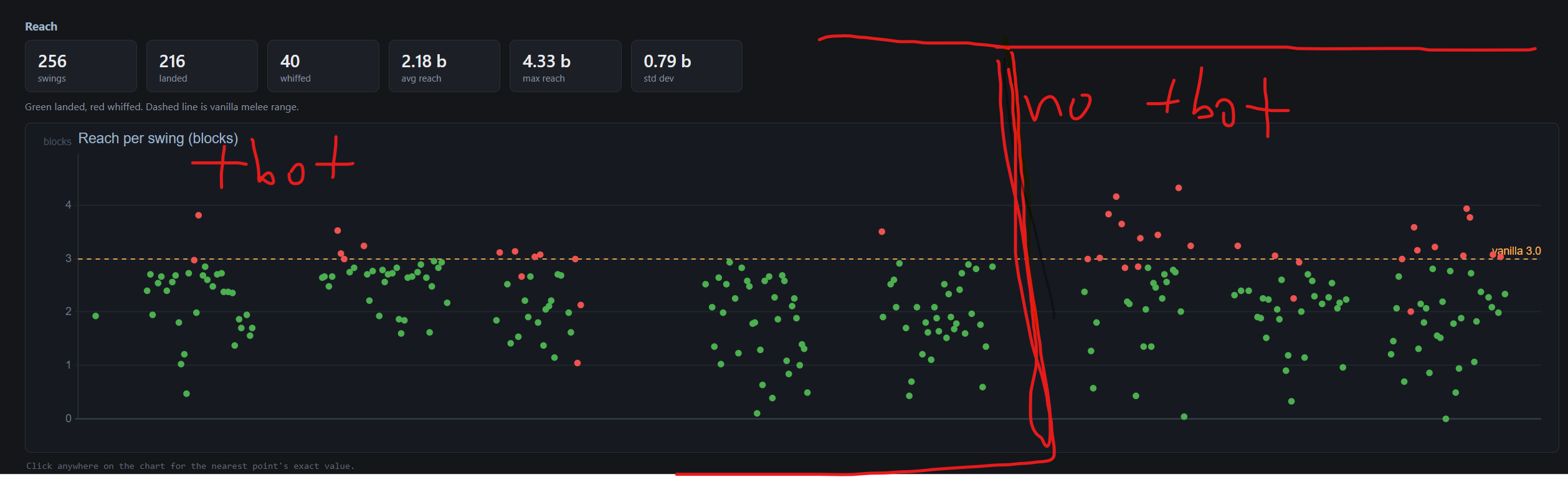 Tbot vs no tbot hit stats slightly more cluster around 3 block line, much less misses
 -
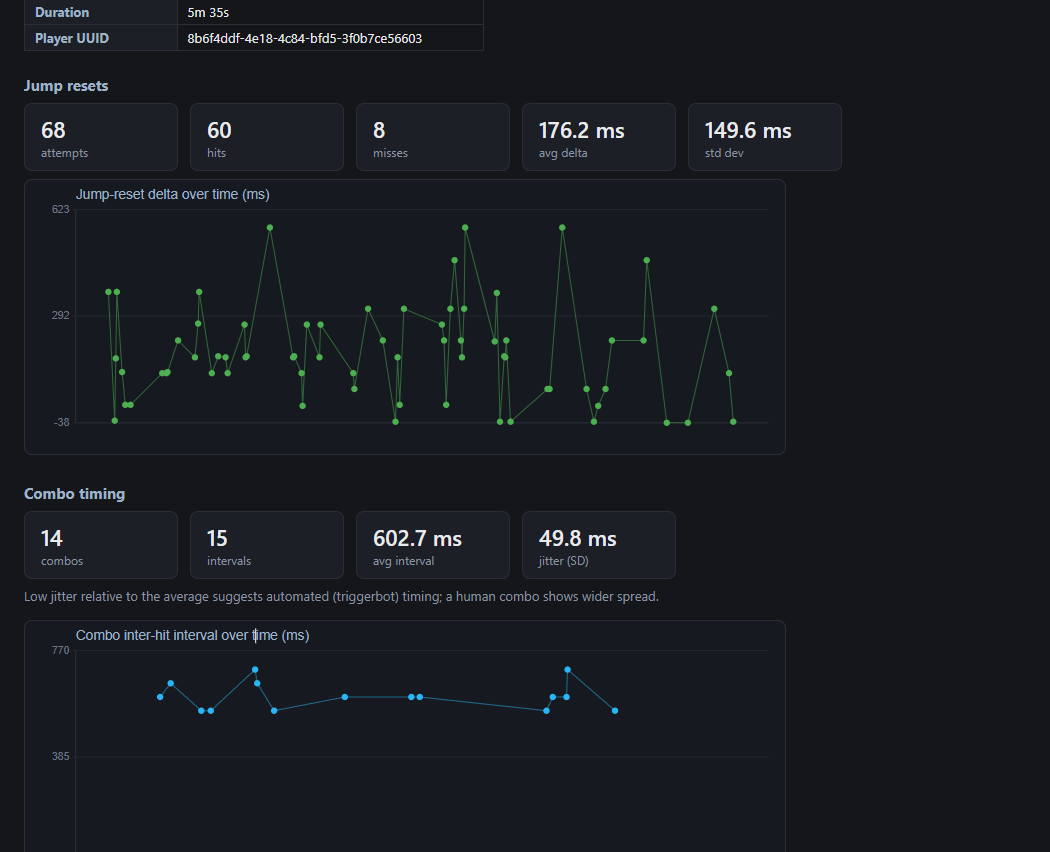 Vanilla example
Versions
Files
Relations
Project Relations
More like this
Similar Mods
Suggestions use data such as tags, dependencies, dependents, descriptions, titles, and more to rank how much they overlap with this mod.
On ModDex
Community snapshot
By the numbers
Statistics

Want to reach Minecraft players?
We're looking for a server hosting partner to feature here and other parts of the site. Interested? Send us a message!
Get in touchGet it on
Available Platforms
On ModDex
Community snapshot
By the numbers
Statistics
Resources