Community listing page, reviews here may not be monitored by the author.
Command Bookmarks


No reviews yet
A client-side Fabric mod that lets you bookmark and execute frequently used commands and chat messages with a single click.
Community voices
Reviews
No reviews yet. Be the first to review this project!
Get it on
Available Platforms
Compatibility
Supported Environments
Runs entirely on the client. Works on vanilla servers.
About
Project Details
For authors
Embed Badge
If you're the author of this project, you can embed a live badge anywhere that supports HTML or Markdown. It updates automatically whenever ratings change.
Use HTML for any page that supports it, or Markdown for README files and Markdown-based descriptions.
Identifiers
Platform IDs
Resources
External Links
About
Description
Command Bookmarks
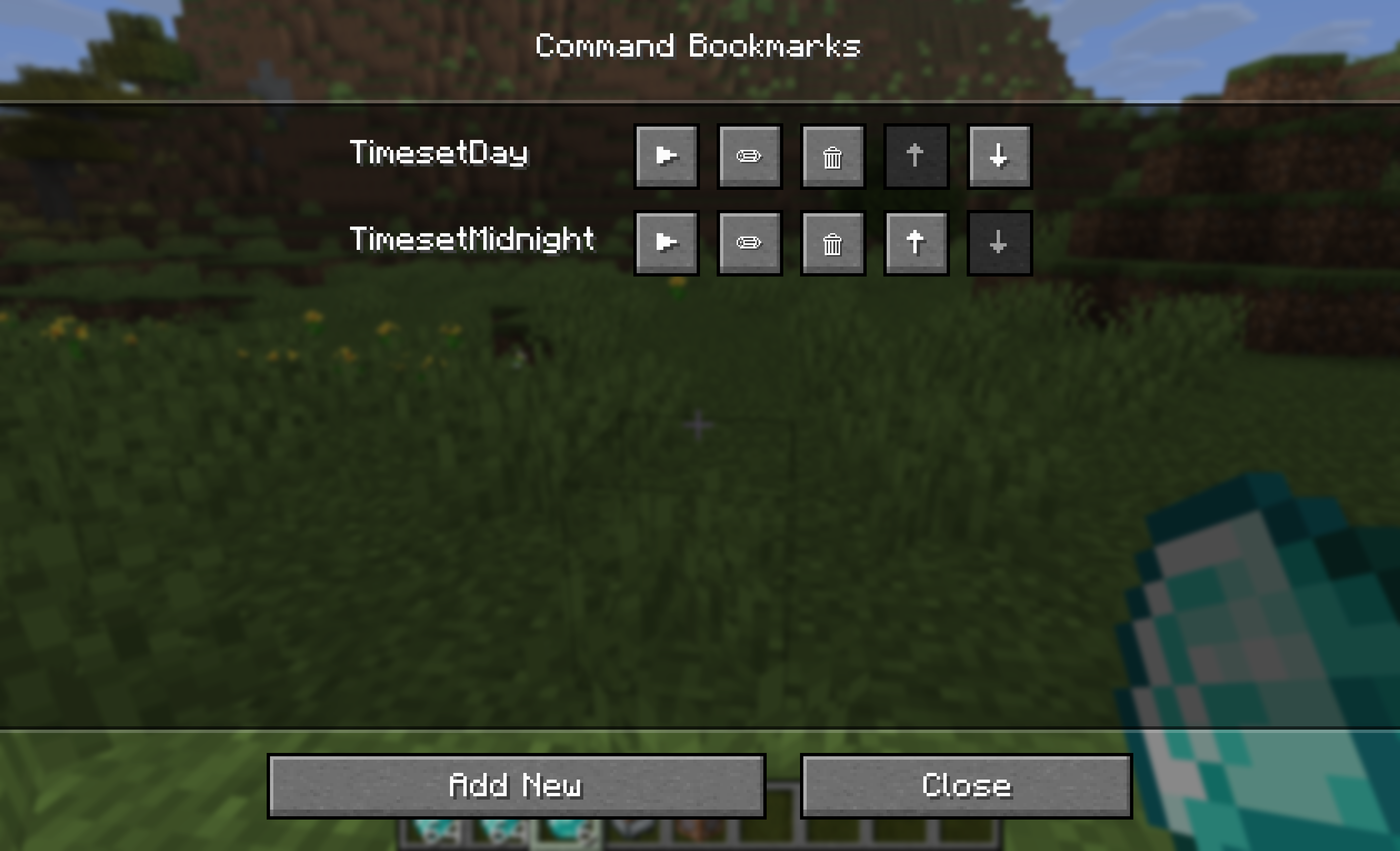
A client-side Fabric mod that allows you to bookmark frequently used commands and chat messages for one-click execution via a dedicated GUI. Stop typing the same long commands over and over again!
Features
- Easy Access: Press the
Vkey (customizable in controls) to open the bookmark list anytime. - Save & Execute: Register any commands (e.g.,
/time set day) or regular chat messages and execute them with a single click▶. - Edit & Delete: Easily modify existing bookmarks
✏or remove them🗑when no longer needed. - Reordering: Move your most important bookmarks to the top using the
↑and↓buttons. - Smart Tooltips: Hover over long commands in the list to view their full text.
- Client-Side Only: Works everywhere. You don't need to install this mod on the server to use it in multiplayer!
Supported Versions
- Minecraft: 1.21.11 (Fabric)
- Requirements: Fabric Loader & Fabric API
How to Use
- Press
V(default) to open the Command Bookmarks GUI.- Changing the Keybind: You can change this key at any time by going to Minecraft's Options -> Controls -> Key Binds -> Miscellaneous -> Open Command Bookmarks.
- Click [Add New].
- (Optional) Enter a label to easily identify what the command does.
- (Required) Enter your command (starting with
/) or a chat message. - Click [Save].
- The next time you need it, simply open the GUI again and press the
▶execute button next to your bookmark!
License
MIT License. Feel free to use this in your modpacks!
Command Bookmarks
A client-side Fabric mod that allows you to bookmark frequently used commands and chat messages for one-click execution via a dedicated GUI. Stop typing the same long commands over and over again!
Features
- Easy Access: Press the
Vkey (customizable in controls) to open the bookmark list anytime. - Save & Execute: Register any commands (e.g.,
/time set day) or regular chat messages and execute them with a single click▶. - Edit & Delete: Easily modify existing bookmarks
✏or remove them🗑when no longer needed. - Reordering: Move your most important bookmarks to the top using the
↑and↓buttons. - Smart Tooltips: Hover over long commands in the list to view their full text.
- Client-Side Only: Works everywhere. You don't need to install this mod on the server to use it in multiplayer!
Supported Versions
- Minecraft: 1.21.11 (Fabric)
- Requirements: Fabric Loader & Fabric API
How to Use
- Press
V(default) to open the Command Bookmarks GUI.- Changing the Keybind: You can change this key at any time by going to Minecraft's Options -> Controls -> Key Binds -> Miscellaneous -> Open Command Bookmarks.
- Click [Add New].
- (Optional) Enter a label to easily identify what the command does.
- (Required) Enter your command (starting with
/) or a chat message. - Click [Save].
- The next time you need it, simply open the GUI again and press the
▶execute button next to your bookmark!
License
MIT License. Feel free to use this in your modpacks!
Screenshots
Gallery
-
 BookmarkGUI
Versions
Files
Relations
Project Relations
More like this
Similar Mods
Suggestions use data such as tags, dependencies, dependents, descriptions, titles, and more to rank how much they overlap with this mod.
On ModDex
Community snapshot
By the numbers
Statistics
Want to reach Minecraft players?
We're looking for a server hosting partner to feature here and other parts of the site. Interested? Send us a message!
Get in touchGet it on
Available Platforms
On ModDex
Community snapshot
By the numbers
Statistics
Resources