
Community listing page, reviews here may not be monitored by the author.
Commerce: Economy & Public Services

No reviews yet
Build a server-authoritative economy with banking, currency, vending, companies, securities, property records, public services, and multilingual tools.
Community voices
Reviews
No reviews yet. Be the first to review this project!
Get it on
Available Platforms
About
Project Details
For authors
Embed Badge
If you're the author of this project, you can embed a live badge anywhere that supports HTML or Markdown. It updates automatically whenever ratings change.
Use HTML for any page that supports it, or Markdown for README files and Markdown-based descriptions.
Identifiers
Platform IDs
Resources
External Links
About
Description
Commerce 1.6.6
Requirements
Minecraft Java Edition: 1.20.1
Forge: 47.4.10
Java: 17
Current version: 1.6.6
Commerce works in single-player worlds and on multiplayer servers. For multiplayer, the server and every connecting client should use the same mod version.
1. About Commerce
Commerce is a server economy, player trading, public service, and business management mod. It goes beyond adding money: cash, bank accounts, shops, delivery services, companies, stocks, lotteries, insurance, auctions, tenders, commissions, territories, communication, and server administration all work as parts of the same system.
The mod is designed for survival servers, town and city servers, economy servers, and modpacks with role-based or story-driven gameplay. Administrators decide how currency enters circulation, how services are priced, where taxes and fees go, how public spending works, and which industries are available. Players can work, run shops, build companies, invest, take commissions, and use public services.
Version 1.6.6 includes a Treasury with income and spending records, inflation risk assessment, server-wide money supply history, shared municipal commissions, and a public free-material library. Server income and spending now form a visible economy that administrators can review and adjust.
2. Main Systems
2.1 Cash and Banking
Commerce provides physical banknotes in denominations of 1, 5, 10, 50, and 100. It also includes bank accounts, bank cards, ATMs, transfers, loans, term deposits, fines, relief payments, and configurable gold banking.
The Bank Core no longer handles normal cash deposits and withdrawals. Players use an ATM to deposit or withdraw cash. The Bank Core is mainly used for administration, account services, loans, term deposits, gold settings, lost-card handling, and financial controls.
2.2 Treasury and Money Circulation
Public income can be paid into the Treasury. This includes taxes, service fees, fines, loan interest, territory fees, toll-gate income, recruitment posting fees, delivery charges, player-written SMS fees, item-cleanup recovery fees, communication-station fees, teleport fees, tender taxes, auction and commission-market fees, online-store activation fees, cloud-storage expansion fees, death penalties, and insurance payments.
The Treasury can fund municipal commission rewards, relief payments, loan payouts, term-deposit interest, and trash-recycling rewards. The lottery and stock market still keep the independent funds or records required by their own systems.
The Accounting Terminal shows the Treasury balance, its historical high, income and spending records, daily and monthly statistics, and inflation risk. The main formula is: daily currency created minus daily currency permanently removed equals the server-wide change in money supply. Daily history is kept for up to 60 real-world days, with a chart, risk score, and practical adjustment suggestions.
2.3 Identity, Communication, and Public Services
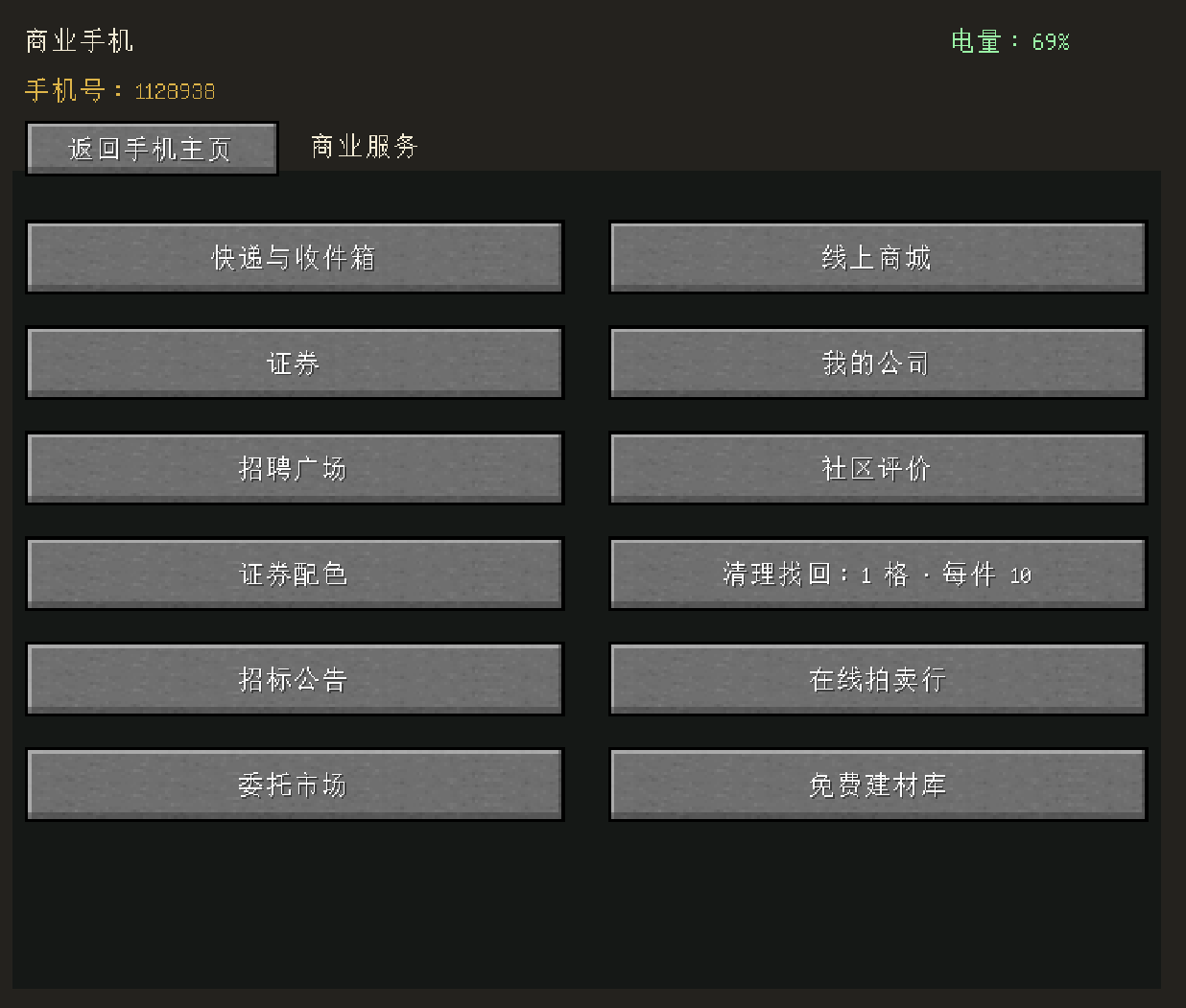
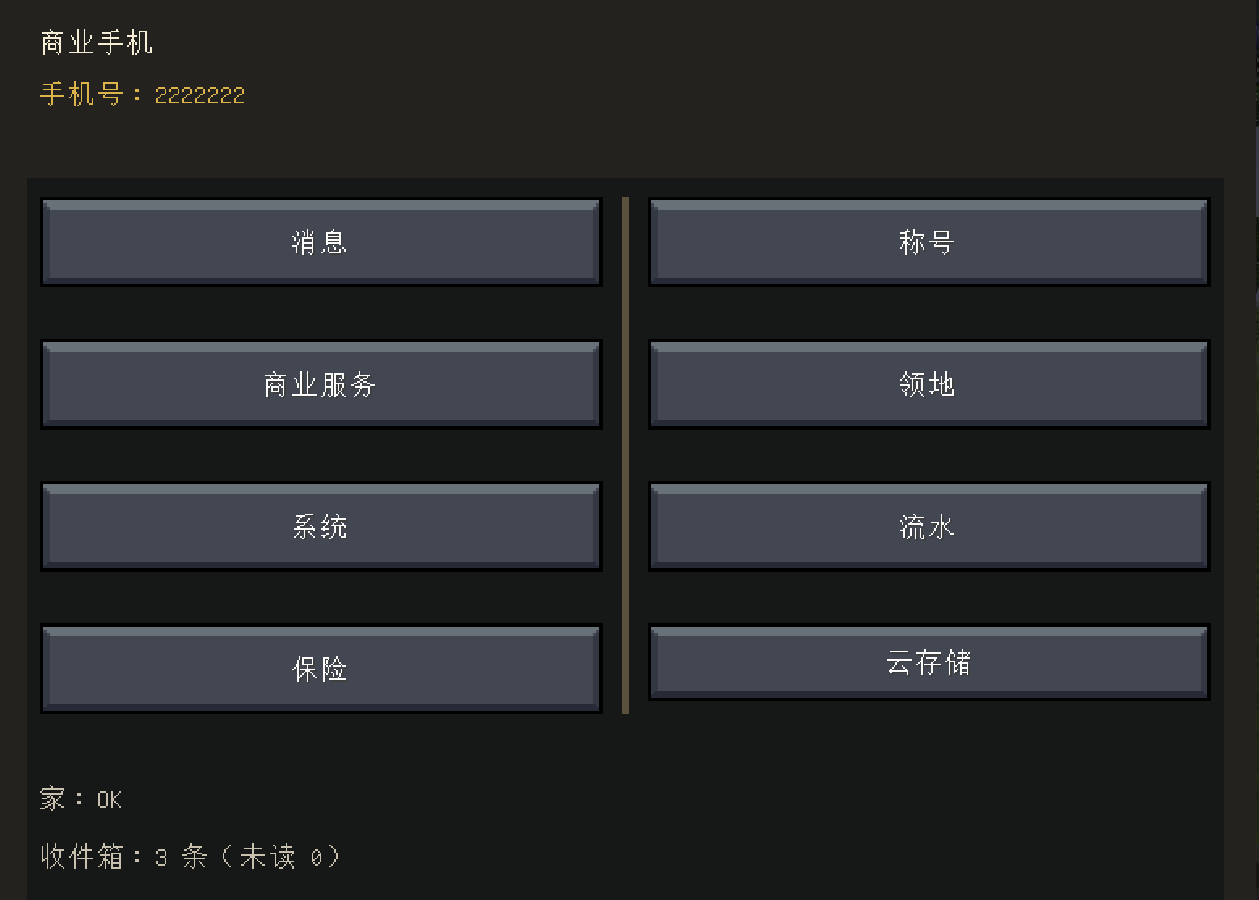
The Commerce Phone and Commerce Computer provide access to player identity, phone numbers, messages, system notices, mail, deliveries, cloud storage, the online store, stocks, companies, auctions, tenders, commissions, territories, and other public services.
A manually written player-to-player SMS costs the sender 3 currency units. Receiving a message is free, and the fee goes to the Treasury. System messages are not charged as personal SMS. Players can also manage blocked contacts, titles, and public profile information.
2.4 Shops, Logistics, and Online Trading
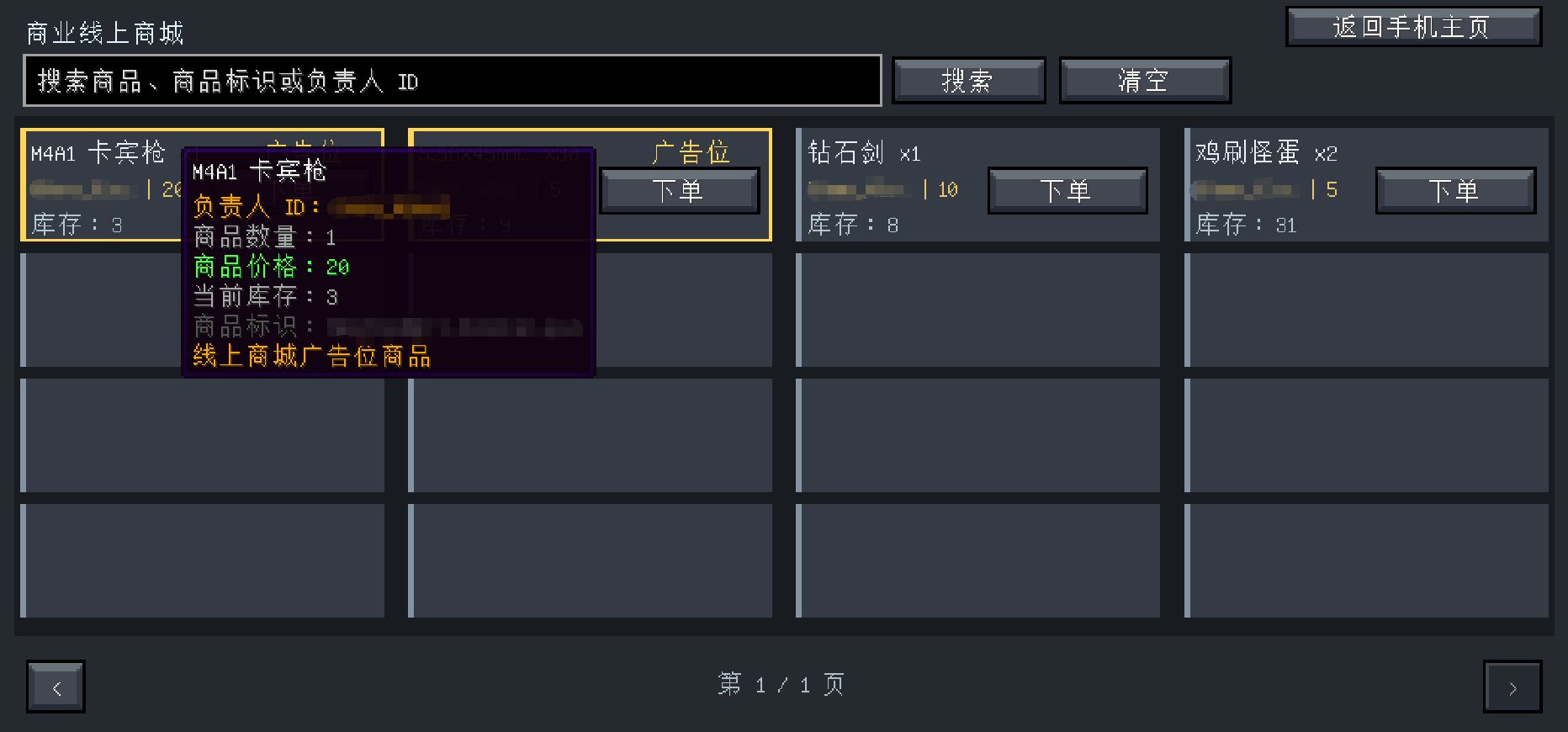
Player Vending Machines allow shop owners to bind a machine, choose products, set stock and prices, and list products in the online store. Depending on the machine and service, checkout can use cash or bank balance. Coupons, change, delivery, and service charges are calculated during checkout.
The Commerce Mailbox receives mail attachments, online-store orders, auction deliveries, public-library shipments, and other system items. Each player should place a mailbox and bind it to their identity.
2.5 Companies, Stocks, and Business
Players can establish companies, recruit employees, sign employment contracts, set salaries, and build company reputation. The system tracks salaries, unpaid wages, and company debt, and prevents certain conflicting owner and employee relationships.
The Stock Exchange supports account opening, platform funds, buying and selling, orders, portfolios, industry indices, candlestick charts, market news, events, and share-price factors. Current industries include agriculture, livestock, mining, real estate, finance, services, and insurance. Administrators can manage trading hours, fees, limits, listing policies, preset events, and random market events.
2.6 Lottery, Insurance, and Financial Services
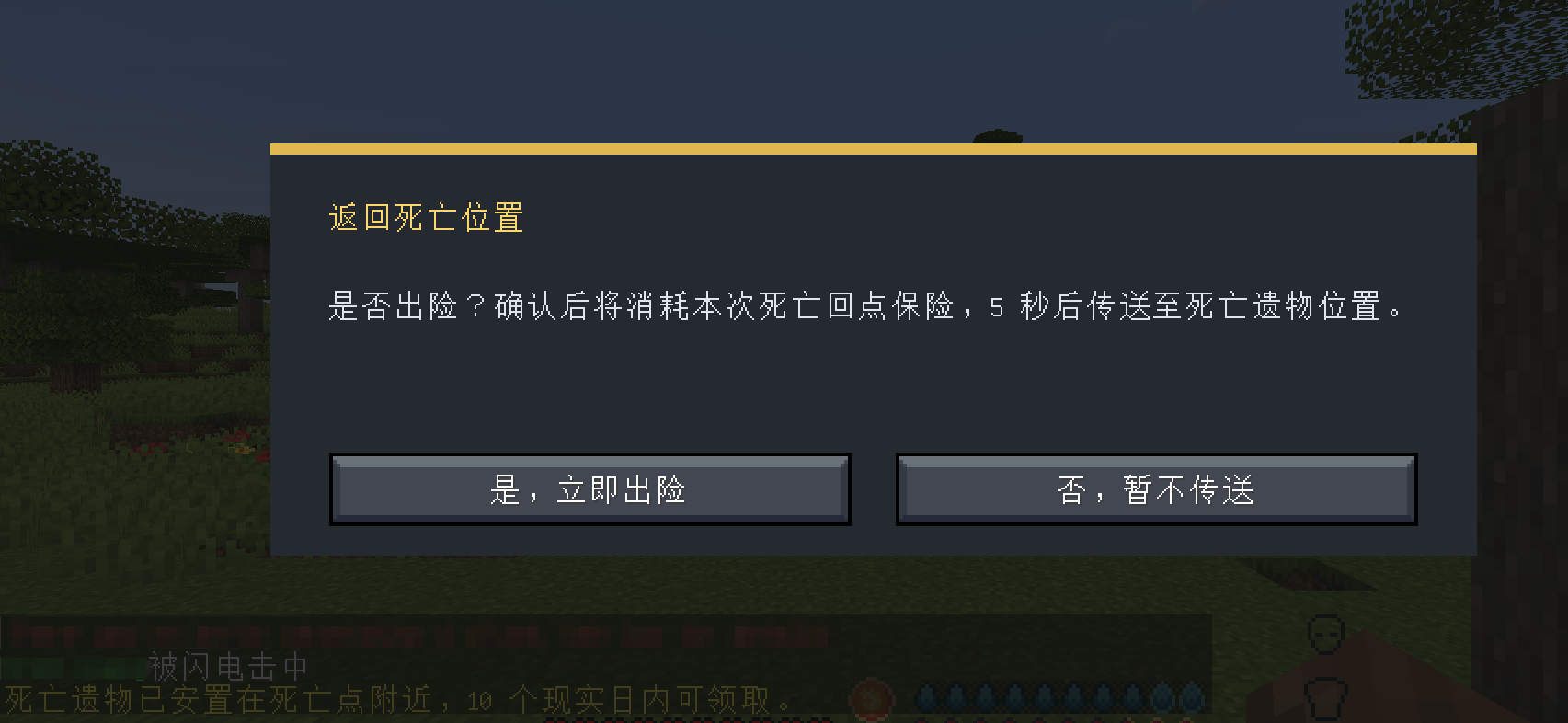
The Lottery Station uses its own prize pool. An administrator should fund the pool before ticket sales begin. Insurance can provide configurable death-related protection, return services, emergency assistance, effect removal, recovery, and temporary protection. Prices, payouts, and service switches should be checked before a server opens.
2.7 Auctions, Tenders, and Secure Trading
The Auction House supports timed listings, bidding, settlement, fees, and item delivery. The Tender system supports lowest-bid and scored selection modes, together with budget escrow, bid deposits, opening, scoring, awards, acceptance, refunds, taxes, overdue deductions, announcements, and history.
The Secure Trader completes an exchange only after both players have confirmed their items and funds. Some financial and trading services can be restricted when a player's assets are frozen.
2.8 Municipal and Player Commissions
The Municipal Commission Center shows the same public task list to every player. Its home screen contains 12 tasks in a 3-by-4 layout. Tasks can require item collection, mob kills, or sales of specified items to an Administrator Vending Machine. Once a task is accepted, it is removed from the shared list and replaced immediately. Only the player who accepted it can finish it.
Timers use an hours:minutes:seconds format. Required items can be submitted from the task-submission screen. Administrators can set the price of an immediate refresh for all unclaimed tasks; the default price is 80. Refreshing does not affect tasks already in progress.
If the Treasury falls below 40% of its historical high, new public commissions are paused. They resume automatically when the balance reaches 50%. A paid refresh does not charge the player while commissions are paused.
The Commission Market lets players publish their own request, reward, and deadline for another player to accept. It includes reward escrow, completion settlement, deletion refunds, fees, two-sided reviews, and public comments. Administrators can remove inappropriate comments.
2.9 Public Free-Material Library
Administrators can publish items from vanilla and modded Forge creative tabs to a public free-material library. The system distinguishes item variants with different NBT data, enchantments, potion contents, and similar properties. It supports selection across tabs, range selection, publishing and unpublishing, rule settings, and up to 200 administration log entries.
Rules include a minimum player level, a maximum amount per claim, a cooldown measured in real-world minutes, and an optional requirement to deliver the claim in a shulker box through the Commerce Mailbox.
Players only see creative-tab categories that currently contain published items. A direct claim succeeds only when the entire batch fits in the player's inventory. Delivery succeeds only when the mailbox is bound, capacity is available, and the player can pay the delivery charge. Failed attempts do not take payment or deliver only part of a claim. Public-library delivery does not require a courier company, and the fee is recorded in the phone ledger and paid into the Treasury.
2.10 Territories, Security, and Server Management
The Territory Selector marks an area and starts the claim process. Territory owners can manage trusted players and rules for block breaking, interaction, entry, teleporting, hostile mobs, fire, and PvP.
The Login Security Terminal provides registration, passwords, verification codes, login teleportation, arrival points, forced respawn, login protection, and starter items. It is designed to preserve normal bed-respawn behavior where applicable.
The Server Item Cleanup Station warns players before clearing dropped items and can keep the latest recovery record. A player may use the phone or computer to pay the configured fee and recover their own last cleared items.
Death Remains protect related drops from ordinary players, explosions, entities, projectiles, and block replacement. Return and insurance behavior can be configured by an administrator.
Administrators can also manage weather, natural rain, bedrock protection, prisons, wanted players, villager trading, hostile-mob strength, death rules, territories, world teleportation, rankings, and financial safety settings.
3. Standalone Items and Their Uses
3.1 Vending Machine Key
Binds and manages a Player Vending Machine. The owner can use it to open the settings for a machine they control.
3.2 Administrator Tablet
The main server administration tool. In addition to its own menus, an administrator can hold the tablet and right-click compatible devices to open their administration screens.
3.3 Bank Card
Linked to a player's bank account and used with ATMs and selected financial services. A lost card can be reported and replaced without deleting the account.
3.4 Commerce Phone
The player's portable service terminal. It handles phone-number binding, messages, transaction records, mail, the online store, stocks, companies, tenders, auctions, commissions, the public material library, territories, insurance, relief services, and other features.
3.5 Commerce Computer
A placeable service terminal for public areas or for players who do not yet have a phone. It provides access to supported Commerce services from a fixed location.
3.6 Bedrock Brush
Works with the administrator's bedrock protection and unprotection tools for controlled management of protected bedrock areas.
3.7 Lightning Striker
Creates a lightning effect for administrator actions, events, performances, or story scenarios.
3.8 Server Owner's Baton
A powerful administrator enforcement tool. It should not normally be distributed as a standard player item.
3.9 Territory Selector
Marks the boundaries of a new territory and begins the claim process. The selection expires if it is not confirmed in time.
3.10 Empty Animal Egg
A blank carrier used by the mod's animal-egg workflow.
3.11 Firework Shell
Ammunition for the Automatic Firework Launcher, intended for celebrations, events, and decorative shows.
3.12 Super Bone
Used in the enhanced dog companion system to create a stronger partner for combat and companionship.
3.13 War Horse Armor
Used by the war-horse system to improve a mount's survivability and movement capabilities.
3.14 Memorial Coin
An administrator-controlled collectible or award for events, achievements, and commemorations.
3.15 Coupon
Applies a discount during eligible transactions on Commerce devices that support coupon checkout.
3.16 Gold Crown Trophy
Stores and displays award information and can be placed as a trophy model.
3.17 Gold Star Trophy
Provides a second gold-style award display for ceremonies and collections.
3.18 Crystal Honor Trophy
A crystal-style award item that can store honor information and be displayed.
3.19 Amethyst Honor Trophy
An amethyst-style award item for recording and displaying achievements.
3.20 Phone Battery
The energy item used by the Commerce Phone and the Phone Battery Exchanger service.
3.21 Banknote 1
The smallest physical cash denomination.
3.22 Banknote 5
Physical cash for small transactions.
3.23 Banknote 10
Physical cash for everyday transactions.
3.24 Banknote 50
Physical cash for larger transactions.
3.25 Banknote 100
The largest standard single banknote currently provided by the mod.
3.26 Cash Bundle
Used for cash-related displays, builds, and role-playing scenarios.
3.27 Bank Security Spawn Token
Spawns bank security personnel for banks and other public facilities.
3.28 Debt Collector Spawn Token
Spawns a debt collector for overdue-loan and debt-recovery gameplay.
3.29 Lottery Ticket
The entry item for Lottery Station drawings. Winnings are settled from the station's prize pool.
3.30 Property Certificate
Records property-related information and can be used for registration, ownership, and display.
3.31 Title Token
Used to create, grant, or record a player title, subject to the server's permissions and rules.
3.32 Tender Document
A business document used to submit or record information in the tender process.
3.33 Company Employment Contract
Used in company recruitment and employment to record the relationship between a company and an employee.
4. Devices, Blocks, and Their Uses
4.1 Player Vending Machine
The main player-run shop. It supports owner binding, product and stock settings, cash or bank settlement, coupons, online-store listings, and delivery.
4.2 Item Dispenser
Distributes starter packs, event rewards, or scheduled gifts. In random mode, it deducts and gives only the prize that was actually selected.
4.3 Trash Can
Recycles configured items and pays the configured reward. Public recycling rewards can come from the Treasury. New servers should begin with the default values and adjust them after observing prices.
4.4 Automatic Firework Launcher
Consumes Firework Shells to run firework shows for holidays, events, and commercial areas.
4.5 Elevator Block
Provides quick movement between floors in shopping centers, offices, stations, and public buildings.
4.6 Commerce Spawner
Provides configurable entity spawning for resource areas, events, and economy-server gameplay.
4.7 Administrator Vending Machine
A server-operated shop for starter goods, player-item purchasing, and municipal sale tasks. Relevant income can be paid into the Treasury.
4.8 Bank Core
The banking administration and financial-services center. Players can access transfers, loans, term deposits, and gold services. Administrators can manage accounts, platform funds, loan and deposit plans, fines, asset freezes, lost cards, gold mode, debt recovery, memorial coins, coupons, relief services, and risk lists.
Default loan principals are 200, 400, and 700. Administrators can add plans or delete the currently displayed plan. Custom plans already saved in an older world are preserved.
4.9 Bank ATM
Used to open an account, receive or replace a bank card, and deposit or withdraw cash. It is the normal player's main cash-access device.
4.10 Blast-Resistant Glass
A building block for banks, stock exchanges, and protected facilities, reducing the risk of ordinary damage or explosions.
4.11 Gold Block and Gold Block Pile
Used for the gold economy, asset displays, and building decoration. Their financial behavior depends on the gold mode selected by the administrator.
4.12 Stock Exchange Core
The entry point for securities accounts, funds, trading, portfolios, industry indices, charts, market news, events, and administrator policies.
4.13 Company Core
Used to create and manage companies, recruitment, employment contracts, salaries, unpaid wages, debt, company information, and reputation.
4.14 Commerce Mailbox
Receives deliveries, mail attachments, online orders, auction items, and public-library shipments. The player must place it and bind it to their identity.
4.15 Accounting Terminal
Shows Treasury income and spending, balance history, daily and monthly statistics, money-supply changes, inflation risk, and adjustment suggestions. Administrators can also inject funds into the Treasury.
4.16 Server Item Cleanup Station
Configures cleanup intervals and warnings, reduces dropped-item load, and retains the most recent recovery set for players.
4.17 Login Security Terminal
Manages registration, login, verification codes, protection, arrival points, forced respawn, and starter items. A world should deploy and configure it according to the on-screen guidance.
4.18 Toll Gate
Charges players according to its rules. It is suitable for transport routes, attractions, member areas, and story locations. Income goes to the Treasury.
4.19 Death Remains
A system-generated block that protects death-related drops. It should not normally be distributed as a standard building block.
4.20 LED Display Module
Builds information displays and larger screen arrangements in public areas.
4.21 Advertising Machine
Publishes commercial advertising and server information in malls, stations, and public squares.
4.22 Communication Station
Provides public communication services and charges the configured fee, which is paid into the Treasury.
4.23 Lottery Station Core
The entry point for ticket purchases, drawings, and prize-pool management. An administrator must check and fund the pool before opening it to players.
4.24 Property Registry
Handles Property Certificates and related registration services.
4.25 Crafting and Use Restrictor
Creates rules for holding, crafting, using, dropping, and selling items. Each rule category has 54 slots and is enforced on the server, making it suitable for administrator items, story items, and items that could disrupt balance.
4.26 Teleporter
Supports stations, channels, fees, cooldowns, and random teleportation. Random travel searches for a safe location, and a failed search does not charge the player.
4.27 Title Registry
Registers, manages, and displays player titles.
4.28 Wall Analog Clock
Displays world time and works as decoration for stations, shops, and public buildings.
4.29 Digital Calendar Clock
Displays date and time information in a digital format.
4.30 Tender Core
The main device for project publication, bids, opening, scoring, awards, acceptance, refunds, taxes, and record viewing.
4.31 Commerce Auction House
Handles timed listings, bidding, settlement, and delivery. Auction duration follows server rules, while payment and item delivery use the banking and mailbox systems.
4.32 Secure Trader
Each side places items or confirms funds, and the exchange takes place only after both players confirm.
4.33 Phone Battery Exchanger
Provides battery replacement for Commerce Phones using Phone Batteries.
4.34 Municipal Commission Center
Shows server-wide public tasks, progress, and rewards. Acceptance, replacement, submission, paid refreshes, and Treasury pause rules are all handled centrally.
4.35 Commission Market
Lets players publish and accept private commissions, with reward escrow, deadlines, settlement, refunds, fees, reviews, and comments.
4.36 Bid Opening Block
Retained for compatibility with older worlds and structures. New builds should use the Tender Core for the current tender workflow.
4.37 Banknote, Property Certificate, and Trophy Displays
Placing the related item creates a display model for banks, offices, museums, and award walls. These are display forms of their items, not separate administration devices.
5. Administrator Tablet Features
5.1 Players and Access
Manage Commerce administrators, preassigned or activated phone numbers, the player identity directory, phone-number resets, and multiplayer login verification.
5.2 Service Settings
Manage insurance, delivery prices and delays, courier companies, online-store listings and advertising prices, cloud storage, broadcast mail, floating text, and the public free-material library.
Administrators can also prepare a server-wide message shown in the center of every player's screen, choose its text color and duration, and optionally send the same message to chat. Unsent text is retained as a draft if the screen is reopened.
5.3 World Management
Manage weather and natural rain, trash rewards, bedrock protection, administrator-item cleanup, Nether and End travel, financial safety, wanted players, territories, prisons, villager trading, hostile mobs, death rules, and other world-level settings.
5.4 Rankings and Public Information
Review or configure asset, company, and reputation rankings, decide whether administrators are included in selected statistics, and manage business information intended for players.
6. Recommended First Steps for Server Administrators
6.1 Learn every section of the Administrator Tablet before changing financial data in a live world.
6.2 Hold the Administrator Tablet and right-click the Bank Core, Stock Exchange, Lottery Station, Company Core, vending machines, and other devices to find their separate administration screens.
6.3 Open the Stock Exchange administration screen and use the blank button labeled "Share Price Factors." Learn how natural resources, industries, company reputation, events, and other factors affect prices before disabling private-company listings in any industry. The setting is located at Stock Exchange Administration > Company Registration > Private-Company Listing Policy.
6.4 Most items do not have crafting recipes. Distribute them through Administrator Vending Machines, player shops, starter gifts, event rewards, or your own server rules.
6.5 Some devices accept only cash, while some services charge only bank balance. A starter path should give players access to both physical cash and a bank account.
6.6 Test economic changes on a copy of the world and keep backups of the world, configuration, and player data before opening the server or making major adjustments.
7. Recommended Setup for a New World
7.1 Administrator Tablet > World Management > Trash Management: begin with the default rewards and adjust them after observing the economy.
7.2 Administrator Tablet > Players and Access > Commerce Administrators: add your own player ID first.
7.3 Administrator Tablet > Players and Access > Multiplayer Login Verification: decide whether it is needed and complete a real login test.
7.4 Administrator Tablet > Service Settings > Insurance: check prices, payouts, service switches, and anything that may affect balance.
7.5 Bank Core Administration > Gold: select a gold mode. This has a major effect on gold-related gameplay and should be decided early.
7.6 Bank Core Administration: review loan and term-deposit plans, fines, relief services, asset-freeze rules, and initial funds.
7.7 Lottery Administration: fund the prize pool before allowing players to buy tickets.
7.8 Stock Exchange Administration > Accounts and Funds: inject platform funds if required, then check listings, trading hours, fees, limits, and preset events.
7.9 Accounting Terminal: confirm that Treasury income and spending are recorded correctly, then review the inflation-risk and money-supply-change screens.
7.10 Municipal Commission Center: check rewards, deadlines, the immediate-refresh price, and the 40% pause and 50% resume thresholds.
7.11 Administrator Tablet > Public Free-Material Library: publish the intended items and set the minimum level, claim size, cooldown, delivery method, and fee.
7.12 Crafting and Use Restrictor: add administrator items, story items, and any other items that could damage server balance.
7.13 Server Item Cleanup Station: configure the cleanup interval, warning, and recovery fee.
7.14 Login Security Terminal: configure registration, the arrival point, protection, and starter items, then test the whole flow with a normal player account.
7.15 Give new players a free or inexpensive path to a Commerce Phone or public Commerce Computer, a Commerce Mailbox, starter cash, and an ATM so they can open an account and obtain a Bank Card.
7.16 Complete at least one multiplayer end-to-end test for auctions, tenders, commissions, company salaries, deliveries, and online-store purchases. Confirm that charges, refunds, deliveries, taxes, and Treasury records agree.
8. Common Recovery Procedures
8.1 Lost Bank Card
Hold the Administrator Tablet and right-click the Bank Core. Enter the affected player's ID on the first screen and report the card as lost. The player can then use an ATM to receive a replacement. Replacing the card does not erase the account.
8.2 Lost Phone
The player can use a new Commerce Phone and continue the number-binding process. Their number and server identity are not stored only in the lost physical item, so the existing number can be recovered.
8.3 Delivery Cannot Be Completed
Check that the player has placed and bound a Commerce Mailbox, then check its capacity, the player's balance, and the applicable service charge. Public free-material library delivery does not require an existing courier company.
8.4 Municipal Commissions Have Stopped Refreshing
Check whether the Treasury is below 40% of its historical high. Public commissions resume automatically after the Treasury reaches 50%.
8.5 Trading or Cloud Storage Is Unavailable
Check whether the player's personal assets are frozen and which financial services are restricted by the stated freeze reason.
9. Recommended Start for Players
9.1 Obtain a Commerce Phone, or begin with a server-provided Commerce Computer.
9.2 Bind a phone number and review messages, transaction records, and service entries.
9.3 Use an ATM to open a bank account and receive a personal Bank Card.
9.4 Obtain a Commerce Mailbox, place it, and right-click it to bind the player's identity.
9.5 Learn the difference between cash and bank balance, and find out how the server distributes starter currency.
9.6 Follow the server's rules to work, run a shop, join a company, complete municipal commissions, invest, or use other services.
10. Supported Languages
10.1 Simplified Chinese
10.2 Traditional Chinese
10.3 English
10.4 Japanese
10.5 Russian
10.6 Arabic
10.7 Korean
10.8 Italian
10.9 Spanish
10.10 German
10.11 French
11. Support My Mod Development
If you enjoy my mods and would like to support future development, you can choose a voluntary one-time support option on Patreon. Supporting me is completely optional and does not unlock mod files, exclusive gameplay features, early access, or in-game advantages.
One-time support on Patreon:
https://www.patreon.com/ShenXiangiioo/shop
12. Authorization and Distribution
Commerce is created by ShenXiangiioo. All rights are reserved.
Before adding this mod to any modpack or installing it on any server, you must contact the author and receive clear permission. The modpack listing or server information page must show that the author's permission was granted and must credit ShenXiangiioo as the author.
To request permission, contact me through the comment section on the page where you found this mod, or through Instagram:
@ShenXiangiioo
https://www.instagram.com/shenxiangiioo/
Redistribution, re-uploading, repackaging, inclusion in a modpack, installation on a server, or commercial use without permission is not allowed.
===============中文=================
Commerce 商业模组 1.6.6
适用环境
Minecraft Java 版:1.20.1
Forge:47.4.10
Java:17
当前mod版本:1.6.6
支持单人游戏和多人服务器。多人联机时,服务器与玩家客户端都应安装相同版本的模组。
一、模组简介
Commerce 是一套围绕服务器经济、玩家交易、公共服务和经营管理设计的综合商业模组。它不只是增加几种货币,而是把现金、银行账户、商店、快递、公司、证券、彩票、保险、拍卖、招投标、委托、领地、通信和服务器管理连接在同一个体系中。
模组适合生存服务器、城镇服、经营服和带有剧情或角色分工的整合包。管理员可以自行决定货币投放方式、服务价格、税费、公共支出和行业规则;玩家则可以工作、经营商店、组建公司、投资、参与委托和使用各种公共服务。
1.6.6 已加入国库收支、通胀风险评估、全服货币变化记录、共享市政委托以及公共免费物资库等内容。服务器的收入与支出不再只是页面上的数字,而是能够形成可查询、可调节的经济循环。
二、主要系统
1. 现金与银行
模组提供 1、5、10、50、100 五种面额的实体钞票,也提供银行账户、银行卡、ATM、转账、贷款、定期存款、罚款、救助金和黄金模式等功能。
银行核心不再办理普通存取款。玩家需要通过 ATM 存入或取出现金,银行核心主要用于管理员设置、账户管理、贷款、定存、黄金、挂失和金融风控。
2. 国库与货币循环
税金、手续费、罚金、贷款利息、领地费、收费门收入、招聘发布费、快递费、人工短信费、清理赎回费、通讯站费用、传送费用、招投标税费、拍卖和委托市场手续费、线上商城开通费、云存储扩容费、死亡惩罚、保险费等公共收入可以进入国库。
市政委托奖励、救助金、贷款支出、定存利息、垃圾桶回收奖励等公共支出可以由国库承担。彩票站和证券系统仍保留各自需要独立管理的资金或记录。
记账器可以查看国库余额、历史最高金额、收入与支出明细、每日及每月统计,并根据“每日新增货币-每日永久回收货币=全服货币变化”计算通胀风险。全服货币变化按现实日保存历史记录,最多保留 60 日,并提供走势图、风险分值和调节建议。
3. 身份、通信与公共服务
手机和电脑承担玩家身份、号码、短信、系统通知、邮箱、快递、云存储、商城、证券、公司、拍卖、招投标、委托、领地和其他公共服务入口。
玩家之间人工发送短信时,每条向发送方收取 3 单位费用,接收免费,费用进入国库。系统消息不按人工短信收费。玩家还可以管理黑名单、称号和公开资料。
4. 商店、物流与线上交易
玩家贩卖机支持绑定店主、设置商品、库存和价格,并可接入线上商城。交易可以根据设备规则使用现金或银行余额,优惠券、找零、配送和服务费会在结算时统一处理。
商业快递箱用于接收邮件、商城订单、拍卖物品、公共物资库配送和其他系统物品。放置后需要由玩家绑定自己的身份。
5. 公司、证券和经营
玩家可以创建公司、招聘员工、签订劳动合同、设置工资并积累公司信誉。系统会记录工资、欠薪和公司债务,并限制部分互相冲突的身份关系。
证券交易所支持开户、平台资金、买卖、委托、持仓、行业指数、K 线、市场新闻、事件和股价影响因素。当前包含农业、畜牧、采矿、房地产、金融、服务和保险等行业。管理员可以管理交易时间、费用、限制、公司上市政策、预设事件和随机事件。
6. 彩票、保险与金融服务
彩票站具有独立奖池,管理员应在开放购票前注入初始资金。保险系统提供死亡相关保障、返回服务、紧急援助、状态清除、恢复和短时保护等可配置内容。管理员应先检查价格、赔付和服务开关,避免影响服务器平衡。
7. 拍卖、招投标与安全交易
拍卖行支持限时发布、竞价、成交、费用和物品交付。招投标系统支持最低价和综合评分等模式,并处理预算托管、保证金、开标、评分、中标、验收、退款、税费、逾期扣款、公告和历史记录。
安全交易器用于两名玩家确认物品和资金后再完成交换,降低直接交易产生的误会。部分金融和交易服务会受到个人资产冻结状态限制。
8. 市政委托与玩家委托
市政委托中心会向全服显示同一批任务。首页同时显示 12 个任务,按 3 行 4 列排列,包含收集、击杀和向管理员贩卖机出售指定物品等类型。一个任务被玩家领取后,会立即从公共列表中移除并补充新任务;已领取的任务只能由领取者继续完成。
任务倒计时使用“小时:分钟:秒”显示。玩家可以在任务物品提交页面直接交付物品。管理员可以设置立即刷新全部未领取任务的价格,默认费用为 80,刷新不会影响正在执行的任务。
当国库余额低于历史最高金额的 40% 时,系统暂停发布新的公派悬赏;余额恢复到 50% 时自动恢复。暂停期间,付费刷新不会扣款。
委托市场允许玩家自行发布需求、报酬和期限,由其他玩家领取并完成。系统提供报酬托管、完成结算、删除退款、手续费、双方评价和公开评论;管理员可以处理违规评论。
9. 公共免费物资库
管理员可以从原版和其他模组的 Forge 创造模式分类中选择物品,发布到公共免费物资库。系统可以识别带 NBT、附魔、药水等差异的物品变体,并支持跨分类选择、连续选择、公开或撤下物品、规则设置和最多 200 条管理日志。
管理员可以设置最低领取等级、单次领取上限、按现实分钟计算的冷却时间,以及是否必须通过潜影盒和商业快递箱配送。
玩家通过手机进入物资库时,只会看到已有公开物品的分类。直接领取只有在整个物品批次都能放入背包时才会完成;配送也会在快递箱已绑定、容量足够且余额足够时一次性完成,失败时不会只扣钱或只发一部分物品。物资库配送不要求服务器先建立快递公司,配送费会进入国库并记录在手机账单中。
10. 领地、安全与服务器管理
领地圈地器用于选择范围和建立领地。领地主人可以设置受信任玩家,以及破坏、使用、进入、传送、敌对生物、火焰和 PVP 等规则。
登录安全终端可以为世界提供注册、密码、验证码、登录传送、到达点、强制重生、登录保护和新手物品等功能。它会尽量保留玩家原有的床重生逻辑。
全服掉落物清理站可以定时警告并清理掉落物,也能让玩家通过手机或电脑支付费用赎回最近一次被清理的个人物品。
死亡遗物用于保护死亡掉落,能够阻止普通玩家、爆炸、实体、弹射物或方块替换随意破坏。相关返回和保险服务可由管理员配置。
管理员还可以管理天气、自然降雨、基岩保护、监狱、通缉、村民交易、敌对生物强度、死亡规则、领地规则、世界传送、排行榜和金融安全等内容。
三、独立道具及用途
1. 贩卖机钥匙
用于绑定和管理玩家贩卖机。店主可借此进入自己的设备设置页面。
2. 管理员专用平板电脑
服务器管理的主要入口。除平板内的菜单外,管理员还可以手持平板右键不同设备,进入该设备的后台管理页面。
3. 银行卡
与玩家银行账户绑定,用于 ATM 和部分金融服务。银行卡丢失后可以挂失并补领。
4. 商业手机
玩家随身服务终端。用于绑定号码、收发消息、查看账单、使用邮箱、商城、证券、公司、招投标、拍卖、委托市场、公共物资库、领地、保险、救助和其他服务。
5. 商业电脑
可固定放置的服务终端,适合服务器公共区域或没有手机的玩家使用部分商业服务。
6. 基岩刷
配合管理员的基岩保护和解除保护功能使用,用于需要受控处理的基岩区域。
7. 雷击器
在管理员或活动玩法中触发雷击效果,适合惩罚、演出或剧情事件。
8. 服主的棍棒
管理员专用的高强度处置工具,不建议作为普通玩家物品投放。
9. 领地圈地器
选择领地范围并进入领地创建流程。选择状态具有时限,使用后应按页面提示完成确认。
10. 空动物蛋
作为模组动物蛋相关流程中的空白载体使用。
11. 烟花弹
烟花自动发射器使用的弹药,可用于庆典、活动和服务器景观表演。
12. 超级骨头
用于强化犬类伙伴相关玩法,使其成为更适合战斗和陪伴的特殊伙伴。
13. 战马铠甲
用于战马强化玩法,可提升坐骑的生存和行动能力。
14. 纪念币
用于活动纪念、奖励或收藏,可由管理员控制发放。
15. 优惠券
用于支持优惠券结算的商业设备,在符合条件的交易中抵扣部分费用。
16. 金冠奖杯
可记录并展示荣誉信息,也可以作为奖杯模型摆放。
17. 金星奖杯
用于另一种金色荣誉展示,可记录颁发内容并摆放。
18. 水晶荣誉奖杯
用于水晶风格的荣誉记录和陈列。
19. 紫晶荣誉奖杯
用于紫晶风格的荣誉记录和陈列。
20. 手机电池
商业手机的能源道具,可通过手机换电器处理换电服务。
21. 面额 1 钞票
最小面额的实体现金。
22. 面额 5 钞票
用于小额现金交易。
23. 面额 10 钞票
用于日常现金交易。
24. 面额 50 钞票
用于较大金额的现金交易。
25. 面额 100 钞票
当前常用钞票中的最大单张面额。
26. 成捆钞票
用于现金陈列、场景布置和与现金有关的玩法。
27. 银行安保刷怪蛋
生成银行安保人员,用于银行区域或公共设施的防卫。
28. 催债员刷怪蛋
生成催债员,用于贷款逾期和债务追缴相关玩法。
29. 彩票
玩家参与彩票站开奖的凭证,奖金从彩票站奖池结算。
30. 不动产权证
记录不动产相关信息,可用于产权登记、持有和展示。
31. 称号器
用于创建、发放或记录玩家称号,具体权限由服务器设置决定。
32. 招标文件
参与招投标流程所需的业务道具,用于提交或记录投标内容。
33. 公司劳动合同
用于公司招聘和雇佣关系,记录公司与员工之间的劳动关系。
四、设备、方块及用途
1. 玩家自动贩卖机
玩家经营商店的核心设备。支持店主绑定、商品和库存设置、现金或银行结算、优惠券、线上商城展示及配送。
2. 物品发放器
用于新手礼包、活动奖励或定时发放。管理员可以配置奖品和发放方式,随机模式只会实际扣除并发放选中的奖品。
3. 垃圾桶
回收指定物品并按照设置发放奖励。公共回收奖励可以由国库承担,建议开服时先使用默认奖励,再根据物价调整。
4. 烟花自动发射器
自动消耗烟花弹进行烟花表演,适合节日、活动和商业区域装饰。
5. 电梯方块
用于楼层之间快速移动,适合商场、办公楼和公共建筑。
6. 商业刷怪器
提供可配置的生物生成用途,适合经营服的资源区和活动区域。
7. 管理员自动贩卖机
由服务器经营的商店,可用于投放基础物资、回收玩家物品和承接市政委托中的出售任务。相关收入可以进入国库。
8. 银行核心
银行后台和金融管理中心。玩家可使用转账、贷款、定存和黄金等服务;管理员可管理账户、平台资金、贷款与定存套餐、罚款、资产冻结、银行卡挂失、黄金模式、债务追缴、纪念币、优惠券、救助服务和风险名单。
默认贷款本金为 200、400、700,管理员可以新增套餐或删除当前套餐。旧世界中已经保存的自定义套餐会继续保留。
9. 银行 ATM 机
用于开户、领取或补领银行卡,以及现金存款和取款。ATM 是普通玩家办理现金存取的主要设备。
10. 防爆玻璃
用于银行、交易所和重要设施的安全建筑,可降低普通破坏或爆炸带来的风险。
11. 金砖与金砖堆
用于黄金经济、资产展示和建筑装饰。银行黄金功能的实际规则由管理员选择的黄金模式决定。
12. 证券交易所核心方块
证券开户、资金、股票交易、持仓、行业指数、K 线、市场新闻、事件和管理员政策的入口。
13. 公司核心方块
用于创建和管理公司、招聘、劳动合同、工资、欠薪、债务、公司资料与信誉。
14. 商业快递箱
接收快递、邮件附件、商城订单、拍卖物品和公共物资库配送。玩家放置后需要右键绑定自己的身份。
15. 记账器
查看国库收支、资金历史、每日与每月统计、全服货币变化、通胀风险分值和调节建议,也可由管理员向国库注资。
16. 全服掉落物清理站
设置清理间隔和警告,减少服务器掉落物负担,并保留最近一次可赎回记录。
17. 登录安全终端
管理注册、登录、验证码、保护、到达点、强制重生和新手物品。一个世界应按照系统提示部署和设置。
18. 收费门
玩家通过时按规则收取费用,适合交通、景区、会员区和剧情区域,收入进入国库。
19. 死亡遗物
玩家死亡后用于保护相关掉落的系统方块,通常由系统生成,不建议作为普通建筑方块发放。
20. LED 大屏幕模块
用于公共区域的信息展示和屏幕组合。
21. 广告机
用于发布商业广告和服务器信息,适合商场、车站和公共广场。
22. 通讯站
提供通信相关公共服务并收取设定费用,相关收入进入国库。
23. 彩票站核心方块
彩票购买、开奖和奖池管理入口。管理员必须在正式开放前检查并补充奖池。
24. 不动产登记处
处理不动产权证及相关登记业务。
25. 合成使用限制器
可设置持有、合成、使用、丢弃和出售限制。每类规则提供 54 个位置,并在服务端执行,适合限制剧情物品、管理员物品或可能破坏平衡的物品。
26. 传送机
支持站点、频道、收费、冷却和随机传送。随机传送会寻找安全位置,失败时不会收取费用。
27. 称号登记处
用于登记、管理和展示玩家称号。
28. 墙面指针时钟
显示世界中的时间,适合作为车站、商店和公共建筑装饰。
29. 电子日历钟
以电子形式显示日期和时间信息。
30. 招投标核心方块
发布项目、提交投标、开标、评分、中标、验收、退款、税费和记录查询的中心设备。
31. 商业拍卖行
发布限时拍卖、竞价、成交和交付的设备。拍卖时长可按规则设置,物品通过银行和快递体系结算。
32. 安全交易器
双方分别放入物品或确认资金,全部确认后才执行交换。
33. 手机换电器
为商业手机提供换电服务,使用手机电池完成相应操作。
34. 市政委托中心
显示全服共享的公共任务、任务进度和奖励。任务领取、替换、提交、付费刷新及国库暂停规则均由服务器统一处理。
35. 委托市场
供玩家发布和承接私人委托,支持报酬托管、期限、结算、退款、手续费、评价和评论。
36. 开标方块
为旧世界和旧版结构保留的兼容方块。新建内容建议使用招投标核心方块完成相关流程。
37. 钞票、不动产权证和奖杯展示模型
放置对应道具后可形成展示模型,用于银行、办公室、展馆和荣誉墙。这些展示模型属于对应物品的陈列形式,不是独立的管理设备。
五、管理员平板功能
1. 玩家与权限
管理商业管理员、已预分配或已开通的手机号码、玩家身份目录、号码重置和多人登录验证。
2. 功能设置
管理保险、快递价格与延迟、快递公司、线上商城上架与广告价格、云存储、广播邮件、悬浮文字、公共免费物资库等服务。
管理员还可以编辑全服画面中央推送消息,选择字体颜色和显示时间,并决定是否同步发送到聊天框。未发布的文字会保存为草稿,重新进入页面后可以继续编辑。
3. 世界管理
管理天气和自然降雨、垃圾桶奖励、基岩保护、管理员物品清理、下界与末地传送、金融安全、通缉、领地、监狱、村民交易、敌对生物、死亡规则和其他世界级设置。
4. 排行与公开信息
查看或配置资产、公司和信誉等排行,决定管理员是否参与部分统计,并管理服务器需要公开的业务信息。
六、管理员首次开服建议
1. 先熟悉管理员专用平板中的每个分类和按钮,不要直接在正式世界中盲目修改金融数据。
2. 手持管理员平板,逐个右键银行核心、证券交易所、彩票站、公司核心、贩卖机等设备,确认哪些设备具有独立后台。
3. 进入证券交易所后台,找到空白按钮并打开“股价影响因素说明”。先了解自然资源、行业、公司信誉、事件和其他因素如何影响股价,再决定是否关闭某些行业的民企上市。设置路径为:证券交易所后台-公司登记-民企上市政策。
4. 大部分物品没有合成表。管理员需要通过管理员贩卖机、玩家商店、新手赠礼、活动奖励或其他服务器规则投放。
5. 为保持货币流通,部分设备只接受现金,部分服务只从银行余额扣款。设计新手流程时必须同时提供取得现金和开设银行账户的途径。
6. 正式调整经济参数前,建议复制世界进行测试,并保留世界、配置和玩家数据备份。
七、新世界建议完成的初始设置
1. 管理员平板-世界管理-垃圾桶管理:初期建议使用默认奖励,观察物价后再调整。
2. 管理员平板-玩家与权限-商业管理员:先把自己的玩家 ID 设为商业管理员。
3. 管理员平板-玩家与权限-多人登录验证:根据服务器情况决定是否启用,并完成实际登录测试。
4. 管理员平板-功能设置-保险设置:检查保费、赔付、服务开关和可能影响平衡的内容。
5. 银行核心后台-金砖功能:设置黄金模式。这项设置会影响黄金玩法,建议优先确认。
6. 银行核心后台:检查贷款和定存套餐、罚款、救助服务、资产冻结规则与初始资金。
7. 彩票后台:先向奖池注入金额,再允许玩家购票。
8. 证券交易所后台-开户与存取:建议注入平台资金,并检查上市、交易时间、手续费、限制和预设事件。
9. 记账器:确认国库初始金额、收入与支出是否正常记录,查看通胀风险页面和全服货币变化页面。
10. 市政委托中心:检查奖励、时限、立即刷新价格,以及国库低于 40% 暂停、恢复到 50% 重启的规则。
11. 管理员平板-公共免费物资库:选择公开物品并设置最低等级、领取数量、冷却时间、配送方式和费用。
12. 合成使用限制器:检查需要限制的管理员物品、剧情物品和可能破坏服务器平衡的物品。
13. 全服掉落物清理站:设置清理间隔、警告和赎回费用。
14. 登录安全终端:设置注册、到达点、保护和新手物品,并用普通玩家账号完整测试一次。
15. 为新玩家准备低成本或免费取得手机(或公共电脑)、商业快递箱、基础货币和 ATM 的途径,确保玩家能够开户并获得自己的银行卡。
16. 对拍卖、招投标、委托市场、公司工资、快递和线上商城各完成一次多人闭环测试,确认扣款、退款、交付、税费和国库记录一致。
八、常见情况处理
1. 银行卡丢失
管理员手持平板右键银行核心,在首页输入需要挂失的玩家 ID 并完成挂失。该玩家再次使用 ATM 时即可按流程领取新银行卡,原有账户数据不会因为换卡消失。
2. 手机丢失
玩家可以使用一部新手机继续号码绑定流程。号码和服务器身份数据不是只保存在丢失的物品中,因此可以继承原号码。
3. 快递无法送达
先检查玩家是否放置并绑定商业快递箱,再检查箱内容量、账户余额和相应服务费用。公共免费物资库的配送不要求已经建立快递公司。
4. 市政委托停止刷新
检查国库是否低于历史最高金额的 40%。国库恢复到 50% 后,公派任务会自动恢复。
5. 交易或云存储无法使用
检查玩家是否处于个人资产冻结状态,以及冻结理由中限制了哪些金融服务。
九、玩家刚进入服务器时的建议流程
1. 获得商业手机,或先使用服务器放置的商业电脑。
2. 使用手机完成号码绑定,并查看消息、账单和服务入口。
3. 使用 ATM 开户并领取自己的银行卡。
4. 获得商业快递箱,放置后右键绑定自己的玩家身份。
5. 了解现金和银行余额的区别,确认服务器提供的基础货币取得方式。
6. 再根据服务器规则选择工作、经营商店、加入公司、参与市政委托、投资证券或使用其他服务。
十、语言支持
1. 简体中文
2. 繁体中文
3. 英语
4. 日语
5. 俄语
6. 阿拉伯语
7. 韩语
8. 意大利语
9. 西班牙语
10. 德语
11. 法语
十一、赞助开发
如果你喜欢我的模组,也愿意支持后续开发,可以在 Patreon 或 爱发电 选择赞助。赞助完全自愿,不会解锁模组文件。
Patreon 赞助页面:
https://www.patreon.com/ShenXiangiioo/shop
爱发电赞助页面:
https://afdian.com/a/shenxiangiioo?utm_source=copylink&utm_medium=link
十二、授权与分发声明
Commerce 由 ShenXiangiioo 制作,作者保留全部权利。
将本模组加入任何整合包,或安装到任何服务器之前,必须先联系作者并取得明确授权。整合包发布页或服务器介绍页必须展示已经取得的作者授权,并标注作者 ShenXiangiioo。
申请授权时,可以在你看到本模组的发布页评论区联系我
https://www.curseforge.com/minecraft/mc-mods/commerce-economy-public-services
也可以通过 Instagram 联系我:
@ShenXiangiioo
https://www.instagram.com/shenxiangiioo/
未经许可,不得转载、重新上传、重新打包、加入整合包、部署到服务器或用于商业用途。
Screenshots
Gallery
-
 1.png 1.png
 -
 线ä¸ååææ.png 线ä¸ååææ.png
 -
 ææºåä¸åè½.png ææºåä¸åè½.png
 -
 ææºçé¢.png ææºçé¢.png
 -
 è¶ çº§çç.png è¶ çº§çç.png
 -
 å ¶ä¸2个ä¿é©æå¡.png å ¶ä¸2个ä¿é©æå¡.png
 -
 æå¤ä¿é©çæçé¢.png æå¤ä¿é©çæçé¢.png
 -
 e33ec0d45ddee5852ef7e2cdfd5d9b3d.png e33ec0d45ddee5852ef7e2cdfd5d9b3d.png
Versions
Files
Relations
Project Relations
More like this
Similar Mods
Suggestions use data such as tags, dependencies, dependents, descriptions, titles, and more to rank how much they overlap with this mod.
On ModDex
Community snapshot
By the numbers
Statistics
Want to reach Minecraft players?
We're looking for a server hosting partner to feature here and other parts of the site. Interested? Send us a message!
Get in touchGet it on
Available Platforms
On ModDex
Community snapshot
By the numbers
Statistics
Resources