
Community listing page, reviews here may not be monitored by the author.
Config-Cloud-Backuper


No reviews yet
A simple Minecraft mod for backing up game configuration files, with configurable backup paths and WebDAV cloud backup support for both client and server usage.
Community voices
Reviews
No reviews yet. Be the first to review this project!
Get it on
Available Platforms
Compatibility
Supported Environments
Install on the client or the server; either alone gives full functionality.
About
Project Details
For authors
Embed Badge
If you're the author of this project, you can embed a live badge anywhere that supports HTML or Markdown. It updates automatically whenever ratings change.
Use HTML for any page that supports it, or Markdown for README files and Markdown-based descriptions.
Identifiers
Platform IDs
About
Description
Config Cloud Backuper
A simple Minecraft mod for backing up game configuration files, with configurable backup paths and WebDAV cloud backup support for both client and server usage.
Features
- Client + server command support — both sides can use commands; server also supports
/server_config_backuper ...(requires Fabric API) - Client-to-server upload — clients can upload local backups to server storage; files are saved per player and retention is configurable
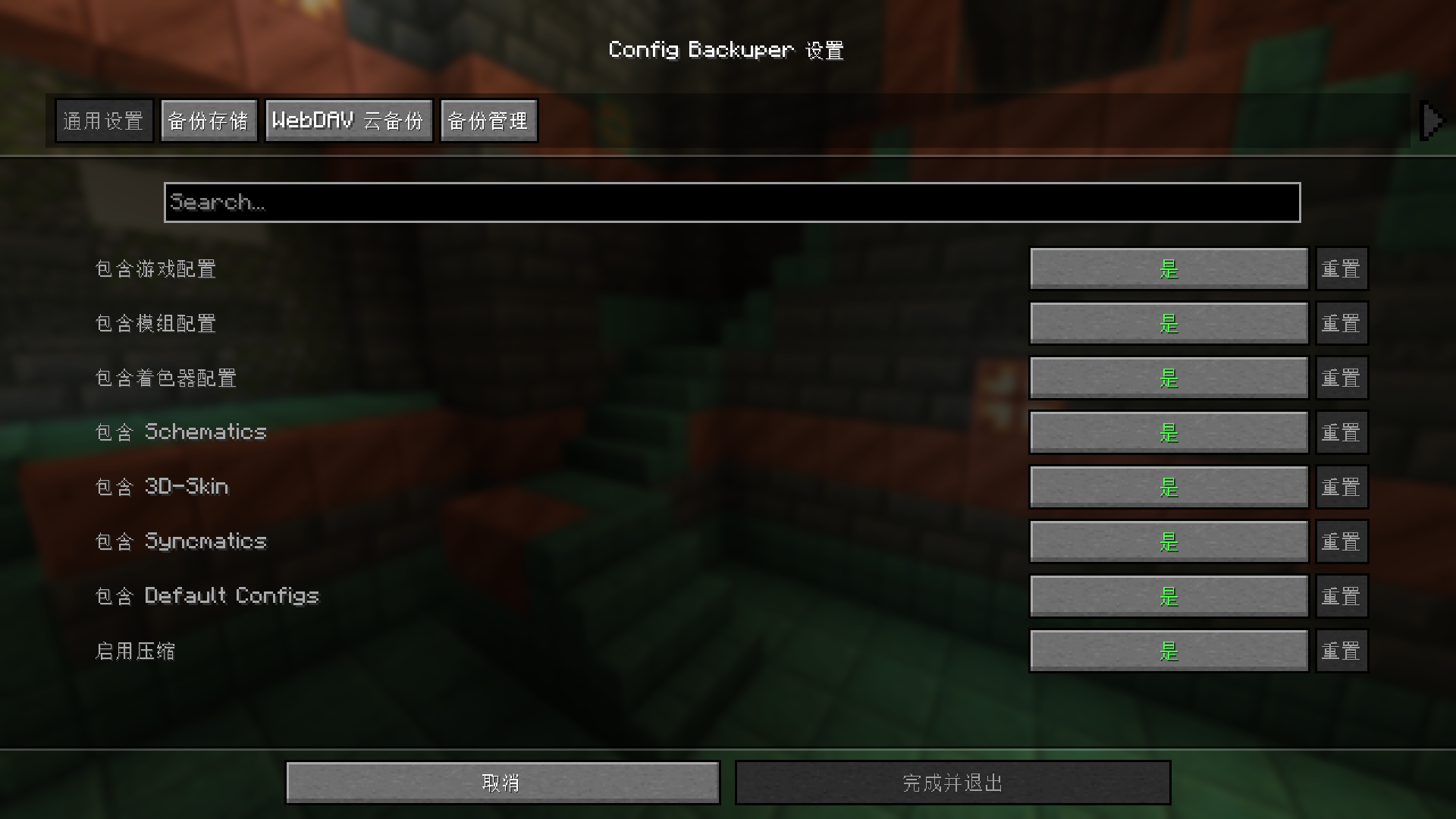
- Optional GUI — install ModMenu and Cloth Config API, then open settings from ModMenu
- Backup game configs, mod configs, shader configs, and more folders (see
config/config-cloud-backuper.json) - Backup compression and automatic old-backup cleanup
- WebDAV — auto upload after backup (if enabled), plus manual list/upload/download commands
- Security checks — client upload only accepts
.zipwith size limit and filename sanitization; server validates SHA-256 and writes audit logs
Requirements
- Minecraft 1.21.1
- Fabric Loader >=0.16.0
- Java 21+
- Fabric API (required for command registration)
- ModMenu (optional)
- Cloth Config API (optional, needed only for ModMenu GUI)
Commands (Client/Server)
Commands are grouped under: remote cloud / remote server.
Root command prefixes (kept for compatibility):
- Client:
/config_backuper - Server:
/config_backuperor/server_config_backuper(same functionality)
> Note: The command prefix is intentionally kept for backward compatibility with existing scripts and habits. A cloud-style prefix can be introduced later in a major release with alias transition.
| Subcommand | Description |
|---|---|
backup |
Run local backup and clean old files exceeding maxBackups; if WebDAV auto-upload is enabled, upload the latest backup afterward |
list |
List local backup files matching configured prefix/suffix |
config reload |
Reload config-cloud-backuper.json from disk and refresh runtime instances |
config show |
Show current main config values |
config set <key> <value> |
Update and save main config (true/false etc. are supported for booleans) |
remote cloud status |
Show WebDAV config (password masked) |
remote cloud list |
List files in remote WebDAV directory |
remote cloud upload [file] |
Force upload local backup file (latest by default) to WebDAV; credentials are still required |
remote cloud download [file] |
Download remote file into local backup directory (latest by name by default) |
remote cloud set <field> <value> |
Write fields in config-cloud-backuper_webdav.json: enabled, serverUrl, username, password, remotePath |
remote server status |
(Client) Query server-side client-upload config |
remote server list |
(Client) Query current player's uploaded backups on server |
remote server upload [file] |
(Client) Upload local backup to server (latest by default) |
Running root command without subcommand prints brief help.
Server Examples
/server_config_backuper backup: run server backup/server_config_backuper list: list server local backups/server_config_backuper config show: show current server config/server_config_backuper remote server status: show client-upload config/server_config_backuper remote server list: show your uploaded backups (requires OP level > 2)/server_config_backuper remote server set folder ./configcloudbackuper-backups/client-uploads: set upload root folder/server_config_backuper remote server set maxPerPlayer 20: set max backups per player
Configuration
Main config: config/config-cloud-backuper.json
WebDAV config: config/config-cloud-backuper_webdav.json
You can also edit values with config / remote cloud / remote server commands above.
General and Backup Storage
Main fields include: includeGameConfigs, includeModConfigs, includeShaderPackConfigs, includeSchematics, include3dSkin, includeSyncmatics, includeDefaultConfigs, compressionEnabled, maxBackups, backupFolder, backupFilePrefix, backupFileSuffix.
Client Upload to Server (main config fields)
clientUploadToServerEnabled: allow client uploads to server (defaulttrue)clientUploadFolder: server storage root for uploaded backups (default./configcloudbackuper-backups/client-uploads)clientUploadMaxBackupsPerPlayer: max backups per player (-1means unlimited, default10)
Server storage structure:
<clientUploadFolder>/<playerName>/<backupFile>
WebDAV (config-cloud-backuper_webdav.json)
enabled— auto upload latest backup after local backup flowserverUrl,username,password,remotePath— server and path settings
WebDAV security behavior:
- Upload also writes checksum file:
<filename>.sha256 - Download reads
.sha256first, then verifies SHA-256 after download; mismatch deletes the file and returns error
Modpack Usage
You may freely include this mod in modpacks without requesting permission.
Development
Build
cd fabric
./gradlew build
For local client testing with ModMenu + Cloth GUI, this repo already includes Cloth via modLocalRuntime. You still need to add ModMenu in your run profile (or modRuntimeOnly).
Config Cloud Backuper
A simple Minecraft mod for backing up game configuration files, with configurable backup paths and WebDAV cloud backup support for both client and server usage.
Features
- Client + server command support — both sides can use commands; server also supports
/server_config_backuper ...(requires Fabric API) - Client-to-server upload — clients can upload local backups to server storage; files are saved per player and retention is configurable
- Optional GUI — install ModMenu and Cloth Config API, then open settings from ModMenu
- Backup game configs, mod configs, shader configs, and more folders (see
config/config-cloud-backuper.json) - Backup compression and automatic old-backup cleanup
- WebDAV — auto upload after backup (if enabled), plus manual list/upload/download commands
- Security checks — client upload only accepts
.zipwith size limit and filename sanitization; server validates SHA-256 and writes audit logs
Requirements
- Minecraft 1.21.1
- Fabric Loader >=0.16.0
- Java 21+
- Fabric API (required for command registration)
- ModMenu (optional)
- Cloth Config API (optional, needed only for ModMenu GUI)
Commands (Client/Server)
Commands are grouped under: remote cloud / remote server.
Root command prefixes (kept for compatibility):
- Client:
/config_backuper - Server:
/config_backuperor/server_config_backuper(same functionality)
Note: The command prefix is intentionally kept for backward compatibility with existing scripts and habits. A cloud-style prefix can be introduced later in a major release with alias transition.
| Subcommand | Description |
|---|---|
backup |
Run local backup and clean old files exceeding maxBackups; if WebDAV auto-upload is enabled, upload the latest backup afterward |
list |
List local backup files matching configured prefix/suffix |
config reload |
Reload config-cloud-backuper.json from disk and refresh runtime instances |
config show |
Show current main config values |
config set <key> <value> |
Update and save main config (true/false etc. are supported for booleans) |
remote cloud status |
Show WebDAV config (password masked) |
remote cloud list |
List files in remote WebDAV directory |
remote cloud upload [file] |
Force upload local backup file (latest by default) to WebDAV; credentials are still required |
remote cloud download [file] |
Download remote file into local backup directory (latest by name by default) |
remote cloud set <field> <value> |
Write fields in config-cloud-backuper_webdav.json: enabled, serverUrl, username, password, remotePath |
remote server status |
(Client) Query server-side client-upload config |
remote server list |
(Client) Query current player's uploaded backups on server |
remote server upload [file] |
(Client) Upload local backup to server (latest by default) |
Running root command without subcommand prints brief help.
Server Examples
/server_config_backuper backup: run server backup/server_config_backuper list: list server local backups/server_config_backuper config show: show current server config/server_config_backuper remote server status: show client-upload config/server_config_backuper remote server list: show your uploaded backups (requires OP level > 2)/server_config_backuper remote server set folder ./configcloudbackuper-backups/client-uploads: set upload root folder/server_config_backuper remote server set maxPerPlayer 20: set max backups per player
Configuration
Main config: config/config-cloud-backuper.json
WebDAV config: config/config-cloud-backuper_webdav.json
You can also edit values with config / remote cloud / remote server commands above.
General and Backup Storage
Main fields include: includeGameConfigs, includeModConfigs, includeShaderPackConfigs, includeSchematics, include3dSkin, includeSyncmatics, includeDefaultConfigs, compressionEnabled, maxBackups, backupFolder, backupFilePrefix, backupFileSuffix.
Client Upload to Server (main config fields)
clientUploadToServerEnabled: allow client uploads to server (defaulttrue)clientUploadFolder: server storage root for uploaded backups (default./configcloudbackuper-backups/client-uploads)clientUploadMaxBackupsPerPlayer: max backups per player (-1means unlimited, default10)
Server storage structure:
<clientUploadFolder>/<playerName>/<backupFile>
WebDAV (config-cloud-backuper_webdav.json)
enabled— auto upload latest backup after local backup flowserverUrl,username,password,remotePath— server and path settings
WebDAV security behavior:
- Upload also writes checksum file:
<filename>.sha256 - Download reads
.sha256first, then verifies SHA-256 after download; mismatch deletes the file and returns error
Modpack Usage
You may freely include this mod in modpacks without requesting permission.
Development
Build
cd fabric
./gradlew build
For local client testing with ModMenu + Cloth GUI, this repo already includes Cloth via modLocalRuntime. You still need to add ModMenu in your run profile (or modRuntimeOnly).
Screenshots
Gallery
-
 Photo
Photo
Versions
Files
Relations
Project Relations
More like this
Similar Mods
Suggestions use data such as tags, dependencies, dependents, descriptions, titles, and more to rank how much they overlap with this mod.
On ModDex
Community snapshot
By the numbers
Statistics
Want to reach Minecraft players?
We're looking for a server hosting partner to feature here and other parts of the site. Interested? Send us a message!
Get in touchGet it on
Available Platforms
On ModDex
Community snapshot
By the numbers