
Community listing page, reviews here may not be monitored by the author.
Convenient Crafting


No reviews yet
This mod adds ways to un- craft things, oasis, greenhouses, and more to come! Surviving in desert biomes becomes much easier with this mod, adding ways to craft essential resources like wood with sticks.
Community voices
Reviews
No reviews yet. Be the first to review this project!
Get it on
Available Platforms
Compatibility
Supported Environments
Must be installed on both the client and the server.
About
Project Details
For authors
Embed Badge
If you're the author of this project, you can embed a live badge anywhere that supports HTML or Markdown. It updates automatically whenever ratings change.
Use HTML for any page that supports it, or Markdown for README files and Markdown-based descriptions.
Identifiers
Platform IDs
About
Description
Convenient Crafting
Convenient Crafting is a lightweight quality-of-life mod for Minecraft 1.21.1 on NeoForge. It focuses on making everyday crafting, recipe lookup, storage cleanup, and small survival chores faster while keeping the vanilla feel intact.
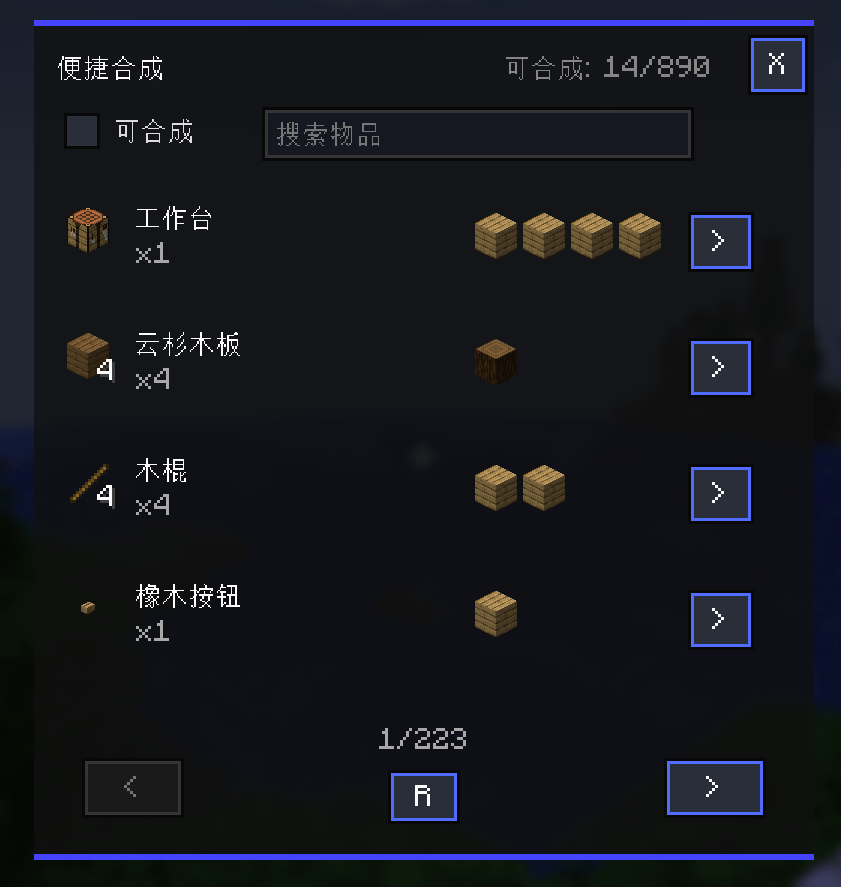
Press G to open a compact crafting assistant anywhere, then craft directly from the materials in your inventory, the container you are currently using, and supported storage bags.
中文简介:便捷合成是一个轻量级生存辅助模组,提供随身合成助手、配方搜索、背包整理、容器整理、分类袋和一键合成,让日常冒险、建造和整理物品更顺手。
中文关键词:便捷合成,快捷合成,随身合成,一键合成,配方搜索,背包整理,容器整理,箱子整理,木桶整理,潜影盒整理,分类袋,矿物袋,种子袋,染料袋。
What It Does
Convenient Crafting is built around a portable crafting panel that stays quick, compact, and useful during normal play:
- Craft without placing a workstation first
- Search recipes by name, id, mod, tooltip, tag, ingredient, or creative tab
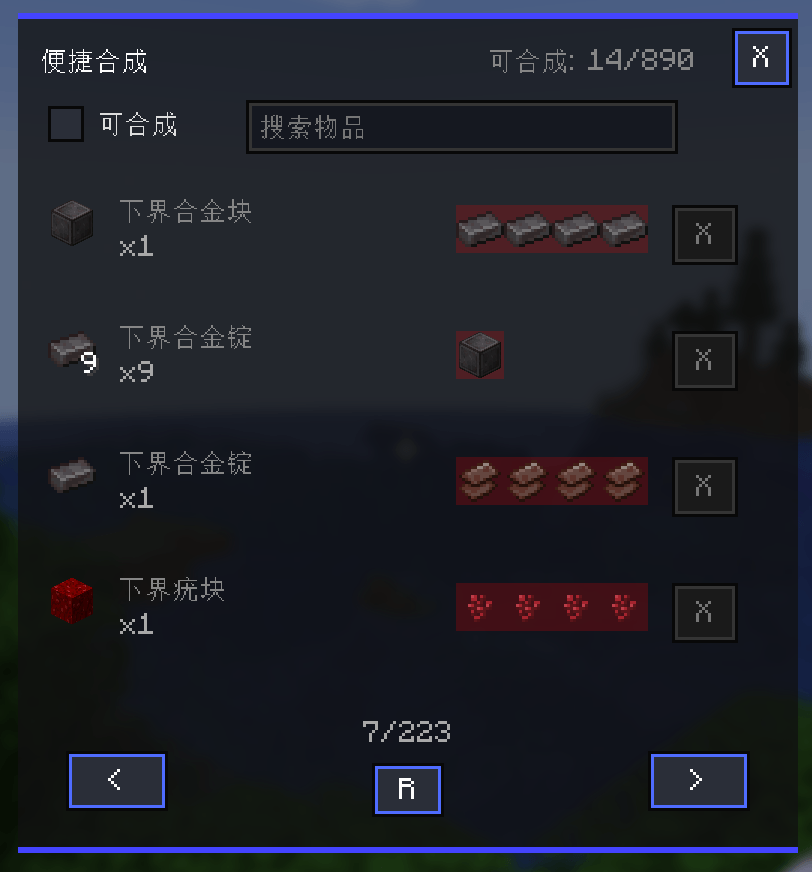
- Filter to only recipes you can currently craft
- Click or press hotkeys on displayed items to look up recipes and usages
- Craft once, batch craft, or try nested crafting for missing intermediate parts
- Use materials from your inventory, opened containers, and supported category bags
- Sort inventories and containers with a compact one-click sort button
It is especially useful while mining, building, exploring, organizing storage rooms, or playing larger modpacks where recipe lists can get noisy.
Supported Recipe Types
The convenient crafting panel supports several vanilla workstation recipe types out of the box:
- Crafting table recipes
- Smithing table recipes
- Brewing stand recipes
- Stonecutter recipes
Recipe types are handled separately, so a stonecutter recipe and a crafting table recipe with similar ingredients will not hide each other in the recipe list.
Modpack authors can also enable compatible custom recipe types through the config when those recipes are safe to craft directly from ingredients and a fixed result.
Search and Recipe Lookup
The search box supports JEI-style advanced filters:
@modidfor mod id filters-termfor exclusions"quoted text"for exact phrases#termfor tooltip text$tagfor item tags%tabfor creative tabs~ingredientfor ingredient searches|for multi-search
You can also interact with items directly in the recipe list:
- Hover an item and press
R, or left-click it, to search for recipes that make it - Hover an item and press
U, or right-click it, to search for recipes that use it - Press
Backspaceto return through recipe and usage search history when the search box is not focused
Batch and Nested Crafting
Convenient Crafting can do more than single-click crafting:
- Click
>to craft once - Shift-click
>to batch craft - Alt-click
>to try nested crafting
Nested crafting simulates the required crafting chain before it starts. If the final item cannot be made, the mod shows a scrollable missing-material tree so you can see which raw materials are still missing.
The nested crafting search includes safety limits for recursion depth, search steps, candidate recipes, and missing-material rows, helping it stay responsive in large modpacks.
Brewing and Stonecutting
Brewing recipes follow vanilla brewing behavior: one brewing ingredient can process up to three matching input potions in one convenient crafting action.
Stonecutter recipes are supported as their own workstation type, with separate config defaults, unlock handling, craftability checks, direct crafting, and nested crafting candidates.
Category Bags
Convenient Crafting includes three small category-limited bags:
- Seed Bag
- Dye Bag
- Mineral Bag
Each bag provides 9 slots for its category. Bag contents can be used by convenient crafting, nested crafting checks, brewing, smithing, configured simple recipes, automatic pickup, and inventory sorting.
The Mineral Bag also supports a convenientcrafting:minerals item tag so modpacks can extend which ore and mineral items it accepts.
Inventory Sorting
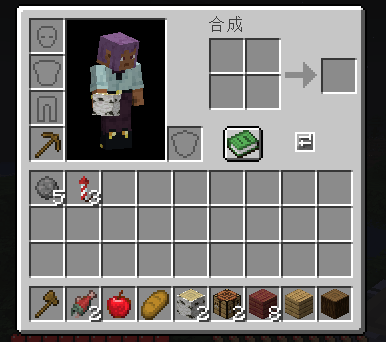
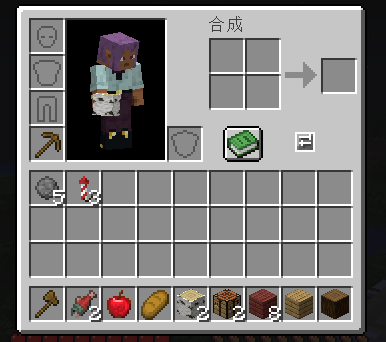
The mod includes a compact inventory sort button for inventory and container screens. Sorting can merge stackable items, group similar items, preserve item component data, and work with supported bag contents.
Middle-click sorting is also supported from the player inventory screen.
Performance
Convenient Crafting is designed to stay responsive in large modpacks:
- Incremental recipe loading
- Reusable recipe indexes
- Cached material and craftability checks
- Current-page rendering
- Cached page navigation views
- Background recipe index preloading during normal gameplay
- Cached nested-crafting candidate lookups
Recipe index caches are kept across ordinary screen changes and cleared when leaving a world.
Modpack Configuration
The common config file is located at:
.minecraft/config/convenientcrafting-common.toml
Useful options include:
enabledBuiltinRecipeTypesfor vanilla workstation recipe typesadditionalRecipeTypesfor compatible custom recipe typesrecipeTypeUnlockItemsfor workstation unlock rules
Server-side unlock syncing keeps multiplayer clients aligned with the server config. Administrators can also unlock recipe types for players with:
/convenientcrafting unlock <targets> all/convenientcrafting unlock <targets> <recipe_type_id>
Controls
| Key / Action | Function |
|---|---|
G |
Open the convenient crafting panel |
Click > |
Craft once |
Shift-click > |
Batch craft |
Alt-click > |
Try nested crafting |
Hover item + R |
Search recipes for the item |
Hover item + U |
Search usages for the item |
| Left-click recipe-list item | Search recipes for the item |
| Right-click recipe-list item | Search usages for the item |
| Middle-click inventory | Sort inventory |
Compatibility
- Minecraft 1.21.1
- NeoForge 21.1.220+
- Multiplayer friendly
- Datapack compatible
- Modpack configurable
- Built to stay lightweight and vanilla-friendly
Convenient Crafting reduces repetitive crafting and inventory busywork so you can spend more time building, exploring, and actually playing.
Convenient Crafting
Convenient Crafting is a lightweight quality-of-life mod for Minecraft 1.21.1 on NeoForge. It focuses on making everyday crafting, recipe lookup, storage cleanup, and small survival chores faster while keeping the vanilla feel intact.
Press G to open a compact crafting assistant anywhere, then craft directly from the materials in your inventory, the container you are currently using, and supported storage bags.
中文简介:便捷合成是一个轻量级生存辅助模组,提供随身合成助手、配方搜索、背包整理、容器整理、分类袋和一键合成,让日常冒险、建造和整理物品更顺手。
中文关键词:便捷合成,快捷合成,随身合成,一键合成,配方搜索,背包整理,容器整理,箱子整理,木桶整理,潜影盒整理,分类袋,矿物袋,种子袋,染料袋。
What It Does
Convenient Crafting is built around a portable crafting panel that stays quick, compact, and useful during normal play:
- Craft without placing a workstation first
- Search recipes by name, id, mod, tooltip, tag, ingredient, or creative tab
- Filter to only recipes you can currently craft
- Click or press hotkeys on displayed items to look up recipes and usages
- Craft once, batch craft, or try nested crafting for missing intermediate parts
- Use materials from your inventory, opened containers, and supported category bags
- Sort inventories and containers with a compact one-click sort button
It is especially useful while mining, building, exploring, organizing storage rooms, or playing larger modpacks where recipe lists can get noisy.
Supported Recipe Types
The convenient crafting panel supports several vanilla workstation recipe types out of the box:
- Crafting table recipes
- Smithing table recipes
- Brewing stand recipes
- Stonecutter recipes
Recipe types are handled separately, so a stonecutter recipe and a crafting table recipe with similar ingredients will not hide each other in the recipe list.
Modpack authors can also enable compatible custom recipe types through the config when those recipes are safe to craft directly from ingredients and a fixed result.
Search and Recipe Lookup
The search box supports JEI-style advanced filters:
@modidfor mod id filters-termfor exclusions"quoted text"for exact phrases#termfor tooltip text$tagfor item tags%tabfor creative tabs~ingredientfor ingredient searches|for multi-search
You can also interact with items directly in the recipe list:
- Hover an item and press
R, or left-click it, to search for recipes that make it - Hover an item and press
U, or right-click it, to search for recipes that use it - Press
Backspaceto return through recipe and usage search history when the search box is not focused
Batch and Nested Crafting
Convenient Crafting can do more than single-click crafting:
- Click
>to craft once - Shift-click
>to batch craft - Alt-click
>to try nested crafting
Nested crafting simulates the required crafting chain before it starts. If the final item cannot be made, the mod shows a scrollable missing-material tree so you can see which raw materials are still missing.
The nested crafting search includes safety limits for recursion depth, search steps, candidate recipes, and missing-material rows, helping it stay responsive in large modpacks.
Brewing and Stonecutting
Brewing recipes follow vanilla brewing behavior: one brewing ingredient can process up to three matching input potions in one convenient crafting action.
Stonecutter recipes are supported as their own workstation type, with separate config defaults, unlock handling, craftability checks, direct crafting, and nested crafting candidates.
Category Bags
Convenient Crafting includes three small category-limited bags:
- Seed Bag
- Dye Bag
- Mineral Bag
Each bag provides 9 slots for its category. Bag contents can be used by convenient crafting, nested crafting checks, brewing, smithing, configured simple recipes, automatic pickup, and inventory sorting.
The Mineral Bag also supports a convenientcrafting:minerals item tag so modpacks can extend which ore and mineral items it accepts.
Inventory Sorting
The mod includes a compact inventory sort button for inventory and container screens. Sorting can merge stackable items, group similar items, preserve item component data, and work with supported bag contents.
Middle-click sorting is also supported from the player inventory screen.
Performance
Convenient Crafting is designed to stay responsive in large modpacks:
- Incremental recipe loading
- Reusable recipe indexes
- Cached material and craftability checks
- Current-page rendering
- Cached page navigation views
- Background recipe index preloading during normal gameplay
- Cached nested-crafting candidate lookups
Recipe index caches are kept across ordinary screen changes and cleared when leaving a world.
Modpack Configuration
The common config file is located at:
.minecraft/config/convenientcrafting-common.toml
Useful options include:
enabledBuiltinRecipeTypesfor vanilla workstation recipe typesadditionalRecipeTypesfor compatible custom recipe typesrecipeTypeUnlockItemsfor workstation unlock rules
Server-side unlock syncing keeps multiplayer clients aligned with the server config. Administrators can also unlock recipe types for players with:
/convenientcrafting unlock <targets> all/convenientcrafting unlock <targets> <recipe_type_id>
Controls
| Key / Action | Function |
|---|---|
G |
Open the convenient crafting panel |
Click > |
Craft once |
Shift-click > |
Batch craft |
Alt-click > |
Try nested crafting |
Hover item + R |
Search recipes for the item |
Hover item + U |
Search usages for the item |
| Left-click recipe-list item | Search recipes for the item |
| Right-click recipe-list item | Search usages for the item |
| Middle-click inventory | Sort inventory |
Compatibility
- Minecraft 1.21.1
- NeoForge 21.1.220+
- Multiplayer friendly
- Datapack compatible
- Modpack configurable
- Built to stay lightweight and vanilla-friendly
Convenient Crafting reduces repetitive crafting and inventory busywork so you can spend more time building, exploring, and actually playing.
Screenshots
Gallery
-
 1.png 1.png
 -
 2.png 2.png
 -
 3.png 3.png
-
 Pack the backpack One-click organization of backpack
 -
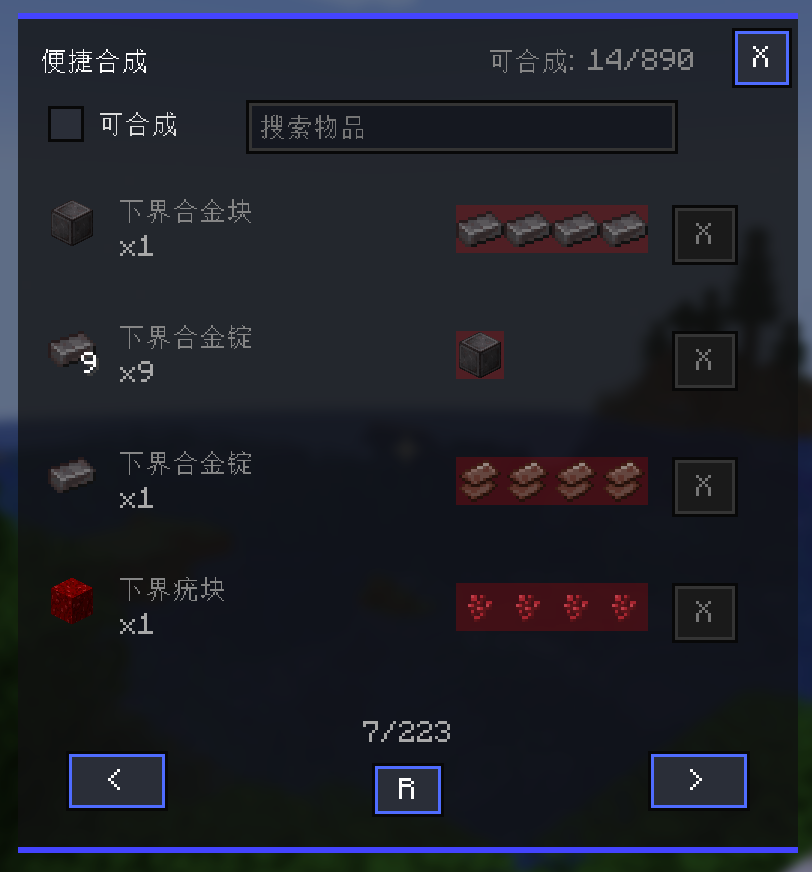 Recipe list A backpack can only be made with the right materials.
 -
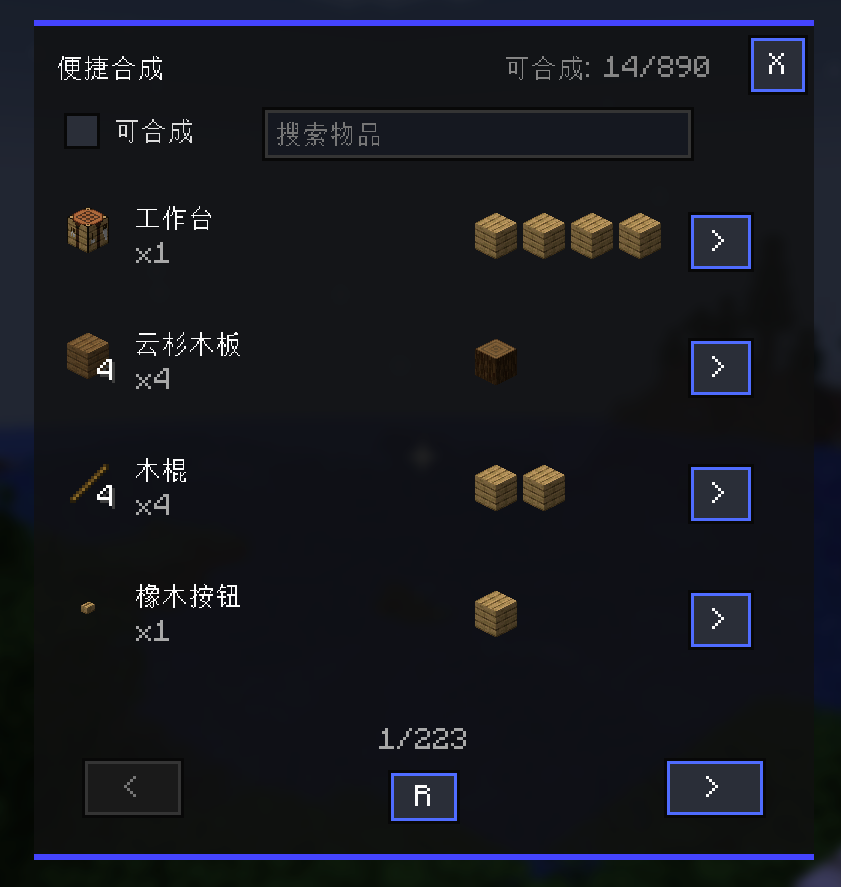 Convenient Synthesis Panel Press the "G" key to open.
Versions
Files
Relations
Project Relations
More like this
Similar Mods
Suggestions use data such as tags, dependencies, dependents, descriptions, titles, and more to rank how much they overlap with this mod.
On ModDex
Community snapshot
By the numbers
Statistics
Want to reach Minecraft players?
We're looking for a server hosting partner to feature here and other parts of the site. Interested? Send us a message!
Get in touchGet it on
Available Platforms
On ModDex
Community snapshot
By the numbers