
Community listing page, reviews here may not be monitored by the author.
Conveyor Belt Plus

No reviews yet
A spline-based item logistics mod: belts that bend, logistical chutes that install themselves, and a splitter that shares the load.
Community voices
Reviews
No reviews yet. Be the first to review this project!
Get it on
Available Platforms
About
Project Details
For authors
Embed Badge
If you're the author of this project, you can embed a live badge anywhere that supports HTML or Markdown. It updates automatically whenever ratings change.
Use HTML for any page that supports it, or Markdown for README files and Markdown-based descriptions.
Identifiers
Platform IDs
Resources
External Links
About
Description
Conveyor Belt Plus
A spline-based item logistics mod: belts that bend, chutes that install themselves, and a splitter that shares the load.
Conveyor Belt Plus carries items along smooth curved routes instead of straight block-to-block pipes. Route a belt from one inventory to another and the mod fits the transfer chutes for you. Routes, filters and upgrades are validated on the server side, an upgrade keeps everything in place.
Highlights
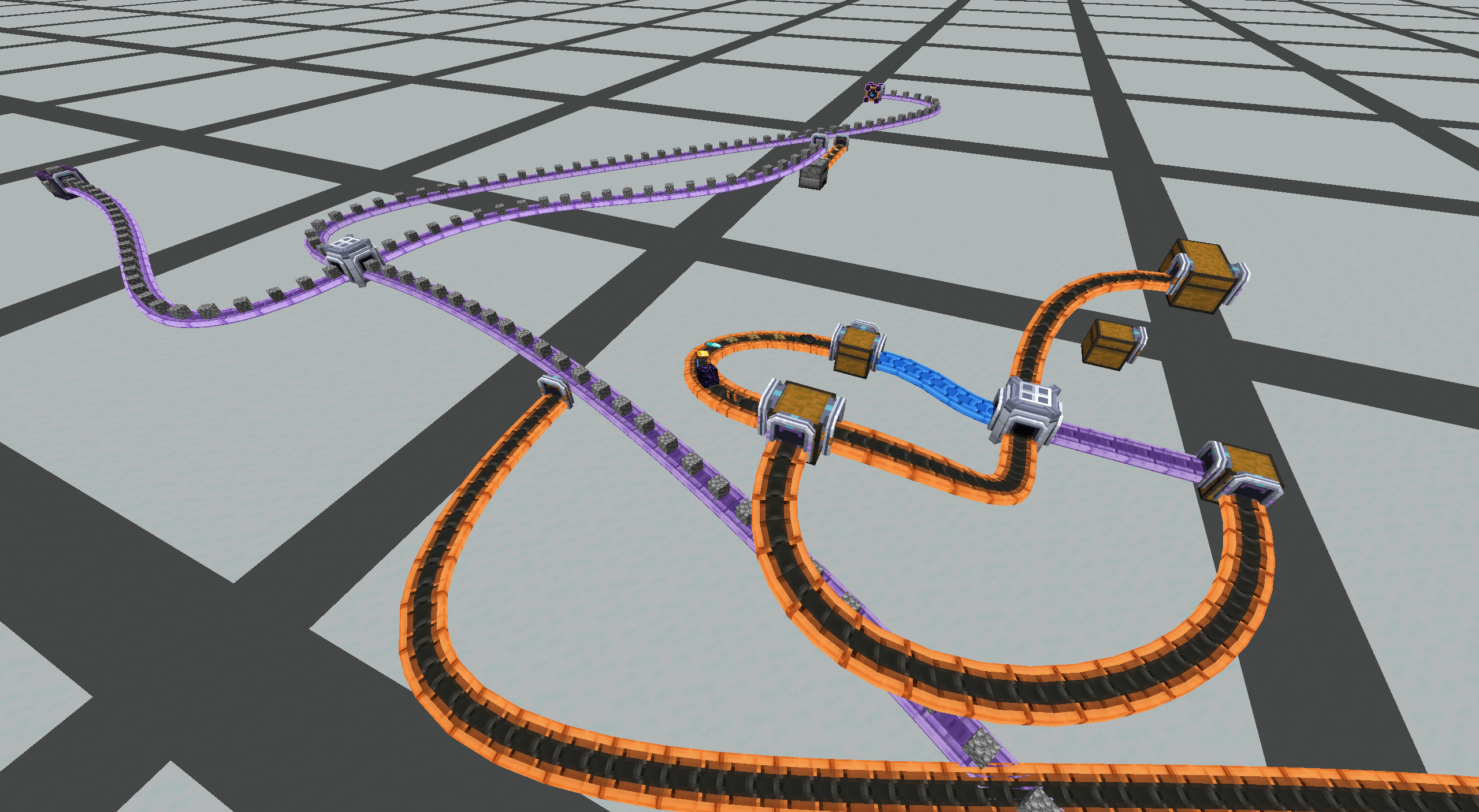
- Belts that curve. Place a start, place a destination, then click Conveyor Supports to guide turns and height. A conveyor-shaped preview shows the route before you commit to it.
- Three speed tiers. Standard, Advanced and Ultimate belts (orange, blue and purple materials) carry items at 1 / 2 / 4 blocks per second by default, and each tier is configurable from 0.1 to 64 blocks per second.
- Chutes install themselves. While you build a route the mod places the chutes it needs, taking them from your offhand first and then from your inventory, and it refuses to build when chutes are missing or a turn is too sharp.
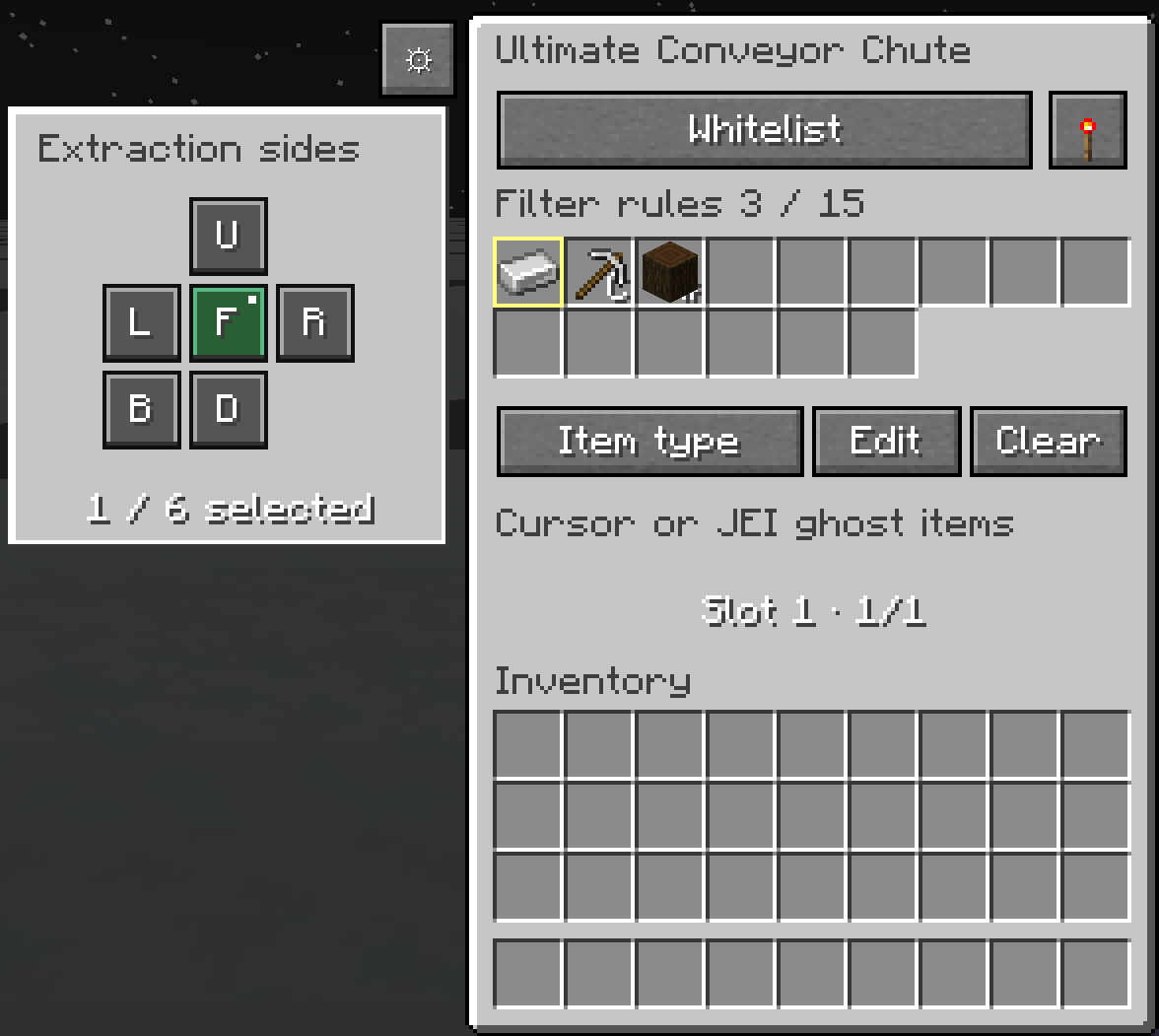
- Filters. Mark items by dragging a ghost entry out of JEI or clicking with a stack on the cursor; no items are consumed. A rule can match an item, an exact set of data components or an item tag, in blacklist or whitelist mode.
- Upgrade in place. Sneak + right-click a route's start, or a lower-tier chute, to upgrade it. Filters, redstone mode, facing, connections, route geometry and the items already travelling are all preserved. In survival the upgrade consumes one higher-tier item and returns the old one; in creative neither happens.
- Load sharing. The four-sided Logistics Splitter buffers a single item type and hands batches out evenly across the outputs that can accept them.
- Take items back out. Aim at an item riding a belt and right-click with an empty main hand to pick it up, with server-side reach and visibility checks; anything that does not fit stays on the belt.
- Tooltips. Items and blocks describe their purpose, current statistics and basic controls; hold Ctrl for the extra help.
Belts
- Right-click a start, then right-click a destination.
- Click Conveyor Supports while building to steer the route's turns and height.
- Sneak + use in the air to cancel the route you are building.
- Item motion is animated per route and stops when transport stops.
- Sneak + right-click the start of a route to upgrade it; on a splitter, pick the individual output face.
Chutes
A chute attaches to the side of an inventory and loads or unloads the belt connected to it.
| Tier | Belt speed (default) | Chute batch (default) | Filter rules (default) |
|---|---|---|---|
| Standard | 1 block/s | 1 stack | 5 |
| Advanced | 2 blocks/s | 4 stacks | 10 |
| Ultimate | 4 blocks/s | 8 stacks | 15 |
Every one of those values is configurable. Ranges: belt speed 0.1 - 64 blocks/s, batch 1 - 64 stacks, shared item/tag/component rule limit 1 - 54.
Redstone control. Five modes per chute, saved with the world and kept through upgrades:
| Mode | Effect |
|---|---|
| Always active | Extract and insert at all times. |
| Active without signal | Transfer only while unpowered. |
| Active with signal | Transfer only while powered. |
| Never active | Stop container transfers; items already on belts keep moving. |
| Redstone pulse | One batch per rising edge, keeping at most one pending pulse while blocked. |
Extraction sides. Each chute can be told which faces of the container it is attached to may be pulled from. Select several faces and the chute queries them in round-robin order while still obeying the container's own sided permissions, the filters, the redstone mode and the one-batch limit. The default is just the attached face, and insertion is unaffected. The whole feature can be switched off in the config; saved selections are kept but ignored.
Open a chute with a right-click to change its rules, redstone mode or extraction sides. New chutes allow all items.
Logistics Splitter
- Buffers up to 512 individual items of one type by default (configurable, 1 - 1048576).
- Divides each batch evenly between the outputs that are available and automatically skips blocked entrances.
- A batch larger than the free space enters in bounded parts instead of being dropped.
- Lowering the configured capacity never deletes items that are already stored.
- Choose an individual output face while upgrading.
Integrations (all optional)
- JEI - drag ghost filter markers straight out of the recipe screen; nothing is consumed.
- Jade - shows the splitter buffer contents and count, chute filter icons, a text-only chute redstone line, and the package and count riding the belt you are aiming at. The redstone line has its own Jade display toggle, and every display reuses the existing client synchronization instead of adding a polling channel.
- RTS Building - cursor-based belt preview, a per-builder endpoint draft across storage extractions, and remote empty-hand pickup of rendered items, all subject to RTS range, claim and capability checks.
Configuration
All settings use the native NeoForge config system, registered as a SERVER config in config/conveyor_belt_plus.toml. NeoForge handles loading, validation, saving, file watching and the initial server-to-client synchronization, and per-world overrides with the same filename work in a world's serverconfig directory.
The screen is registered under Mods -> Conveyor Belt Plus -> Config. SERVER options can be edited while playing a local world, not while connected to somebody else's server. Reducing a limit keeps saved data: rules above a reduced filter capacity stay stored but inactive, and shrinking the splitter buffer never deletes its contents.
Options include belt.<tier>.speed, chute.<tier>.stacks, chute.<tier>.filters, splitter.buffer_items and chute.extraction_sides_enabled.
License
MIT.
Screenshots
Gallery
-
 belt.png belt.png
 -
 chutegui_en.png chutegui_en.png
Versions
Files
Relations
Project Relations
More like this
Similar Mods
Suggestions use data such as tags, dependencies, dependents, descriptions, titles, and more to rank how much they overlap with this mod.
On ModDex
Community snapshot
By the numbers
Statistics
Want to reach Minecraft players?
We're looking for a server hosting partner to feature here and other parts of the site. Interested? Send us a message!
Get in touchGet it on
Available Platforms
On ModDex
Community snapshot
By the numbers
Statistics
Resources