
Community listing page, reviews here may not be monitored by the author.
Coord Saver

No reviews yet
This is a convenient coordinate-saving mode that allows you to save and share coordinates. 좌표를 저장, 공유를 할 수 있는 편리한 좌표저장모드입니다.
Community voices
Reviews
No reviews yet. Be the first to review this project!
Get it on
Available Platforms
Compatibility
Supported Environments
Runs entirely on the client. Works on vanilla servers.
About
Project Details
For authors
Embed Badge
If you're the author of this project, you can embed a live badge anywhere that supports HTML or Markdown. It updates automatically whenever ratings change.
Use HTML for any page that supports it, or Markdown for README files and Markdown-based descriptions.
Identifiers
Platform IDs
Resources
External Links
About
Description
Press "설정" in shift-f screen, and change into english!
마인크래프트에서 좌표를 저장, 공유를 할 수 있는 모드로 shift + f를 눌러 다양한 기능을 확인하실 수 있습니다!! 그리고 모드메뉴와 함께 하면 설정도 할 수 있습니다! 죽은 위치를 확인할 수 있도록 해줘요!!
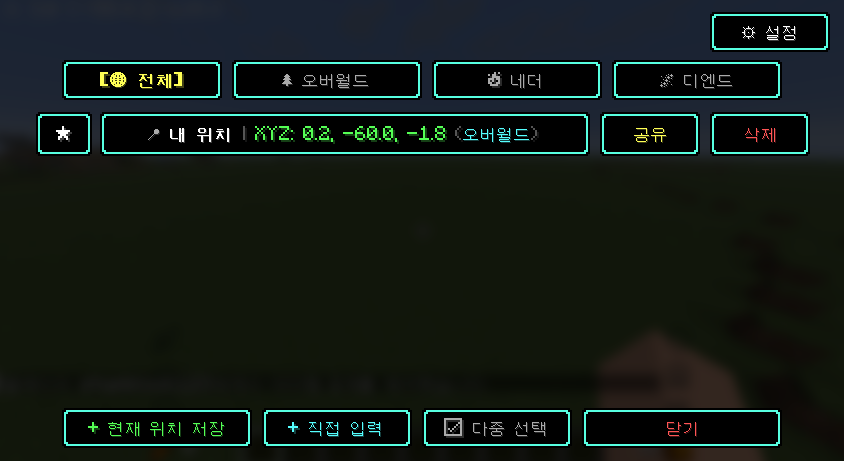 Save and share coordinates in Minecraft!. You can press Shift + F to explore various features in this mod!! And if you use it together with the mode menu, you can also configure settings! Please let me check where the dead one is!!
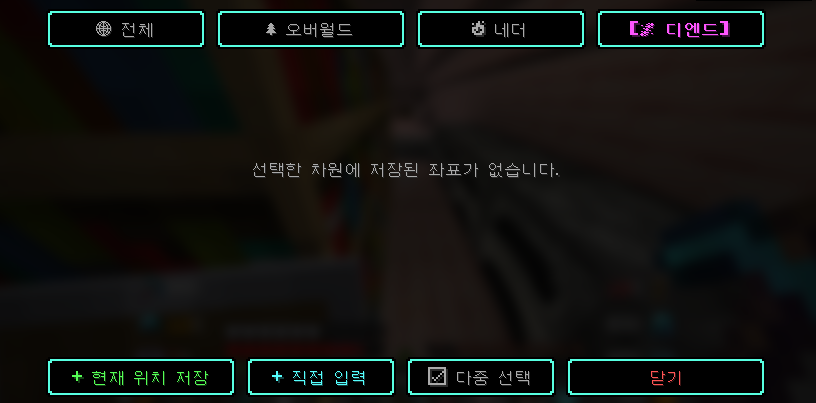
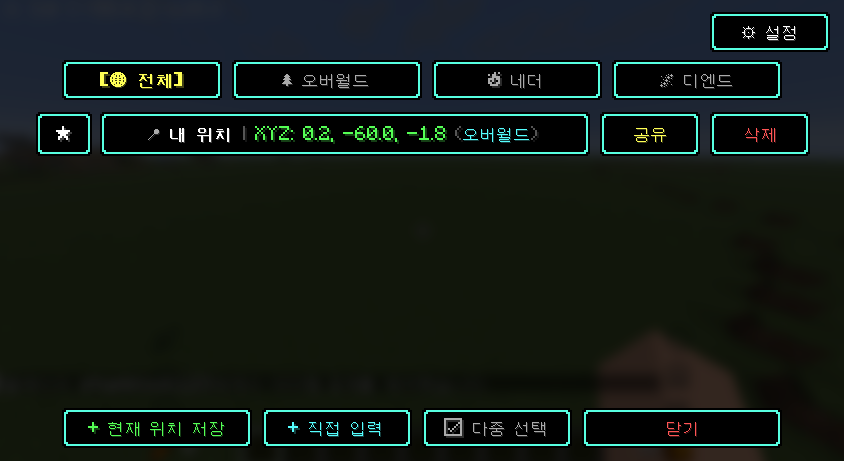
📍 1. 편리한 좌표 저장 및 관리 단축키 열기: 인게임에서 Shift + F 키를 눌러 직관적인 GUI 화면을 엽니다. (조작 설정에서 원하는 키로 변경 가능) 원클릭 좌표 저장: 현재 플레이어의 **X, Y, Z 좌표와 차원(오버월드, 네더, 디엔드)**을 자동으로 인식하여 손쉽게 저장합니다. 차원별 필터링: 전체, 오버월드, 네더, 디엔드 탭을 통해 차원별로 저장된 좌표를 깔끔하게 분류하여 조회할 수 있습니다. 중요 좌표 핀 고정 (📌): 자주 가는 집, 포탈, 광산 등의 좌표를 목록 상단에 고정해 둘 수 있습니다. 클립보드 간편 복사: 목록에서 좌표를 클릭하면 채팅/공유용 텍스트가 클립보드에 자동으로 복사됩니다. 다중 선택 모드: 여러 좌표를 한 번에 선택하여 일괄 삭제하거나 관리할 수 있습니다.
🧭 2. 실시간 HUD 목적지 네비게이션 (26.2 신규) 원클릭 목적지 설정: 좌표 목록에서 [목적지] 버튼을 누르면 화면 상단에 실시간 네비게이션 HUD가 켜집니다. 8방향 상대 방위각 안내: 플레이어가 바라보는 시선에 맞춰 실시간으로 방향 화살표(▲, ↗, ▶, ↘, ▼, ↙, ◀, ↖)를 표시합니다. 거리 및 고도차 표시: 목적지까지의 **직선거리(m)**가 실시간으로 갱신됩니다. 목표 지점과의 **높낮이 고도차(▲ +15m, ▼ -8m)**를 함께 안내합니다. 도착 알림: 목적지 4블록 이내에 접근하면 [ 📍 도착: '목적지' ] 초록색 완료 배지로 전환됩니다. 차원 감지: 목적지가 다른 차원(예: 지옥)에 있는 경우 차원 불일치 경고를 표시합니다.
💀 3. 사망 위치 자동 기록 (Death Point) 사망 좌표 자동 백업: 플레이어가 사망하면 그 즉시 사망한 정확한 위치(X, Y, Z)와 차원이 좌표 목록에 💀 사망 위치로 자동 저장됩니다. 아이템 회수 지원: 사망 직후 바로 [목적지]를 눌러 떨어진 아이템 위치까지 네비게이션을 따라 쉽게 찾아갈 수 있습니다. (설정에서 켜기/끄기 가능)
📢 4. P2P 좌표 공유 시스템 (서버 플러그인 불필요) 서버 모드/플러그인 없이 작동: 클라이언트 전용 기능으로, 일반 바닐라/페이퍼 서버 어디서든 동작합니다. 귓속말 및 전체 공유: 목록에서 [공유] 버튼을 눌러 온라인 플레이어를 선택하거나 전체 채팅으로 좌표를 보낼 수 있습니다. 스마트 수신 ([수락] 버튼): 공유받은 플레이어는 채팅창에 뜨는 [수락] 버튼을 클릭하기만 하면 자신의 모드 좌표 목록에 즉시 등록됩니다.
⚙️ 5. 환경 설정 및 다국어 지원 환경 설정 메뉴: 💀 사망 시 자동 좌표 저장: [ ON / OFF ] 🧭 목적지 HUD 네비게이션: [ ON / OFF ] 🌐 언어 전환: 한국어(Korean) / 영어(English) 원클릭 전환
📍 1. Convenient coordinate saving and management Open Shortcuts: In-game, press Shift + F to open the intuitive GUI screen. (Can be changed to the desired key in the operation settings) One-click coordinate saving: automatically recognizes and easily saves the current player’s X, Y, Z coordinates and the dimension (Overworld, Nether, End). Dimension-based filtering: Through the Whole, Overworld, Nether, and Deend tabs, you can neatly sort and view coordinates stored by dimension. Important coordinate pin fixes (📌): You can pin frequently visited houses, portals, mines, and other coordinates at the top of the list. Easy clipboard copy: Clicking a coordinate in the list automatically copies the chat/share text to the clipboard. Multiple selection mode: You can select multiple coordinates at once to delete or manage them in bulk.
🧭 2. Real-time HUD destination navigation (new in 26.2) One-click destination setting: When you press the [Destination] button in the coordinate list, the real-time navigation HUD will turn on at the top of the screen. 8-direction relative direction guidance: Displays directional arrows (▲, ↗, ▶, ↘, ▼, ↙, ◀, ↖) in real-time aligned with the player’s line of sight. Distance and height difference display: The **straight-line distance (m) to the destination is updated in real time. We also guide you through the elevation difference to the target point (▲ +15m, ▼ -8m). Arrival notification: If you reach within 4 blocks of the destination, it will change to a [📍 Arrival: 'Destination'] green completion badge. Dimension detection: Displays a dimension mismatch warning if the destination is in a different dimension (e.g., hell).
💀 3. Automatic recording of the death location (Death Point) Automatic death coordinate backup: When a player dies, the exact location of the death (X, Y, Z) and its dimension are automatically saved to the coordinate list as 💀 death location. Item retrieval support: Immediately after death, you can press [Destination] and easily follow navigation to the location of the dropped item. (Can be turned on/off in settings)
📢 4. P2P coordinate-sharing system (no server plugin required) Works without server mode/plugins: a client-only feature that works anywhere on a regular vanilla/paper server. Whisper and share to everyone: In the list, press the [Share] button to select the online player, or send the coordinates to everyone in chat. Smart Receive ([Accept] button): The player who receives the share simply clicks the [Accept] button that appears in the chat window, and it is immediately added to their list of mod coordinates.
⚙️ 5. Settings and multilingual support Preferences menu: 💀 Automatically save coordinates upon death: [ ON / OFF ] 🧭 Destination HUD Navigation: [ ON / OFF ] 🌐 Language Switch: One-click toggle between Korean and English
Screenshots
Gallery
Versions
Files
Relations
Project Relations
More like this
Similar Mods
Suggestions use data such as tags, dependencies, dependents, descriptions, titles, and more to rank how much they overlap with this mod.
On ModDex
Community snapshot
By the numbers
Statistics

Want to reach Minecraft players?
We're looking for a server hosting partner to feature here and other parts of the site. Interested? Send us a message!
Get in touchGet it on
Available Platforms
On ModDex
Community snapshot
By the numbers
Statistics
Resources