Community listing page, reviews may not be monitored by the author.
Recall Coords - Coordinate Saver & Death Tracker


No reviews yet
Save and recall important coordinates, including death locations, to easily find your way with Recall Coords

Community voices
Reviews
No reviews yet. Be the first to review this project!
Get it on
Available Platforms
Compatibility
Supported Environments
Runs entirely on the client. Works on vanilla servers.
About
Project Details
For authors
Embed Badge
If you're the author of this project, you can embed a live badge anywhere that supports HTML or Markdown. It updates automatically whenever ratings change.
Use HTML for any page that supports it, or Markdown for README files and Markdown-based descriptions.
Identifiers
Platform IDs
Resources
External Links
About
Description
Recall Coords
Recall Coords is a lightweight client-side coordinate saver and waypoint utility mod that helps you quickly save, organize, and recall important locations in your Minecraft worlds and multiplayer servers.
Perfect for:
- Bases
- Nether portals
- Villages
- Structures
- Death locations
- Exploration routes
✔ Client-side only
✔ Works on most multiplayer servers
✔ Automatic death coordinate saving
✔ Lightweight and fast
✔ Multi-dimension support
✔ Simple .rc commands
Features
Save Important Locations
Quickly store coordinates for:
- Bases
- Villages
- Strongholds
- Trial Chambers
- Ancient Cities
- Custom locations
Automatic Death Tracking
Died in lava? Lost your items in caves?
Recall Coords automatically saves your death location so you can quickly return and recover your gear.
Multi-Dimension Support
Supports:
- Overworld
- Nether
- End
Each saved coordinate remembers its dimension automatically.
A client-side coordinate manager that works on ANY server! Save and manage coordinates with .rc commands that never leave your client.
Features
- Save coordinates with custom names and descriptions
- World specific storage - each server/world maintains its own coordinate list
- Multi dimensional support (Overworld, Nether, End)
- Automatic biome detection - coordinates show the biome they were saved in
- Death location tracking - automatically saves where you died
- Persistent storage - coordinates are saved locally between game sessions
- Interactive UI with clickable coordinate names and hover tooltips
- Copy coordinates - click coordinates to copy them to clipboard
Dependencies
FABRIC API REQUIRED
This mod requires Fabric API to function properly. Make sure to install Fabric API alongside this mod. https://www.curseforge.com/minecraft/mc-mods/fabric-api
Commands
All commands use .rc (dot rc) instead of /rc
Adding Coordinates
.rc add auto <name> [description]- Auto detect current location & biome.rc add <x> <y> <z> <name> [description]- Manually specify coordinates
Managing Coordinates
.rc delete <name>- Delete a saved coordinate.rc view <name>- View detailed information about a coordinate.rc list- List all saved coordinates (clickable names!).rc death- View your last death location in current world.rc help- Show all available commands
Interactive Features
- Click coordinate names in
.rc listto view details - Click coordinates in
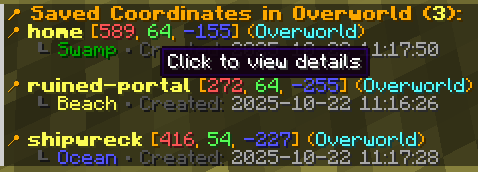
.rc viewand.rc deathto copy to clipboard - Hover over elements to see helpful tooltips
Examples


Recall Coords
Recall Coords is a lightweight client-side coordinate saver and waypoint utility mod that helps you quickly save, organize, and recall important locations in your Minecraft worlds and multiplayer servers.
Perfect for:
- Bases
- Nether portals
- Villages
- Structures
- Death locations
- Exploration routes
✔ Client-side only
✔ Works on most multiplayer servers
✔ Automatic death coordinate saving
✔ Lightweight and fast
✔ Multi-dimension support
✔ Simple .rc commands
Features
- Save coordinates with custom names and descriptions
- World specific storage - each server/world maintains its own coordinate list
- Multi dimensional support (Overworld, Nether, End)
- Automatic biome detection - coordinates show the biome they were saved in
- Death location tracking - automatically saves where you died
- Persistent storage - coordinates are saved locally between game sessions
- Interactive UI with clickable coordinate names and hover tooltips
- Copy coordinates - click coordinates to copy them to clipboard
Dependencies
FABRIC API REQUIRED
This mod requires Fabric API to function properly. Make sure to install Fabric API alongside this mod. Click To Download
Commands
All commands use .rc (dot rc) instead of /rc
Adding Coordinates
.rc add auto <name> [description]- Auto detect current location & biome.rc add <x> <y> <z> <name> [description]- Manually specify coordinates
Managing Coordinates
.rc delete <name>- Delete a saved coordinate.rc view <name>- View detailed information about a coordinate.rc list- List all saved coordinates (clickable names!).rc death- View your last death location in current world.rc help- Show all available commands
Interactive Features
- Click coordinate names in
.rc listto view details - Click coordinates in
.rc viewand.rc deathto copy to clipboard - Hover over elements to see helpful tooltips
Examples


Screenshots
Gallery
-
 Coordinates display 1.png
 -
 Detailed view 2.png
 -
 Death locations 3.png
-
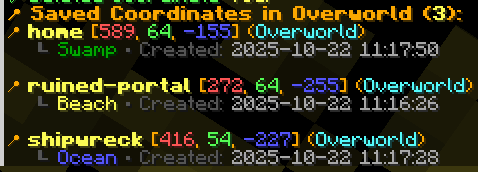
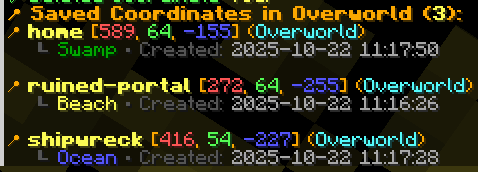
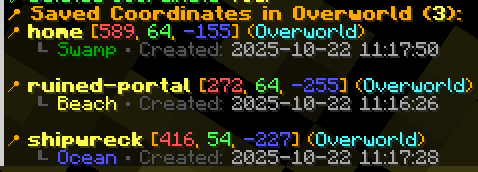 All list of saved coordinates All list of saved coordinates with general information
 -
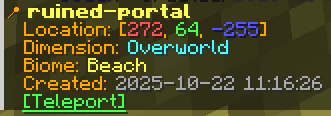 Saved Coordinated Details Detailed information about saved coordinates
 -
 Last Death Coordinates Auto saved last death coordinates
Versions
Files
Relations
Project Relations
More like this
Similar Mods
Suggestions use data such as tags, dependencies, dependents, descriptions, titles, and more to rank how much they overlap with this mod.
On ModDex
Community snapshot
By the numbers
Statistics

Get it on
Available Platforms
On ModDex
Community snapshot
By the numbers
Statistics
Resources