
Community listing page, reviews here may not be monitored by the author.
copypaster


No reviews yet
Copy/paste Minecraft cuboid regions to .nbt with player-relative positioning, interactive selection, paste preview, and undo.
Community voices
Reviews
No reviews yet. Be the first to review this project!
Get it on
Available Platforms
Compatibility
Supported Environments
Must be installed on both the client and the server.
About
Project Details
For authors
Embed Badge
If you're the author of this project, you can embed a live badge anywhere that supports HTML or Markdown. It updates automatically whenever ratings change.
Use HTML for any page that supports it, or Markdown for README files and Markdown-based descriptions.
Identifiers
Platform IDs
Resources
External Links
About
Description
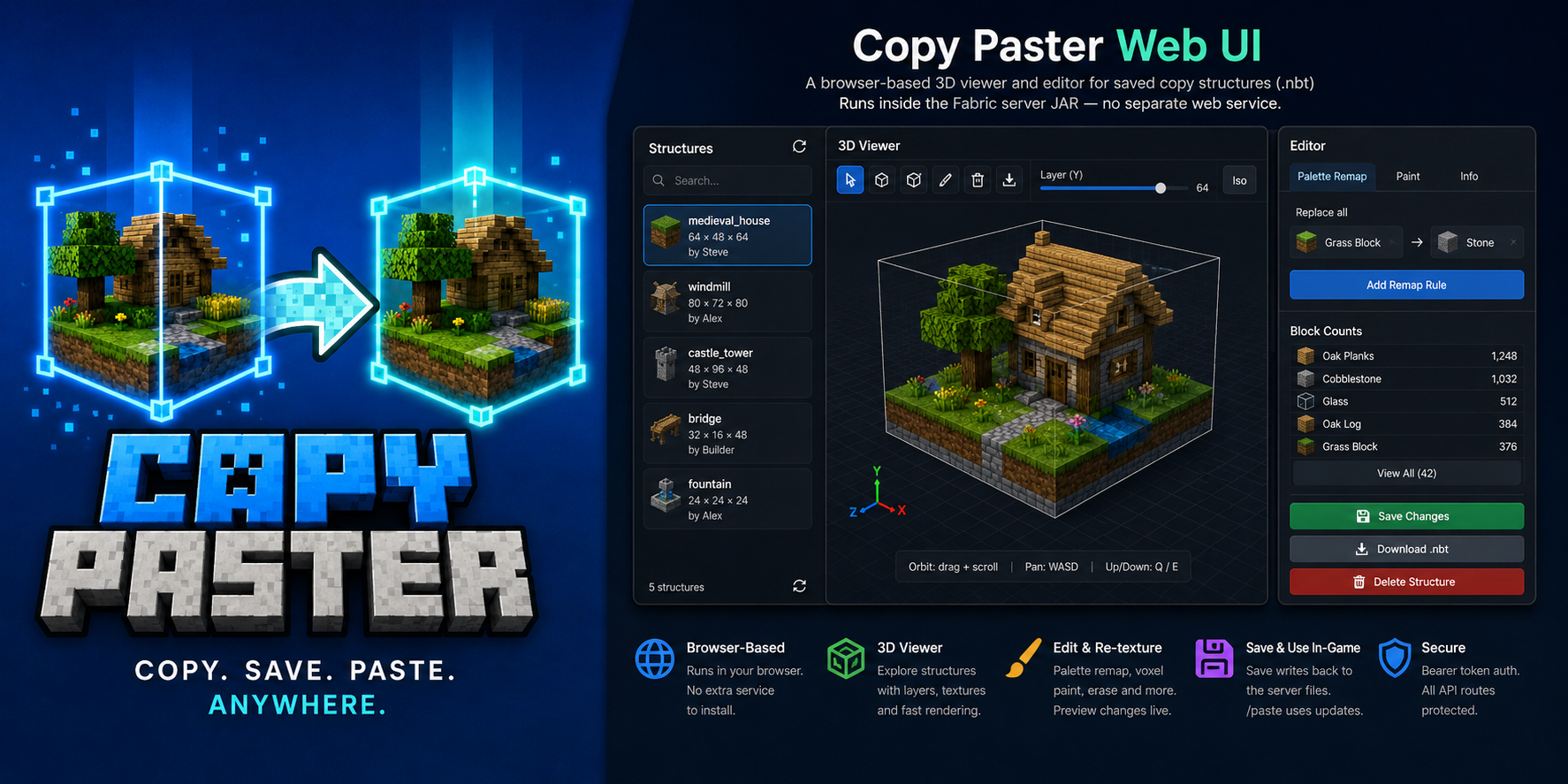
Copy cuboid regions to files. Paste them back exactly where you mean to — anchored to your position.




Copy Paster is a Fabric client + server mod for survival and creative builders who want a fast, visual way to duplicate structures without leaving the game. Select a box with keybinds, name it in chat, then paste it later — position follows where you stand at copy time and paste time, so offsets stay intuitive.
[/]copy — two corners, live wireframe preview, name in chat- Paste options — absolute coords, rotation, mirror, skip air, overwrite confirm
- Paste ghost preview — cyan box when blocks would be overwritten (respects rotation/mirror)
- Post-paste edits —
/pasterotate,/pastemirror,/pastemovewith cascaded undo - Undo —
/pasteundowith persistent snapshots undercopypaster/undos/(survives restart) - LuckPerms — grant
copypaster.*nodes to non-ops; vanilla operators always allowed - Web UI (optional) — browser 3D viewer/editor with texture-accurate preview, palette remap, voxel paint, import/export
.nbt - Ukrainian (
uk_ua) — full UI strings alongside English
Source: github.com/matrunchyk/copypaster · Changelog · Issues
Install
| Where | What |
|---|---|
| Dedicated server | Matching copy_paster-<version>+<mc>.jar in mods/ + Fabric API |
| Each player who copies | Same JAR (same MC version) in client mods/ + bind [ / ] |
Pick your JAR (server and every copying client must match):
| Minecraft | Java | Example artifact |
|---|---|---|
| 1.21.11 | 21 | copy_paster-3.4.1+1.21.11.jar |
| 26.2 | 25 | copy_paster-3.4.1+26.2.jar |
Requires Fabric Loader 0.19.3+ and Fabric API.
Server-only mode: /paste, /copylist, /copyinfo, /copyblocks, /copydelete, /copyweb, and the web UI still work. World copy requires the client mod and keybinds (or /copy with coords).
Optional: Mod Menu + Cloth Config for in-game client settings.
Quick start
1 · Save a region
- Stand at the anchor point you want for this copy.
- Press
[on corner 1, then]on corner 2 (wireframe follows your crosshair for the end corner). Or run/copy x1 y1 z1 x2 y2 z2without the client mod (requirescopypaster.copy). - Type a structure name in chat (
a–z,0–9,_,-, max 64 chars). Typecancelto abort (timeout from server config, default 60 s).
2 · Paste it back
- Stand in the same relative spot you used when copying (or use
at— see commands). /paste <name>— if the ghost warns about overwrites, run the suggested… confirmcommand.- Use
/pasteinfowhile looking at the build, or/pasteundolist, then/pasteundo <id>.
Examples:
/paste house
/paste house at 100 64 -20
/paste house rotate 90 mirror left_right noair confirm
Commands
| Command | Description |
|---|---|
/copyhelp |
Command summary (copy, paste, undo, web UI) |
/copy x1 y1 z1 x2 y2 z2 |
Copy region via coordinates (chat naming) |
/copyblocks <name> [page] |
Block type shopping list (paginated) |
/paste <name> |
Paste at player-relative anchor |
/paste <name> at <x> <y> <z> |
Paste with min corner at world coordinates |
/paste <name> rotate <90|180|270> |
Rotate before placing |
/paste <name> mirror <left_right|front_back> |
Mirror before placing |
/paste <name> noair |
Skip air blocks in the structure |
/paste <name> … confirm |
Paste after overwrite warning |
/pasteundo [id] |
Undo latest paste or a specific undo id |
/pasteinfo [distance] |
Undo ID and details for paste at crosshair |
/pasteundolist |
List pastes still available for undo |
/pastecancel |
Dismiss overwrite preview without pasting |
/pasteselect <undo id> |
Highlight a paste; transforms target it |
/pasterotate [90|180|270] |
Rotate an existing paste (cascaded undo) |
/pastemirror x|z |
Mirror an existing paste |
/pastemove <dx> <dy> <dz> |
Nudge an existing paste |
/pastemove at <x> <y> <z> |
Move paste min corner to coordinates |
/copylist |
List saved structures |
/copyinfo <name> |
Size, dimension, offset, metadata |
/copydelete <name> |
Remove .nbt + .json |
/copyweb |
Print web UI URL (when enabled) |
Access: vanilla operator always has full access. With LuckPerms, non-ops need copypaster.* nodes (see README for the full permission table).
Controls
| Input | Action |
|---|---|
[ |
Set corner 1 (look at a solid block) |
] |
Set corner 2 and send region to server |
| Chat name | Save structure after corners are set |
cancel in chat |
Abort naming session |
Keybinds default to [ and ] on new installs — rebind under Options → Controls → Copy Paster if needed.
Web UI (optional)
Browser 3D viewer/editor for saved structures. Enable in config/copypaster-server.yml (web.enabled: true), restart, then run /copyweb. Features: orbit + WASD pan, Colors/Textures modes, palette remap, voxel paint, import/export .nbt.
Limits & storage
| Max volume | limits.maxVolume in server config (default 32 768) |
| Copy session timeout | limits.sessionTimeoutSeconds (default 60) |
| Files | Server copypaster/structures/ — <name>.nbt + <name>.json |
| Undo | Saved under copypaster/undos/ until /pasteundo; survives restart |
License
MIT — Copyright (c) 2026 Serhii Matrunchuk
Copy cuboid regions to files. Paste them back exactly where you mean to — anchored to your position.



Copy Paster is a Fabric client + server mod for survival and creative builders who want a fast, visual way to duplicate structures without leaving the game. Select a box with keybinds, name it in chat, then paste it later — position follows where you stand at copy time and paste time, so offsets stay intuitive.
[/]copy — two corners, live wireframe preview, name in chat- Paste options — absolute coords, rotation, mirror, skip air, overwrite confirm
- Paste ghost preview — cyan box when blocks would be overwritten (respects rotation/mirror)
- Post-paste edits —
/pasterotate,/pastemirror,/pastemovewith cascaded undo - Undo —
/pasteundowith persistent snapshots undercopypaster/undos/(survives restart) - LuckPerms — grant
copypaster.*nodes to non-ops; vanilla operators always allowed - Web UI (optional) — browser 3D viewer/editor with texture-accurate preview, palette remap, voxel paint, import/export
.nbt - Ukrainian (
uk_ua) — full UI strings alongside English
Source: github.com/matrunchyk/copypaster · Changelog · Issues
Install
| Where | What |
|---|---|
| Dedicated server | Matching copy_paster-<version>+<mc>.jar in mods/ + Fabric API |
| Each player who copies | Same JAR (same MC version) in client mods/ + bind [ / ] |
Pick your JAR (server and every copying client must match):
| Minecraft | Java | Example artifact |
|---|---|---|
| 1.21.11 | 21 | copy_paster-3.5.1+1.21.11.jar |
| 26.2 | 25 | copy_paster-3.5.1+26.2.jar |
| 26.3 | 25 | copy_paster-3.5.1+26.3.jar |
Requires Fabric Loader 0.19.5+ and Fabric API.
Server-only mode: /paste, /copylist, /copyinfo, /copyblocks, /copydelete, /copyweb, and the web UI still work. World copy requires the client mod and keybinds (or /copy with coords).
Optional: Mod Menu + Cloth Config for in-game client settings.
Quick start
1 · Save a region
- Stand at the anchor point you want for this copy.
- Press
[on corner 1, then]on corner 2 (wireframe follows your crosshair for the end corner). Or run/copy x1 y1 z1 x2 y2 z2without the client mod (requirescopypaster.copy). - Type a structure name in chat (
a–z,0–9,_,-, max 64 chars). Typecancelto abort (timeout from server config, default 60 s).
2 · Paste it back
- Stand in the same relative spot you used when copying (or use
at— see commands). /paste <name>— if the ghost warns about overwrites, run the suggested… confirmcommand.- Use
/pasteinfowhile looking at the build, or/pasteundolist, then/pasteundo <id>.
Examples:
/paste house
/paste house at 100 64 -20
/paste house rotate 90 mirror left_right noair confirm
Commands
| Command | Description |
|---|---|
/copyhelp |
Command summary (copy, paste, undo, web UI) |
/copy x1 y1 z1 x2 y2 z2 |
Copy region via coordinates (chat naming) |
/copyblocks <name> [page] |
Block type shopping list (paginated) |
/paste <name> |
Paste at player-relative anchor |
/paste <name> at <x> <y> <z> |
Paste with min corner at world coordinates |
/paste <name> rotate <90|180|270> |
Rotate before placing |
/paste <name> mirror <left_right|front_back> |
Mirror before placing |
/paste <name> noair |
Skip air blocks in the structure |
/paste <name> … confirm |
Paste after overwrite warning |
/pasteundo [id] |
Undo latest paste or a specific undo id |
/pasteinfo [distance] |
Undo ID and details for paste at crosshair |
/pasteundolist |
List pastes still available for undo |
/pastecancel |
Dismiss overwrite preview without pasting |
/pasteselect <undo id> |
Highlight a paste; transforms target it |
/pasterotate [90|180|270] |
Rotate an existing paste (cascaded undo) |
/pastemirror x|z |
Mirror an existing paste |
/pastemove <dx> <dy> <dz> |
Nudge an existing paste |
/pastemove at <x> <y> <z> |
Move paste min corner to coordinates |
/copylist |
List saved structures |
/copyinfo <name> |
Size, dimension, offset, metadata |
/copydelete <name> |
Remove .nbt + .json |
/copyweb |
Print web UI URL (when enabled) |
Access: vanilla operator always has full access. With LuckPerms, non-ops need copypaster.* nodes (see README for the full permission table).
Controls
| Input | Action |
|---|---|
[ |
Set corner 1 (look at a solid block) |
] |
Set corner 2 and send region to server |
| Chat name | Save structure after corners are set |
cancel in chat |
Abort naming session |
Keybinds default to [ and ] on new installs — rebind under Options → Controls → Copy Paster if needed.
Web UI (optional)
Browser 3D viewer/editor for saved structures. Enable in config/copypaster-server.yml (web.enabled: true), restart, then run /copyweb. Features: orbit + WASD pan, Colors/Textures modes, palette remap, voxel paint, import/export .nbt.
Limits & storage
| Max volume | limits.maxVolume in server config (default 32 768) |
| Copy session timeout | limits.sessionTimeoutSeconds (default 60) |
| Files | Server copypaster/structures/ — <name>.nbt + <name>.json |
| Undo | Saved under copypaster/undos/ until /pasteundo; survives restart |
License
MIT — Copyright (c) 2026 Serhii Matrunchuk
Screenshots
Gallery
-
 Copy Paster Copy/paste Minecraft cuboid regions using an interactive selection, paste preview, and undo — blocks, items, entities included!
Versions
Files
Relations
Project Relations
More like this
Similar Mods
Suggestions use data such as tags, dependencies, dependents, descriptions, titles, and more to rank how much they overlap with this mod.
On ModDex
Community snapshot
By the numbers
Statistics
Want to reach Minecraft players?
We're looking for a server hosting partner to feature here and other parts of the site. Interested? Send us a message!
Get in touchGet it on
Available Platforms
On ModDex
Community snapshot
By the numbers
Statistics
Resources