
Community listing page, reviews here may not be monitored by the author.
Cosmic Additions – Oxygen & Survival Addon

No reviews yet
Cosmic Additions is an exciting addon for the Cosmic Horizons mod that introduces new mechanics such as oxygen system, radiation, and temperature, enhancing the survival experience.
Community voices
Reviews
No reviews yet. Be the first to review this project!
Get it on
Available Platforms
Compatibility
Supported Environments
Must be installed on both the client and the server.
About
Project Details
For authors
Embed Badge
If you're the author of this project, you can embed a live badge anywhere that supports HTML or Markdown. It updates automatically whenever ratings change.
Use HTML for any page that supports it, or Markdown for README files and Markdown-based descriptions.
Identifiers
Platform IDs
Resources
External Links
About
Description
Cosmic Additions expands the vast universe of Cosmic Horizons by adding realistic survival challenges to space exploration. Designed for players who love the thrill of interplanetary travel, this addon brings depth to your adventures with three core mechanics: oxygen supply, radiation exposure, and extreme temperatures. Craft and upgrade space suits to withstand the harsh environments of planets, moons, and galaxies, turning every expedition into a test of strategy and preparation.
Key Features
- Oxygen Management: Equip suits to monitor and consume oxygen levels. Run low, and you'll see bubble effects as your air supply depletes—find an Oxygen Distributor or risk suffocation!
- Radiation Resistance: In high-radiation zones like Mercury or Pluto, exposure builds over time. Suits reduce accumulation rates, but exceeding your threshold triggers the radiation effect, causing damage and debuffs like nausea and slowness.
- Build in Sealed Areas: Establish your own protected bases in designated Sealed Areas — safe from environmental hazards and hostile mobs, perfect for storing your resources and crafting equipment.
- Temperature Regulation: Each planet has a fixed temperature (inspired by NASA data, scaled for gameplay). Suits provide safe ranges—Steel handles Mars (-65°C) and Luna (+120°C), Titanium opens most of the solar system, and Nickel is essential for extremes like Venus (+460°C) or Pluto (-225°C). Stray outside your suit's limits, and suffer burning or freezing effects.
- Customizable Suits: Four tiers of suits (Improvised, Steel, Titanium, Nickel) with increasing protection. Mix and match pieces for partial coverage, but missing parts reduce effectiveness.
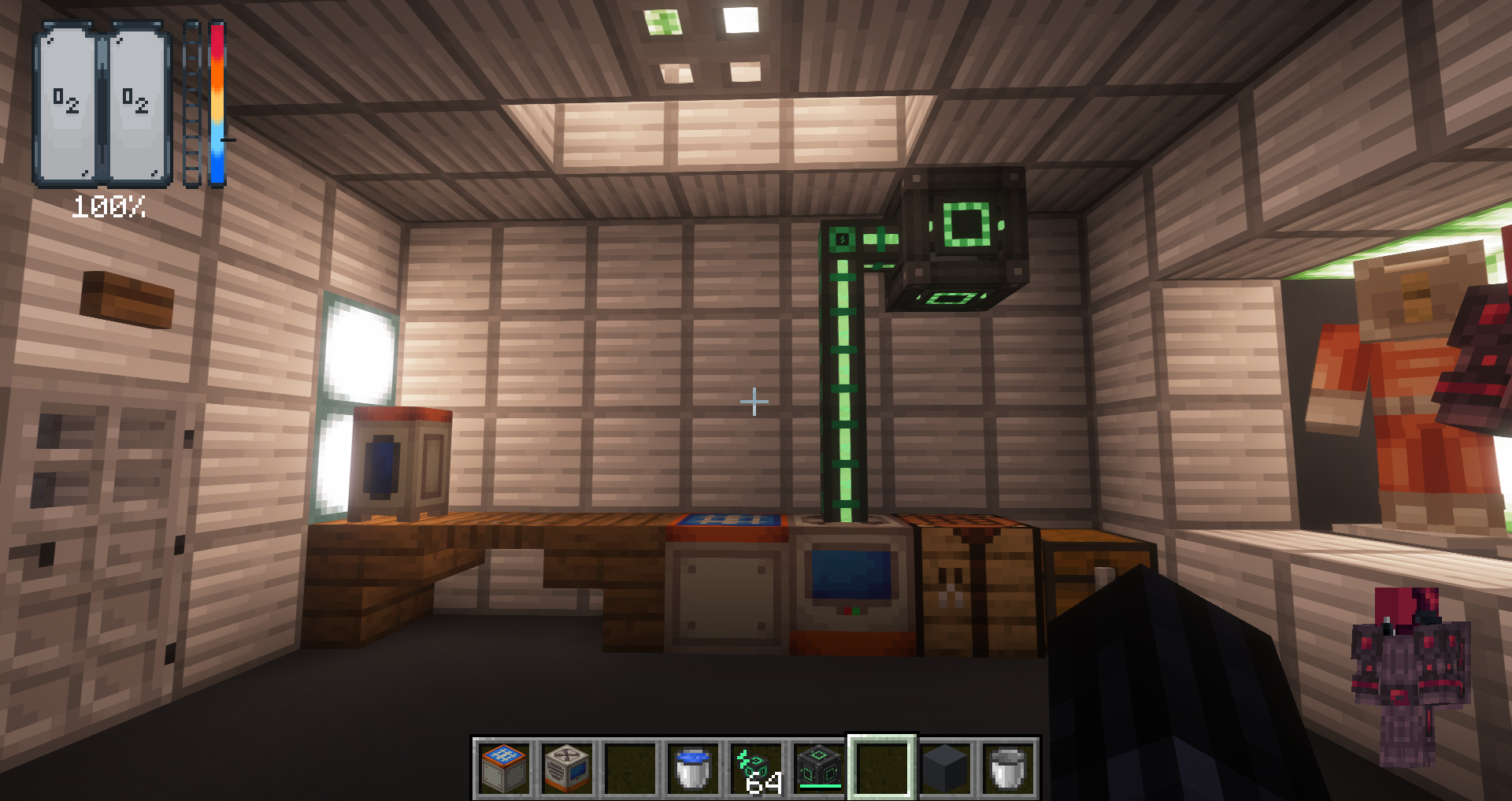
- HUD Integration: A clean overlay shows real-time oxygen bars, radiation levels, and a dynamic thermometer for temperature, making monitoring intuitive.
How to Get Started
Installation: Cosmic Additions is an addon for Cosmic Horizons, so install Cosmic Horizons first from Modrinth or CurseForge. Add Cosmic Additions to your mods folder. Requires Minecraft 1.20.1 with Forge loader. No additional dependencies, but compatible with JEI for recipes.
Crafting Suits: Start with basic materials (Steel for tier 1, titanium for Tier 2). Use an anvil or crafting table to assemble helmets, chestplates, leggings, and boots.
Exploration Tips:
- Tier 1 (Steel): Perfect for Mars, Luna, and space travel (-80°C to +120°C safe range).
- Tier 2 (Titanium): Handles Jupiter, Europa, and Mercury (-150°C to +300°C).
- Tier 3 (Nickel): Endgame gear for Venus, Neptune, Uranus, and Pluto (-250°C to +500°C).
Survival Guide:
 HUD Overview: Your heads-up display (HUD) is your lifeline. It shows:
- Oxygen Bar: A segmented bar (0-10 levels) indicating oxygen levels (0-100%). Bubbles decrease as oxygen depletes.
- Radiation Bar: A segmented bar showing exposure (0-60 units). Fills faster in high-radiation planets like Mercury or Pluto.
- Temperature Bar: A thermometer with a moving line indicating current temperature (°C). 0°C is neutral (center). Blue for cold, red for hot.
Oxygen Management
How it Works: Oxygen is consumed in hostile dimensions (e.g., space, moons, planets) at a rate based on your suit tier and activity. The variable OxygenLevel starts at 100% and decreases over time. When it reaches 0%, bubble effects appear, and you take damage (delegated to DecreaseProcedure).
Consumption Rate (per second):
No Suit: 2.0 (rapid depletion). Improvised/Steel (Tier 1): 0.5 (moderate, good for short trips). Titanium (Tier 2): 0.25 (slow, for longer explorations). Nickel (Tier 3): 0.1 (minimal, endgame).
Missing suit pieces increase consumption by 0.2 per piece.
Tips: Monitor the oxygen bar—bubbles mean you're low. Use oxygen tanks for quick escapes; they pause consumption. Experiment with partial suits, but full sets are essential for deep space.
Radiation Resistance
How it Works: Radiation accumulates in specific planets (e.g. Mercury, Pluto) as RadiationExposure (0-60 units). It increases at a rate based on your suit:
No Suit/Improvised: +4/s (reaches 60 in 15s). Steel (Tier 1): +2/s (reaches 60 in 30s). Titanium (Tier 2): +1/s (reaches 60 in 60s). Nickel (Tier 3): +0/s (inmune). When RadiationExposure reaches the threshold (15 for no suit, 30 for Steel, 60 for Titanium), it triggers the radiation effect, causing damage (1 HP/s), nausea, slowness, and accelerated oxygen consumption (if below 50%).

Tips: The radiation bar fills progressively. Use Titanium for medium-risk planets, Nickel for high-radiation ones. Partial suits increase exposure rate.
Temperature Regulation
How it Works: Each planet has a fixed temperature (inspired by NASA data, scaled for gameplay). TemperatureValue starts at 0°C and moves progressively toward the planet's temperature at a rate based on your suit:
No Suit/Improvised: +15/s (rapid).
Steel (Tier 1): +6/s (moderate).
Titanium (Tier 2): +3/s (slow).
Nickel (Tier 3): +0/s (inmune).
When TemperatureValue exceeds your suit's safe range, it triggers freeze (cold) or burning (hot) effects, causing damage, debuffs, and particles.
 Safe Ranges:
Steel: -80°C to +120°C.
Titanium: -150°C to +300°C.
Nickel: -250°C to +500°C.
Planet Temperatures:
Dimensions & Safety: Solar System (-60°C, hostile, tier 1)
Earth’s Moon (120°C, hostile, tier 1)
Mars Lands (-65°C, hostile, tier 2)
Mercury Wasteland (200°C, hostile, radiation, tier 2)
Venus Lands (460°C, hostile, tier 3)
Jupiter Lands (-110°C, hostile, tier 1)
J1407b Lands (-100°C, hostile, tier 1)
J1900 Planet (300°C, hostile, tier 1)
Europa Lands (-160°C, hostile, tier 1)
Glacio Lands (-150°C, hostile, tier 1)
Gaia Black Hole 1 (20°C, hostile, tier 1)
Neptune Lands (-200°C, hostile, tier 3)
Uranus Lands (-195°C, hostile, tier 1)
Pluto Wastelands (-225°C, hostile, radiation, tier 3)
Cosmic Moon (120°C, hostile, tier 1)
B1400 Centauri (0°C, hostile, tier 1)
Overworld (15°C, safe, tier 0)
Nether (228.88°C, safe, tier 0)
Safe Entities: Space nodules
Screenshots
Gallery
-
 Logo
Logo -
Versions
Files
Relations
Project Relations
More like this
Similar Mods
Suggestions use data such as tags, dependencies, dependents, descriptions, titles, and more to rank how much they overlap with this mod.
On ModDex
Community snapshot
By the numbers
Statistics

Want to reach Minecraft players?
We're looking for a server hosting partner to feature here and other parts of the site. Interested? Send us a message!
Get in touchGet it on
Available Platforms
On ModDex
Community snapshot
By the numbers
Statistics
Resources