
Community listing page, reviews here may not be monitored by the author.
Cracker's Wither Storm Mod: V-Sides Soundtrack


No reviews yet
Overrides the CWSM's default soundtrack with a fully custom UST written by a friend.

Community voices
Reviews
No reviews yet. Be the first to review this project!
Get it on
Available Platforms
Compatibility
Supported Environments
Runs entirely on the server. Also works in singleplayer.
About
Project Details
For authors
Embed Badge
If you're the author of this project, you can embed a live badge anywhere that supports HTML or Markdown. It updates automatically whenever ratings change.
Use HTML for any page that supports it, or Markdown for README files and Markdown-based descriptions.
Identifiers
Platform IDs
Resources
External Links
About
Description


NOTICE: Only versions 1.20.1 and above will be kept up to date.
ABOUT
This mod serves as an add-on and incorporates its very own soundtrack to Cracker's Wither Storm Mod, overriding the mod's default music with custom tracks written by the artist, Vertigo.
Important note: Like CWSM's default music, the volume of all tracks added by the mod can be adjusted via the "Jukebox/Note Blocks" slider in Options > "Music & Sounds" in the menu.
CONFIG FOLDER: config/CWSM V-Sides; Common.toml
Things that can be configured:
- Toggling any track in the mod from playing (includes an option where you get to disable the entire soundtrack)
- Whether music subtitles are active by default
- Whether the Withered Radio drops from the Wither Storm
- Disabling the message that shows up every time you enter a world for the first time
Exclusive music will play when the following conditions are met (by order of when they typically are going to be):
• A Wither Storm (Phase 1-3) is within 100 blocks in proximity of the player, stops playing if the player goes 14 blocks below the surface
• A Wither Storm (Phase 4-5) is within 230 blocks in proximity of the player, stops playing if the player goes 14 blocks below the surface
• A Withered Symbiont is within 69 blocks in proximity of the player
• A knocked out Wither Storm is within 88 blocks in proximity of the player (and additionally when resurrected)
• A Wither Storm (Phase 6-7) is within 350 blocks in proximity of the player, stops playing if the player goes 14 blocks below the surface
• The player is in the bowels
• The fight with the Command Block is initiated, 3 unique tracks for each phase
• The Wither Storm is ultimately vanquished from the world
The Withered Radio
- Obtained upon the defeat of a Wither Storm, allows the player to listen to all tracks played during the storm's active rampage at will as well as unused/exclusive (versions of) tracks that would've otherwise not been heard in default survival gameplay.
List of all tracks in the mod (in order of when they will typically play):
Additional features included in the mod:
• Depending on whichever song is currently being played, a message will appear by the player's action bar for a brief moment specifying the current track being played at the exact moment. The player can also run the command sequence /cwsmvsides.enable.subtitles (true/false) to toggle this feature as they please!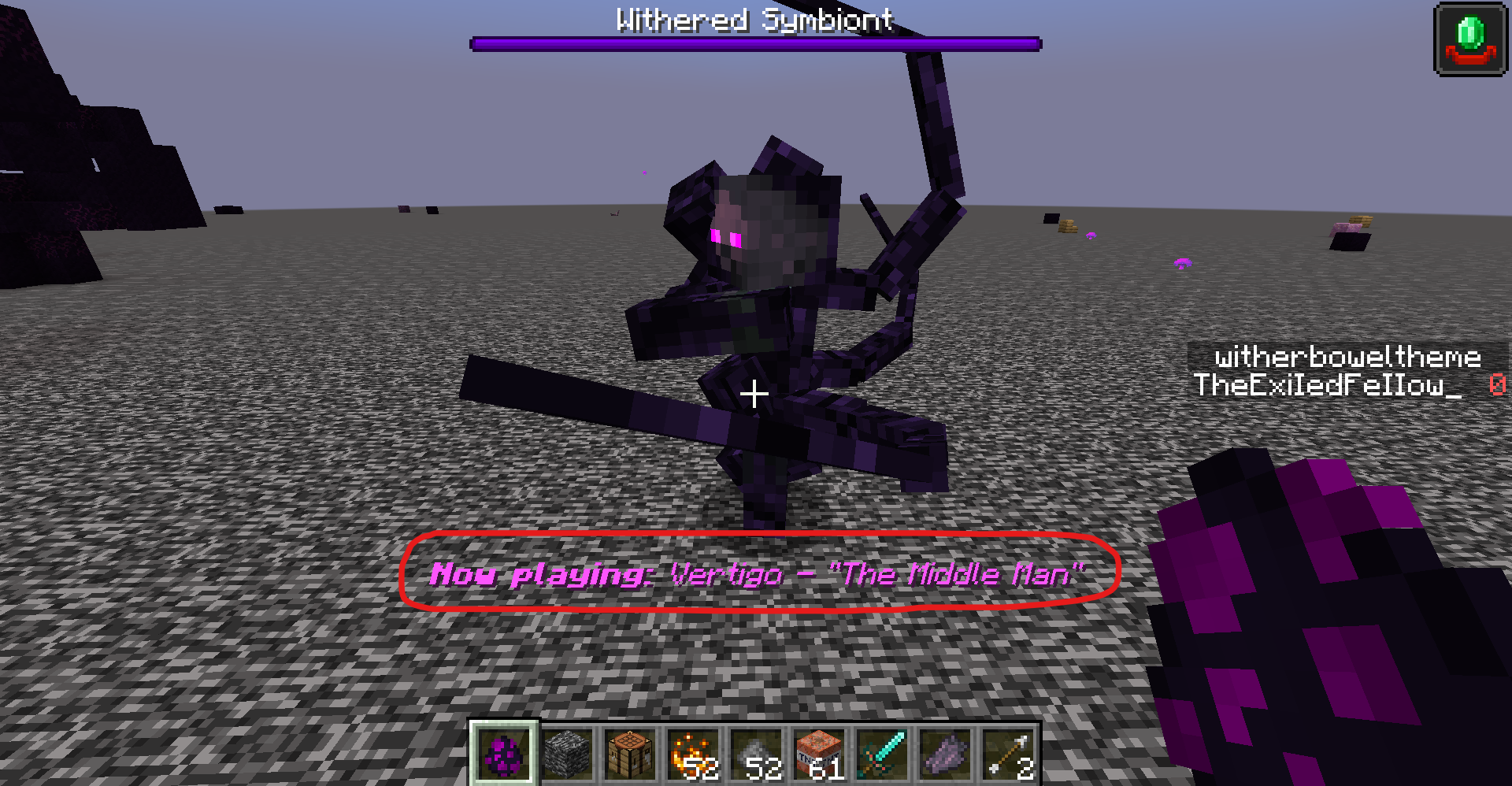
• The soundtrack can be toggled at any time via /cwsmvsides.enable (true/false)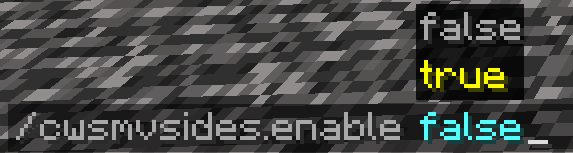
(Note: A message will pop-up every time the player enters a world for the first time stating exactly this.)
"Music only plays at boss spawn"
You probably had Dynamic Surroundings installed. Don't worry, there isn't a need to get rid of the mod. Instead, follow these steps to completely solve the issue while still having Dynamic Surroundings installed.
https://docs.google.com/document/d/1T0fpHUYm9zE_luBFx0mNjUFQxZxxc6drXSR_lBbBJCc/edit?usp=sharing
NOTICE: Only versions 1.20.1 and above will be kept up to date.
ABOUT
This mod serves as an add-on and incorporates its very own soundtrack to Cracker's Wither Storm Mod, overriding the mod's default music with custom tracks written by the artist, Vertigo.
Important note: Like CWSM's default music, the volume of all tracks added by the mod can be adjusted via the "Jukebox/Note Blocks" slider in Options > "Music & Sounds" in the menu.
CONFIG FOLDER: config/CWSM V-Sides; Common.toml
Things that can be configured:
- Toggling any track in the mod from playing (includes an option where you get to disable the entire soundtrack)
- Whether music subtitles are active by default
- Whether the Withered Radio drops from the Wither Storm
- Disabling the message that shows up every time you enter a world for the first time
Exclusive music will play when the following conditions are met (by order of when they typically are going to be):
• A Wither Storm (Phase 1-3) is within 100 blocks in proximity of the player, stops playing if the player goes 14 blocks below the surface
• A Wither Storm (Phase 4-5) is within 230 blocks in proximity of the player, stops playing if the player goes 14 blocks below the surface
• A Withered Symbiont is within 69 blocks in proximity of the player
• A knocked out Wither Storm is within 88 blocks in proximity of the player (and additionally when resurrected)
• A Wither Storm (Phase 6-7) is within 350 blocks in proximity of the player, stops playing if the player goes 14 blocks below the surface
• The player is in the bowels
• The fight with the Command Block is initiated, 3 unique tracks for each phase
• The Wither Storm is ultimately vanquished from the world
The Withered Radio
- Obtained upon the defeat of a Wither Storm, allows the player to listen to all tracks played during the storm's active rampage at will as well as unused/exclusive (versions of) tracks that would've otherwise not been heard in default survival gameplay.
List of all tracks in the mod (in order of when they will typically play):
Additional features included in the mod:
• Depending on whichever song is currently being played, a message will appear by the player's action bar for a brief moment specifying the current track being played at the exact moment.
The player can enter the command sequence /cwsmvsides.enable.subtitles (true/false) to toggle this feature as they see fit!
• The soundtrack can be toggled at any time via /cwsmvsides.enable (true/false)
(Note: A message will pop-up every time the player enters a world for the first time stating exactly this.)
"Music only plays at boss spawn"
You probably had Dynamic Surroundings installed. Don't worry, there isn't a need to get rid of the mod. Instead, follow these steps to completely solve the issue while still having Dynamic Surroundings installed.
https://docs.google.com/document/d/1T0fpHUYm9zE_luBFx0mNjUFQxZxxc6drXSR_lBbBJCc/edit?usp=sharing
Screenshots
Gallery
-
 CWSM: V-Sides
Versions
Files
Relations
Project Relations
More like this
Similar Mods
Suggestions use data such as tags, dependencies, dependents, descriptions, titles, and more to rank how much they overlap with this mod.
- Cracker's Wither Storm Mod
- Command Tool Expansion (Cracker's Wither Storm Mod Addon)
- The Lightbringer (Cracker's Wither Storm Mod)
- Explosive Block [Cracker's Wither Storm Mod and Enderite Mod]
- Explosive Block [Cracker's Wither Storm Mod]
- Cracker's Wither Storm | Elixir And Command Block Recipe
- Falcon's Wither Storm Adventure: Core
- Falcon's Wither Storm Addon (Discontinued)
- Wither Storm Delight
- Electro's Command Block Tools - CWM Addon
- More Command Block Tools
- CWSM Expansion
On ModDex
Community snapshot
By the numbers
Statistics
 (opens in a new tab)
Get it on
Available Platforms
On ModDex
Community snapshot
By the numbers
Statistics
Resources