Community listing page, reviews may not be monitored by the author.
Craft Calc

No reviews yet
Chat calculator: type a math expression and see the result instantly. Press Tab to paste it.

Community voices
Reviews
No reviews yet. Be the first to review this project!
Get it on
Available Platforms
About
Project Details
For authors
Embed Badge
If you're the author of this project, you can embed a live badge anywhere that supports HTML or Markdown. It updates automatically whenever ratings change.
Use HTML for any page that supports it, or Markdown for README files and Markdown-based descriptions.
Identifiers
Platform IDs
Resources
External Links
About
Description
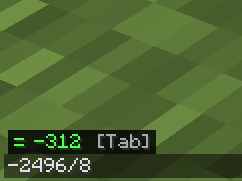
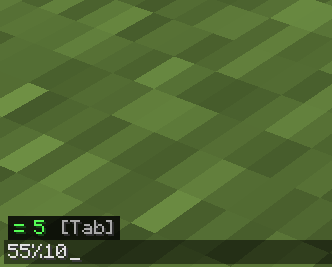
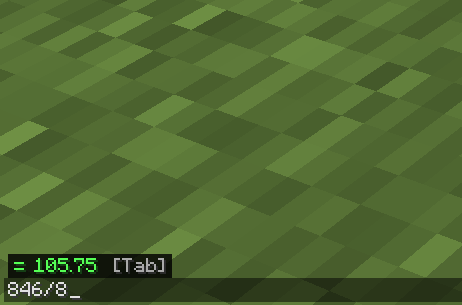
A calculator inside the Minecraft chat, with shortcuts built for players. Open the chat, type a math expression and the result shows up above the text box, no commands needed. Press Tab to replace the expression with its result.
What it is for
- Work out how many items, stacks or chests you need without leaving the game.
- Size farms and factories: how many machines are needed to reach a rate per minute.
- Quick math while playing, instead of opening a separate calculator.
How to use it
- Open the chat with
T. - Type an expression, for example
5*3+2. - Read the result above the text box.
- Press
Tabto paste it, orEnterto send the message as usual.
What it understands
- Operators:
+ - * / % ^and parentheses. Decimals use a dot (0.5). - Percentages:
20% de 150gives 30 ("de" means "of"). - Functions:
sqrtabsfloorceilroundminmaxpowlogln. - Minecraft helpers:
maq(120;30)(machines needed, rounded up),stacks(1000)andcofres(5000)(chests needed). - Constants:
stack(64),cofreorshulker(1728 items),doble(3456, double chest),segundo(20 ticks),minuto(1200 ticks) anddia(24000 ticks, one Minecraft day).
Examples: ceil(1000/stack) gives 16 stacks. 3*minuto gives 3600 ticks.
Minecraft shortcuts
On top of normal math, Craft Calc has a few shortcuts for things you calculate all the time in Minecraft. Every shortcut has an English and a Spanish name, and both do the same thing.
Ready-made numbers
These are numbers the mod already knows, so you don't have to remember them. Use them inside a calculation:
| Name | Spanish name | Value |
|---|---|---|
stack |
pila |
64 items (one full stack) |
chest |
cofre |
1728 items (a full chest or shulker box) |
double |
doble |
3456 items (a full double chest) |
second |
segundo |
20 ticks |
minute |
minuto |
1200 ticks |
day |
dia |
24000 ticks (one Minecraft day) |
Examples:
2*chestgives 3456 items.3*minutegives 3600 ticks.ceil(1000/stack)gives 16, the stacks needed to hold 1000 items.
Important: a word on its own does nothing. Typing just day shows no result, because the calculator only turns on when it sees an operation like +, -, *, / or a function. That way it never gets in the way of your normal chat messages. Type 2*day and you will see = 48000.
Shortcut functions
These do a calculation and round up, since you can't build half a machine or use half a chest.
machines(wanted ; per machine) (Spanish: maq) How many machines you need. The first number is how many items per minute you want, and the second is how many one machine makes per minute.
- A furnace smelts 6 items per minute. To smelt 120 per minute, type
machines(120;6)and you get= 20furnaces. - A blast furnace smelts 12 per minute:
machines(120;12)gives= 10.
stacks(items) How many stacks of 64 your items fill. stacks(1000) gives = 16.
chests(items) (Spanish: cofres) How many chests you need to store that many items. chests(5000) gives = 3. For double chests, type ceil(5000/double) and you get = 2.
These shortcuts assume stacks of 64. Items that stack to 16, or don't stack, need a different calculation.
Options
After running the game once, config/craftcalc.properties is created. You can change the result color, the box position (left, center or right) and show or hide the [Tab] hint.
Requirements
- Minecraft 26.3
- Fabric Loader and Fabric API
- Client-side only: no need to install it on the server.
Screenshots
Gallery
-
 551b31c77bcd2848a50c5de4d0b7deeba6f67990.png 551b31c77bcd2848a50c5de4d0b7deeba6f67990.png
-
 5d14258d742e9c2baaccbbc4304aadc89ba87710.png 5d14258d742e9c2baaccbbc4304aadc89ba87710.png
-
 0f9e693f6f42e2c57fe6ca6f3c143645395a09bc.png 0f9e693f6f42e2c57fe6ca6f3c143645395a09bc.png
Versions
Files
Relations
Project Relations
More like this
Similar Mods
Suggestions use data such as tags, dependencies, dependents, descriptions, titles, and more to rank how much they overlap with this mod.
On ModDex
Community snapshot
By the numbers
Statistics

Get it on
Available Platforms
On ModDex
Community snapshot
By the numbers
Statistics
Resources