
Community listing page, reviews may not be monitored by the author.
CraftPilot: AI Control

No reviews yet
Let AI assistants like Claude see and control your Minecraft client via MCP: screenshots, GUI, commands, movement.

Community voices
Reviews
No reviews yet. Be the first to review this project!
Get it on
Available Platforms
About
Project Details
For authors
Embed Badge
If you're the author of this project, you can embed a live badge anywhere that supports HTML or Markdown. It updates automatically whenever ratings change.
Use HTML for any page that supports it, or Markdown for README files and Markdown-based descriptions.
Identifiers
Platform IDs
Resources
External Links
About
Description
CraftPilot: AI Control
Give your AI assistant eyes and hands inside Minecraft. CraftPilot lets AI assistants such as Claude see and control your Minecraft client through the Model Context Protocol (MCP).
Fabric 1.21.1 | Client-side | NeoForge / Forge planned | Author: fr4me | License: MIT
What it does
CraftPilot runs a small local API inside your game client and, together with the craftpilot-mcp bridge, exposes it to MCP-capable AI assistants. The AI can:
- Take screenshots and look at what you see
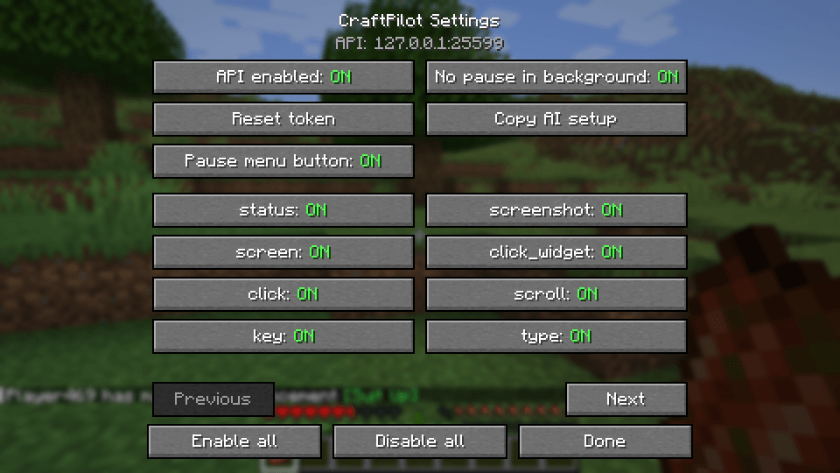
- Read and press GUI buttons on any screen (menus, inventories, death screen, mod screens)
- Press keys and type text
- Run commands and read their output
- Move, look around, jump, use items and attack
- Inspect your inventory and select hotbar slots
- List, open, create and leave singleplayer worlds
Use cases
- Test your own mods and modpacks automatically
- Reproduce bug reports step by step
- Build with commands while the AI does the typing
- Make screenshots for mod pages
Safety
- Listens only on 127.0.0.1 (loopback), never on your network
- Protected by a secret token generated on first start (reset with
/craftpilot token reset) - Every command can be toggled off in the settings, with tooltips explaining each one
- A master switch turns the whole API off
- The mod itself sends nothing to the internet
- Meant for singleplayer and testing. Not for public servers. Do not use it to cheat.
Setup in 3 steps
- Install the mod and Fabric API into your
modsfolder. - Install Node.js (https://nodejs.org).
- Add this to your
claude_desktop_config.json:
{"mcpServers":{"craftpilot":{"command":"npx","args":["-y","github:laur221/craftpilot"]}}}Tip: run /craftpilot setup in game, or press the Copy AI setup button, to copy this config to your clipboard. Then restart Claude Desktop.
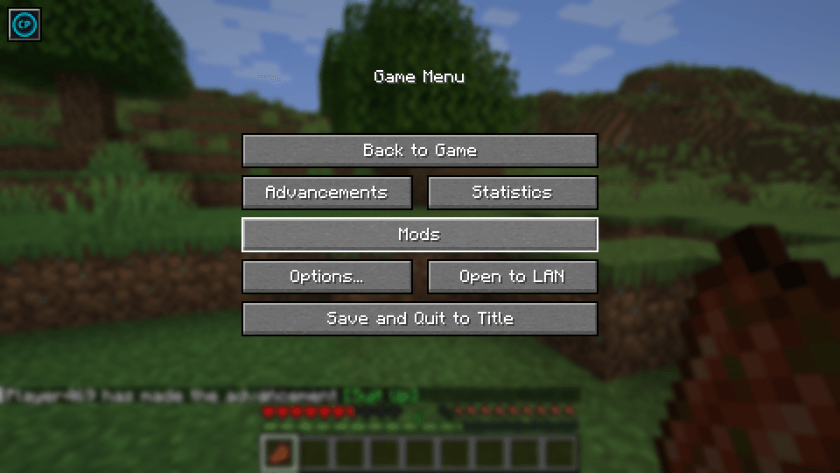
Settings
- Click the icon button in the top-left of the pause menu
- Or open the config screen through Mod Menu
- Commands:
/craftpilot config,/craftpilot setup,/craftpilot status,/craftpilot token reset
Tools
| Tool | Description |
|---|---|
mc_status |
Client state: world, screen, player, window, FPS, version |
mc_screenshot |
Take a screenshot and return it as an image |
mc_screen |
List widgets on the current screen with labels and coordinates |
mc_click_widget |
Click a button or widget by label or id |
mc_click |
Click at GUI coordinates |
mc_scroll |
Scroll the mouse wheel at GUI coordinates |
mc_key |
Press a key by name |
mc_type |
Type text into the focused field |
mc_command |
Run a slash command and return its output |
mc_chat |
Send a chat message |
mc_chat_log |
Read the last chat lines |
mc_move |
Hold movement keys for N ticks |
mc_look |
Set or adjust player rotation |
mc_hotbar |
Select a hotbar slot |
mc_use |
Hold use (right-click) for N ticks |
mc_attack |
Hold attack (left-click) for N ticks |
mc_inventory |
List inventory contents |
mc_world |
List, open, create or leave singleplayer worlds |
mc_respawn |
Respawn and close the death screen |
mc_capabilities |
Show which tools are enabled or disabled in settings |
FAQ
Does it work with AI clients other than Claude? Yes, any client that supports MCP servers over stdio can use craftpilot-mcp.
Which languages are supported? English and Russian.
Does it work on servers? It is client-side and meant for singleplayer and testing. Do not use it on public servers or to cheat.
Is anything sent to the internet? Not by the mod. Your AI client talks to its own provider as usual.
CraftPilot is not affiliated with Mojang, Microsoft or Anthropic.
Screenshots
Gallery
Versions
Files
Relations
Project Relations
More like this
Similar Mods
Suggestions use data such as tags, dependencies, dependents, descriptions, titles, and more to rank how much they overlap with this mod.
On ModDex
Community snapshot
By the numbers
Statistics

Get it on
Available Platforms
On ModDex
Community snapshot
By the numbers
Statistics
Resources