Community listing page, reviews may not be monitored by the author.
Create: Advanced Electricity / Technology Addon

No reviews yet
Powered lamps, fuse boxes, subsea cables and a modern diving suit for Create: Crafts & Additions.

Community voices
Reviews
No reviews yet. Be the first to review this project!
Get it on
Available Platforms
About
Project Details
For authors
Embed Badge
If you're the author of this project, you can embed a live badge anywhere that supports HTML or Markdown. It updates automatically whenever ratings change.
Use HTML for any page that supports it, or Markdown for README files and Markdown-based descriptions.
Identifiers
Platform IDs
Resources
External Links
About
Description
Description
Crafts & Additions: Lamps & Fuses
Put your Crafts & Additions power grid to work. This addon adds lamps that actually need electricity, real fuse boxes with circuits and breakers, long-distance subsea cables, a control room computer that watches your grid, and a modern diving suit with a working dive computer.
Everything runs on Forge Energy (FE) from Create: Crafts & Additions and connects with its normal wire spools and connectors.
Requirements
- Minecraft 1.20.1 with Forge
- Create
- Create: Crafts & Additions
- Optional: MrCrayfish's Furniture Mod: Refurbished (the Power Box can supply its lamps and appliances)
Install the mod on both the server and the client.
💡 Lighting
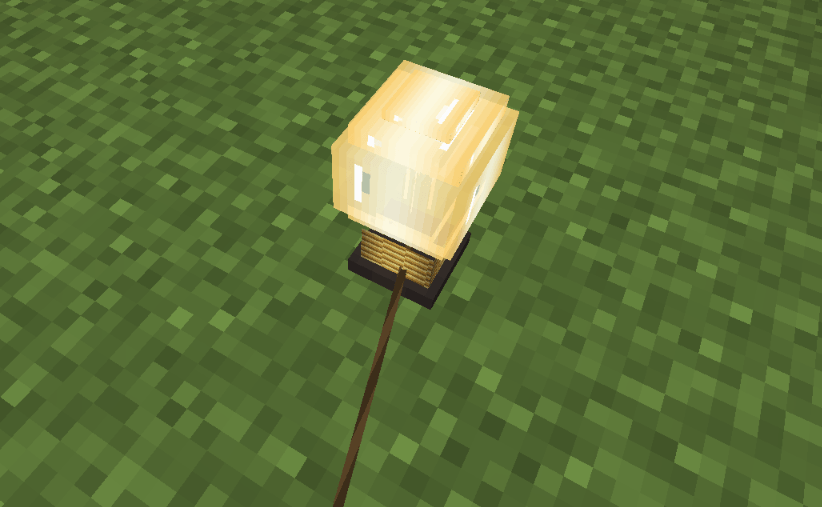
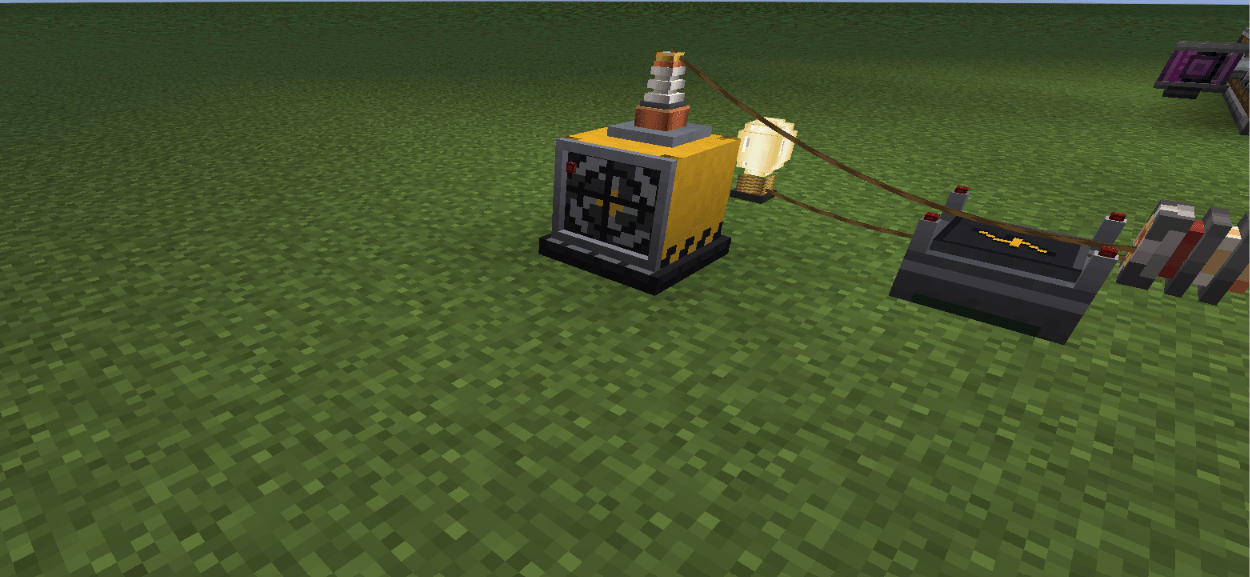
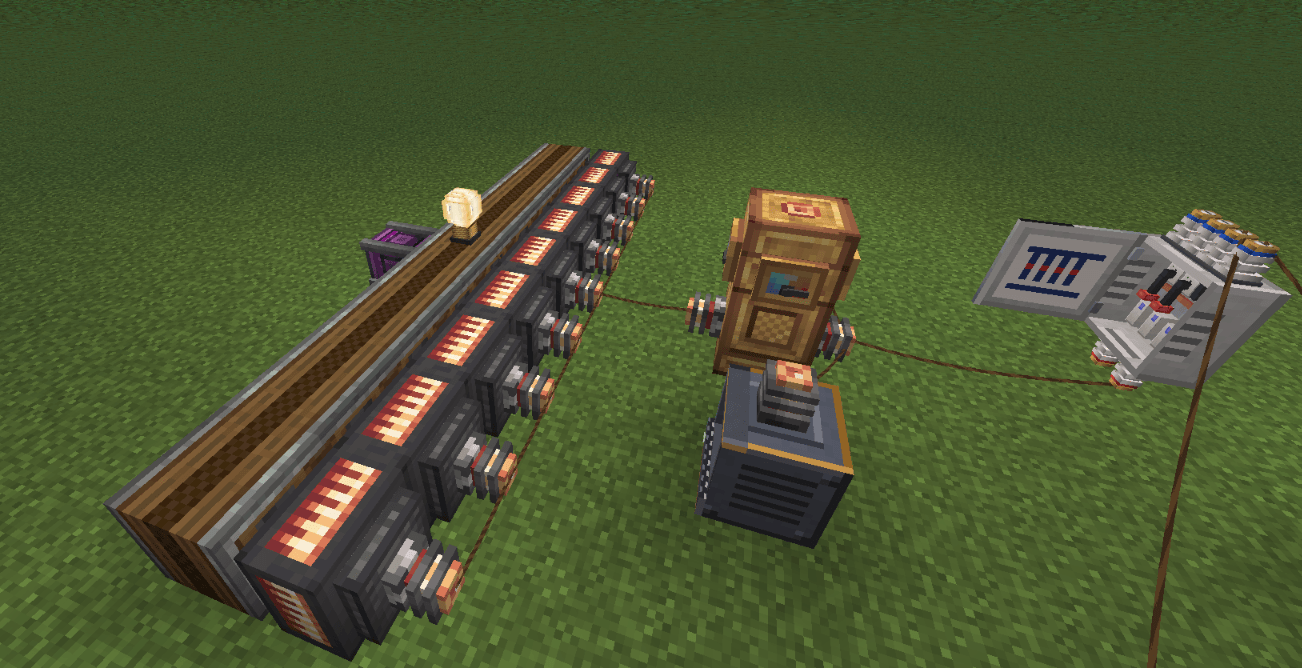
- Light Bulb and Industrial Lamp: they only light up while they receive power. Wire them up with a Crafts & Additions spool. They turn off within a fraction of a second when the power is cut, and they don't flicker.
- Alarm Lamp: a flashing red light with a siren. It is triggered by redstone. Right-click it with an empty hand to switch between siren, horn, bell and silent.
⚡ Power Distribution
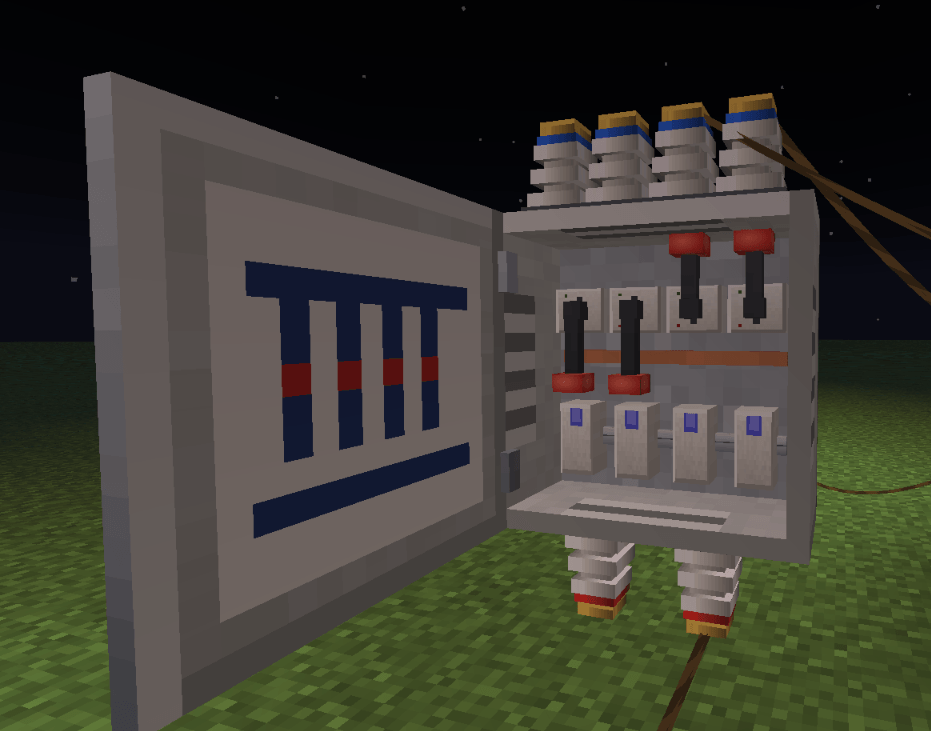
- Fuse Box:
- The door opens and closes, and an analog gauge on the door shows the current load.
- It has 2 inputs at the bottom (red terminals) and 4 circuits at the top (blue terminals).
- Every circuit has its own lever and its own fuse.
- The menu shows demand, throughput and an energy meter for each circuit.
- Fuses from 16 A up to 500 A:
- Overload a circuit for too long and its fuse blows. Short load spikes are tolerated.
- A blown fuse can be repaired with wire in a crafting table.
- Circuit Breakers from 16 A up to 500 A: they trip instead of burning out. Flip the lever back on and you're done.
- Control Panel: a switch with a power meter that sits in the line. It can be locked with a Key, and keys can be copied in a crafting table.
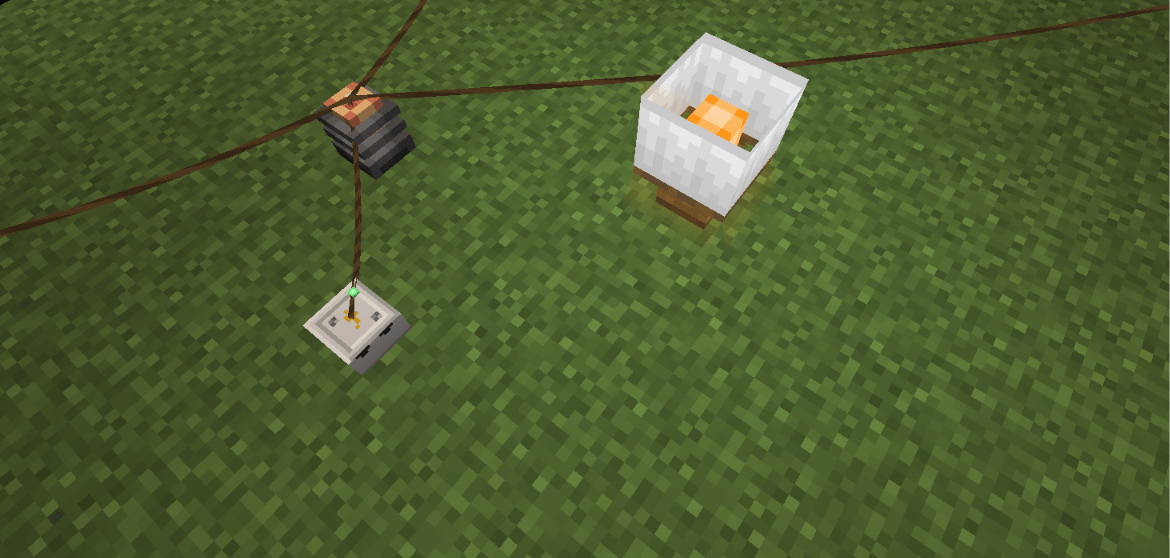
- Light Switch: a small wall switch that goes into the cable line, with power coming in at the bottom and going out at the top. Right-click to switch the lights behind it on or off. With a wire spool in your hand you connect cables instead.
- Emergency Stop: a yellow box with a red mushroom button that goes into the cable line. Right-click it and everything behind it goes dead at once. The button stays pressed until you reset it with sneak + right-click. While it is triggered it gives a redstone signal (great with the alarm lamp), and the control room computer reports it.
- Automatic connector modes: Crafts & Additions connectors are set up for you, so power flows through every cable. Connectors on generators pull, connectors on machines push, and accumulators charge from the side the power comes from and feed out on the other sides. This also works for machines from other mods. A connector you switch with the wrench keeps your setting. You can turn this off in the config.
- Power Box: a small junction box for walls and ceilings. It powers the block it is mounted on. With Refurbished installed, you can link that mod's lamps and appliances to it.
🗼 High Voltage Pylons
Build big lattice pylons layer by layer: a foot with concrete footings, segments, cross arms with four insulator strings and a top with a red warning light. The pylon looks like a real one: wide at the bottom, tapering up to the lowest cross arm, with longer arms at the bottom and shorter ones at the top. The insulators are real Crafts & Additions wire nodes: like large connectors they take gold or electrum wire, with spans of up to 128 blocks (configurable). Power flows through all insulators of a cross arm from pylon to pylon. Cross arms face across the line when placed, and you can climb up inside the pylon.
☀️ Solar & ☢️ Nuclear Power
- Solar Panel: generates power during the day, most at noon with a clear sky, less in the rain and nothing at night. It needs open sky above it. The power comes out of the + / − ports at the back.
- RBMK-1000 Reactor (inspired by HBM's Nuclear Tech): build the core yourself from single 4 block tall columns next to each other (the lids on top form the reactor floor) – fuel channels, control rods (manual or automatic), graphite moderators, absorbers, reflectors, boiler channels and blank columns.
- Fuel rods send neutrons in straight lines to the next fuel rod. Moderators turn fast neutrons into slow ones that split the fuel twice as well, control rods absorb depending on their position, absorbers stop everything and reflectors send neutrons back.
- Heat spreads to the neighbouring columns; boiler channels turn it into steam for the turbines. Like the real RBMK it has a positive void coefficient (less water = more power), xenon poisoning after a shutdown (the "iodine pit") and slow control rods.
- Two kinds of fuel: low and highly enriched uranium, each lasting well over an hour at full power. The lids glow when the core gets hot.
- The columns have detailed 3D lids: inserted fuel rods are visible (with a blue Cherenkov glow while running) and control rod drives rise and sink with the rod position.
- Fuel Loading Machine: a gantry crane over the core, controlled from the console – it takes fuel rods from a Fuel Rod Storage and inserts them, or pulls hot spent rods and stores them, from a safe distance.
- RBMK Console: a large control desk (5 × 3 blocks) whose screens show the core map live, the power history and the readings. Its control room GUI is fully interactive, with an HBM-style control room look (steel panel, green CRT displays, column icons with heat bars, power graph). The map shows every column by type, temperature, flux, xenon or water. Click a column to see everything about it and change its settings: rod position, rod group, whether the automatic moves it, the feed water valve of a boiler, or eject a fuel rod. Settings tab: automatic target and speed, warning temperature, automatic safety shutdown (by temperature or when a boiler runs dry), turbine valve and rod groups. AZ-5 and AZ-5 reset, plus a scrollable log of every action and warning.
- Computers connected to the console's data port read everything (
reactor.info(),reactor.columns(),reactor.log()) and can control the reactor; new log entries arrive as events. Server racks connected to the console can show it on websites. - Above 1000 °C it gets critical. At 1500 °C a channel ruptures: steam shoots out of the lids, the core rumbles and the siren wails, and 3 seconds later the steam explosion tears the core apart. Burning reactor debris flies everywhere and the fuel melts into glowing corium that melts its way down through the ground (configurable).
- Corium and debris are radioactive – hunger, weakness, nausea, poison and wither near them. The Geiger Counter clicks faster the closer you get and shows the dose.
- Steam cycle with pipes (like HBM's NTM Extended): the RBMK Steam Connector sits below or next to a column; Create pipes and pumps feed water in and pump steam out. The large steam turbines (3 × 3 × 5, with generator, coupling, high and low pressure casings) make power from it and give off spent steam, which must be piped into the large condenser (3 × 3 × 3) or a cooling tower (a basin and at least 3 shells – 5 % evaporates). The water is piped back to the steam connector.
⚛️ Uranium Production Line
- Uranium ore and fluorite ore (stone and deepslate) generate in the Overworld.
- Mine raw uranium, crush it with Create's crushing wheels, wash it with a fan into nuggets or smelt it into uranium ingots.
- Uranium Converter (electric): uranium ingot + fluorite + water → gaseous uranium hexafluoride (UF6).
- Gas Centrifuge (electric, 2 blocks tall): enriches UF6. Centrifuges next to each other form a cascade – the bigger, the faster; HEU needs at least 4. Output: enriched uranium (LEU) or highly enriched uranium (HEU) plus depleted uranium.
- RBMK fuel rods are now made from enriched uranium (3 LEU or 3 HEU). Spent fuel rods can be broken down into depleted uranium.
- Uranium items, fuel rods and spent fuel are radioactive in your inventory – store spent fuel in nuclear waste barrels behind reinforced concrete.
🔬 More Realistic RBMK & Radio
- Decay heat: after a shutdown the fuel keeps heating (about 6.5 % of the previous power, slowly fading) – keep cooling after AZ-5.
- Positive scram effect (Chernobyl): the graphite displacers at the tips of fully withdrawn control rods raise the power for the first seconds of insertion.
- Operational reactivity margin (ORM) in equivalent rods with a minimum (15 % of the control rods) – warning in the log and on the console. Boiler pressure in bar, safety valve at 85 bar. Both also in
reactor.info(). - Core mimic panel (like the round lamp board in the Chernobyl control room, 3 × 3 blocks): one lamp per channel – fuel yellow to white by power, control rods green / yellow / red by position (white rim while moving), boilers blue by water, overheated channels flashing red – plus a reactivity meter (needle −1…+1 β), reactor period, ORM and warning lamps. The core now really measures reactivity and period and warns about a short period.
- Radio: signal quality falls with distance – weak messages arrive garbled, music gets quieter. Higher radios reach further, shortwave (below 30 MHz) reaches much further at night, UHF a bit less, rain and thunderstorms dampen. The radio panel shows the band and the signal quality.
☢️ Radiation & Mushroom Cloud
- A meltdown now ends with a mushroom cloud: fireball, rising stem, glowing cap that cools to grey smoke, a rolling dust ring and a condensation ring – about 35 seconds long. Radioactive fallout settles in a wide circle around the crater.
- Stronger radiation: corium, debris and waste are much more radioactive and reach further. Players now accumulate a dose (RAD) that wears off only very slowly: from 100 RAD radiation sickness (new status effect), then weakness, nausea, poison, wither and blindness – 1000 RAD is lethal.
- Radiation effect on screen: green flicker and vignette depending on the dose, plus a RAD meter.
- Radioactive things now also radiate outside of inventories: a pulled fuel rod lying on the ground, the rod in the loading machine's gripper and fuel rod storages (their walls shield three quarters).
- Gas mask with filters: particle filter (P3, radioactive dust), activated carbon (poison gas, smoke) and NBC filter (everything, shortest life). Filters wear out while they filter; insert by holding mask and filter in one hand each and right-clicking. 3D model with lenses and a filter canister in the filter's colour.
- Lead armor (75 % radiation protection, good armor) – with new lead ore, lead ingots and blocks of lead (strong radiation shielding).
- RadAway removes 300 RAD, iodine tablets halve the absorbed radiation for 3 minutes.
🦺 Hazmat Suit & Oxygen Tanks
- Hazmat suit (gas mask, suit, leggings, boots): each piece blocks part of the radiation, the full suit 95 %. It wears down under radiation and is repaired with leather.
- The hazmat suit is a modern 3D model: panoramic visor, respirator with two filter cartridges, breathing air cylinder on the back, belt and chest dosimeter, high-vis yellow with reflective stripes.
- Oxygen tanks in 3 tiers: tier 1 (copper) 5 minutes, tier 2 (brass) 10 minutes, tier 3 (sturdy) 15 minutes of air.
🔊 Sounds
- New sounds for the power plant: reactor hum (louder with more power), control room alarm, meltdown siren and core rumble, AZ-5, control rod drives, steam venting, turbines, gas centrifuges, uranium converter, blast door motor and slam, Geiger counter clicks and radio static.
🚪 Doors & Deco
- Steel door, lab door (with window), security door (redstone only), heavy bunker door and steel hatch.
- Blast door: 3 × 3 blocks, the two leaves slide sideways into the wall – opens by right-click or redstone at any part.
- Lab tiles, vents, steel beams, block of depleted uranium and warning signs (radiation, high voltage, wear hazmat suit).
📻 Radio (reworked)
- New control panel: illuminated dial (drag, click or scroll to tune), digital display with signal bars, scan to the next station, 6 presets (sneak + click saves), volume and a status line (antenna, range, stations, computers).
- Simpler: antennas (satellite dish, radio tower) and frequency tuners within 8 blocks are found automatically – no cables needed.
- More detailed model: wooden case with brass trim, illuminated dial with a moving needle, digital frequency display, speaker grille, knobs and carrying handle.
🧱 Building Blocks
- Reinforced concrete (block, slab, stairs, wall), reinforced concrete bricks and tiles, pillars, hazard concrete, steel plating, steel grates and reinforced glass – blast resistant, and they shield radiation.
🔧 Electronics
- Electronics Workbench: put in a blank circuit board and fit it with resistors, capacitors, transistors, microchips, relays and LEDs on an 8 × 5 grid. The parts decide what you get: a basic, control or processor board.
- Every board looks exactly like you built it – in your hand, in the inventory and on the ground.
- The boards are needed for the RBMK console and the control rods.
🌊 Long Distance & Underwater
- Subsea Cable:
- A waterproof cable that lies on the seabed and carries power over very long distances, even through unloaded chunks.
- You place it like Create train tracks. Right-click a placed cable to select it as the start, aim at the target and watch the live preview, then right-click to lay the whole line.
- The line follows the terrain and curves smoothly out of the direction the start cable points in.
- Subsea Cable Converter: connects the subsea cable to a normal Crafts & Additions grid. Put a regular connector on top; the converter sets the connector's mode for you.
💻 Computers, Radio & Internet
Programmable computers that run on Crafts & Additions power. They talk to each other over the radio and host websites on server racks.
- Computer: right-click to open its screen. It boots CogOS, a small operating system with files, an editor, a web browser and a shell. Every block of the set has small colour-coded ports: + (red) and − (blue) for power, data (copper) to link devices to the computer, and antenna (silver) on the radio for dishes and towers. You click the port you want with the wire spool. Data wires carry no power, so every device that uses power gets its own power wire.
- Keyboard and Mouse: right-click the computer with them and they sit on the same desk block in front of the screen, cabled to the ports at the back. Sneak + right-click with an empty hand takes them off again. You need the keyboard to type and the mouse to click in apps and on links.
- Radio: wire it to the back of the computer; it gets its power through the same wire. Messages are sent on a frequency, which you set with the Frequency Tuner (wired to the computer, or placed next to the radio).
- Radio frequency: right-click the radio to set its frequency directly (or use a wired Frequency Tuner). Sneak + right-click shows its status.
- Range: 128 blocks for the radio alone, 512 with a Satellite Dish, up to 8000 with a Radio Tower (the tower needs power). All values are configurable.
- Build your own Radio Tower: start with the Radio Tower Base (power and antenna ports), then stack red or white lattice segments and platforms with railings and lamps (+300 blocks each), an antenna mast with dipoles (+600 blocks each) and a warning light on top. The tower tapers like a real broadcast mast: on the base the lattice starts out wide, and above every platform it gets one step narrower (wide → medium → narrow). Sneak + right-click a layer to change its width. The taller the tower, the further it reaches. You can climb up the centre pole inside, and the lights turn on when the tower has power.
- Music over the radio:
radio.play("c d e g:2", 140, "bell")plays a melody from every radio on the same frequency within range. All note block instruments are available. - Television: a flat screen on a stand with rabbit-ear antenna. Computers draw on it with
tv.text(...)and send the picture withtv.show(): through a data wire, or over the air to every TV tuned to the radio's frequency. Without a signal it shows static. - Server Rack: two blocks tall with 8 bays. Slide Servers in by hand with a right-click and pull them out with an empty hand; you can see them in the rack, with LEDs that light up while it has power. The rack holds up to 8 servers. Each server stores one website with its own domain, like
weather.mc. Wire it to a computer with a radio to bring it online. Give a server a password and you can manage it from anywhere in range over the radio (rack connect).
CogScript: computers are programmed in CogScript, a simple language that can still do a lot:
func greet(name) { return "Hello " + name + "!" }
for i in 1..3 { print(greet("Player " + i)) }

radio.send("Hello everyone!")
msg = radio.receive(10)          // wait up to 10 seconds
if msg { print(msg.from + ": " + msg.text) }

page = web.get("weather.mc/today")
Works like ComputerCraft: the blocks have the familiar light grey CC look, the computer reads and outputs redstone on all six sides, and CogScript understands the well-known CC names: term, colors, fs.open, os.pullEvent, os.startTimer, textutils, rednet (send to one computer or broadcast), peripheral and redstone.
Coding helper: type helfer and describe what you want, for example "chat over radio", "door with password" or "alarm system". The helper writes the program for you and opens it in the editor. helfer fix finds errors, explains them in plain language, spots typos ("did you mean print?") and repairs simple mistakes. helfer erklaer explains a program line by line. It all runs offline on the computer.
Designer: you can also build apps and websites without writing layout code. design menu opens a visual editor: place texts, buttons and panels with the mouse, drag them around, resize them, pick colors, and give buttons an ID (for apps) or a link (for websites). One click creates the matching app code skeleton. Designs work as websites too, and the browser shows them graphically.
It has variables, if/while/for, functions, lists and tables, plus text, math and list helpers. Apps can draw on the screen with colors and react to keys, clicks and radio messages. Websites can be plain text with colors and clickable links, or scripts that answer requests and keep their own data, for example a guest book. Type help on the computer for the full manual.
🎬 Ponder Scenes
Hold W over an item to watch an animated Create-style tutorial (Ponder). There are scenes for building the radio tower, the HV pylons, solar panels, the RBMK reactor with turbines and cooling tower, the computer, radio and music, the television, the server rack, light switch and emergency stop, the fuse box and the subsea cable, in English and German.
🖥️ Control Room Computer
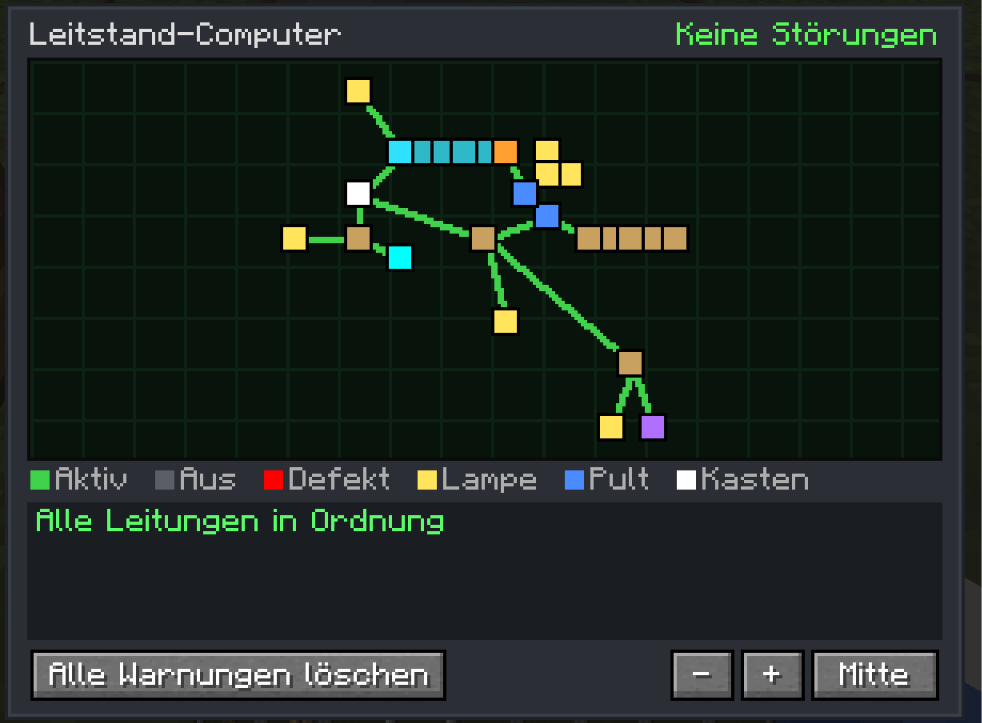
A live map of your whole grid. It shows fuse boxes, panels, lamps, connectors and subsea lines, and it updates the moment something is built or broken.
- It reports broken wires, missing blocks, blown fuses, overloads and switched-off circuits.
- It gives a redstone signal when there is a fault, which is handy together with the alarm lamp.
- Warnings can be dismissed one by one.
🤿 Modern Diving Suit
- Helmet: a full-face helmet with a transparent visor, so your face stays visible. It has a headlamp that lights up underwater.
- Suit: a drysuit with a built-in battery.
- Leggings and Boots: they make you swim faster.
- Full suit: protects you from electric shocks. Bare Crafts & Additions wires that hang in water will shock you otherwise!
- Air supply, used in this order:
- Air Hose connected to an electric Air Pump
- Oxygen Tank (refill it at the pump)
- the suit's battery as a reserve
- Charging Station: recharges the suit.
🫧 Decompression & Dive Computer
The diving system uses a realistic pressure model:
- Every 10 blocks of water adds 1 bar of pressure. Your body takes up pressure over time while you breathe compressed air.
- Ascend too fast after a deep or long dive and you get decompression sickness: nausea, then slowness and weakness, then damage. Diving back down (recompression) helps.
- Descend too fast and you get a barotrauma.
- Shallow dives down to about 8 blocks never need a stop, just like real diving.
A dive computer on your screen shows:
- depth and pressure
- ascent and descent speed
- remaining air and battery
- tissue saturation
- the next decompression stop
- flashing warnings
Follow the stops and nothing will happen to you.
⚙️ Configuration
You can adjust a lot in the common config file:
- power use of every block
- fuse ratings, tolerance and overload time
- subsea cable throughput and length
- air, tank and battery values
- electric shock
- reactor meltdown, explosion power, radiation and corium
- every decompression setting, or switch decompression off completely
🌍 Languages
English and German.
Requires Create and Create: Crafts & Additions. This is an independent addon and is not affiliated with the Create or Crafts & Additions teams.
Screenshots
Gallery
-
 Screenshot 2026-10-14 180912.png Screenshot 2026-10-14 180912.png
 -
 Screenshot 2026-10-14 180940.png Screenshot 2026-10-14 180940.png
 -
 Light Bulb Screenshot 2026-10-14 181241.png
 -
 Screenshot 2026-10-14 181257.png Screenshot 2026-10-14 181257.png
 -
 Screenshot 2026-10-14 181313.png Screenshot 2026-10-14 181313.png
 -
 Screenshot 2026-10-14 181359.png Screenshot 2026-10-14 181359.png
Versions
Files
Relations
Project Relations
More like this
Similar Mods
Suggestions use data such as tags, dependencies, dependents, descriptions, titles, and more to rank how much they overlap with this mod.
On ModDex
Community snapshot
By the numbers
Statistics

Get it on
Available Platforms
On ModDex
Community snapshot
By the numbers
Statistics
Resources