
Community listing page, reviews here may not be monitored by the author.
Create: Brass Man

No reviews yet
A Create mod addon which adds Iron Man like Blocks, Armor and abilitys.

Community voices
Reviews
No reviews yet. Be the first to review this project!
Get it on
Available Platforms
About
Project Details
For authors
Embed Badge
If you're the author of this project, you can embed a live badge anywhere that supports HTML or Markdown. It updates automatically whenever ratings change.
Use HTML for any page that supports it, or Markdown for README files and Markdown-based descriptions.
Identifiers
Platform IDs
Resources
External Links
About
Description
Create: Brass Man
Iron Man-inspired technology powered by Create's kinetic energy!
Overview
Create: Brass Man integrates Marvel's Iron Man technology with the mechanical world of Create. Build advanced powered armor, fly through the skies, and upgrade your equipment using kinetic energy and mechanical engineering.
Features
Brass Man Armor System
Complete Powered Armor Set:
- Chestplate - Flight system, energy storage (air & power)
- Helmet - HUD integration, tactical display
- Leggings - Enhanced movement speed and jump strength
- Boots - Fall damage negation
All armor pieces:
- Run on Create's rotational kinetic energy
- Support upgradable armor system (⭐ MK 2 → ⭐⭐ MK 7 → ⭐⭐⭐ MK 42)
Energy & Power Systems
Kinetic Battery
- Portable energy storage device
- Charges in Air Compressor
- Powers armor and equipment
- 15 upgrade slots for capacity/charging enhancements
Air Compressor
- Converts Create's rotational force to battery charge
- Place Brass Armor Stand on top for charging
- Compatible with all Create power sources
- Kinetic-powered operation
Power Mechanics:
- Compressed air system for flight
- Kinetic energy for abilities
Custom Machines
Modification Station
- Install upgrade modules on armor
- Simple 3-slot interface: Item + Upgrade = Enhanced Item
- Supports all armor pieces and batteries
Customization Station
- 4 unique armor variants featuring different abilities
- Personalize your suit appearance
- Each armor style comes with own abilities
Brass Armor Stand
- Display your suits
- Charge armor when placed on Air Compressor
- Decorative and functional
Kinetic Motor
- Use Kinetic Batteries as portable power source
- Convert stored energy to rotational force
Upgrade System
Remote Assembly (Chestplate-only)
- MK 2 (⭐) - Manual equip only
- MK 7 (⭐⭐) - Suit is callable from Brass Armor stand if it's on an Air Compressor
- MK 42 (⭐⭐⭐) - Suit can be called from chests, Brass Armor stands and will automatically fly to its assigned Brass Armor stand or enter Sentry mode (if no armor stand assigned) when thrown on the ground
Standard Upgrades (All armor pieces)
Power Upgrades:
- Power Cell - Increased energy capacity
- Quick Charge - Faster charging speed
- Power Efficiency - Decreased energy usage
Air Upgrades:
- Air Tank - Increased air capacity
- Air Efficiency - Decreased air usage
Other Upgrades:
- Speed Boost - Increase the max speed boost of your Brass Man leggings
- Remote Assembly - See Remote Assembly section for more information
Planned Upgrades:
- Jump Boost - Increase the max jump boost of your Brass leggings
Upgrade Features:
- 15 upgrade slots per armor piece
- Mix and match different upgrade types
- Visual indicators (stars) for upgrade levels
- Persistent through charging/storage
JEI Integration (Optional)
- Full recipe viewing support
- Shows all armor upgrade paths
- Remote Assembly tier progression visualization
- Tooltips display correctly in recipe viewer
Requirements
Minecraft: 1.21.1
Mod Loader: NeoForge 21.1.1+
Required Mods: Create 6.0.6+
Optional Mods: JEI (Just Enough Items) - for recipe viewing
Installation
-
Install NeoForge 1.21.1
- Download from NeoForged.net
- Run installer and select "Install Client"
-
Install Create Mod
- Download Create 6.0.6+ from CurseForge
- Place
.jarfile inmodsfolder
-
Install Create: Brass Man
- Download from CurseForge
- Place
.jarfile inmodsfolder
-
Optional: Install JEI
- Recommended for viewing recipes
- Download from CurseForge
-
Launch Minecraft!
Getting Started
Your First Armor
Materials Needed:
- Brass Ingots (from Create)
- Compact Mechanisms (Sequenced Assembly)
- Smart Mechanisms (Sequenced Assembly)
- Kinetic Circuits
- Various Create components
Crafting Process:
- View recipes in JEI or check the wiki
- Craft Brass Man Chestplate
- Craft Air Compressor
- Craft Brass Armor Stand
Setup:
- Place Air Compressor
- Connect to Create power source (windmill, water wheel, etc.)
- Place Brass Armor Stand on top of Air Compressor
- Right-click Armor Stand with Chestplate to begin charging
Flying Your First Flight
- Equip charged Brass Man Chestplate
- Press Space to take off (only if flying is enabled)
- Hold Space and look in direction to fly
- Release Space to hover/descend (if hover ability is enabled)
- Monitor air and power levels in HUD (if wearing helmet)
Flight Controls:
- Space - Ascend
- Shift - Descend (if airborne)
- Mouse Look - Direction control
Applying Upgrades
- Open Modification Station GUI
- Place item to upgrade in left slot
- Place upgrade module in middle slot
- Take upgraded item from right slot
Upgrade Info:
- Each armor piece has 15 upgrade slots
Upgrading Armor Level
- Open Modification Station GUI
2. Place One Compact Mechanism, One Smart Mechanism and One Precision Mechanism into the three slots on the left and press the upgrade button below the slots
Key Crafting Components
Base Components:
- Compact Mechanism - Sequenced Assembly recipe
- Smart Mechanism - Sequenced Assembly recipe
- Kinetic Circuit - Advanced movement parts
- Brass Casing - Create component
- Precision Mechanism - Create component
Energy Storage:
- Kinetic Battery - Portable power storage
- Power Cell Upgrade - Increase capacity
Upgrade Modules:
- Various upgrade items (view in JEI)
- Remote Assembly upgrade (MK 2/7/42)
> Tip: Install JEI to view all crafting recipes in-game!
Customization
Armor Styles
Use the Customization Station to apply one of 4 unique styles:
Default Brass Style
- 3x Yellow Dye
- 3x Orange Dye
- 1x Brass Ingot
Iced Brass Style
- 3x Cyan Dye
- 3x Light Blue Dye
- 1x Blue Ice
- grants the ability to normally walk/fly in powdered snow and resistance to freezing
Ocean Brass Style
- 3x Cyan Dye
- 3x Blue Dye
- 1x Heart of the Sea
- grants the ability to breathe, swim/walk/fly and see underwater
Flaming Brass Style
- 3x Red Dye
- 3x Yellow Dye
- 1x Blaze Powder
- grants the ability to breathe, swim/walk/fly and see under lava
Jarvis AI Assistant
- Customize flight speed
- Toggle hover mode
- Adjust HUD elements
- Configure abilities
Compatibility
Create Mod
- Status: Required
- Notes: Deep kinetic energy integration
JEI (Just Enough Items)
- Status: Optional
- Notes: Full recipe viewing support
REI (Roughly Enough Items)
- Status: Untested
- Notes: Should work but not officially supported
EMI (Enough Mod Items)
- Status: Untested
- Notes: Should work but not officially supported
License
MIT License © 2025 BlackRedCoded
This mod is provided as-is.
You may:
- Use in modpacks (with credit)
- Create addon mods
- Modify for personal use
You may NOT:
- Reupload without permission
- Claim as your own work
Support & Community
- Bug Reports: GitHub Issues
- Discord: Join my Discord
- CurseForge: Project Page
Credits
- Author: BlackRedCoded
- Create Mod Team: For the amazing Create mod framework
- Inspiration: Marvel's Iron Man universe
- Community: A great thanks to all of you for playing this mod!
Made with love, time and lots of kinetic energy
Screenshots
Gallery
-
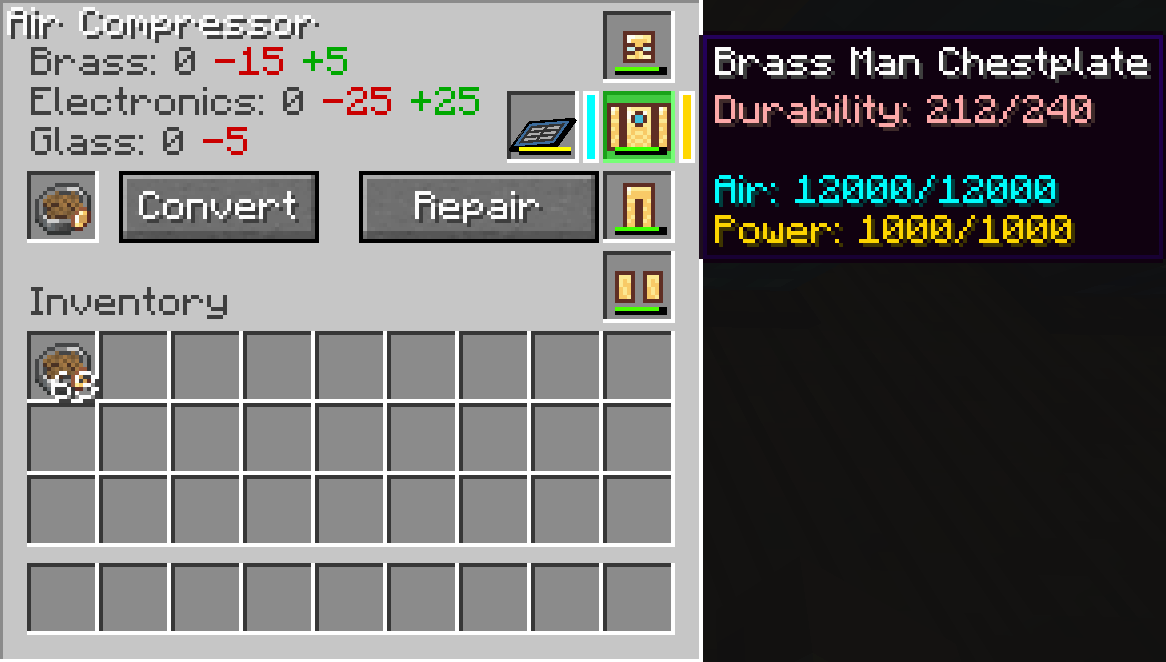 Air Compressor GUI The slot on the left is for scrapping items into repair materials, the armor slots on the right are selectable and used to repair selected armor piece using materials. The slot next to the chestplate is for charging specific items.
 -
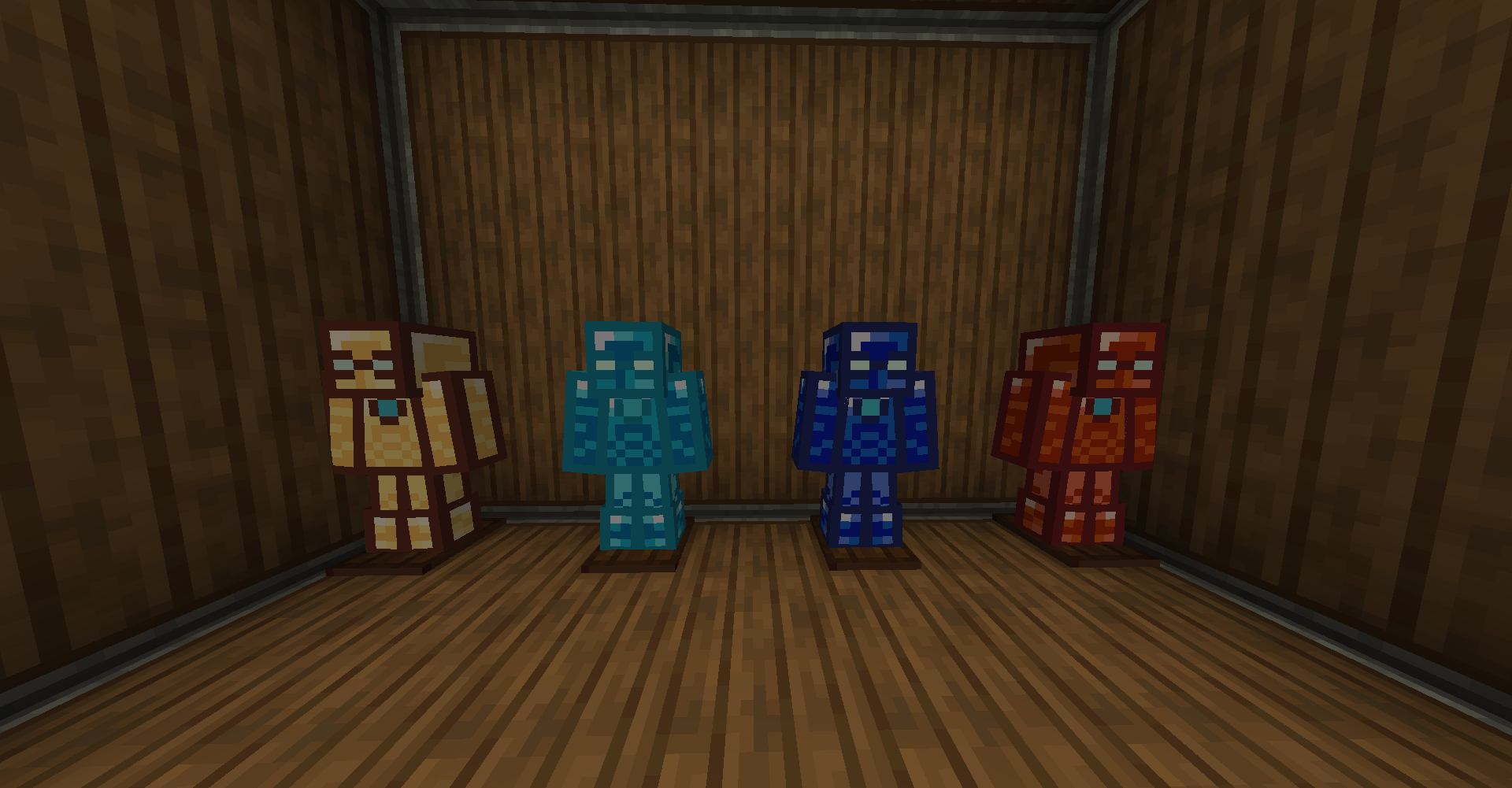 4 Different Styles 4 Different Armor Styles, yet!
 -
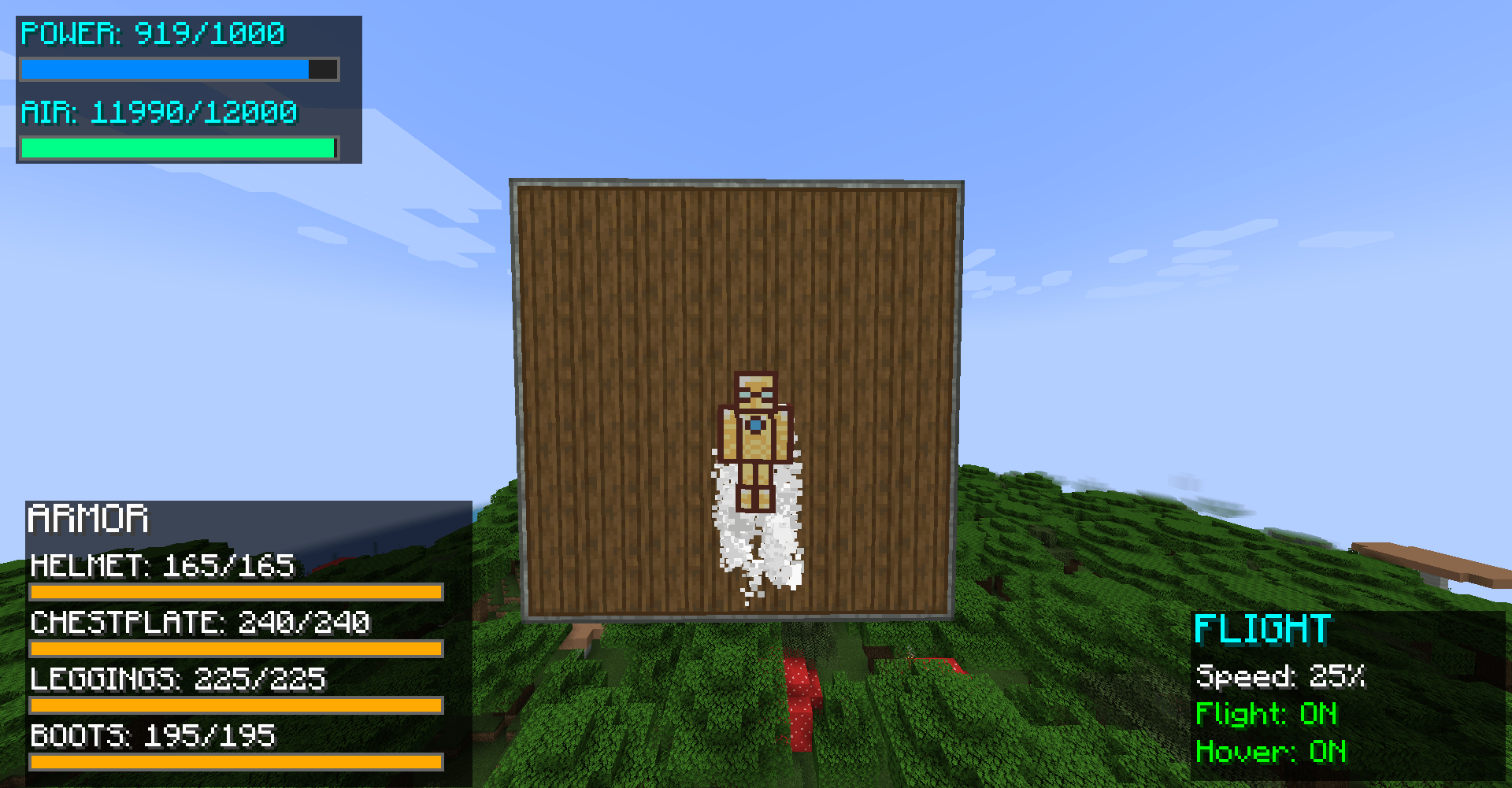 Hover mode
 -
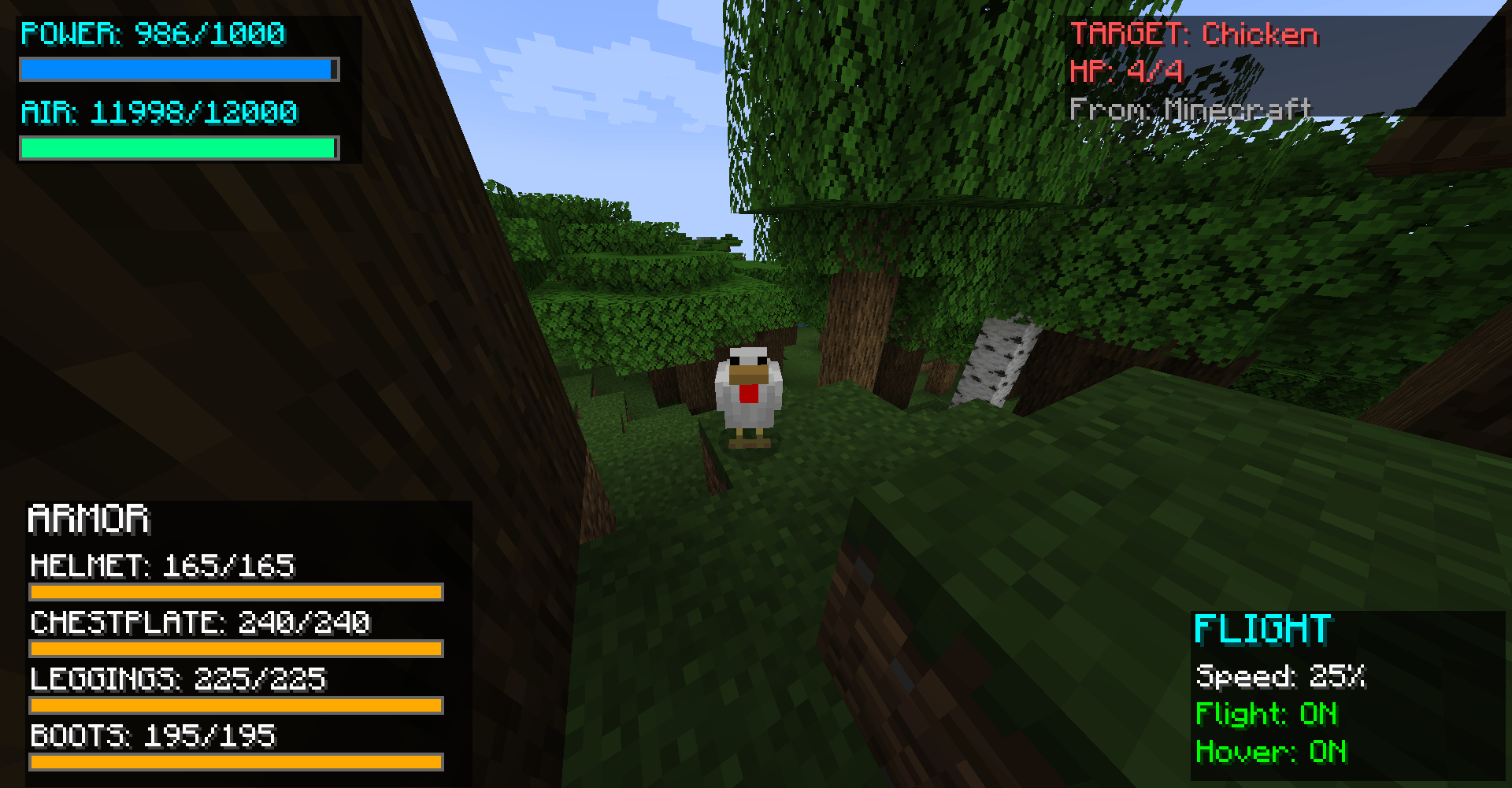 The HUD of the Brass Helmet
 -
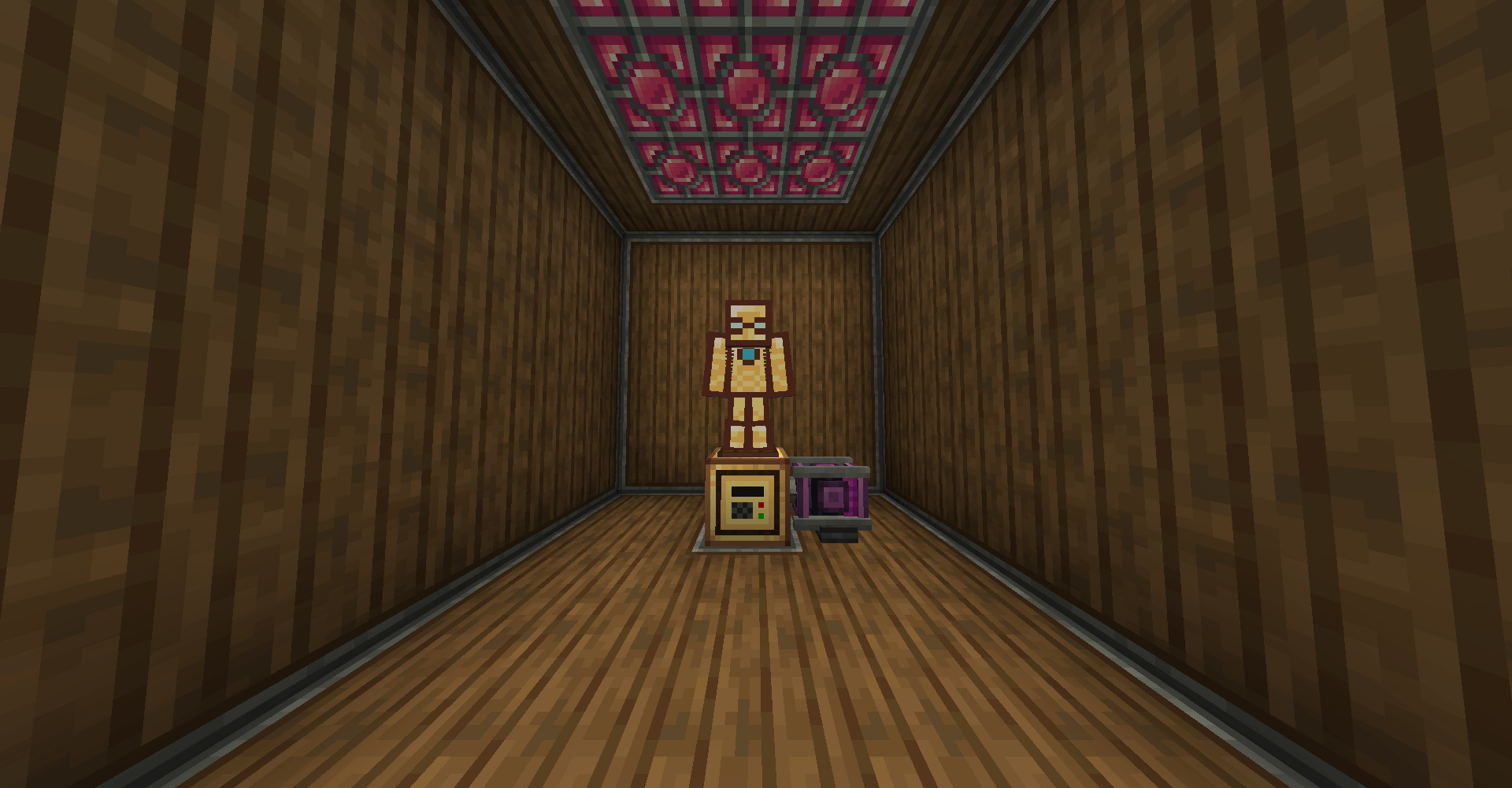 The full Brass Man Armor The Brass Armor set on a Brass Armor Stand on top of a Air Compressor powered by a creative motor.
Versions
Files
Relations
Project Relations
More like this
Similar Mods
Suggestions use data such as tags, dependencies, dependents, descriptions, titles, and more to rank how much they overlap with this mod.
On ModDex
Community snapshot
By the numbers
Statistics
 (opens in a new tab)
Get it on
Available Platforms
On ModDex
Community snapshot
By the numbers
Statistics
Resources