Community listing page, reviews may not be monitored by the author.
Create: EasyNBTs

No reviews yet
A mod that replaces NBT nested blocks such as in copycats in bulk.

Community voices
Reviews
No reviews yet. Be the first to review this project!
Get it on
Available Platforms
About
Project Details
For authors
Embed Badge
If you're the author of this project, you can embed a live badge anywhere that supports HTML or Markdown. It updates automatically whenever ratings change.
Use HTML for any page that supports it, or Markdown for README files and Markdown-based descriptions.
Identifiers
Platform IDs
Resources
External Links
About
Description
Create: EasyNBTs
What is it?
Create: EasyNBTs is a utility mod for the Create ecosystem designed to make bulk block replacements in .nbt schematic files (like Copycat blocks) effortless. Whether you are updating a massive build or switching palettes across blueprints, EasyNBTs has you covered!
Key Features
- Quick Command Access: Even though the mod is heavily GUI-based, it features a smart command system that scans available Create schematics and autocompletes block syntax.
- Easy2Use: Designed so anyone can understand it immediately, automatically stripping unnecessary prefixes like
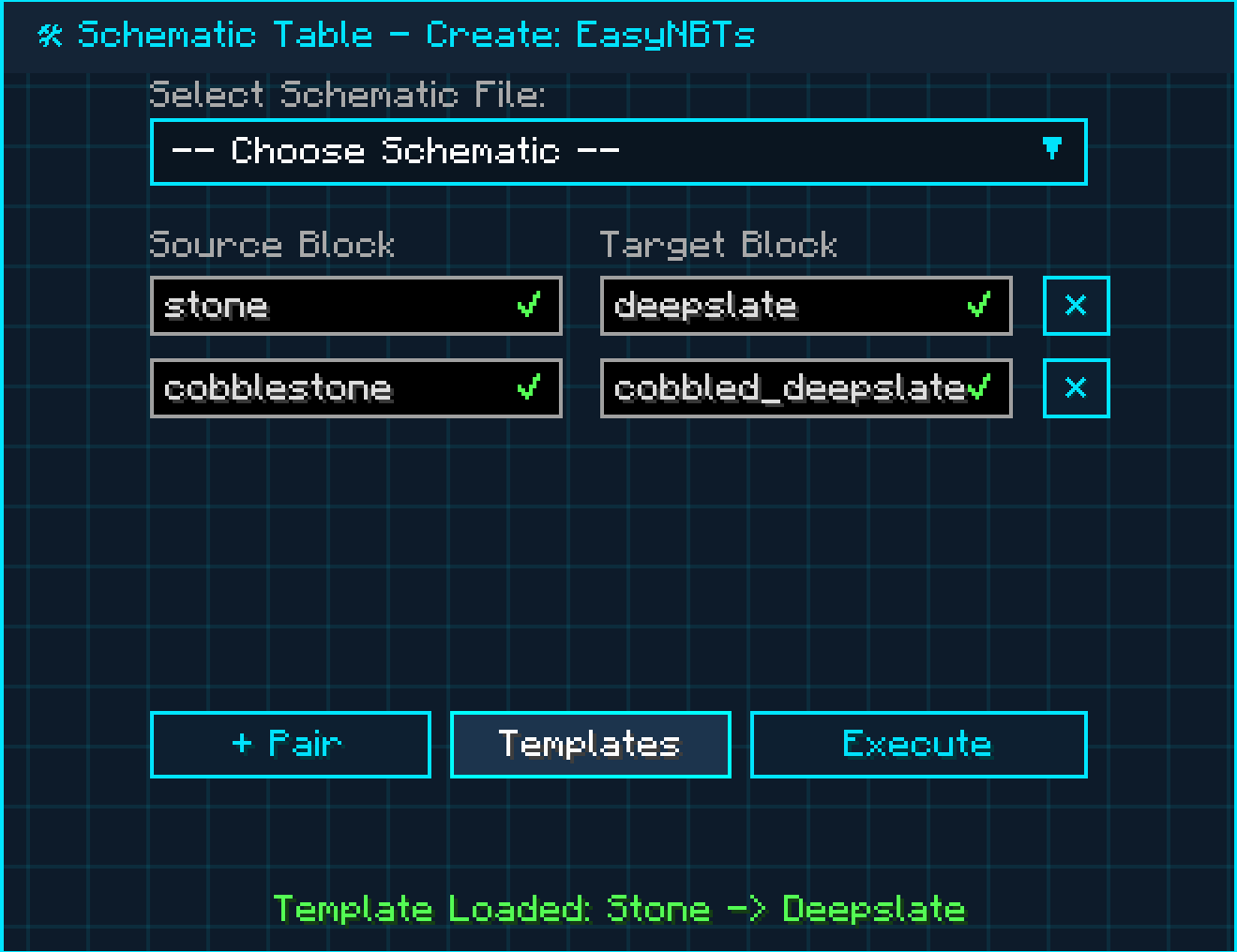
minecraft:. (Note: For now, autocorrect supports blocks with standard 90-degree rotations. See Future Plans for more details). - Schematic Inspired GUI: Pair up to 4 block replacements at once and choose your desired schematic to convert.
- Yummy moving grid yesyesyes
Controls & Commands
Opening the GUI
- Type
/nbtswitchin chat. - Press
LEFT ALT(orALT + S).
GUI Basics
- Pair: Add a conversion table row.
- Choose Schematic: Select the
.nbtfile you want to edit. - Source Block: The original block in your
.nbtfile. - Target Block: The block you want to swap in.
- Templates: Quick-load presets to show you how syntax should look.
- Execute: Replaces the chosen blocks in the schematic. (AVOID USING A SCHEMATIC THAT IS CURRENTLY IN YOUR INVENTORY; RE-SAVE IT FIRST!)
Command Version Basics
- Quick Pros: Very fast setup that outputs directly into a brand-new file.
1. /nbtswitch: Opens the GUI.2. /nbtswitch <source_block>: Sets the target block you want to replace.3. /nbtswitch <source_block> <target_block>: Sets the replacement block.4. /nbtswitch <source_block> <target_block> <original_file>: Selects your file (autocompletes for you to prevent typos).5. /nbtswitch <source_block> <target_block> <original_file> <new_file_name>: Creates a new converted schematic file.- Example Syntax:
/nbtswitch oak_log acacia_log bighouse.nbt tuffhouse
Installation & Setup
Prerequisites
Before installing Create: EasyNBTs, make sure you have installed:
- Fabric Loader (For your target Minecraft version)
- Fabric API (Required library)
Step-by-Step Setup
- Download the latest
Create-EasyNBTs-x.x.x.jarfrom the Releases / Versions tab. - Locate your Minecraft installation folder:
- Windows:
%appdata%\.minecraft - macOS:
~/Library/Application Support/minecraft - Linux:
~/.minecraft
- Windows:
- Drag and drop both Fabric API and Create: EasyNBTs into your
modsfolder. - Launch the game using your Fabric launcher profile.
- In-game, press
LEFT ALTor type/nbtswitchin chat to open the menu!
FAQ
Q: Can I run this mod on NeoForge?
A: Yes, absolutely! You just need to install Forgified Fabric API (and Sinytra Connector) in your NeoForge setup.
Future Plans & Bug Reporting
Future updates will focus on adding block palettes and expanding command capabilities. Planned features include:
- Multi-block Perlin noise texture generation for single-block walls (simulates gradient texturing).
- Vignette-style block shadowing and sun-angle calculations (using a color, saturation, and tone database).
- Extended stability for all modded blocks. (Note: This mod dynamically supports every modded block, but if you encounter any edge-case crashes, please report them below).
- Full support for 45-degree rotated blocks (does not affect nested Copycat blocks).
- Bringing Perlin noise and shadowing options to the command line version with up to 3 replacement blocks.
Bug Reporting
Found a bug? Contact alexgamingfun in Discord DMs (Display: Hunter / HunterousAleks).
A Note from the Developer
To everyone who downloads this mod: thank you! I love the Create mod and wanted to give back to this amazing community.
Why did I make this mod?
Because I know the pain of spending countless hours swapping blocks manually one-by-one, only to be disappointed with the final look. Existing online NBT conversion tools don't work with Copycat blocks—so I built this in-game tool to solve that problem for everyone.
Supported Mods & Minecraft Versions
Supported Mods
While all block-adding mods are dynamically supported, these popular ecosystem mods have been tested:
Create Ecosystem
- Create
- Create: Copycats+
- Create Deco
- Create: Connected
- Create: Design n' Decor
- Create: Steam & Rails
- Create: Alloyed
Building & Decor Mods
- Chipped
- FramedBlocks
- Rechiseled
- Architect's Palette
- Handcrafted
- Macaw's Bridges
- Macaw's Roofs
- Macaw's Windows
- Supplementaries
- …and many more!
Minecraft Version
Currently targeting 1.21.1 (the most active version). Additional version ports will be released based on community feedback!
License
Licensed under CC0 1.0 Universal (Public Domain). Feel free to use this mod in any modpack!
Screenshots
Gallery
Versions
Files
Relations
Project Relations
More like this
Similar Mods
Suggestions use data such as tags, dependencies, dependents, descriptions, titles, and more to rank how much they overlap with this mod.
On ModDex
Community snapshot
By the numbers
Statistics

Get it on
Available Platforms
On ModDex
Community snapshot
By the numbers
Statistics
Resources