
Community listing page, reviews here may not be monitored by the author.
Create: Instant Schematics


No reviews yet
A Create addon that instantly loads schematics without using the Schematic Table.
Community voices
Reviews
No reviews yet. Be the first to review this project!
Get it on
Available Platforms
Compatibility
Supported Environments
Must be installed on both the client and the server.
About
Project Details
For authors
Embed Badge
If you're the author of this project, you can embed a live badge anywhere that supports HTML or Markdown. It updates automatically whenever ratings change.
Use HTML for any page that supports it, or Markdown for README files and Markdown-based descriptions.
Identifiers
Platform IDs
About
Description
Create: Instant Schematics





Overview
Have you ever wondered why Create's Schematic Table takes so long to upload large schematics?
Why wait, when the schematic already exists?
Create: Instant Schematics is a lightweight Create addon that lets players instantly convert a held Empty Schematic into a written Schematic from an existing .nbt file.
Beyond instant loading, the mod also introduces multiplayer quality-of-life features, including sharing schematic holograms with other players and synchronizing hologram movements in real time, making collaborative building significantly easier.
Instead of waiting for the Schematic Table to upload large files every time, simply run a command and start building immediately.
The mod does not introduce a custom schematic format, GUI, uploader, printer, or hologram renderer. Instead, it builds directly on Create's existing schematic system, allowing Create to handle hologram previews, placement settings, and printing exactly as intended. This means full compatibility with Create's native schematic workflow while eliminating unnecessary waiting.
Features
- Instantly load an existing
.nbtschematic with a command. - List available schematics without leaving the game.
- Recycle a written schematic back into an Empty Schematic.
- Share a loaded schematic directly with another online player.
- List and clear received shared schematics from the client schematic folder.
- Provides tab completion for available schematic filenames.
- Uses Create's native schematic preview and placement behavior.
- Supports filenames with spaces when enclosed in quotes.
- Validates schematic paths to prevent directory traversal.
- Preserves schematic files when unloading a schematic item.
- Synchronizes the client cache so Create can immediately display the hologram preview.
Update 1.0.0
Version 1.0.0 expands the command workflow:
/cis listlists the.nbtschematics available to you./cis share <player>sends your currently loaded schematic to another online player./cis sharedlistlists schematics you have received through CIS sharing./cis load <filename>now supports tab completion for available schematic files.
How To Use This Mod
Install Create: Instant Schematics. See the installation instructions below.
Choose the workflow that matches your setup:
- Singleplayer: Simply use the provided commands to load or unload schematics.
/cischematic load <filename>/cischematic list
- Multiplayer Server: Continue with the steps below.
- Singleplayer: Simply use the provided commands to load or unload schematics.
Ensure the desired
.nbtschematic is available on the server under:
schematics/uploaded/<playerName>/Once the file is there, use /cischematic load <filename> to instantly convert a held Empty Schematic into a written Create Schematic.
If your server host does not allow direct file uploads (for example, Aternos), upload the schematic once using the Create's Schematic Table. After the file has been uploaded to the server, you can reuse it instantly with the provided commands without waiting for another upload.
To share a loaded schematic with another online player, hold the written schematic and run
/cischematic share <player>. The receiving player gets a client-side copy for previewing and reuse.
Commands
/cischematic load <filename>
/cischematic list
/cischematic unload
/cischematic share <player>
/cischematic sharedlist
/cischematic clearshared
Short aliases are also available:
/cis load <filename>
/cis list
/cis unload
/cis share <player>
/cis sharedlist
/cis clearshared
If the filename does not end with .nbt, the extension is appended automatically.
Example:
/cischematic load "example.nbt"/cischematic load <filename> supports tab completion for available .nbt files.
Command summary:
| Command | Description |
|---|---|
/cischematic load <filename> |
Converts a held Empty Schematic into a written Create Schematic for an existing .nbt file. |
/cischematic list |
Lists the schematics available in your schematic source folder. |
/cischematic unload |
Converts a held written schematic back into an Empty Schematic without deleting the file. |
/cischematic share <player> |
Shares the held loaded schematic with another online player. |
/cischematic sharedlist |
Lists CIS shared schematics stored on your client. |
/cischematic clearshared |
Deletes CIS shared schematic files from your client schematic folder. |
Schematic Files
In singleplayer, schematics are loaded from:
schematics/<filename>.nbtOn multiplayer servers, schematics are loaded from:
schematics/uploaded/<playerName>/<filename>.nbtFor example, player Steve on a multiplayer server would load:
schematics/uploaded/Steve/example.nbtRunning /cischematic unload only recycles the held schematic item. It does not modify or delete the .nbt file.
Schematics received through /cischematic share <player> are saved on the receiving client as cis_shared_*.nbt files under:
schematics/Use /cischematic sharedlist to list those received files, or /cischematic clearshared to remove them.
Installation
- Install Minecraft 1.20.1.
- Install Forge 47.4.x.
- Install Create 6.0.x.
- Place Create: Instant Schematics into your
modsfolder. - Launch the game or server.
Java 17 is required.
Requirements
| Create Version | CIS Version |
|---|---|
| 0.5.1.x | 1.0.0 |
| 6.0.x | 1.0.1 |
Notes
Very large schematics may still cause short freezes while Create loads and renders the hologram preview. This mod bypasses the upload process but intentionally relies on Create's native rendering and placement pipeline, so overall performance for extremely large schematics remains limited by Create and Minecraft.
Links
- GitHub: RSlover521/create-instant-schematics
- Issues: Report a bug
- License: MIT
Create: Instant Schematics

Overview
Have you ever wondered why Create's Schematic Table takes so long to upload large schematics?
Why wait, when the schematic already exists?
Create: Instant Schematics is a lightweight Create addon that lets players instantly convert a held Empty Schematic into a written Schematic from an existing .nbt file.
Beyond instant loading, the mod also introduces multiplayer quality-of-life features, including sharing schematic holograms with other players and synchronizing hologram movements in real time, making collaborative building significantly easier.
Instead of waiting for the Schematic Table to upload large files every time, simply run a command and start building immediately.
The mod does not introduce a custom schematic format, GUI, uploader, printer, or hologram renderer. Instead, it builds directly on Create's existing schematic system, allowing Create to handle hologram previews, placement settings, and printing exactly as intended. This means full compatibility with Create's native schematic workflow while eliminating unnecessary waiting.
Features
- Instantly load an existing
.nbtschematic with a command. - List available schematics without leaving the game.
- Recycle a written schematic back into an Empty Schematic.
- Share a loaded schematic directly with another online player.
- List and clear received shared schematics from the client schematic folder.
- Provides tab completion for available schematic filenames.
- Uses Create's native schematic preview and placement behavior.
- Supports filenames with spaces when enclosed in quotes.
- Validates schematic paths to prevent directory traversal.
- Preserves schematic files when unloading a schematic item.
- Synchronizes the client cache so Create can immediately display the hologram preview.
Update 1.0.0
Version 1.0.0 expands the command workflow:
/cis listlists the.nbtschematics available to you./cis share <player>sends your currently loaded schematic to another online player./cis sharedlistlists schematics you have received through CIS sharing./cis load <filename>now supports tab completion for available schematic files.
How To Use This Mod
-
Install Create: Instant Schematics. See the installation instructions below.
-
Choose the workflow that matches your setup:
- Singleplayer: Simply use the provided commands to load or unload schematics.
/cischematic load <filename>/cischematic list
- Multiplayer Server: Continue with the steps below.
- Singleplayer: Simply use the provided commands to load or unload schematics.
-
Ensure the desired
.nbtschematic is available on the server under:schematics/uploaded/<playerName>/Once the file is there, use
/cischematic load <filename>to instantly convert a held Empty Schematic into a written Create Schematic. -
If your server host does not allow direct file uploads (for example, Aternos), upload the schematic once using the Create's Schematic Table. After the file has been uploaded to the server, you can reuse it instantly with the provided commands without waiting for another upload.
-
To share a loaded schematic with another online player, hold the written schematic and run
/cischematic share <player>. The receiving player gets a client-side copy for previewing and reuse.
Commands
/cischematic load <filename>
/cischematic list
/cischematic unload
/cischematic share <player>
/cischematic sharedlist
/cischematic clearshared
Short aliases are also available:
/cis load <filename>
/cis list
/cis unload
/cis share <player>
/cis sharedlist
/cis clearshared
If the filename does not end with .nbt, the extension is appended automatically.
Example:
/cischematic load "example.nbt"
/cischematic load <filename> supports tab completion for available .nbt files.
Command summary:
| Command | Description |
|---|---|
/cischematic load <filename> |
Converts a held Empty Schematic into a written Create Schematic for an existing .nbt file. |
/cischematic list |
Lists the schematics available in your schematic source folder. |
/cischematic unload |
Converts a held written schematic back into an Empty Schematic without deleting the file. |
/cischematic share <player> |
Shares the held loaded schematic with another online player. |
/cischematic sharedlist |
Lists CIS shared schematics stored on your client. |
/cischematic clearshared |
Deletes CIS shared schematic files from your client schematic folder. |
Schematic Files
In singleplayer, schematics are loaded from:
schematics/<filename>.nbt
On multiplayer servers, schematics are loaded from:
schematics/uploaded/<playerName>/<filename>.nbt
For example, player Steve on a multiplayer server would load:
schematics/uploaded/Steve/example.nbt
Running /cischematic unload only recycles the held schematic item. It does not modify or delete the .nbt file.
Schematics received through /cischematic share <player> are saved on the receiving client as cis_shared_*.nbt files under:
schematics/
Use /cischematic sharedlist to list those received files, or /cischematic clearshared to remove them.
Installation
- Install Minecraft 1.20.1.
- Install Forge 47.4.x.
- Install Create 6.0.x.
- Place Create: Instant Schematics into your
modsfolder. - Launch the game or server.
Java 17 is required.
Requirements
| Create Version | CIS Version |
|---|---|
| 0.5.1.x | 1.0.0 |
| 6.0.x | 1.0.1 |
Notes
Very large schematics may still cause short freezes while Create loads and renders the hologram preview. This mod bypasses the upload process but intentionally relies on Create's native rendering and placement pipeline, so overall performance for extremely large schematics remains limited by Create and Minecraft.
Links
- GitHub: RSlover521/create-instant-schematics
- Issues: Report a bug
- License: MIT
Screenshots
Gallery
-
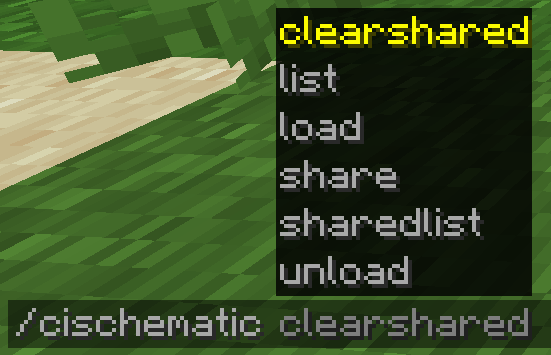 Commands List for Create: Instant Schematics Commands List for Create: Instant Schematics
-
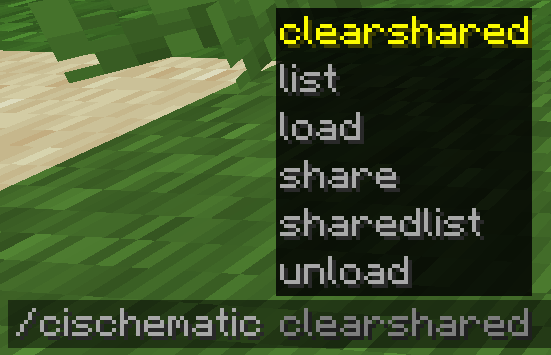 Commands List for Create: Instant Schematics Commands List for Create: Instant Schematics
Versions
Files
Relations
Project Relations
More like this
Similar Mods
Suggestions use data such as tags, dependencies, dependents, descriptions, titles, and more to rank how much they overlap with this mod.
On ModDex
Community snapshot
By the numbers
Statistics
Want to reach Minecraft players?
We're looking for a server hosting partner to feature here and other parts of the site. Interested? Send us a message!
Get in touchGet it on
Available Platforms
On ModDex
Community snapshot
By the numbers