
Community listing page, reviews here may not be monitored by the author.
create-schematic-compute

No reviews yet
Create: Schematic Compute brings a graph-based visual programming interface to the Create ecosystem, allowing you to build complex computational blueprints without messy redstone dust.
Community voices
Reviews
No reviews yet. Be the first to review this project!
Get it on
Available Platforms
Compatibility
Supported Environments
Must be installed on both the client and the server.
About
Project Details
For authors
Embed Badge
If you're the author of this project, you can embed a live badge anywhere that supports HTML or Markdown. It updates automatically whenever ratings change.
Use HTML for any page that supports it, or Markdown for README files and Markdown-based descriptions.
Identifiers
Platform IDs
Resources
External Links
About
Description
Create: Schematic Compute
🎮 9 Programmable Blocks · 86 Node Types · Formula Syntax Highlighting & Autocomplete · Multiplayer Collaboration
九种可编程方块 · 86种节点 · 公式语法高亮与自动补全 · 多人实时协作
Drag, connect, and build logic — just like Unreal Engine Blueprints!
拖拽连接,构建逻辑 — 像虚幻引擎蓝图一样直观!
Created by StarryNight_Luo (y15173334444)






📖 Overview / 简介
🇬🇧 Create: Schematic Compute is a Create mod addon that introduces 10 programmable blocks + 1 portable terminal with a visual node-based programming system. Instead of writing complex redstone circuits, simply drag and connect nodes to build logic — just like Unreal Engine Blueprints or Blender Geometry Nodes. Each computer runs at 20Hz (every game tick) for real-time control. All 10 blocks support real-time multiplayer collaborative editing with live cursor tracking and node lock protection. The FORMULA script editor features syntax highlighting (9 token colours), intelligent autocomplete (functions, variables, @output), real-time validation with error badges, and named constants (PI)/(E).
🇨🇳 机械动力:蓝图计算机 是一个机械动力附属模组,添加了十种可编程方块和一个便携终端,采用可视化节点图编程系统。无需搭建复杂红石电路,只需拖拽连接节点即可构建逻辑——就像虚幻引擎的蓝图系统或 Blender 的几何节点一样直观。每台设备拥有独立的节点图,以 20Hz(每游戏刻) 的频率运行,适合实时控制应用。全部 10 种方块支持多人实时协作编辑,带实时光标追踪和节点锁定保护。FORMULA 公式脚本编辑器 支持语法高亮(9 种词法颜色)、智能自动补全(函数、变量、@output)、实时校验与错误徽章、以及命名常量 (PI)/(E)。
🖥️ Blocks / 方块
🖥️ Holographic Monitor / 全息显示器
3D floating display / 3D 悬浮显示方块
| Feature / 功能 | Description / 说明 |
|---|---|
| 🖼️ Display Nodes / 显示节点 | TEXT, DATA, IMAGE, IMAGE_SEQUENCE / 文本、数值、图片、动画 |
| 🎨 16×16 Pixel Editor / 16×16像素编辑器 | Multi-frame animation + undo/redo / 多帧动画+撤销重做 |
| 📋 Layer Panel / 图层面板 | Drag-drop reorder + 24×24 thumbnails / 拖拽排序+缩略图预览 |
| 🎯 3D Positioning / 3D定位 | X/Y/Z + Roll/Pitch/Yaw freely adjustable / 自由调整位置和旋转 |
| 📡 Signal-Driven / 信号驱动 | IMAGE position/rotation via input signals / 通过输入信号驱位置旋转 |
| 📡 Redstone Input / 红石输入 | Read Redstone Link signals / 从红石链接网络读取信号 |
🖥️ Blueprint Computer / 蓝图计算机
Redstone Link controller / 红石链接控制器
| Feature / 功能 | Description / 说明 |
|---|---|
| 📡 Redstone I/O / 红石I/O | Read/Write Redstone Link network / 读写红石链接网络 |
| 🔗 Private Signal / 私有信号 | Named channel cross-computer communication / 命名通道跨计算机通信 |
| 🚌 Bus System / 总线系统 | BUS_IN/BUS_OUT multi-band data sharing / 多频段数据共享 |
| 📦 Encapsulation I/O / 封装导入导出 | File browser import/export .nbt files / 文件浏览器导入导出 |
⚡ Speed Proxy / 转速代理控制器
Speed Controller direct control / 转速直控
| Feature / 功能 | Description / 说明 |
|---|---|
| 🔄 Speed Control / 转速控制 | Set adjacent Speed Controller RPM (-256~256) / 设置相邻转速控制器RPM |
| 🔗 Private Signal / 私有信号输入 | Named channel cross-computer coordination / 命名通道跨计算机联动 |
⚙️ Programmable Transmission / 可编程变速器
In-line programmable gearbox / 轴上可编程变速
| Feature / 功能 | Description / 说明 |
|---|---|
| 🎚️ Target RPM / 目标转速 | Scroll-set absolute output RPM; graph TX_OUT node overrides while running / 滚轮设定绝对输出转速,图运行时由 TX_OUT 节点接管 |
| 🔀 Face-Relative Direction / 面相对转向 | Output CW/CCW follows the placed face, creative-motor style / 输出逆/顺随放置面(创造马达同款语义) |
| ↕️ 3-Axis Placement / 三向放置 | Horizontal or vertical in-line placement; wrench on side face rotates the axis / 水平/竖直线上放置,扳手点侧面换轴 |
| ⚙️ Bearing Visuals / 轴承动画 | Two independent shaft stubs: input follows network, output follows target / 两端独立轴头动画:输入随网络、输出随目标 |
| 🤝 Stress Network Member / 应力网络成员 | First-class driven member — no input power, no output / 官方应力网络一等成员,无输入动力则无输出 |
🔧 CNC Gearbox / 数控齿轮箱
Driven clutch + motion quota / 从动离合器 + 运动配额
| Feature / 功能 | Description / 说明 |
|---|---|
| 🔌 Clutch / 离合器 | Output face carries a shaft only while engaged; idle auto-disengages / 仅接合时输出面对外传轴,空闲自动分离 |
| 📜 Command Stack / 指令栈 | FIFO motion commands: rotate (degrees) / move (meters) / wait / FIFO 运动指令:旋转(度)/ 直线(米)/ 等待 |
| 🎯 Motion Quota / 运动配额 | Open-loop travel booking, fires a completion pulse at zero / 开环行程记账,配额归零自动打完成脉冲 |
| 🔄 Encoder / 编码器 | Rotary (degrees) + linear (meters) accumulation for graph readback / 旋转(度)+ 直线(米)累计供图读取 |
| ↕️ 3-Axis + Wrench / 三向 + 扳手 | Wrench on end face flips the input, side face rotates the axis / 扳手点端面翻转输入端、点侧面换轴 |
🔌 Program Computer / 编程计算机
Sequential logic / 时序逻辑专用机
| Feature / 功能 | Description / 说明 |
|---|---|
| 📡 Redstone I/O / 红石I/O | Redstone Link network communication / 红石链接网络通信 |
| 🔗 Private Signal / 私有信号 | PRIVATE_IN/PRIVATE_OUT named channel I/O / 命名通道I/O |
| ⏱️ Sequential Nodes / 时序节点 | Delay/Latch/T Flip-Flop/Gate/Pulse Extend/Loop/Fuse/Accumulator/Integrator / 延时/锁存器/T触发器/闸门/脉冲延长/循环/保险/累计器/连续积分器 |
🪑 Control Seat / 控制座椅
Sit-able controller / 可乘坐控制器
| Feature / 功能 | Description / 说明 |
|---|---|
| ⌨️ 58 Key Bindings / 58键绑定 | Click-to-bind UI / 点击绑定 |
| 🖱️ Dual Mode / 双模式 | Joystick (mouse delta) / View Angle (rotation difference) / 摇杆/视角差 |
| 🎮 Gamepad / 手柄 | Dual stick + 15 buttons + analog triggers LT/RT / 双摇杆+15键+模拟扳机 |
| 🔄 Sable Compatible / Sable兼容 | Two camera modes (FIXED / VIEW_DIFFERENCE), world-orientation tracking via quaternion / 双相机模式,四元数世界朝向追踪 |
| 🚪 Controls / 操作 | Right-click sit / Shift+Right-click editor / ~ dismount / TAB mode / ESC release |
📐 Attitude Sensor / 姿态传感器
Physics structure orientation / 物理结构姿态读取
| Feature / 功能 | Description / 说明 |
|---|---|
| 📐 ATTITUDE / 姿态 | Block world-space pitch and roll (facing × sub-level rotation) / 方块自身世界姿态俯仰与横滚(朝向 × 子世界旋转) |
| 🧭 FORWARD / 前方朝向 | World-space forward yaw/pitch / 结构世界空间朝向 |
| ⚡ ACCELERATION / 加速度 | Block-local X/Y/Z acceleration (structure motion in block axes) / 方块本地加速度(结构运动按方块朝向分解) |
| 🚀 VELOCITY / 速度 | Block-local velocity ×2 m/s (structure motion in block axes) / 方块本地速度(结构运动按方块朝向分解) |
| 🔄 POSE_CONVERT / 姿态换算 | Coordinate conversion / 坐标系转换 |
📡 3D Holographic Radar / 3D全息显示雷达
Real-time scanner / 实时实体扫描器
| Feature / 功能 | Description / 说明 |
|---|---|
| 📡 Scan Range / 扫描范围 | 1-128 blocks configurable / 1-128格可配置 |
| 🎯 Target Lock / 目标锁定 | Manual right-click + auto closest / 手动右键锁定+自动最近 |
| 🖥️ Display Style / 显示风格 | Classic XYZ axes / Holographic (white cube + blue plane) / 经典/全息 |
| 📊 TARGET_OUT | Output X/Y/Z/entity ID/distance / 输出坐标/实体ID/距离 |
| 🔍 Filters / 过滤 | Show/hide players, mobs, Sable structures / 独立显示玩家/生物/Sable |
📱 Portable Terminal / 便携终端
Handheld remote editor / 手持远程编辑器
| Feature / 功能 | Description / 说明 |
|---|---|
| 📡 Device Scan / 设备扫描 | Scan 1-128 blocks for programmable blocks / 扫描1-128格可编程方块 |
| ✏️ One-Click Edit / 一键编辑 | Open native GUI instantly / 即时打开原生GUI |
| 📦 All 10 Blocks / 全10方块 | Monitor, Blueprint, Program, Radar, Seat, Sensor, SpeedProxy, Transmission, CNC Gearbox, Kinetic Gauge |
| 🔄 Sable Compatible / Sable兼容 | Sub-level scanning with rotation correction / 子世界扫描+旋转修正 |
🎛️ Kinetic Gauge / 动力传感器
In-line kinetic readout + graph host / 轴上传动读数 + 节点图宿主
| Feature / 功能 | Description / 说明 |
|---|---|
| 📊 Built-in Readout / 内置读数 | Speed digits + stress bar (green→yellow→red, overload blink) + percentage, painted on the panel / 转速数字 + 应力条(绿→黄→红,超载闪烁)+ 百分比,直接画在面板上 |
| 🖥️ Graph Display / 图形接管 | DATA/TEXT nodes in its graph take over the panel (server-authoritative eval snapshot) / 图里的 DATA/TEXT 节点接管面板(服务端求值快照权威) |
| 📈 STRESS / 应力状态 | 4 outputs — ratio (0-1, >1 overloaded), used (SU), unused (0-1), left (SU) / 四个输出——占比、已用(SU)、未用、剩余(SU) |
| ⚡ RPM / 转速 | 1 output — signed network speed (0 unpowered/overloaded) / 一个输出——带符号网络转速(无动力/过载为 0) |
| 🔄 3-Axis Placement / 三轴放置 | Floor/ceiling placement points the display at the player (all 4 yaws, vertical state placeable directly); wall placement uses the clicked face; auto-aligns to a shaft-bearing face / 贴地贴顶正对玩家(四向可选,竖置可直接放出);贴墙用点击面;贴轴自动对齐 |
| 🔧 Wrench / 扳手 | Shaft end face + display side: cycle the panel 90° around the shaft (shaft untouched); the other two faces: rigid rotate (shaft re-points) / 轴端面+显示面:面板绕轴 90° 循环(轴不动);其余两面:整表旋转(轴换向) |
| ⚙️ Shaft Pass-Through / 贯通传轴 | Passes rotation along its own axis and reads the network it sits in / 自身沿旋转轴贯通传轴,并读取所在动力网络的转速与应力 |
| 🧩 Two Model Variants / 双模型变体 | Lectern panel for horizontal shafts, flat panel for vertical shafts; text always upright / 水平轴用讲台面板,竖直轴用平板屏,文字永远直立 |
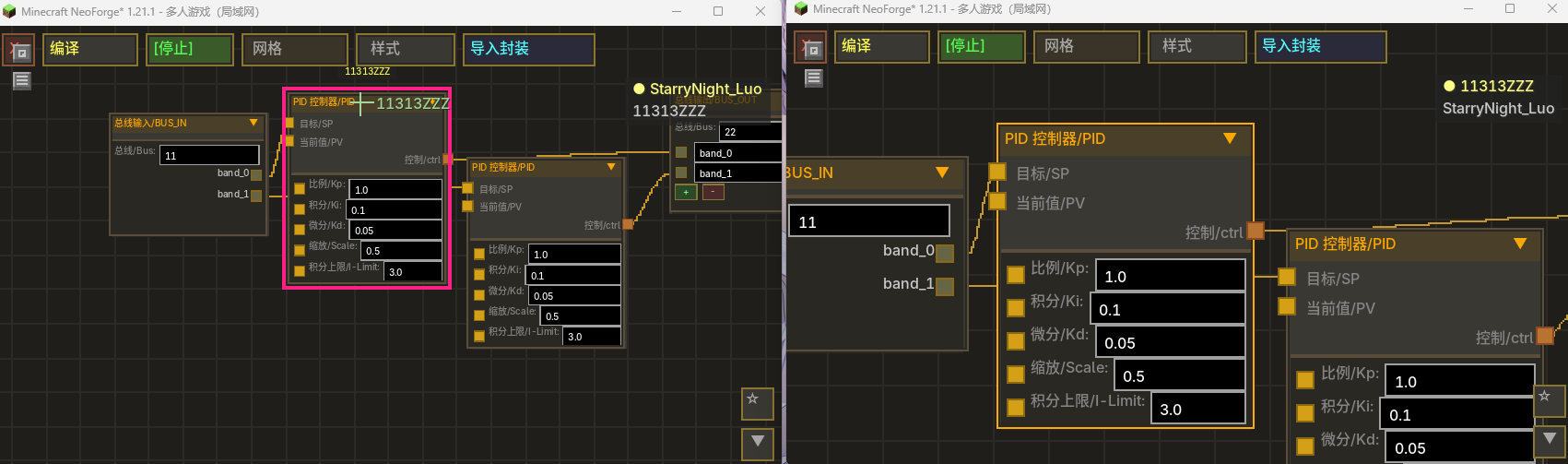
👥 Multiplayer Collaboration / 多人协作(v1.2.4+)
Real-time collaborative graph editing for all 7 block types. Multiple players can edit the same graph simultaneously. 全部 7 种方块支持多人实时协作编辑同一节点图。
| Feature / 功能 | Description / 说明 |
|---|---|
| 🖱️ Live Cursor Tracking / 实时光标 | Colored crosshairs with player names / 彩色十字准星+玩家名 |
| 📦 Remote Drag / 远程拖拽 | Smooth animated node movement / 平滑动画节点移动 |
| 🔗 Wire Preview / 连线预览 | Live bezier curve while dragging / 实时贝塞尔曲线预览 |
| 👤 Player List / 玩家列表 | Right-side vertical list, host highlighted / 右侧竖向列表,房主高亮 |
| 🔒 Node Lock / 节点锁定 | IMAGE nodes protected during pixel edit / 像素编辑时锁定IMAGE节点 |
| 🚪 Auto-Close / 自动关闭 | UI closes when block destroyed / 方块破坏时自动关闭 |
| ⚡ Join/Leave / 加入离开 | Appear immediately on open, disappear on close / 打开即现,关闭即消 |
📝 Formula Script Node / 公式脚本节点
Multi-line script editor (v1.2.0+) — assignments, control flow, vec3, named outputs, comments, line continuation.
多行脚本编辑器 — 支持赋值、控制流、vec3、命名输出、注释、续行。完整语法见 docs/formula-syntax-manual.md。
🧮 Syntax Overview / 语法速览
赋值与输入引脚 / Assignments & input pins — any name assigned anywhere is an internal variable; every other name that is read becomes an input pin. 任何处被赋值的名字是内部变量,其余被读取的名字成为输入引脚:
x = a + 1        -- x 内部变量 / internal; a 成为输入引脚 / input pin
@output x
→ 1 input pin + 1 output / 1 输入 + 1 输出
控制流 / Control flow — repeat / while / if / else / break / continue:
acc = 0
repeat 100 { acc = acc + 1 }
if (acc > 50) { acc = 0 } else { acc = 1 }
@output acc
比较与逻辑 / Comparison & logic — < > <= >= are exact; ==/!= use a 1e-6 tolerance; && !judge truthiness as!=0. < > <= >= 精确;==/!= 1e-6 容差;&&
! 以 !=0 判真。
vec3 与向量函数 / vec3 & vector functions:
v = vec3(3, 4, 0)
@output length(v)     -- 5
@output yaw(v)        -- 角度制,与 DIRECTION 节点一致 / degrees, mirrors DIRECTION
@output v             -- vec3 自动展开为 v.x/v.y/v.z 三个输出引脚 / expands into 3 scalar pins
Vector functions: vec3 length normalize dot cross dist yaw pitch; component access v.x/y/z. 向量函数:vec3 length normalize dot cross dist yaw pitch;分量访问 v.x/y/z。
函数表 / Functions(角度均按度 / trig in degrees):
15 个标量函数 / 15 scalar functions — sin cos tan asin acos atan2 sinh cosh sqrt ln log exp sec csc cot
7 个向量函数 / 7 vector functions — vec3 length normalize dot cross dist yaw pitch
中文输入即转 / CJK input converts live — ()→()、×→*、≥→>=,full-width letters/digits/spaces convert to half-width as you type. ()→()、×→*、≥→>=、全角字母/数字/空格即输即转半角。
预算池 / Budget pool — loop-heavy scripts spread across ticks: a thin progress bar below the node shows solve progress; outputs freeze during the spread and update only on completion (emit-on-done); the warm edit-panel toggle controls whether an input change keeps iterating or strictly freezes. 循环重负载脚本跨 tick 分摊:节点下方进度条显示解算进度,spread 期间输出冻结、完成才更新(emit-on-done);warm 编辑区开关控制输入变更时继续迭代还是严格冻结。典型应用见下方火控弹道解算示例。
🎯 火控弹道解算示例 / Fire-Control Ballistic Solver Example
Newton-iteration aim solver ported from a Python reference (CreateBigCannons ballistic model: semi-implicit Euler dt=1/20, linear/quadratic drag), verified against four reference scenarios.
牛顿迭代弹道反解,移植自 Python 参考实现(CreateBigCannons 弹道模型:半隐式欧拉 dt=1/20、线性/二次阻力),四组场景对拍通过。
Full paste-ready script: docs/examples/ballistic_solver.formula — ~600k interpreter iterations per solve, spread across ticks by the budget pool with a progress bar.
完整可粘贴脚本:docs/examples/ballistic_solver.formula(约 60 万次迭代,由预算池跨 tick 分摊、带进度条)。
-- 输入:mx,my,mz 炮口 / tx,ty,tz 目标 / v0 初速 / g 重力(正) / fd 阻力系数 / qd 二次阻力 / den 密度
-- inputs: mx,my,mz muzzle / tx,ty,tz target / v0 speed / g gravity(+) / fd drag / qd quadratic drag / den density
-- 输出:ay 射向角[0,360) / ap 射角 / hit 可达 / vx0,vy0,vz0 初速向量
-- outputs: ay aim yaw [0,360) / ap aim pitch / hit reachable / vx0,vy0,vz0 velocity vector
ay = atan2(tx - mx, 0 - (tz - mz))
if (ay < 0) ay = ay + 360
cy = cos(ay)
sy = sin(ay)
-- 俯仰粗扫描(361 点)+ 轨迹模拟(半隐式欧拉 dt=1/20,阻力/重力积分,记录最近距离)
-- pitch coarse scan (361 points) + trajectory simulation (semi-implicit Euler dt=1/20, drag/gravity integration, track closest distance)
p = -89.899
bestd = 1000000
repeat 361 {
  vx = v0 * cos(p) * sy
  vy = v0 * sin(p)
  vz = v0 * cos(p) * (0 - cy)
  -- ... 1200 步轨迹模拟(完整脚本见上方链接) ... / 1200-step simulation (full script linked above)
  p = p + 0.49944
}
-- 牛顿迭代精化(≤50 轮,中心差分,阻尼 0.5) / Newton refinement (≤50 rounds, central difference, damping 0.5)
@output ay
@output ap
@output hit
→ 11 inputs + 6 outputs / 11输入 + 6输出
🎨 Syntax Highlighting / 语法高亮
Real-time colour-coded editing with 9 token categories. 9 种词法分类的实时彩色标注。
| Token Type / 词法类型 | Colour / 颜色 | Examples / 示例 |
|---|---|---|
| Functions / 函数 | 🟡 Yellow / 黄色 | sin, cos, sqrt, exp |
| Constants / 常量 | 🩷 Pink / 粉色 | (PI), (E) — 仅分组括号内视为字面量 |
| Identifiers / 标识符 | 🩵 Light Cyan / 浅青 | x, speed, myVar |
| Numbers / 数字 | 🟠 Orange / 橙色 | 3.14, 42, 0.5 |
| Operators / 运算符 | ⬜ Grey / 灰色 | +, -, *, /, ^, % |
| Parens / 括号 | ⬜ Grey / 灰色 | (, ) |
| Comments / 注释 | 🟢 Green / 绿色 | -- this is a comment |
| @output / 输出 | 🟣 Purple / 紫色 | @output |
| Assignment / 赋值 | 🟣 Purple / 紫色 | = |
| Unknown / 未知 | 🔴 Red / 红色 | Invalid characters / 非法字符 |
🔍 Autocomplete / 自动补全
Type to trigger suggestions near the caret, rendered above all pins. 输入即触发,候选框显示在光标下方、所有引脚上方。
| Trigger / 触发方式 | Behaviour / 行为 |
|---|---|
| Type identifier char / 输入标识符字符 | Filtered dropdown: functions, constants, current variables / 过滤候选:函数、常量、当前变量 |
Type @ / 输入 @ |
Immediately suggests @output / 立即建议 @output |
Tab / Enter |
Accept selected candidate / 接受选中候选项 |
↑ ↓ |
Navigate candidates / 导航候选项 |
Esc / any other key |
Close popup / 关闭候选框 |
| Click candidate / 点击候选项 | Accept and insert / 接受并插入 |
| Zoom-aware / 缩放感知 | Popup scales with graph zoom level / 候选框随图缩放 |
✅ Real-Time Validation / 实时校验
Issues shown as red ⚠ badge on the node title bar. Hover the badge to see details. 错误以红色 ⚠ 徽章显示在节点标题栏,悬停查看详情。
| Check / 校验项 | Type / 类型 |
|---|---|
| Bracket matching / 括号匹配 | Error / 错误 |
| Unknown function / 未知函数 | Error / 错误 |
| Function arity / 函数参数数量不符 | Error / 错误 |
| Invalid assignment / 无效赋值 | Error / 错误 |
| Duplicate output names / 重复输出名 | Warning / 警告 |
| @output invalid start / @output 起始非法 | Warning / 警告(表达式输出合法,如 @output length(v)) |
| Red border on MLE / 输入框红色边框 | Visual feedback / 视觉反馈 |
📐 Named Constants / 命名常量
(PI) and (E) in grouping parentheses are literal constants (π ≈ 3.14159, e ≈ 2.71828).
Bare PI / E or PI / E inside function calls like sin(PI) are treated as variable references (create input pins).
(PI) 和 (E) 在分组括号内视为字面常量。裸 PI/E 或函数调用内的 sin(PI) 视为变量(创建输入引脚)。
-- (PI) = literal π, not a variable / 字面量π,不是变量
-- sin(PI) = PI is a variable input / PI 是变量输入
result = (PI) + sin(PI)
@output result
→ 1 input pin (PI) + 1 output / 1 输入引脚 + 1 输出
🚌 BUS System / BUS 总线系统
Global named-channel communication across computers. Like publish-subscribe message bus. 全局命名通道跨计算机通信系统,类似发布-订阅消息总线。
| Feature / 功能 | Description / 说明 |
|---|---|
| 🚌 BUS_OUT / 总线输出 | Write values to named channel with bands / 写入命名通道+频段 |
| 🚌 BUS_IN / 总线输入 | Read band values from channel / 从通道读取频段值 |
| 📋 Band System / 频段 | Named sub-fields per channel / 每通道命名字段 |
| 🔢 Ref Counting / 引用计数 | Auto-cleanup when no BUS_OUT references / 无引用时自动清理 |
| ⚠️ Conflict Detection / 冲突检测 | Reject duplicate channel names / 拒绝重名通道 |
🧩 Node Reference / 节点参考(95 种)
📦 Values / 数值
| Node / 节点 | Description / 说明 |
|---|---|
| Constant / 常量 | Outputs constant value / 输出常量值 |
| Redstone Input / 红石输入 | Reads from Redstone Link / 从红石链接网络读取 |
| Private Signal Input / 私有信号输入 | Reads float from named channel / 从命名通道读取浮点数 |
| Bus Input / 总线输入 | Reads bus channel bands / 从总线通道读取频段值 |
📊 Kinetic Readings / 动力读数 (Kinetic Gauge / Transmission / CNC Gearbox)
| Node / 节点 | Description / 说明 |
|---|---|
| Stress Status / 应力状态 | Kinetic network stress, 4 outputs: ratio (0-1, >1 overloaded), used (SU), unused (0-1), left (SU); all 0 with no network or zero capacity / 动力网络应力,四个输出:占比(0-1,超载 >1)、已用(SU)、未用(0-1)、剩余(SU);无网络/零容量全 0 |
| Speed (RPM) / 转速 | Network rotation speed, signed (negative = reversed), 0 when unpowered/overloaded / 网络转速,带符号(负=反转),无动力/过载为 0 |
🔢 Basic Math / 基础运算
| Node / 节点 | Description / 说明 |
|---|---|
| Add / 加法 | A + B |
| Subtract / 减法 | A - B |
| Multiply / 乘法 | A × B |
| Divide / 除法 | A ÷ B (0 if B=0) |
| Modulo / 模运算 | A % B |
| Power / 次幂 | A ^ B |
| Root / 次方根 | B-th root of A |
| Absolute Value / 绝对值 | |input| |
| Ceil / 向上取整 | Round up |
| Floor / 向下取整 | Round down |
📐 Advanced Math / 高级运算
| Node / 节点 | Description / 说明 |
|---|---|
| Formula / 公式 | Multi-line script editor / 多行脚本编辑器 |
| Round / 保留N位小数 | Round to N decimals / 保留N位小数 |
| Comparison Router / 比较路由 | |A-B| smart routing / 智能信号分流 |
| Pose Convert / 姿态换算 | Pitch/Yaw/Roll coordinate conversion / 姿态角转换 |
| Split / 分割 | Positive/negative signal split / 正负信号分离 |
Trig / 三角函数(度): Sine · Cosine · Tangent · Arc Sine · Arc Cosine · Arc Tangent 2 · Hyperbolic Sine · Hyperbolic Cosine
Other / 其他: Square Root · Natural Log · Base-10 Log · Exponential · Secant · Cosecant · Cotangent · Angle Unwrap · Direction (3-in 3-out)
🧠 Logic / 逻辑
| Node / 节点 | Description / 说明 |
|---|---|
| Greater Than / 大于 | A > B |
| Less Than / 小于 | A < B |
| Greater or Equal / 大于等于 | A ≥ B |
| Less or Equal / 小于等于 | A ≤ B |
| Equals / 等于 | A = B |
| OR Gate / 或门 | A > 0.5 or B > 0.5 |
| Bool / 布尔 | Boolean with invert toggle / 布尔(可反转) |
| Gate / 闸门 | Signal gate with Set/Reset/Toggle / 信号门 |
| Relay A / 继电器A | SPDT relay — contact false→A, contact true→B / 双掷继电器 |
| Relay B / 继电器B | SPST relay — out = contact ? B : A / 单掷合并继电器 |
🎛️ Control / 控制
| Node / 节点 | Description / 说明 |
|---|---|
| PID Controller / PID控制器 | SP/PV PID (scalable output, anti-windup) / SP/PV 双输入 PID(输出可缩放,抗积分饱和) |
| Power PID / 动力PID | PID with base power input / 带基础动力PID |
| Clamp / 限制 | Min/Max clamp / 限幅 |
| Map Range / 映射范围 | Range mapping / 范围映射 |
📤 Output / 输出
| Node / 节点 | Description / 说明 |
|---|---|
| Redstone Output / 红石输出 | Write to Redstone Link (0~15) / 写入红石链接 |
| Private Signal Output / 私有信号输出 | Write to named channel / 写入命名通道 |
| Bus Output / 总线输出 | Writes to bus channel / 写入总线通道 |
| Speed Control / 转速控制 | Speed Controller RPM (-256~256) / 转速控制 |
⏱️ Sequential / 时序 (Program Computer only / 仅编程计算机)
| Node / 节点 | Description / 说明 |
|---|---|
| Delay / 延时 | Delay N ticks / 延时N tick |
| Latch / 锁存器 | Set/Reset latch, configurable default / 可配置默认状态 |
| T Flip-Flop / T触发器 | Toggle flip-flop, configurable default / 可配置默认状态 |
| Pulse Extender / 脉冲延长 | Extend input pulse N ticks / 脉冲延长N tick |
| Loop / 循环 | Fire pulse every interval, repeat count times / 循环脉冲 |
| Safety Timer / 保险 | Trigger (rising edge) or held-high input → 2-tick pulse → cooldown; held-high repeats as pulse generator / 触发(上升沿)或持续高电平 → 2 tick 脉冲 → 冷却;持续高电平自动循环(脉冲发生器) |
| Accumulator / 累计器 | Rising-edge step counter / 累计器 |
| Continuous Integrator / 连续积分器 | Continuous integration, configurable limit / 连续积分器 |
🎮 Input / 输入 (Control Seat + Attitude Sensor / 控制座椅+姿态传感器)
| Node / 节点 | Description / 说明 |
|---|---|
| Keyboard Key / 键盘按键 | 58 bindable keys / 58键绑定 |
| Mouse Joystick / 鼠标摇杆 | Dual mode: incremental (mouse delta) / absolute (stick with memory). Toggle in edit panel. / 双模式:增量/绝对值,编辑区切换 |
| View Angle / 视角差 | View angle delta / 视角差 |
| Mouse Button / 鼠标按键 | Left/Right mouse buttons / 鼠标按键 |
| Gamepad Joystick / 手柄摇杆 | Dual stick LX/LY/RX/RY / 双摇杆 |
| Gamepad Button / 手柄按键 | 15 buttons / 15按键 |
| Gamepad Trigger / 手柄扳机 | Analog triggers LT/RT (0~1) / 模拟扳机 |
| World View / 世界视角 | Player absolute world view direction / 玩家绝对视角 |
| Attitude / 姿态 | Block world-space pitch and roll (facing × sub-level rotation) / 方块自身世界姿态俯仰与横滚(朝向 × 子世界旋转) |
| Forward / 前方朝向 | World-space forward yaw/pitch / 结构朝向 |
| Acceleration / 加速度 | Block-local X/Y/Z acceleration (structure motion in block axes) / 方块本地加速度(结构运动按方块朝向分解) |
| Velocity / 速度 | Block-local velocity ×2 m/s (structure motion in block axes) / 方块本地速度(结构运动按方块朝向分解) |
| World Position / 世界坐标 | World position with offset / 世界坐标(可偏移) |
| Target Output / 目标输出 | Radar target X/Y/Z/entityId/distance / 雷达目标 |
🖼️ Display / 显示 (Monitor only / 仅全息显示器)
| Node / 节点 | Description / 说明 |
|---|---|
| Text / 文本 | Text display with color / 文字显示 |
| Data Display / 数值显示 | Float value display / 数值显示 |
| Image / 图像 | 16×16 pixel image, signal-driven position / 像素图片 |
| Image Sequence / 图像序列 | Multi-frame animation, signal-driven frame / 多帧动画 |
📦 Structure / 结构
| Node / 节点 | Description / 说明 |
|---|---|
| Encapsulation / 封装 | Nest sub-graphs inside a node / 嵌套子图 |
| ENCAP_INPUT / 封装输入 | External input pin / 外部输入引脚 |
| ENCAP_OUTPUT / 封装输出 | External output pin / 外部输出引脚 |
🔧 Debug / 调试 (All blocks / 全部方块)
| Node / 节点 | Description / 说明 |
|---|---|
| Comment / 便利贴 | Sticky-note annotation, resizable (80 |
| Signal Generator / 信号发生器 | Test signal source with XY curve preview + Y-axis range label, manual control-point curve or custom f(x) formula, frequency-generate or input-driven output modes, percentile-based robust auto-scale / 测试信号源,XY曲线预览+Y轴范围标注,手动控制点曲线或自定义f(x)公式,频率发生/指定模式输出,百分位数稳健自动缩放 |
| Signal Probe / 信号探针 | Real-time signal monitor with 100-tick trend chart, percentile-based robust auto-scale (p1-p99), freeze/clear / 实时信号监视,100 tick趋势图,百分位数稳健自动缩放(p1-p99),冻结/清除 |
Signal Generator Modes / 信号发生器模式:
| Mode / 模式 | Description / 说明 |
|---|---|
| 🎯 Manual Curve / 手动曲线 | Drag control points on XY chart. Double-click to add, right-click to delete, drag X/Y freely (X clamped between neighbors, server-sorted). Points synced via multiplayer collaboration. / XY图上拖拽控制点。双击添加,右键删除,XY双向自由拖拽(X被相邻点夹持,服务端排序)。多人协作同步。 |
| 📐 Custom f(x) / 自定义公式 | Enter formula expression using variable x (0x(0 |
| 🔄 Frequency Generate / 频率发生 | X auto-advances 0→1 cyclically. Speed control (manual mode only). Current X position shown as sky-blue marker on chart. / X自动0→1循环推进。speed控制速度(仅手动模式)。天蓝色标记线显示当前X位置。 |
| 🎯 Input-Driven / 指定模式 | X set by dragging sky-blue marker line on chart. No EditBox — pure drag interaction. / 拖拽天蓝色标记线设置X值。无输入框,纯拖拽交互。 |
Signal Probe Features / 信号探针功能:
- 100-tick ring buffer trend chart with percentile-based robust auto-scale (p1-p99)
- Percentile filtering replaces fixed ±5 clipping — correctly displays large-range data (e.g. 0~360)
- Right-click: Freeze/Unfreeze, Clear History
- Shows "---" when blueprint not running
🎮 Controls / 操作指南
| Action / 操作 | Input / 按键 |
|---|---|
| Add node menu / 添加节点 | Right-click empty / 右键空白 |
| Two-column layout / 双列布局 | Click the state-label button on the menu title row (1 Col/2 Col), gold = two columns on / 点击菜单标题行右侧状态文字按钮(单列/双列),金色=双列开启 |
| Edit params / 编辑参数 | Left-click → ▶ / 左键→▶ |
| Connect / 连接 | Drag output pin → input pin / 拖拽输出→输入 |
| Delete node / 删除节点 | Hover + X / 悬停+X |
| Delete connection / 删除连线 | TAB + Left-click / TAB+左键点击 |
| Delete selected / 删除选中 | Delete / Backspace |
| Box select / 框选 | TAB + drag / TAB+拖拽 |
| Duplicate / 复制 | Ctrl + D |
| Undo / 撤回 | Ctrl + Z |
| Redo / 重做 | Ctrl + Y |
| Wrap in Comment / 注释包裹 | Select nodes + C / 选中节点+C |
| Edit Comment text / 编辑注释文本 | Double-click comment body / 双击注释节点 |
| Resize Comment / 调整注释大小 | Drag bottom-right corner / 拖动右下角 |
| Scroll Comment / 滚动注释 | Ctrl + Scroll / Ctrl+滚轮 |
| Zoom / 缩放 | Scroll wheel / 滚轮 |
| Pan / 平移 | Right-click drag / 右键拖拽 |
| Open editor (most blocks) / 打开编辑器 | Right-click / 右键 |
| Control Seat — Sit / 乘坐 | Right-click (empty hand) / 右键(空手) |
| Control Seat/Radar — Editor / 编辑器 | Shift + Right-click / Shift+右键 |
| Control Seat — Dismount / 下马 | ~ |
| Control Seat — Switch mode / 切换模式 | TAB |
| Control Seat — Release mouse / 释放鼠标 | ESC |
| Signal Gen — Add control point / 添加控制点 | Double-click XY chart / 双击XY图 |
| Signal Gen — Delete control point / 删除控制点 | Right-click control point / 右键控制点 |
| Signal Gen — Drag control point / 拖拽控制点 | Left-drag (X clamped, Y free) / 左键拖拽 |
| Signal Gen — Drag X marker / 拖拽X标记 | Left-drag sky-blue line (input mode) / 左键拖拽天蓝色线 |
| Signal Gen — Switch mode / 切换模式 | Click toggle button (confirm with second click) / 点击切换按钮(二次点击确认) |
| Probe — Freeze/Unfreeze / 冻结解冻 | Double-click probe node / 双击探针节点 |
| Probe — Clear/Clear History / 清除历史 | Right-click probe node / 右键探针节点 |
| Bookmark — Open panel / 打开书签面板 | Click ★ bottom-right / 点击右下角★ |
| Bookmark — Add / 添加书签 | [+] in panel or Ctrl+M / 面板内[+]或Ctrl+M |
| Bookmark — Rename / 重命名 | Click ✎ on bookmark row / 点击书签行✎ |
| Bookmark — Delete / 删除 | Click × on bookmark row / 点击书签行× |
| Bookmark — Jump / 跳转 | Click → or name / 点击→或名称 |
| Bookmark — Reorder / 拖拽排序 | Drag name area to new position / 拖拽名称区域到新位置 |
| Bookmark — Reset view / 重置视角 | [↺] in panel or Home key / 面板[↺]或Home键 |
🔄 Sable Physics Integration / Sable 物理集成
Deep integration with Sable physics engine for rotating structures. / 与Sable物理引擎深度集成,支持旋转结构。
| Block / 方块 | Feature / 功能 |
|---|---|
| Control Seat / 控制座椅 | Entity yaw tracks sub-level rotation / 实体yaw追踪子世界 |
| Attitude Sensor / 姿态传感器 | Read logicalPose() quaternion / 读取姿态四元数 |
Thread safe / 线程安全: Shared fields
volatile. Without Sable / 无Sable: Control Seat fully functional, Sensor outputs 0 / 控制座椅完全可用,传感器输出0
💾 Schematic Support / 蓝图兼容
All 10 blocks support Create's Schematicannon — graphs and state fully preserved. / 全部十种方块支持蓝图大炮,图与状态完整保留。
Uses Create's IMergeableBE + SafeNbtWriter / 采用 Create 官方接口
📦 Recipes / 合成配方
| Block / 方块 | Materials / 材料 |
|---|---|
| 🖥️ Monitor / 全息显示器 | Redstone Link×2 + Precision Mechanism + Glass Pane×2 + Brass Casing + Glowstone Dust×2 |
| 🖥️ Blueprint / 蓝图计算机 | Redstone Link×2 + Precision Mechanism + Glass Pane×2 + Repeater + Comparator + Brass Casing×2 |
| ⚡ Speed Proxy / 转速代理 | Brass Ingot×4 + Cogwheel + Glass Pane×2 + Comparator + Andesite Casing |
| 🔌 Program / 编程计算机 | Andesite Casing×4 + Repeater + Glass Pane×2 + Comparator + Andesite Alloy |
| 🪑 Control Seat / 控制座椅 | Heavy Weighted Pressure Plate + Iron Ingot×2 + Brass Casing + Redstone + Redstone Link×4 |
| 📐 Attitude Sensor / 姿态传感器 | Iron Ingot×6 + Repeater + Comparator + Brass Casing×2 |
| 📡 Radar / 雷达 | Monitor×2 + Iron Ingot×4 + Brass Casing + Redstone Block×2 |
| 📱 Portable Terminal / 便携终端 | Redstone Link×4 + Blueprint Computer + Glass Pane×4 |
| 🎛️ Kinetic Gauge / 动力传感器 | Iron Ingot×4 + Shaft×4 + Brass Casing |
⚙️ Block Properties / 方块属性
| Property / 属性 | Value / 值 |
|---|---|
| Hardness / 硬度 | 1.0 (hand breakable / 空手可破坏) |
| Hand break / 空手破坏 | Drops without NBT / 掉落无NBT |
| Wrench right-click / 扳手右键 | Rotate FACING / 旋转方向 |
| Wrench Shift+right-click / 扳手Shift+右键 | Pick up with full NBT / 收回保留NBT |
| 🎛️ Kinetic Gauge wrench / 动力传感器扳手 | Shaft end face + display side: cycle the display 90° around the shaft; the other two faces: rigid rotate (shaft re-points) / 轴端面+显示面:显示绕轴 90° 循环;其余两面:整表旋转(轴换向) |
🔧 Technical Highlights / 技术亮点
| Feature / 特性 | Description / 说明 |
|---|---|
| 👥 Multiplayer Collaboration / 多人协作 | Real-time editing, cursor tracking, node lock / 实时编辑、光标追踪、节点锁 |
| ⚡ Server-Authoritative Eval / 服务端权威评估 | Client receives EvalSnapshot — no local evaluator / 客户端接收快照,无本地评估器 |
| ⚡ Topological Sort Eval / 拓扑排序求值 | O(1) input query cache / O(1) 输入查询缓存 |
| 🚀 GC-Friendly / GC友好 | Reused evaluator instances / 重用求值器 |
| 🔄 Signal Bus / 信号总线 | Global named-channel communication / 全局命名通道通信 |
| 🧹 PID Anti-Windup / PID抗饱和 | Integral capping / 积分上限钳制 |
| 🛡️ Cycle Detection / 环检测 | Compile-time circular dependency check / 编译时循环引用检测 |
| 🎮 GLFW Raw Input / GLFW原始输入 | Bypass Minecraft keybinding system / 绕过MC键位系统 |
| 🔄 Sable Integration / Sable集成 | BlockEntitySubLevelActor sub-level pose reading / 子世界姿态读取 |
📜 Changelog / 更新日志
完整变更日志已拆分至 CHANGELOG.md —— 每个版本一个 <details> 块。
The full changelog now lives in CHANGELOG.md — one <details> block per release.
| Version | 标题 / Title |
|---|---|
| v1.2.5.1 | 动力传感器(kinetic_gauge,Create 表同款 3 轴放置 · STRESS/RPM 节点 · 蓝屏显示)· 编辑器输入焦点与选中高亮修复 · GUI 巨型文件拆分(HUD 裁剪数学 / 显示编辑器 / 设置界面 tab) |
| v1.2.5 | 公式语言升级:控制流 + vec3 + 预算池 / GUI 架构迁移 / 像素编辑器 / 可编程变速箱 |
| v1.2.4.1 | 回归审计 · 总线系统 · 封装状态 · 公式一致性 · Sable 加固 |
| v1.2.4 | 多人协作 + 调试工具链 + 公式编辑器体验 |
更早版本(v1.2.3 及以前)见 CHANGELOG.md。
Older releases (v1.2.3 and earlier): see CHANGELOG.md.
❓ FAQ / 常见问题
Node editor laggy? / 节点编辑器卡顿?
Too many nodes or complex PID. Keep PIDs reasonable. / 节点过多或PID复杂,单计算机PID不宜超过5-6个。Speed Proxy not working? / 转速代理不工作?
Place directly adjacent to a Speed Controller. / 放置在转速控制器相邻面。State lost after schematic? / 蓝图放置后状态丢失?
Use Create 6.0.10+. Full NBT interfaces registered. / 确保使用Create 6.0.10+。Can computers communicate? / 计算机可以通信吗?
Yes — Private Signal I/O (named channels) or BUS_IN/BUS_OUT (banded). / 可以——私有信号I/O或BUS总线。📥 Installation / 安装
| Dependency / 依赖 | Version / 版本 |
|---|---|
| Minecraft | 1.21.1 |
| NeoForge | 21.1.233+ |
| Create | 6.0.10+ |
Sable is optional / Sable 为可选
- Install NeoForge + Create / 安装 NeoForge + Create
- Place
.jarinmodsfolder / 将.jar放入mods - Launch! / 启动!
🌐 Links / 链接
- GitHub: github.com/y15173334444/create-schematic-compute
- Modrinth: modrinth.com/mod/create-schematic-compute
- License / 许可证: MIT © 2026 StarryNight_Luo
⭐ If you enjoy this mod, star us on GitHub! / 喜欢请在GitHub点⭐!
Unleash Create's potential with visual programming! / 用可视化编程释放机械动力的潜力!🚀
Screenshots
Gallery
-
 Multiplayer Collaboration / 多人协作(v1.2.4+)
 -

Versions
Files
Relations
Project Relations
More like this
Similar Mods
Suggestions use data such as tags, dependencies, dependents, descriptions, titles, and more to rank how much they overlap with this mod.
On ModDex
Community snapshot
By the numbers
Statistics

Want to reach Minecraft players?
We're looking for a server hosting partner to feature here and other parts of the site. Interested? Send us a message!
Get in touchGet it on
Available Platforms
On ModDex
Community snapshot
By the numbers
Statistics
Resources