Community listing page, reviews may not be monitored by the author.
Create: Track Covers

No reviews yet
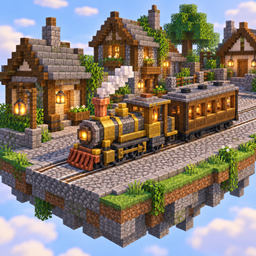
Pave Create's train tracks into the street like tram rails: use any full block on a track and its bed is paved up to the rails, with a groove beside every rail, so the wheels still run on the rails and never sink into the paving.

Community voices
Reviews
No reviews yet. Be the first to review this project!
Get it on
Available Platforms
About
Project Details
For authors
Embed Badge
If you're the author of this project, you can embed a live badge anywhere that supports HTML or Markdown. It updates automatically whenever ratings change.
Use HTML for any page that supports it, or Markdown for README files and Markdown-based descriptions.
Identifiers
Platform IDs
Resources
External Links
About
Description
Tram rails for your Create towns.
Pave Create's train tracks into the street, the way tram rails sit in a cobbled road. Use a block on a track and its bed is paved up to the rails, with a groove beside every rail. The wheels still run on the rails and never sink into the paving.
🛤️ Features
- 🧱 Any full, solid block paves a track: stone bricks, cobblestone, gravel, a grass block, planks, concrete, wool.
- 🚋 Flush with the rails: the paving ends level with the tops of the rails and leaves a groove beside each rail for the wheel flanges. Trains look right and run as before.
- ↔️ One click, three columns: one use paves the track and the columns beside it.
- 🔀 Curves, crossings and junctions are paved too. Rails laid through paving later cut their own grooves.
- 🏙️ Whole streets: use a block on the side of the paving to fill the next column, and pave a whole square flush with the rails.
- 🔧 Reversible: Create's Wrench takes the paving off again, and you get the block back.
- 🚶 Walkable: you and every mob walk on paved track like on the street.
- 🎨 Shader friendly: paving is drawn as part of the terrain, so it works with Sodium, Iris and shaders.
🚀 How to use
- Lay your track as usual. Only level track can be paved.
- Hold a stack of the block you want. Each column of paving takes one block.
- Right-click the track. The track and the column on each side of it are paved.
- For a curve, right-click the curve itself: the whole curve is paved at once.
- To pave the rest of the street, right-click the side of the paving with more blocks.
📦 Requirements
- Minecraft 1.21.1 with NeoForge
- Create 6.0.10 or newer (6.0.x)
🤝 Works with
- Create: Steam 'n' Rails: its wide and narrow gauges and its track styles are paved too.
- JEI: a page on every track that can be paved.
⚙️ Good to know
- There is no config.
- 🌍 In English and German.
Made for the Far Lands modpack. Works in any NeoForge 1.21.1 pack with Create.
Screenshots
Gallery
Versions
Files
Relations
Project Relations
More like this
Similar Mods
Suggestions use data such as tags, dependencies, dependents, descriptions, titles, and more to rank how much they overlap with this mod.
- Create Track Map: Forge
- Create: Track Map (UNOFFICIAL FORK)
- Create Track Map: Fork²
- Create Track Map - Fork
- Create: Track Switch Radio
- create:track mechanism modification
- Create: Lost Cities Subways
- Create: Train Track Rail Grinding
- Create: Auto Track
- Create Train Track Updated
- Create: No Track Map
- Create More Configs
On ModDex
Community snapshot
By the numbers
Statistics

Get it on
Available Platforms
On ModDex
Community snapshot
By the numbers
Statistics
Resources