Community listing page, reviews here may not be monitored by the author.
Cross Server Chat

No reviews yet
CrossServerChat is a simple yet powerful serverside networking tool that links chat, The mod is server-only, so players do not need to install anything. Discord acts as the shared mailbox. No proxy, Redis, or Velocity setup is required.
Community voices
Reviews
No reviews yet. Be the first to review this project!
Get it on
Available Platforms
About
Project Details
For authors
Embed Badge
If you're the author of this project, you can embed a live badge anywhere that supports HTML or Markdown. It updates automatically whenever ratings change.
Use HTML for any page that supports it, or Markdown for README files and Markdown-based descriptions.
Identifiers
Platform IDs
Resources
External Links
About
Description
Cross Server Chat:
Cross Server Chat is a simple yet powerful serverside networking tool that links chat, TAB, and operator commands across multiple Minecraft worlds through one Discord channel. The mod is server-only, so players do not need to install anything. Each world keeps its own identity with a [ServerName] tag, while Discord acts as the shared mailbox. No proxy, Redis, or Velocity setup is required.
Cross-Server Chat:
- Share player chat across every linked world in the format [Camelot] Poe: hello
- Optional Discord webhook so messages use the player's name and skin
- Optional Discord-to-Minecraft chat as [Discord] name: message
- Optional join and leave broadcasts on every linked world
- Works beside Discord Integration when you use a different bot and a different channel
- Loop-safe identity so a world never echoes its own messages back to itself
Network TAB:
- Custom header and footer with Minecraft color codes
- Live network list with %worlds%, player counts, and TPS
- Per-viewer name colors: you can be gold while other players stay white
- Visual HTML editor written to config/CrossServerChat/tab-editor.html
- Instant apply with /cross_server reload, no server restart
- Optional ranks from ranks.toml, e.g. [Dev] Poe in chat and TAB
Network Commands:
- /server_all <command> plus /y confirmation to run an operator command on every linked world
- /cross_server reload and /csc reload to reload config.toml and tab.toml
- Command packets are removed from Discord after other worlds have read them
1. Create a Discord bot:
- Open the Discord Developer Portal and create a new application
- Open Bot, create the bot, and copy the token
- Enable Message Content Intent
- Invite the bot with View Channel, Send Messages, Read Message History, and Manage Messages
- Do not reuse the Discord Integration bot
2. Create a dedicated Discord channel:
- Make a channel only this mod will use
- Do not reuse the Discord Integration chat channel
- Enable Discord Developer Mode, right-click the channel, and copy the Channel ID
- Optional: create a webhook in that channel if you want player names and skins in Discord. The same webhook URL can be used on every world
3. Edit config/CrossServerChat/config.toml on every world:
- serverName must be unique per world, for example Camelot, Tristram, Test
- botToken, channelId, and webhookUrl must be the same on every world
- allowDiscordChat = true if people should be able to talk from Discord into Minecraft
- broadcastJoin and broadcastLeave default to false
- hideCommandMessages = true keeps /server_all packets from sitting in the Discord channel
- Run /cross_server reload or restart after saving you custom player list tab
4. Edit TAB:
- Open config/CrossServerChat/tab-editor.html in a browser
- Design the header, footer, world list, your TAB name color, and other players' TAB name color
- Copy or save the TOML into config/CrossServerChat/tab.toml
- Run /cross_server reload
5. Ranks:
- Edit config/CrossServerChat/ranks.toml
- Put player names (or UUIDs) on a rank list
- Prefixes such as &b[Dev]&r show in chat, TAB (%rank%)
- Copy the same ranks.toml to every linked world
- Run /cross_server reload
Placeholders:
- %title% %subtitle% %server% %online% %local% %max% %tps%
- %worlds% %world% %count% %players% %player% %rank% %level% %chapter% %more%
- %rank% is the prefix from ranks.toml (empty if the player is on no list)
- %level% is Mine and Slash combat level when mineAndSlash = true
- %chapter% is the current FTB Quests chapter when ftbQuests = true (completed quests, not readme ticks)
- Optional ftbChapterMarkers in tab.toml sets start:end quest IDs per chapter; ftbQuestIds is only a filter when markers are empty
Join my Discord server: Here
Terms of use:
 You are welcome to include this mod in any modpack
 You may not re-release this mod as your own
Screenshots
Gallery
-
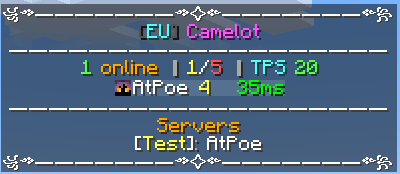 Single online server, custom tab
 -
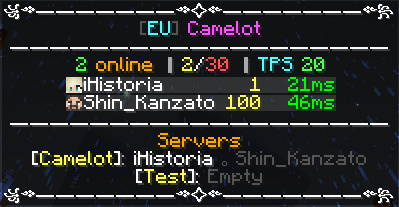 Two Servers online, custom tab
 -
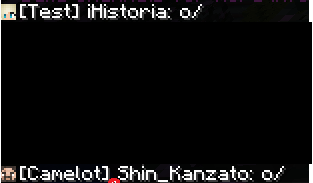 Cross server chat
 -
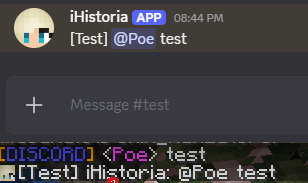 Discord chat / ping
 -
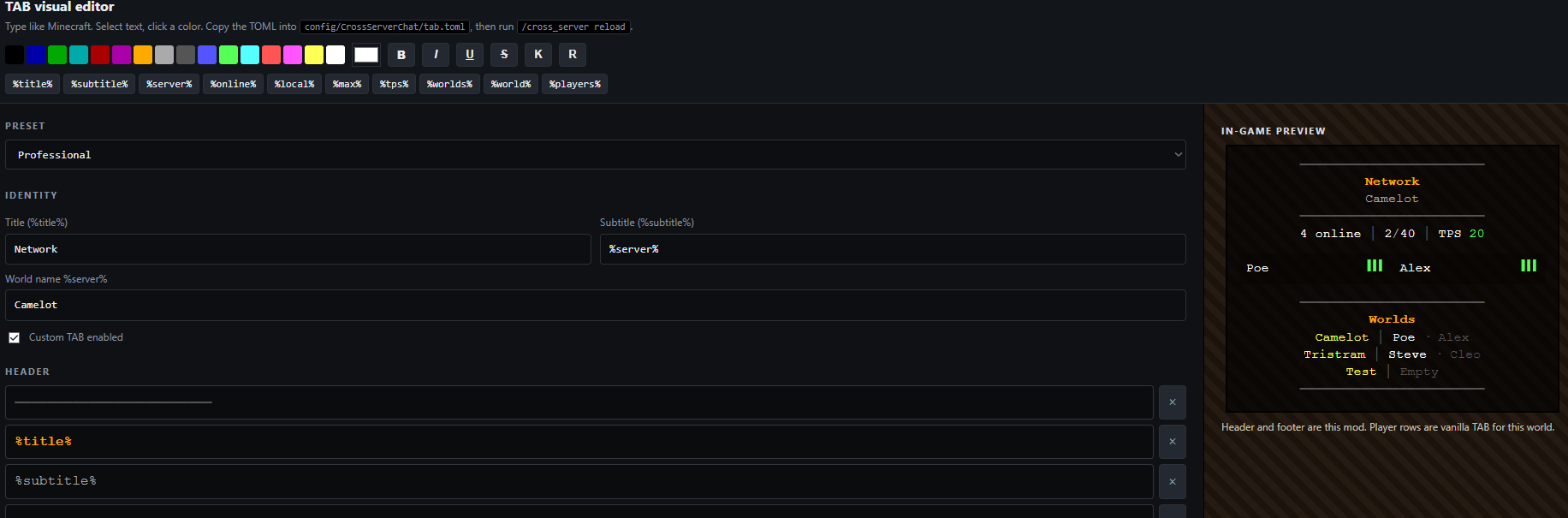 Webeditor /config/CrossServerChat/tab-editor.html
Versions
Files
Relations
Project Relations
More like this
Similar Mods
Suggestions use data such as tags, dependencies, dependents, descriptions, titles, and more to rank how much they overlap with this mod.
On ModDex
Community snapshot
By the numbers
Statistics
Want to reach Minecraft players?
We're looking for a server hosting partner to feature here and other parts of the site. Interested? Send us a message!
Get in touchGet it on
Available Platforms
On ModDex
Community snapshot
By the numbers
Statistics
Resources