
Community listing page, reviews here may not be monitored by the author.
Cursed Fate: UI Additions

No reviews yet
Small but essential UI and QoL improvements for Cursed Fate
Community voices
Reviews
No reviews yet. Be the first to review this project!
Get it on
Available Platforms
About
Project Details
For authors
Embed Badge
If you're the author of this project, you can embed a live badge anywhere that supports HTML or Markdown. It updates automatically whenever ratings change.
Use HTML for any page that supports it, or Markdown for README files and Markdown-based descriptions.
Identifiers
Platform IDs
Resources
External Links
About
Description
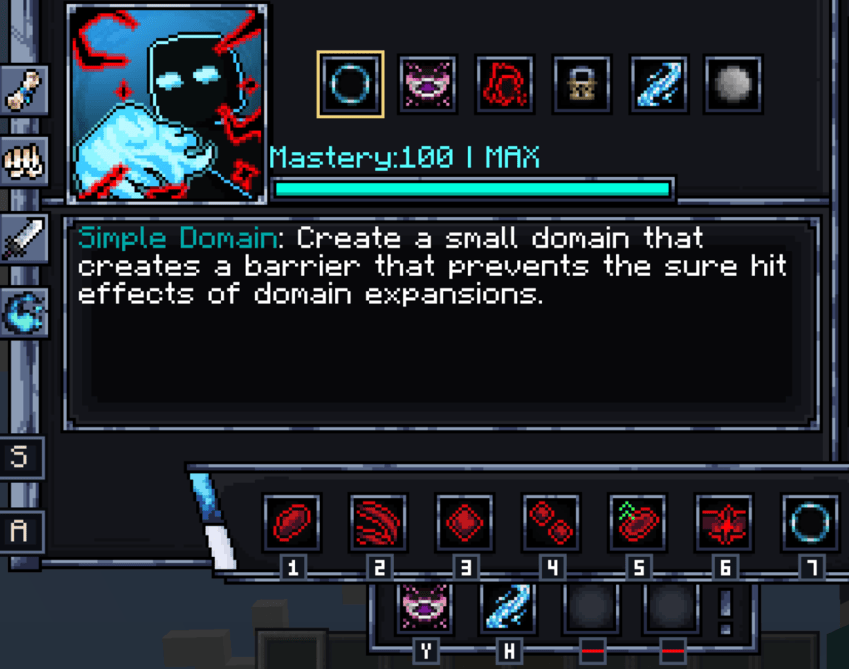
Small, practical UI improvements that (hopefully) make Cursed Fate smoother without changing gameplay. Everything in this mod, in my opinion, should be added to the base mod. Fully clientside and configurable through /cfui!
Features
- Click an ability in the M menu, then press a key to bind it (instead of having to use your mouse)
- Displays your personal key labels beneath hotbar slots
- Save and apply hotbars (including Preset Switch and Extra Abilities), very useful when switching CTs :)
- Allows Preset Switch keybind inside the M menu.
- Adjust Output by holding Output Control and scrolling (thank you to dislucentking for the suggestion)
- Adds shortcuts for minimum and maximum Output (Ctrl + Shift + Output Control for min, Ctrl + Output Control for max)
- Reduces first-person Flow visual clutter
- Lets you see whether a move is toggled or not in the M menu
- Lets you see the description of abilities that are on cooldown (fixes that base mod bug)
- Fixes base mod bug where held keys can get stuck and prevent you from using any other abilities

Save / Apply hotbar preset, bottom-left of M menu
/cfui menu, lets you toggle off any features you don't want
Screenshots
Gallery
Versions
Files
Relations
Project Relations
More like this
Similar Mods
Suggestions use data such as tags, dependencies, dependents, descriptions, titles, and more to rank how much they overlap with this mod.
- Cursed Fate: Mythical Beast Amber
- Cursed Fate:projection Sorcery
- Cursed Fate: Ratio Technique Addon
- Cursed Fate: Cursed Tweaks (New Boss Fights!) CursedFate Addon
- Cursed fate: Modulo Yuji Addon
- Cursed Fate: Wither Rose
- Cursed Fate: Technique Extinguishment
- Cursed Fate: Black Bird Manipulation
- Cursed Fate: Multiverse
- Cursed Fate: Antigravity System
- Cursed Fate: Divine General Mahoraga
- Cursed Fate: Bllue's Weapons
On ModDex
Community snapshot
By the numbers
Statistics
Want to reach Minecraft players?
We're looking for a server hosting partner to feature here and other parts of the site. Interested? Send us a message!
Get in touchGet it on
Available Platforms
On ModDex
Community snapshot
By the numbers
Statistics
Resources