Community listing page, reviews here may not be monitored by the author.
Custom Block Outline


No reviews yet
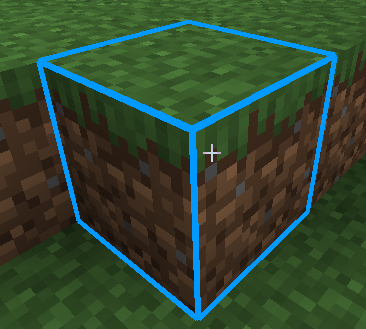
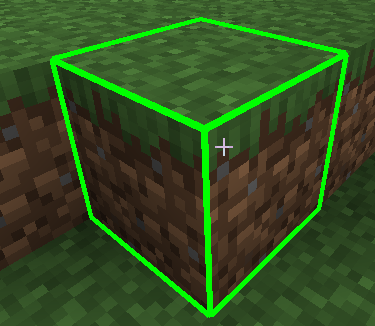
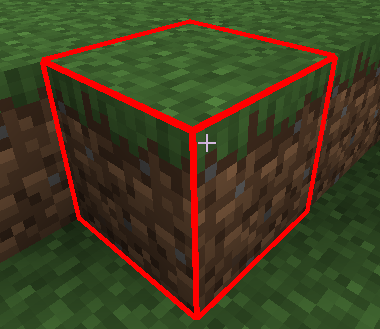
A simple yet highly useful client-side mod that replaces Minecraft's default, boring black block selection outline with a vibrant, fully customizable colored highlight!
Community voices
Reviews
No reviews yet. Be the first to review this project!
Get it on
Available Platforms
Compatibility
Supported Environments
Runs entirely on the client. Works on vanilla servers.
About
Project Details
For authors
Embed Badge
If you're the author of this project, you can embed a live badge anywhere that supports HTML or Markdown. It updates automatically whenever ratings change.
Use HTML for any page that supports it, or Markdown for README files and Markdown-based descriptions.
Identifiers
Platform IDs
Resources
External Links
About
Description
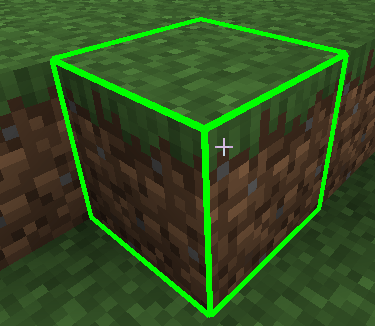
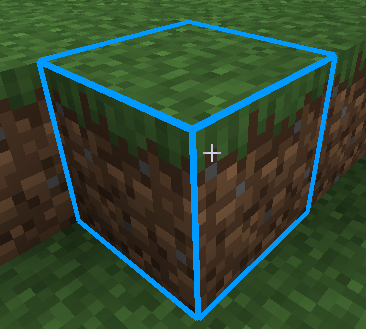
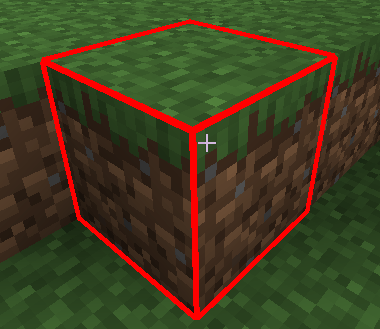
A simple yet highly useful client-side mod that replaces Minecraft's default, boring black block selection outline with a vibrant, fully customizable colored highlight!
Now you can perfectly see which block you are targeting, even in the deepest, darkest caves or while building complex structures.
🌟 Features:
- Color Selection on the Fly: Toggle between Cyan (Blue), Red, Green, or default Black directly in-game.
- Thickness Adjustment: Make the outline ultra-thin or thick and bold for maximum visibility.
- No Restarts Needed: All changes are applied instantly without reloading the world or restarting the game.
🎮 How to Use:
- Look at any block in the world.
- Press the K key on your keyboard to open the configuration menu.
- Select your preferred color or adjust the line thickness using the
+0.5/-0.5buttons. - Click Done to save and return to the game.
📌 Requirements:
- Minecraft Version: 1.20.1
- Mod Loader: Forge
- This is a Client-Side mod. You can safely use it on multiplayer servers without needing it installed on the server side.
Custom Block Outline
A simple yet highly useful client-side mod that replaces Minecraft's default, boring black block selection outline with a vibrant, fully customizable colored highlight!
Now you can perfectly see which block you are targeting, even in the deepest, darkest caves or while building complex structures.
🌟 Features:
- Color Selection on the Fly: Toggle between Cyan (Blue), Red, Green, or default Black directly in-game.
- Thickness Adjustment: Make the outline ultra-thin or thick and bold for maximum visibility.
- No Restarts Needed: All changes are applied instantly without reloading the world or restarting the game.
🎮 How to Use:
- Look at any block in the world.
- Press the K key on your keyboard to open the configuration menu.
- Select your preferred color or adjust the line thickness using the
+0.5/-0.5buttons. - Click Done to save and return to the game.
📌 Requirements:
- Minecraft Version: 1.20.1
- Mod Loader: Forge
- This is a Client-Side mod. You can safely use it on multiplayer servers without needing it installed on the server side.
Screenshots
Gallery
-
 Снимок ÑкÑана 2026-06-04 220225.png Снимок ÑкÑана 2026-06-04 220225.png
 -
 Снимок ÑкÑана 2026-06-04 220208.png Снимок ÑкÑана 2026-06-04 220208.png
 -
 Снимок ÑкÑана 2026-06-04 220155.png Снимок ÑкÑана 2026-06-04 220155.png
Versions
Files
Relations
Project Relations
More like this
Similar Mods
Suggestions use data such as tags, dependencies, dependents, descriptions, titles, and more to rank how much they overlap with this mod.
On ModDex
Community snapshot
By the numbers
Statistics
Want to reach Minecraft players?
We're looking for a server hosting partner to feature here and other parts of the site. Interested? Send us a message!
Get in touchGet it on
Available Platforms
On ModDex
Community snapshot
By the numbers
Statistics
Resources