
Community listing page, reviews may not be monitored by the author.
Custom Jukebox Discs

No reviews yet
Put your own MP3 and OGG music on real jukebox discs. Server-side permissions, quotas and moderation included.

Community voices
Reviews
No reviews yet. Be the first to review this project!
Get it on
Available Platforms
About
Project Details
For authors
Embed Badge
If you're the author of this project, you can embed a live badge anywhere that supports HTML or Markdown. It updates automatically whenever ratings change.
Use HTML for any page that supports it, or Markdown for README files and Markdown-based descriptions.
Identifiers
Platform IDs
Resources
External Links
About
Description
Any MP3 or OGG on your disk becomes a music disc you can put in a jukebox.
Minecraft 1.21.1 · NeoForge · needs to be on the client and the server · MIT licensed
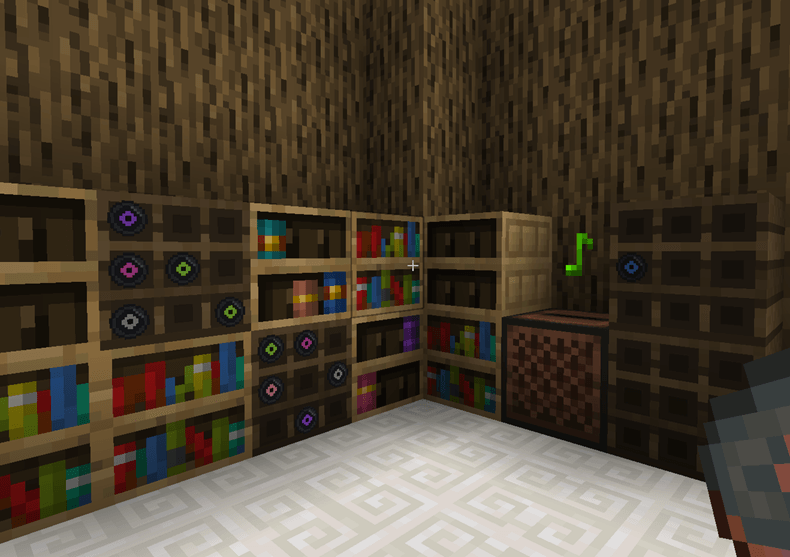
Getting started
- Drop your
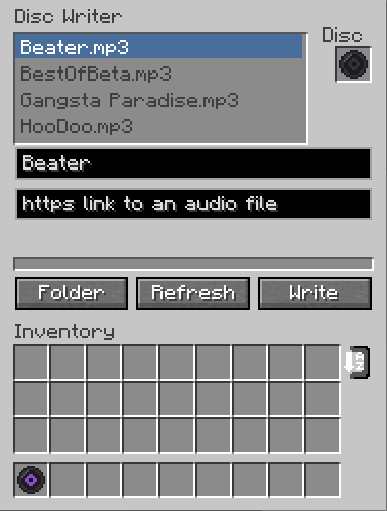
.mp3or.oggfiles into.minecraft/customjukeboxdiscs/uploads - Craft a Disc Writer (iron, redstone, a jukebox) and some Blank Discs (paper and an iron nugget)
- Right-click the writer, put a Blank Disc in the slot, pick a file from the list, hit Write
- Take the disc out and put it in any normal jukebox
That is it. The disc is a real music disc from there on: hoppers move it, comparators read it, breaking the jukebox stops the song, walking away makes it quieter.
What you get
- Your music through the vanilla jukebox, on the Records volume slider, with proper distance falloff
- 12 disc designs, randomly assigned when you write one, so a wall of discs is not 12 identical items
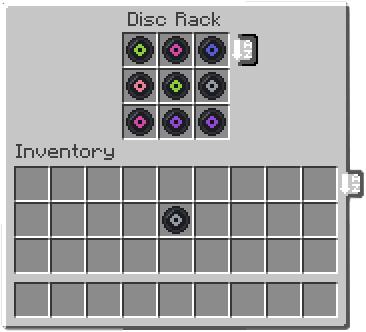
- Disc Rack — a 9 slot shelf that shows the discs inside it. Right-click a disc to grab it, sneak-click to open the whole thing like a chest. Comparators read how full it is
- Works with the Sophisticated Backpacks / Storage jukebox upgrade. Music from a backpack on your back follows you around
- Press J to turn custom music off for yourself. The server then stops sending you tracks at all, so it costs you nothing in bandwidth
- Nothing is transcoded, nothing is bundled that runs outside Java. No FFmpeg, no native binaries, no telemetry
If you run a server
The server decides everything. It re-reads every uploaded file, works out the real length itself, and ignores whatever the client claims about it.
By default only operators can write discs. This trips people up on day one. To open it up:
/customdiscs access mode everyone
/customdiscs access mode allowlist
/customdiscs access allow <player>
/customdiscs access deny <player>
A deny entry beats everything, including operator status.
To see and clean up what people wrote:
/customdiscs tracks list [page]
/customdiscs tracks info <sha256>
/customdiscs tracks delete <sha256>
/customdiscs reload
Default limits, all editable in customjukeboxdiscs-server.toml:
- File size: 10 MiB
- Track length: 10 minutes
- Tracks per player: 20
- Storage per player: 100 MiB
- Storage per server: 2 GiB
- Transfer rate: 512 KiB/s per player
Tracks are stored in the world folder under their content hash, so the same song uploaded by five people takes one slot on disk. A player downloads a track once and caches it for that server; listening to it again is free.
Writing from a link
Off by default. Switch on urlUploads.enabled and list the hosts you trust, and players can paste an https link to an audio file instead of using a local file. The server downloads it and puts it through exactly the same checks as an upload.
This is not a streaming mod. It cannot play from YouTube, Spotify or anything like them, and it never will. The link has to point at an actual audio file — your own web space, the Internet Archive, the Free Music Archive, a file you dropped in Discord.
Worth knowing before you install
- Client and server both need the mod. A server running it alone will not work
- Audio is downmixed to mono. OpenAL will not position a stereo source, and a music disc that plays at the same volume everywhere in the world is worse than a mono one that fades properly
- Only upload music you are allowed to share. Server owners choose who can write discs and can delete anything at any time
- Modpacks are welcome, no need to ask
Screenshots
Gallery
Versions
Files
Relations
Project Relations
More like this
Similar Mods
Suggestions use data such as tags, dependencies, dependents, descriptions, titles, and more to rank how much they overlap with this mod.
On ModDex
Community snapshot
By the numbers
Statistics

Get it on
Available Platforms
On ModDex
Community snapshot
By the numbers
Statistics
Resources