Community listing page, reviews here may not be monitored by the author.
Custom pvp hud


No reviews yet
FlexHUD — Controls and Keybinds Summary FlexHUD is a fully customizable HUD system that allows players to move, resize, scale, and organize HUD elements directly in-game.
Community voices
Reviews
No reviews yet. Be the first to review this project!
Get it on
Available Platforms
Compatibility
Supported Environments
Runs entirely on the client. Works on vanilla servers.
About
Project Details
For authors
Embed Badge
If you're the author of this project, you can embed a live badge anywhere that supports HTML or Markdown. It updates automatically whenever ratings change.
Use HTML for any page that supports it, or Markdown for README files and Markdown-based descriptions.
Identifiers
Platform IDs
Resources
External Links
About
Description
FlexHUD — Controls and Keybinds Summary
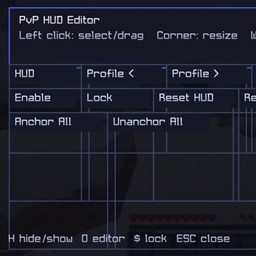
FlexHUD is a fully customizable HUD system that allows players to move, resize, scale, and organize HUD elements directly in-game.
Main Controls
Lock Selected HUD
Locks the currently selected HUD to prevent it from being moved accidentally.
- Default key:
' - Press the key to lock or unlock the selected HUD.
Open HUD Editor
Opens the HUD editor, where you can customize your HUD elements.
- Default key:
0 - Select a HUD element and move it to the desired position.
- Resize and scale HUD elements according to your preferences.
- Configure each HUD individually.
Toggle PvP HUD
Quickly shows or hides the PvP HUD.
- Default key:
H - Press
Hto enable or disable the PvP HUD without opening the editor.
Keybinds
Each action displays its assigned key directly in the FlexHUD settings.
The Reset button next to a keybind restores that action to its default key.
Keybinds can also be changed through Minecraft's standard Controls menu.
Recommended Workflow
- Press
0to open the HUD Editor. - Select the HUD element you want to edit.
- Move and resize it until it is positioned correctly.
- Press
'to lock the selected HUD once you are satisfied with its position. - Press
Hto quickly toggle the PvP HUD. - Use Reset whenever you want to restore a keybind to its default setting.
FlexHUD is designed to provide complete HUD customization while keeping controls simple, fast, and easy to use.
FlexHUD — Controls and Keybinds Summary
FlexHUD is a fully customizable HUD system that allows players to move, resize, scale, and organize HUD elements directly in-game.
Main Controls
Lock Selected HUD
Locks the currently selected HUD to prevent it from being moved accidentally.
- Default key:
' - Press the key to lock or unlock the selected HUD.
Open HUD Editor
Opens the HUD editor, where you can customize your HUD elements.
- Default key:
0 - Select a HUD element and move it to the desired position.
- Resize and scale HUD elements according to your preferences.
- Configure each HUD individually.
Toggle PvP HUD
Quickly shows or hides the PvP HUD.
- Default key:
H - Press
Hto enable or disable the PvP HUD without opening the editor.
Keybinds
Each action displays its assigned key directly in the FlexHUD settings.
The Reset button next to a keybind restores that action to its default key.
Keybinds can also be changed through Minecraft's standard Controls menu.
Recommended Workflow
- Press
0to open the HUD Editor. - Select the HUD element you want to edit.
- Move and resize it until it is positioned correctly.
- Press
'to lock the selected HUD once you are satisfied with its position. - Press
Hto quickly toggle the PvP HUD. - Use Reset whenever you want to restore a keybind to its default setting.
FlexHUD is designed to provide complete HUD customization while keeping controls simple, fast, and easy to use.
Screenshots
Gallery
Versions
Files
Relations
Project Relations
More like this
Similar Mods
Suggestions use data such as tags, dependencies, dependents, descriptions, titles, and more to rank how much they overlap with this mod.
On ModDex
Community snapshot
By the numbers
Statistics
Want to reach Minecraft players?
We're looking for a server hosting partner to feature here and other parts of the site. Interested? Send us a message!
Get in touchGet it on
Available Platforms
On ModDex
Community snapshot
By the numbers
Statistics
Resources