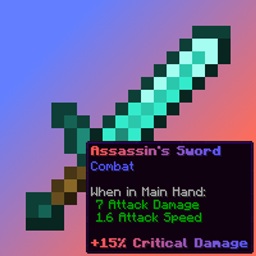
Community listing page, reviews here may not be monitored by the author.
Custom Tooltip API


No reviews yet
Data-driven tooltip text creation.

Community voices
Reviews
No reviews yet. Be the first to review this project!
Get it on
Available Platforms
Compatibility
Supported Environments
Runs entirely on the client. Works on vanilla servers.
About
Project Details
For authors
Embed Badge
If you're the author of this project, you can embed a live badge anywhere that supports HTML or Markdown. It updates automatically whenever ratings change.
Use HTML for any page that supports it, or Markdown for README files and Markdown-based descriptions.
Identifiers
Platform IDs
About
Description
Custom Tooltip API
Custom Tooltip API is a powerful client-side Minecraft mod and developer library that gives you full control over item tooltips. Add custom lore, dynamic real-time data, animated gradients, and custom backgrounds, all configurable in-game or through code.
No need to code for basic usage, as it features a powerful in-game interface and full JSON support. However, it also provides a robust Developer API for those who want to inject tooltips via code.
Key Features
Icon Alignment: Align tooltip icons from external resource packs to the start of the line so the position stays consistent!
Advanced Targeting: Target specific item IDs (
minecraft:diamond_sword), tag groups (#c:swords), entire mod namespaces (minecraft:*), Regex patterns (regex:.*_sword), or every item at once (*).Dynamic Placeholders: Embed real-time item data directly into your text using variables like
%durability%,%max_durability%,%weapon_damage%, or%enchantments%. You can also embed keybind hints using the format<key:key.jump>->[Space].Multi-line Support (Lore): Add entire paragraphs of lore or skill descriptions.
Visual Effects & Gradients:
- Rainbow: Animated rainbow effect.
- Slide Gradient: Two-color gradients that flow through the text.
- Breathing Gradient: A smooth pulse between two colors.
- Static Gradient & Solid: Fixed gradients or traditional solid text.
- Colors: Hex codes (e.g.
#RRGGBB), legacy codes (e.g.&d) or Minecraft color names (e.g.blue).
Custom Backgrounds & Borders: Solid, Gradient, Texture (Stretch), or Texture (Framed / Nine-Slice) modes with full opacity control. Drop any background image into
config/custom-tooltip-api/backgrounds/and enable it per tooltip via the dynamically generated resource pack. Supports full compatibility with Tierify custom rendering.Custom Fonts: Drop any font into
config/custom-tooltip-api/fonts/and enable it per tooltip via the dynamically generated resource pack.Positioning: Decide exactly where your text appears:
- Top: Right below the item's name.
- Bottom: At the very end of all descriptions.
- Prepend: At the start of a specific line.
- Append: At the end of a specific line.
- Replace Name: Swap the item's default name for your custom text.
- Replace Line: Replace a specific line with your custom text.
- Replace All: Completely clear the original tooltip and show only yours.
Visibility Conditions: Show a tooltip only when an item is Damaged, Enchanted, or Unbreakable. Use Require Keybind mode to hide tooltips until the player holds a configurable key.
Text Modifiers: Full support for Bold, Italic, Underlined,
Strikethrough, and O̷͍̞͐͑b̷̻̌f̶̯̈u̸̲͗͐s̶̩̬͝c̵͎̊a̸̹̟̎ẗ̴͖̿e̴̟̪͊̈́ď̴̹̪ (obfuscated) text.
In-Game Interface (GUI)
Manage all your tooltips directly from the Mods Menu. No need to manually edit files unless you want to.
Hold
CTRLin the edit screen for an instant Live Preview of your tooltip.Copy/paste entries to clipboard, reorder, duplicate, enable/disable, and sort by creation date or alphabetically.
For Developers (API)
Developers can use the built-in API to register tooltips and custom placeholders directly through code, with full .dynamicText() support for live per-frame data like energy, mana, or any custom NBT.
For Modpack Creators
The mod generates a custom_tooltip_api/config.json5 file in your config folder. It fully supports code comments, making it incredibly easy to document your modpack's systems for your development team or community.
Drop custom backgrounds into config/custom-tooltip-api/backgrounds/ and custom fonts into config/custom-tooltip-api/fonts/. Enable the dynamically generated resource pack to activate them.
Dependencies
Required on all platforms:
Fabric only:
Custom Tooltip API
Custom Tooltip API is a powerful client-side Minecraft mod and developer library that gives you full control over item tooltips. Add custom lore, dynamic real-time data, animated gradients, and custom backgrounds, all configurable in-game or through code.
No need to code for basic usage, as it features a powerful in-game interface and full JSON support. However, it also provides a robust Developer API for those who want to inject tooltips via code.
Key Features
-
Icon Alignment: Align tooltip icons from external resource packs to the start of the line so the position stays consistent!
-
Advanced Targeting: Target specific item IDs (
minecraft:diamond_sword), tag groups (#c:swords), entire mod namespaces (minecraft:*), Regex patterns (regex:.*_sword), or every item at once (*). -
Dynamic Placeholders: Embed real-time item data directly into your text using variables like
%durability%,%max_durability%,%weapon_damage%, or%enchantments%. You can also embed keybind hints using the format<key:key.jump>->[Space]. -
Multi-line Support (Lore): Add entire paragraphs of lore or skill descriptions.
-
Visual Effects & Gradients:
- Rainbow: Animated rainbow effect.
- Slide Gradient: Two-color gradients that flow through the text.
- Breathing Gradient: A smooth pulse between two colors.
- Static Gradient & Solid: Fixed gradients or traditional solid text.
- Colors: Hex codes (e.g.
#RRGGBB), legacy codes (e.g.&d) or Minecraft color names (e.g.blue).
-
Custom Backgrounds & Borders: Solid, Gradient, Texture (Stretch), or Texture (Framed / Nine-Slice) modes with full opacity control. Drop any background image into
config/custom-tooltip-api/backgrounds/and enable it per tooltip via the dynamically generated resource pack. Supports full compatibility with Tierify custom rendering. -
Custom Fonts: Drop any font into
config/custom-tooltip-api/fonts/and enable it per tooltip via the dynamically generated resource pack. -
Positioning: Decide exactly where your text appears:
- Top: Right below the item's name.
- Bottom: At the very end of all descriptions.
- Prepend: At the start of a specific line.
- Append: At the end of a specific line.
- Replace Name: Swap the item's default name for your custom text.
- Replace Line: Replace a specific line with your custom text.
- Replace All: Completely clear the original tooltip and show only yours.
-
Visibility Conditions: Show a tooltip only when an item is Damaged, Enchanted, or Unbreakable. Use Require Keybind mode to hide tooltips until the player holds a configurable key.
-
Text Modifiers: Full support for Bold, Italic, Underlined,
Strikethrough, and O̷͍̞͐͑b̷̻̌f̶̯̈u̸̲͗͐s̶̩̬͝c̵͎̊a̸̹̟̎ẗ̴͖̿e̴̟̪͊̈́ď̴̹̪ (obfuscated) text.
In-Game Interface (GUI)
-
Manage all your tooltips directly from the Mods Menu. No need to manually edit files unless you want to.
-
Hold
CTRLin the edit screen for an instant Live Preview of your tooltip. -
Copy/paste entries to clipboard, reorder, duplicate, enable/disable, and sort by creation date or alphabetically.
For Developers (API)
Developers can use the built-in API to register tooltips and custom placeholders directly through code, with full .dynamicText() support for live per-frame data like energy, mana, or any custom NBT.
For Modpack Creators
The mod generates a custom_tooltip_api/config.json5 file in your config folder. It fully supports code comments, making it incredibly easy to document your modpack's systems for your development team or community.
Drop custom backgrounds into config/custom-tooltip-api/backgrounds/ and custom fonts into config/custom-tooltip-api/fonts/. Enable the dynamically generated resource pack to activate them.
Dependencies
Required on all platforms:
Fabric only:
Screenshots
Gallery
-
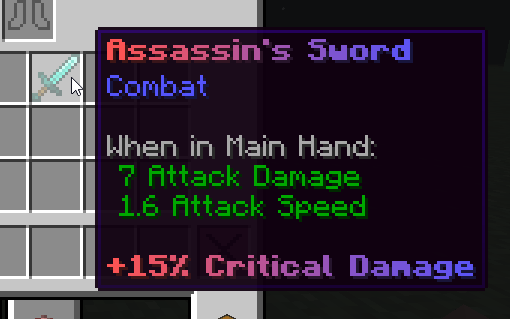 Example custom tooltip
 -
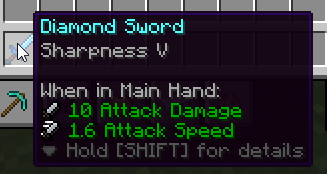 Icon alignment feature Shows the icon alignment feature with the Attribute Icons (RPG Series) resource pack. (https://www.curseforge.com/minecraft/texture-packs/attribute-icons-rpg-series-resource-pack)
 -
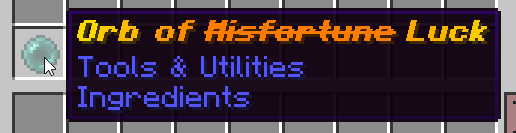 (Funny) tooltip example
 -
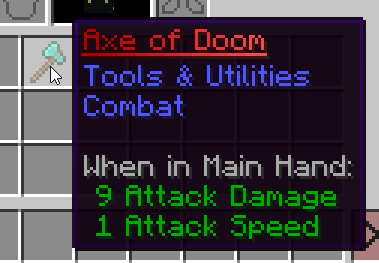 Another custom tooltip
 -
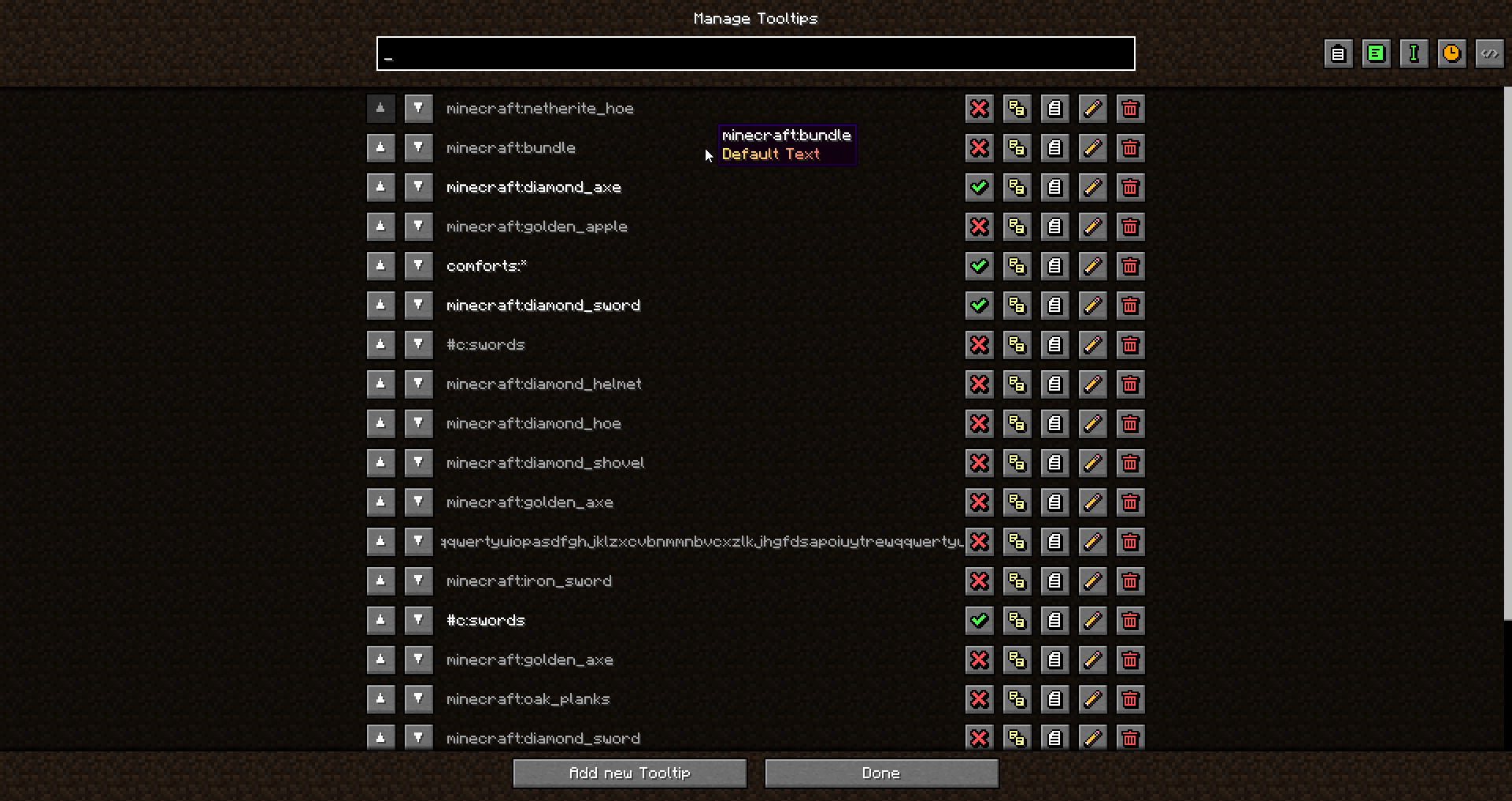 Tooltip Listing screen
 -
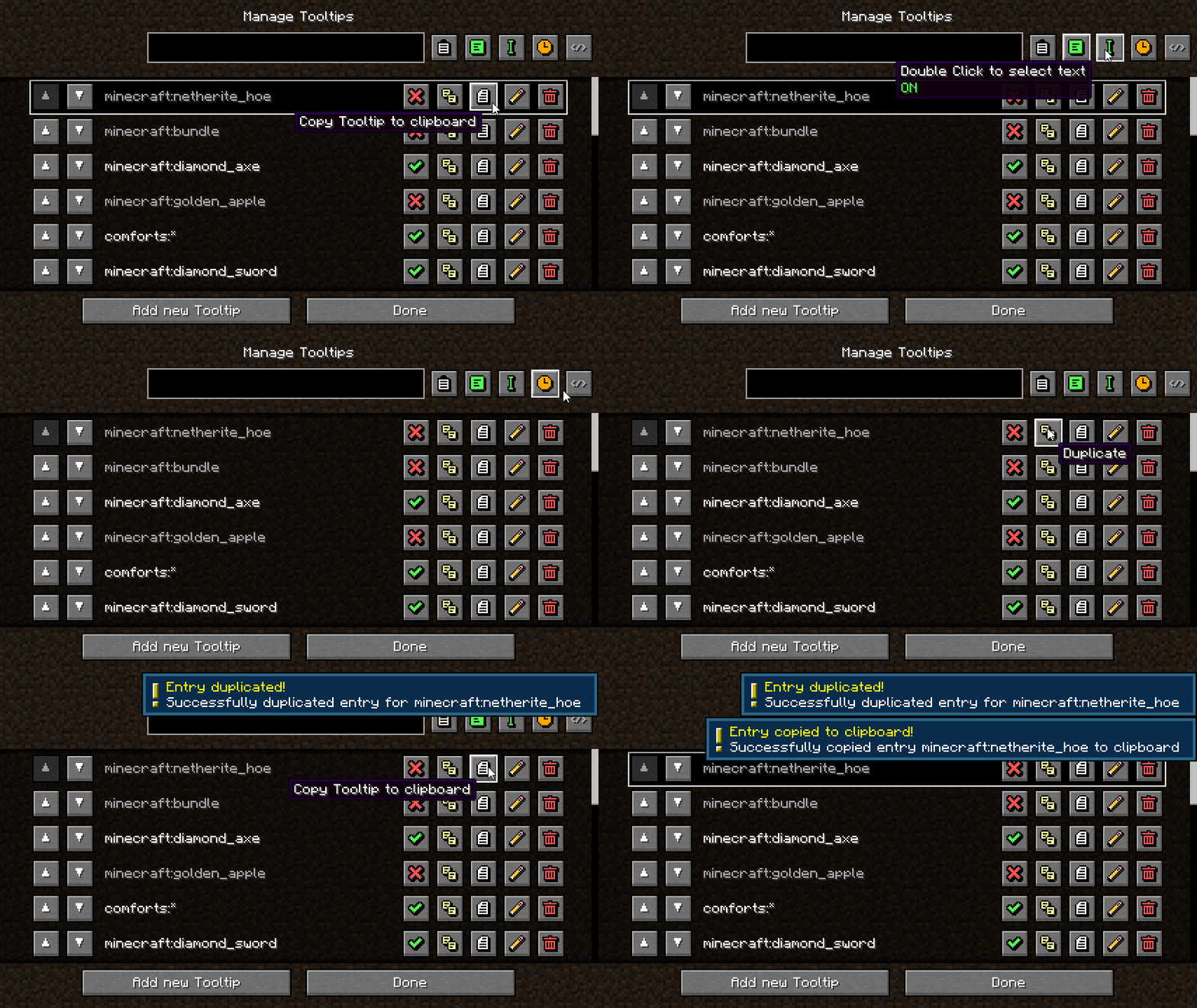 Available tooltip list screen functions
 -
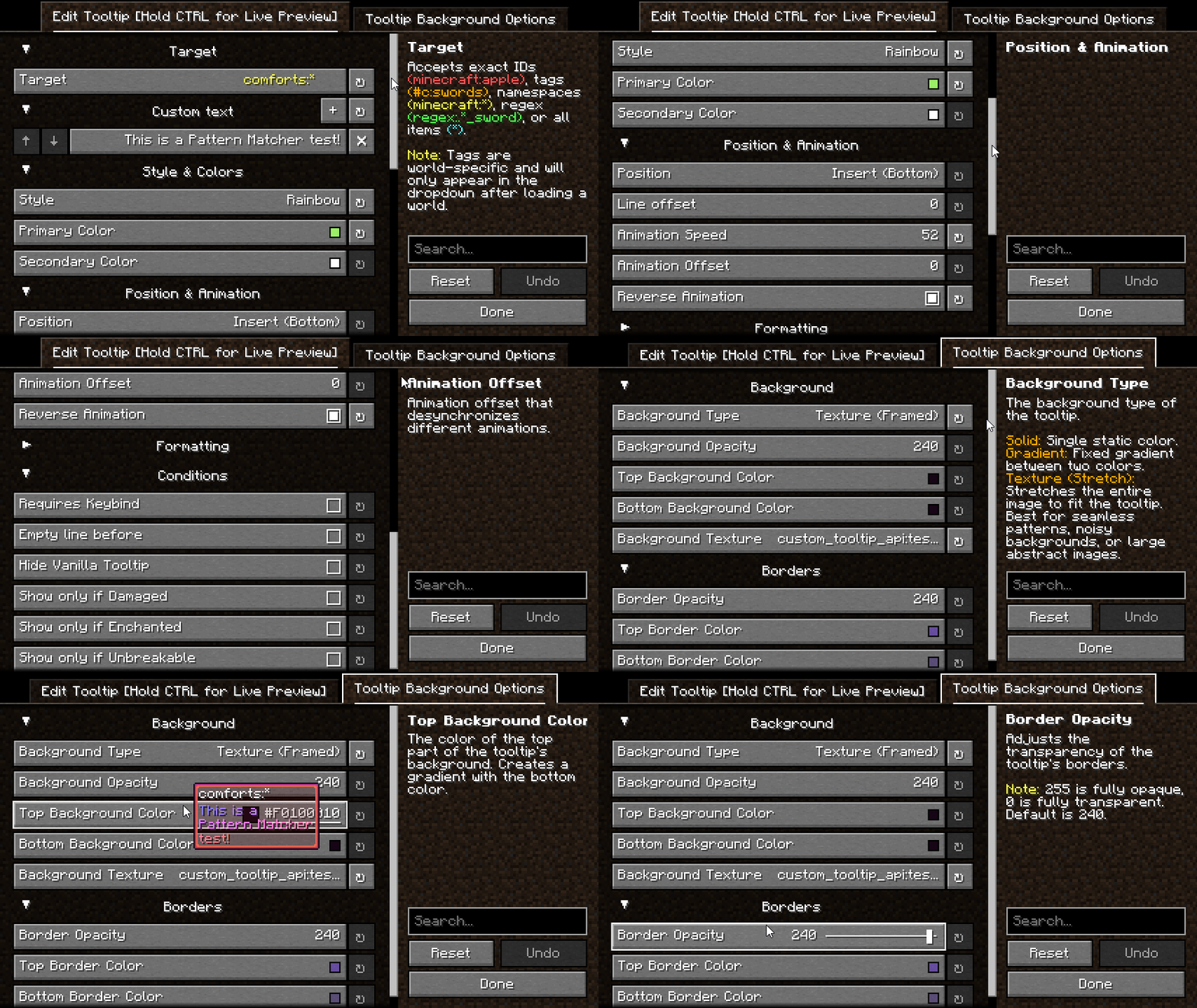 Tooltip Edit Screen
-
 Example custom tooltip
 -
 (Funny) tooltip example
 -
 Icon alignment feature Shows the icon alignment feature with the Attribute Icons (RPG Series) resource pack. (https://modrinth.com/resourcepack/attribute-icons-rpg-series)
 -
 Another custom tooltip
 -
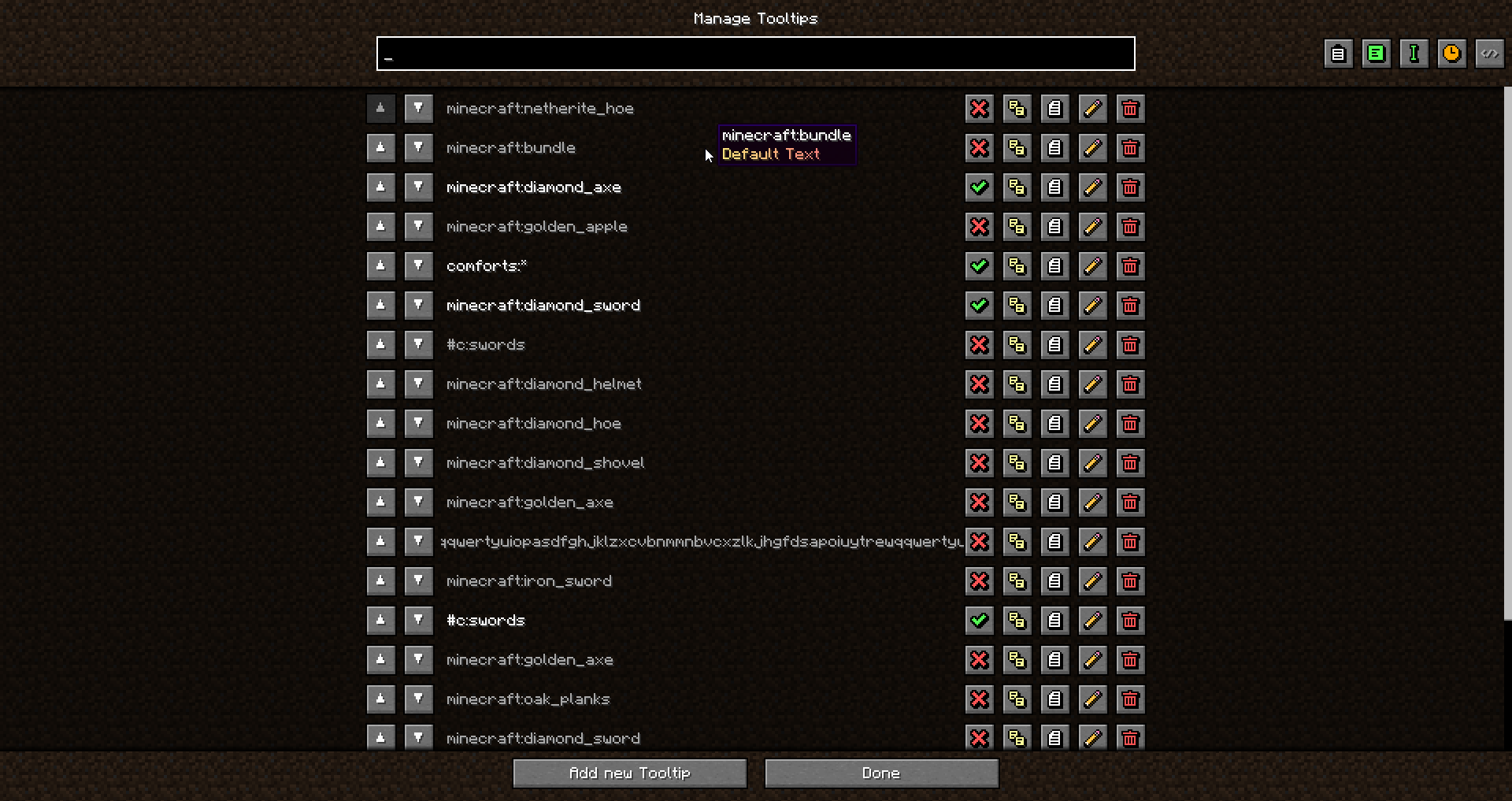 Tooltip Listing screen
 -
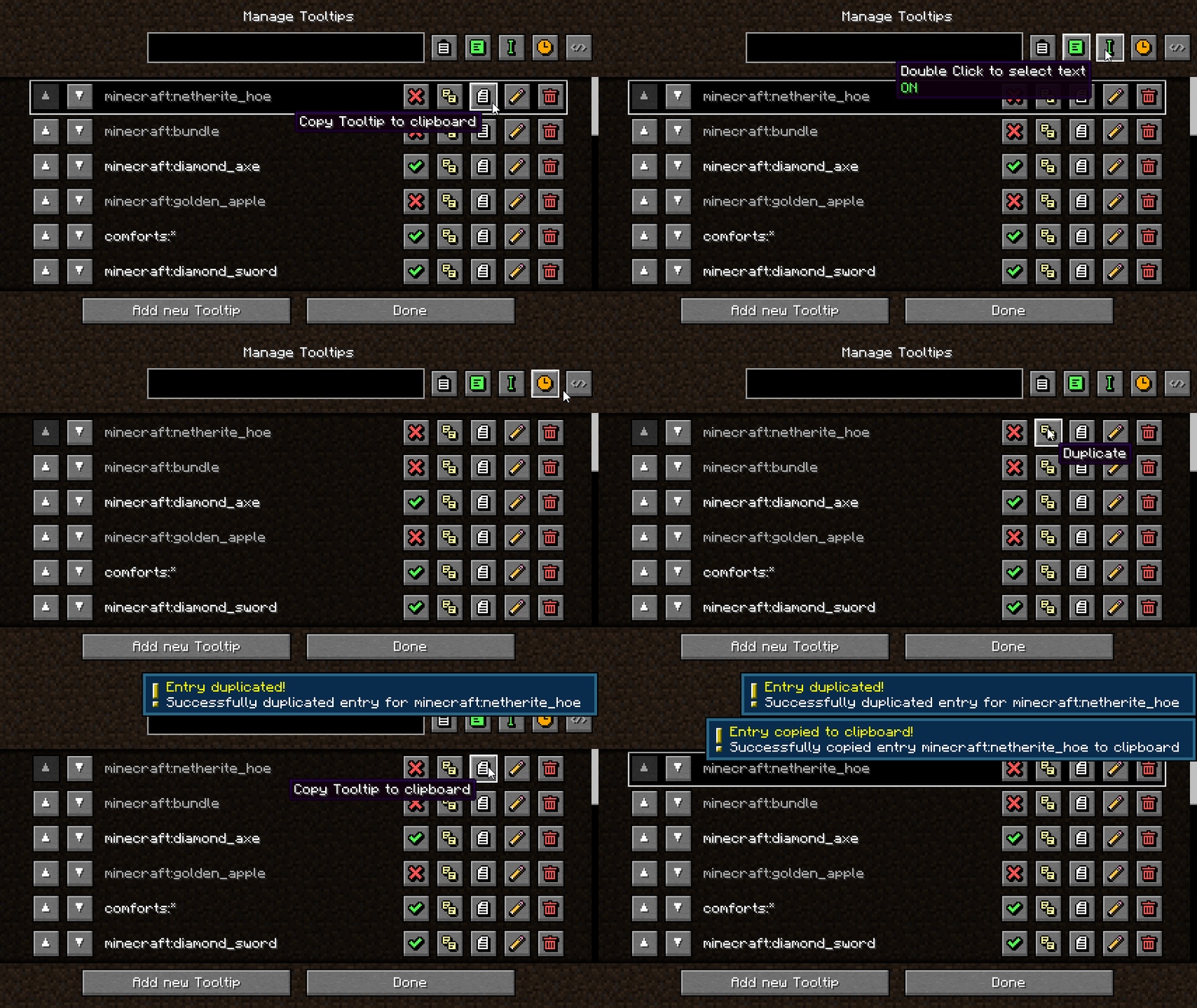 Available tooltip list screen functions
 -
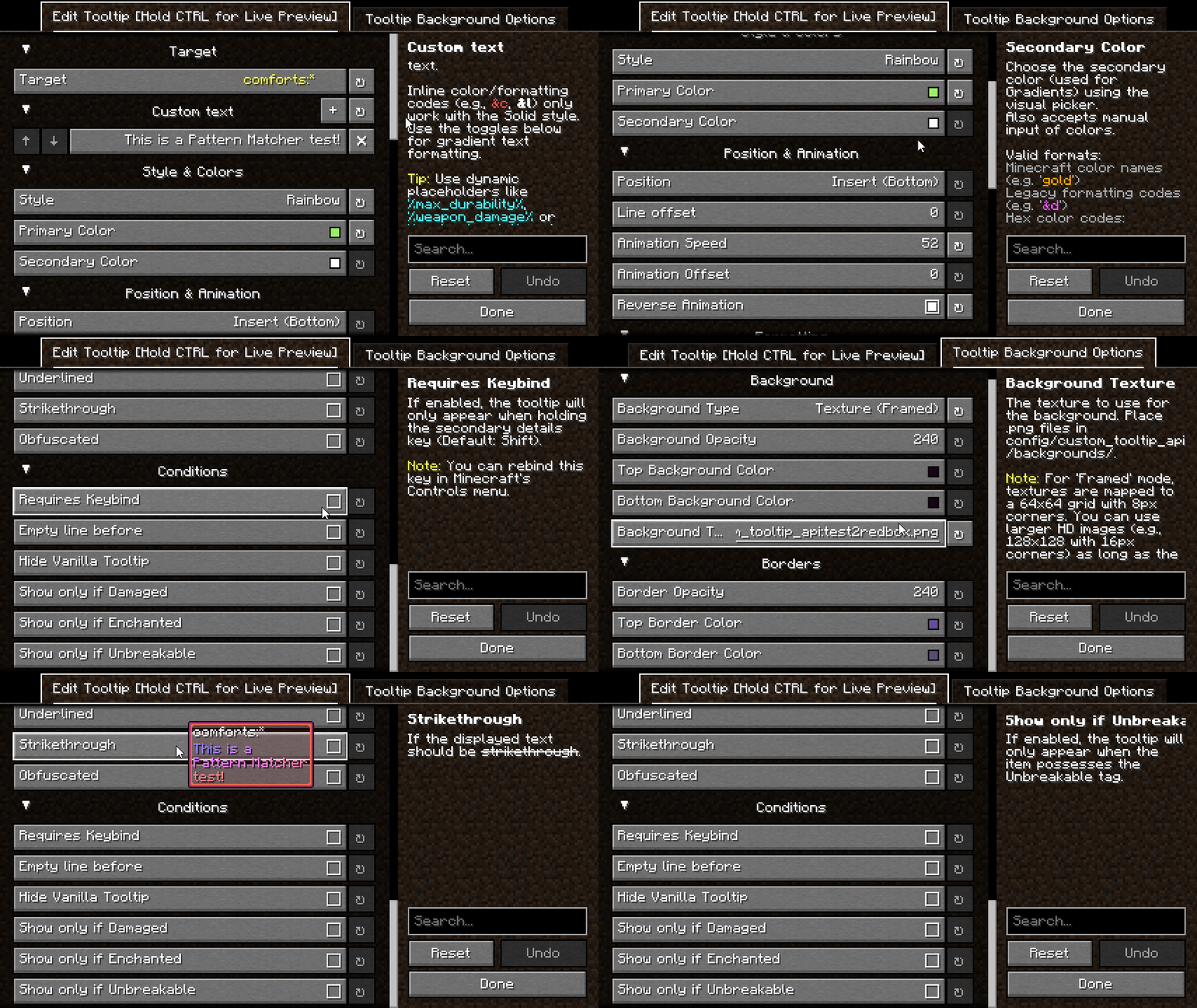 Tooltip Edit Screen
Versions
Files
Relations
Project Relations
More like this
Similar Mods
Suggestions use data such as tags, dependencies, dependents, descriptions, titles, and more to rank how much they overlap with this mod.
On ModDex
Community snapshot
By the numbers
Statistics
 (opens in a new tab)
Get it on
Available Platforms
On ModDex
Community snapshot
By the numbers