Community listing page, reviews may not be monitored by the author.
CustomCommandBlock

No reviews yet
Create custom dungeons and mob raids with configurable waves, spawn locations, arena boundaries, rewards, and redstone activation!

Community voices
Reviews
No reviews yet. Be the first to review this project!
Get it on
Available Platforms
About
Project Details
For authors
Embed Badge
If you're the author of this project, you can embed a live badge anywhere that supports HTML or Markdown. It updates automatically whenever ratings change.
Use HTML for any page that supports it, or Markdown for README files and Markdown-based descriptions.
Identifiers
Platform IDs
Resources
External Links
About
Description
Custom Command Block
Create your own dungeons, custom mob raids, and challenging combat encounters in Minecraft!
Custom Command Block is a Minecraft Forge mod that introduces a powerful, fully configurable block designed to help players, map creators, and modpack developers build custom dungeon encounters without needing complicated commands or datapacks.
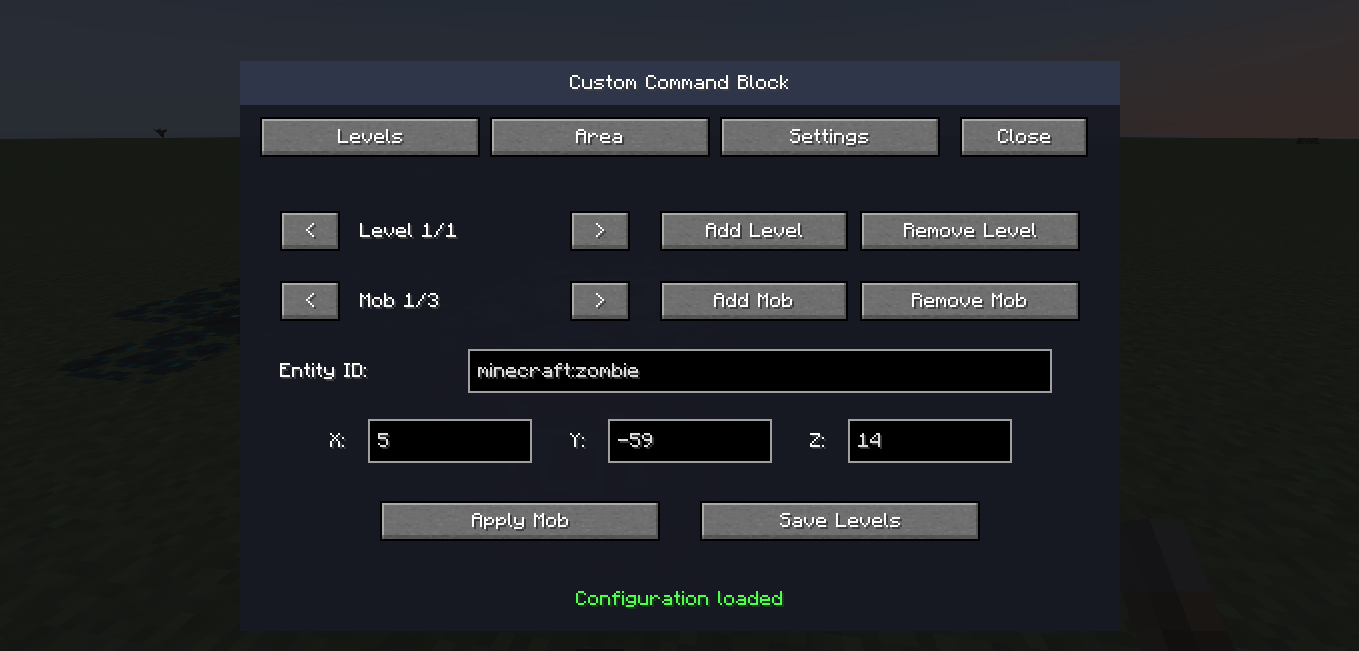
With an intuitive graphical interface, you can create multiple waves of enemies, configure individual mob spawn locations, define custom battle arenas, customize rewards, and control how your raids operate.
Whether you're building an adventure map, an RPG world, or a custom survival experience, Custom Command Block gives you the tools to create exciting combat challenges.
Main Features
⚔️ Custom Raid Levels and Enemy Waves
Create unique combat encounters with multiple levels of difficulty.
-
Create and configure multiple raid levels.
-
Add different types of enemies to each level.
-
Configure individual spawn coordinates for mobs.
-
Set up automatic progression between waves.
-
Customize delays between levels.
-
Combine different enemy types to create challenging battles.
Each level can have its own enemy configuration, allowing you to design anything from a simple zombie encounter to a complex dungeon battle.
👾 Vanilla and Modded Mob Support
Custom Command Block supports registered Minecraft entities, including compatible mobs added by other mods.
-
Spawn vanilla Minecraft enemies.
-
Configure compatible modded entities using their registered IDs.
-
Use entity ID autocomplete to simplify configuration.
-
Combine different mob types in the same raid.
This makes the mod useful for custom modpacks and RPG adventures.
🛡️ Configurable Dungeon Boundaries
Define the area where your raid will take place.
-
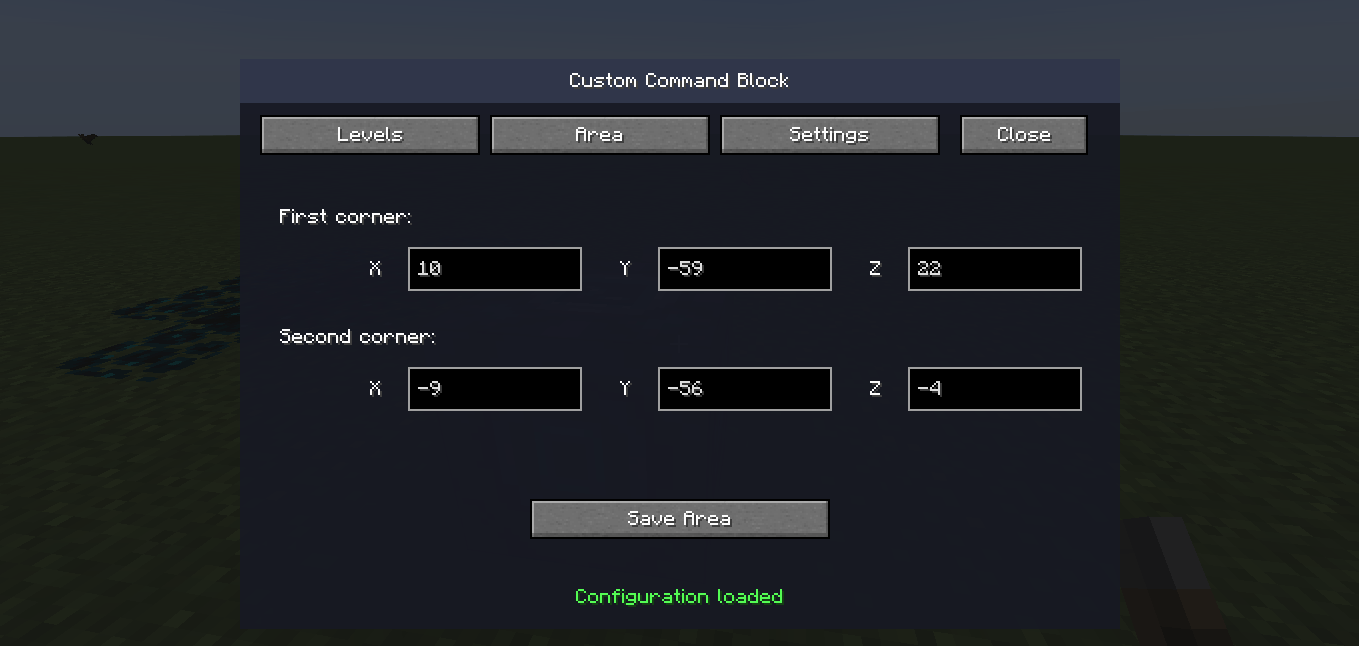
Select two opposite corners to create a rectangular arena.
-
Create a visible, translucent blue boundary.
-
Keep players and raid mobs inside the configured area.
-
Include the floor and ceiling in the boundary.
-
Create dungeon arenas without placing physical barrier blocks.
The virtual boundary allows you to build custom combat arenas while preserving the surrounding environment.
⚙️ Advanced Raid Settings
Customize how your dungeon operates.
-
Configure delays between enemy waves.
-
Set automatic cancellation when players leave the area.
-
Enable or disable repeatable raids.
-
Configure completion rewards.
-
Customize raid messages and notifications.
These options allow you to create different types of challenges, from repeatable combat arenas to one-time dungeon encounters.
🎁 Custom Rewards
Reward players for completing your challenges.
Configure an item reward that players can receive after successfully completing the raid.
Use rewards to encourage exploration, progression, and challenging combat encounters.
🔴 Redstone Activation
Custom Command Block can be activated using a redstone signal.
This allows you to integrate your dungeons with:
-
Redstone mechanisms.
-
Adventure map triggers.
-
Custom dungeon entrances.
-
Automated combat challenges.
💾 Persistent Configuration
Your configured dungeon settings are saved in the Minecraft world.
You can close and reopen your world without needing to recreate your raid configuration.
🖥️ Easy-to-Use Graphical Interface
The block includes a custom configuration interface divided into three main sections:
Levels: Configure enemy waves, entity IDs, and spawn positions.
Area: Define the dungeon boundaries and combat region.
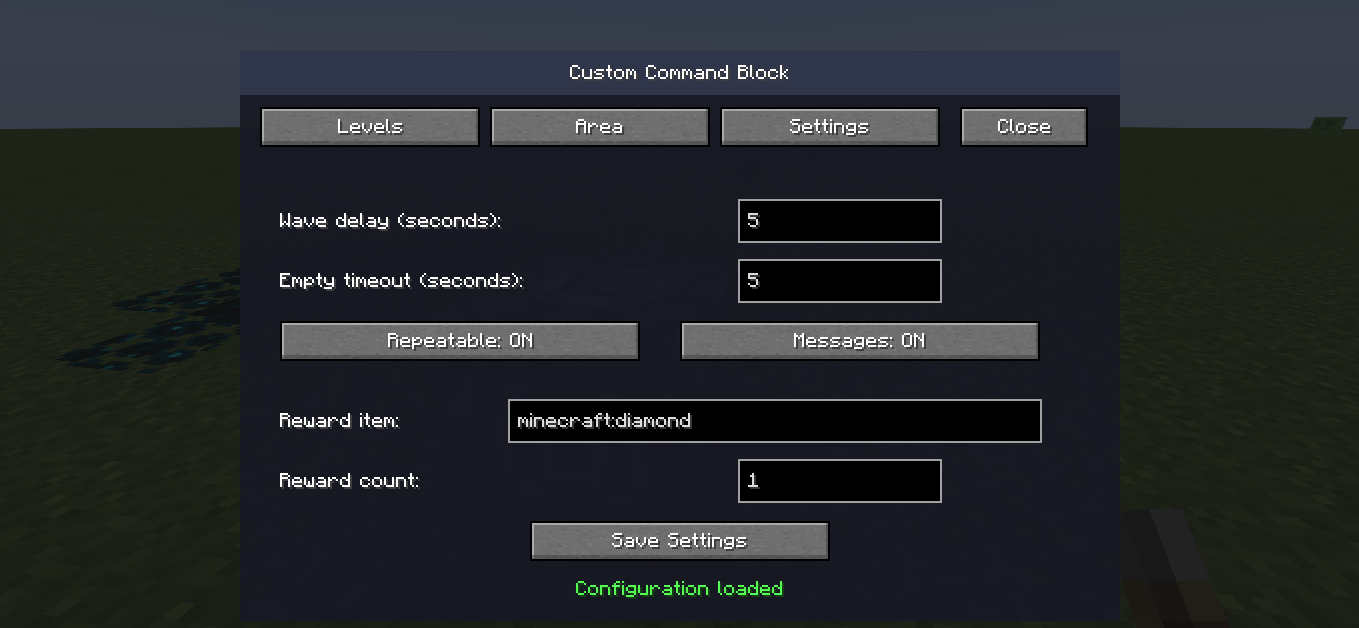
Settings: Customize raid behavior, delays, rewards, and additional options.
No complex command syntax is required for normal configuration.
How to Use
Step 1 — Obtain the Block
Open the Creative Inventory and locate the Custom Command Block in its dedicated creative tab.
Step 2 — Place the Block
Place the block in the location where you want to configure your dungeon.
Step 3 — Configure the Arena
Open the block's interface and navigate to the Area tab.
Define two opposite corners of your dungeon to establish the combat region.
Step 4 — Create Enemy Waves
Navigate to the Levels tab.
Add your desired mobs, configure their entity IDs, and specify their spawn coordinates.
Create additional levels to build progressively challenging encounters.
Step 5 — Customize Settings
Open the Settings tab to configure wave delays, cancellation behavior, repeatability, rewards, and messages.
Step 6 — Activate the Dungeon
Connect the Custom Command Block to a redstone mechanism and activate it.
Your custom raid is ready!
Compatibility
-
Minecraft Version: 1.19.2
-
Mod Loader: Minecraft Forge
-
Forge Version: 43.x
-
Edition: Minecraft Java Edition
-
Mod Version: 1.0.0
The mod supports vanilla entities and compatible entities registered by other installed mods.
Compatibility with individual third-party mods may vary.
Screenshots
Gallery
-
 Captura de tela 2026-11-03 211812.png Captura de tela 2026-11-03 211812.png
-
 Captura de tela 2026-11-03 211845.png Captura de tela 2026-11-03 211845.png
-
 Captura de tela 2026-11-03 211901.png Captura de tela 2026-11-03 211901.png
Versions
Files
Relations
Project Relations
More like this
Similar Mods
Suggestions use data such as tags, dependencies, dependents, descriptions, titles, and more to rank how much they overlap with this mod.
On ModDex
Community snapshot
By the numbers
Statistics

Get it on
Available Platforms
On ModDex
Community snapshot
By the numbers
Statistics
Resources