
Community listing page, reviews here may not be monitored by the author.
CustomCommands

No reviews yet
A velocity plugin to create custom commands
Community voices
Reviews
No reviews yet. Be the first to review this project!
Get it on
Available Platforms
About
Project Details
For authors
Embed Badge
If you're the author of this project, you can embed a live badge anywhere that supports HTML or Markdown. It updates automatically whenever ratings change.
Use HTML for any page that supports it, or Markdown for README files and Markdown-based descriptions.
Identifiers
Platform IDs
About
Description
CustomCommands for Velocity
This is a Velocity plugin that allows you to create custom commands. It offers you a simple way to create commands that can be executed by players. These commands can be customized to your liking.
Installation
- Download the latest release from modrinth.
- Put the jar file in
plugins/. - Restart your server.
Usage
| Command | Description | Permission |
|---|---|---|
/customcommands reload |
Reload the configuration file and all the custom commands | customcommands.reload |
/customcommands list |
List all custom commands | customcommands.list |
/customcommands help |
Show the help page | customcommands.help |
/customcommands version |
Show the plugin's version | customcommands.version |
/customcommands |
Show the help page | customcommands.help |
All these commands require their respective permissions or the customcommands.admin permission.
They can also be executed via /cc.
/customcommands list
This command displays a list of all custom commands, which looks like this:
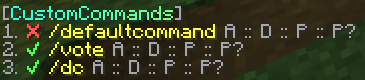
- The ✔/❌ indicates whether the command is enabled or disabled.
- The yellow string is the command name. Click to suggest the command in the chat input.
- Hover A to see an array of all the aliases.
- Hover D to see the description.
- Hover P to see the permission.
- Hover P? to see whether the prefix should be added to the response message.
Configuration
config.toml
The config is located at plugins/customcommands/config.toml.
Content of config.toml
# CustomCommands Configuration

# This is the prefix that will be displayed in front of all messages
# Only supports MiniMessage, see https://docs.advntr.dev/minimessage/format.html and https://webui.advntr.dev/ for more information
Prefix = "<gray>[<gradient:#38ffdb:#8aff8c>CustomCommands<gray>]"

# This is the default message that will be displayed when a player does not have permission to execute a command
No-Permission = "<red>You do not have permission to execute this command."

# This is the default message that will be displayed when a command is run from the console, but the command is not allowed to be run from the console
No-Console-Command = "This command cannot be run from console!"

# This is the default message that will be displayed when a command has been executed successfully
Command-Executed = "<green>Command executed successfully."

# Do not change this
Config-Version = 1.0
Custom Commands
Create your custom commands in plugins/customcommands/Commands/.
Each command is saved in a separate toml file.
Content of the default command file (DefaultCommand.toml)
# Command Configuration

# Enabled?
Enabled = true

# This is the command name that will be used to call the command in the chat
Name = "defaultcommand"

# These are the aliases. Empty the array if you don't need any aliases, like so: Aliases = []
Aliases = ["default", "defaultcmd"]

# This is the description of the command that will be displayed in the help command
Description = "This is the default command of CustomCommands"

# This is the permission required to use the command. Leave empty for no permission
Permission = "customcommands.defaultcommand"

# This is the response that will be sent when the command is called. Leave empty for no response
# Only supports MiniMessage, see https://docs.advntr.dev/minimessage/format.html and https://webui.advntr.dev/ for more information
Response = "<green>Command executed successfully!"

# Add the plugins Prefix configured in config.toml to the response message
UsePrefix = true

# This is the cooldown of the command in seconds
Cooldown = 0

# Proxy command to execute. This code is run on console, without any permission checks. Leave empty for no proxy command
# To view all placeholders, see https://github.com/thevalleyy/CustomCommands?tab=readme-ov-file#placeholders
# Example: ProxyCommand = "send %player% hub"
ProxyCommand = ""
Placeholders
%player%- The player who executed the command
Screenshots
Gallery
-
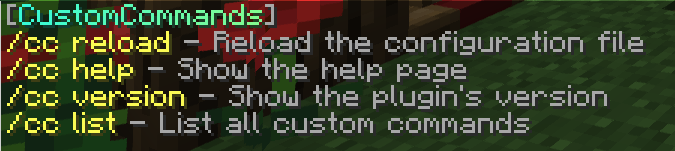 Help menu This image shows the help menu
 -
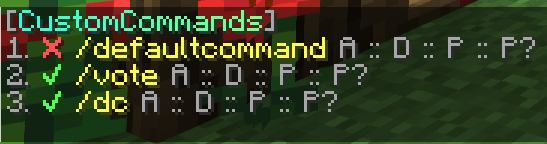 Command list This image shows the command list
Versions
Files
Relations
Project Relations
More like this
Similar Mods
Suggestions use data such as tags, dependencies, dependents, descriptions, titles, and more to rank how much they overlap with this mod.
On ModDex
Community snapshot
By the numbers
Statistics

Want to reach Minecraft players?
We're looking for a server hosting partner to feature here and other parts of the site. Interested? Send us a message!
Get in touchGet it on
Available Platforms
On ModDex
Community snapshot
By the numbers