
Community listing page, reviews here may not be monitored by the author.
Custom Durability


No reviews yet
A fabric mod that allows for changing the durabilities of all items!
Community voices
Reviews
No reviews yet. Be the first to review this project!
Get it on
Available Platforms
Compatibility
Supported Environments
Must be installed on both the client and the server.
About
Project Details
For authors
Embed Badge
If you're the author of this project, you can embed a live badge anywhere that supports HTML or Markdown. It updates automatically whenever ratings change.
Use HTML for any page that supports it, or Markdown for README files and Markdown-based descriptions.
Identifiers
Platform IDs
About
Description
Custom Durability
A Fabric Mod that allows for changing the durabilities of all items.
Overview
Change any item's durability with a Command!
Should work on Integrated Servers and Dedicated Servers.
Requires FAPI
Need on Client: ✅ Need on Server: ✅
Report any Issues on GitHub or my Discord Server
Haven't tested modded items, I'm mainly just targetting this mod for Vanilla, since it's what I wanted... it probably? should? work with modded items?

Commands
A bunch of commands to help you set the durability of an item using its ID or Tag, or bulk setting by using wildcards
/cd armorMultiplier [True or False]- whether to use the vanilla armor multipliers for armor (more on this below)
/cd clear [Optional Item ID or Tag]:- sets all configured items back to their default vanilla durabilities
- without the optional argument, clears all configured durabilities.
- with the optional argument, clears that specified item or tag.
/cd list- lists all items, tags and their new durabilities.
/cd set item [Item ID or Tag] [Durability]- sets an item (or tag) to a durability
/cd set wildcard [String with Wildcards] [Durability]- adds items using wildcards to a temporary context (more on this below)
/cd context list- lists all items in your current context.
/cd context clear [Optional Item ID]- clears all items in your current context.
/cd context set item [Item ID or Tag] [Durability]- sets an item in your current context to a durability.
/cd context set all [Durability]- sets all items in your current context to a durability.
/cd context filter [TOOL / WEAPON / ARMOUR / OTHER]- filters items in your current context list based off of the given input (KEEPS the thing you inputted, look at example below)
/cd context confirm- applies all the item configurations in your current context into your main config.
/cd context cancel- cancels the current context.
Some Examples:
Setting a diamond pickaxe's durability to 5000:
/cd set item diamond_pickaxe 5000
Setting all diamond tools durability to 5000:
/cd set item #cd:tools/diamond 5000
An example attempt of setting all minecraft diamond tools to 5000 using wildcards:
cd set wildcard minecraft:*diamond* 5000
This then puts it into your temporary context, which would match with all diamond tools, and diamond armor, which you don't want, you'd then have to either:
- click the tool filtering button
Keep all: [TOOL] [WEAPON] [ARMOUR] [OTHER] - run
/cd context filter TOOLto keep all tools and filter out armour - or just manually remove all the armour items.
Context
/cd set wildcard doesn't immediately put all the items it matches into your main config,
in order to not add things the wildcard wasn't supposed to get, it puts it in a temporary config that you can remove or edit the entries until you decide to
apply it to the main config, either through /cd context confirm or by clicking the button shown after running /cd set wildcard command (or shown in the /cd context list command).
✖ Armor Multiplier
The Armor Multiplier option is so that you can use a base vanilla value that will multiply your inputted durability, so if you put 5 for boot armor, it would get multiplied by 13, so you'd get what, 65? (this is how vanilla does it, and is why helmets, chestplates, leggings and boots don't share the same durability)
Default Multipliers:
- Helmet: 11
- Chestplate: 16
- Leggings: 15
- Boots: 13
🕮 Helpful Tags
I added some tags that should help with some of the more common items:
#cd:toolswoodstoneirongolddiamondnetherite
#cd:armorleatherchainmailirongolddiamondnetherite
You'd use these by for example doing:
- For Wooden Tools:
/cd set item #cd:tools/wood [durability] - For Leather Armor:
/cd set item #cd:armor/leather [durability]
Custom Durability
A Fabric Mod that allows for changing the durabilities of all items.
Overview
Change any item's durability with a Command!
Should work on Integrated Servers and Dedicated Servers.
Requires FAPI
Need on Client: ✅ Need on Server: ✅
Report any Issues on GitHub
Haven't tested modded items, I'm mainly just targetting this mod for Vanilla, since it's what I wanted... it probably? should? work with modded items?
Commands
A bunch of commands to help you set the durability of an item using its ID or Tag, or bulk setting by using wildcards
-
/cd armorMultiplier [True or False]- whether to use the vanilla armor multipliers for armor (more on this below)
-
/cd clear [Optional Item ID or Tag]:- sets all configured items back to their default vanilla durabilities
- without the optional argument, clears all configured durabilities.
- with the optional argument, clears that specified item or tag.
-
/cd list- lists all items, tags and their new durabilities.
-
/cd set item [Item ID or Tag] [Durability]- sets an item (or tag) to a durability
-
/cd set wildcard [String with Wildcards] [Durability]- adds items using wildcards to a temporary context (more on this below)
-
/cd context list- lists all items in your current context.
-
/cd context clear [Optional Item ID]- clears all items in your current context.
-
/cd context set item [Item ID or Tag] [Durability]- sets an item in your current context to a durability.
-
/cd context set all [Durability]- sets all items in your current context to a durability.
-
/cd context filter [TOOL / WEAPON / ARMOUR / OTHER]- filters items in your current context list based off of the given input (KEEPS the thing you inputted, look at example below)
-
/cd context confirm- applies all the item configurations in your current context into your main config.
-
/cd context cancel- cancels the current context.
Some Examples:
Setting a diamond pickaxe's durability to 5000:
/cd set item diamond_pickaxe 5000
Setting all diamond tools durability to 5000:
/cd set item #cd:tools/diamond 5000
An example attempt of setting all minecraft diamond tools to 5000 using wildcards:
cd set wildcard minecraft:*diamond* 5000
This then puts it into your temporary context, which would match with all diamond tools, and diamond armor, which you don't want, you'd then have to either:
- click the tool filtering button
Keep all: [TOOL] [WEAPON] [ARMOUR] [OTHER] - run
/cd context filter TOOLto keep all tools and filter out armour - or just manually remove all the armour items.
Context
/cd set wildcard doesn't immediately put all the items it matches into your main config,
in order to not add things the wildcard wasn't supposed to get, it puts it in a temporary config that you can remove or edit the entries until you decide to
apply it to the main config, either through /cd context confirm or by clicking the button shown after running /cd set wildcard command (or shown in the /cd context list command).
✖ Armor Multiplier
The Armor Multiplier option is so that you can use a base vanilla value that will multiply your inputted durability, so if you put 5 for boot armor, it would get multiplied by 13, so you'd get what, 65? (this is how vanilla does it, and is why helmets, chestplates, leggings and boots don't share the same durability)
Default Multipliers:
- Helmet: 11
- Chestplate: 16
- Leggings: 15
- Boots: 13
🕮 Helpful Tags
I added some tags that should help with some of the more common items:
#cd:toolswoodstoneirongolddiamondnetherite
#cd:armorleatherchainmailirongolddiamondnetherite
You'd use these by for example doing:
- For Wooden Tools:
/cd set item #cd:tools/wood [durability] - For Leather Armor:
/cd set item #cd:armor/leather [durability]
Screenshots
Gallery
-
 Command
 -
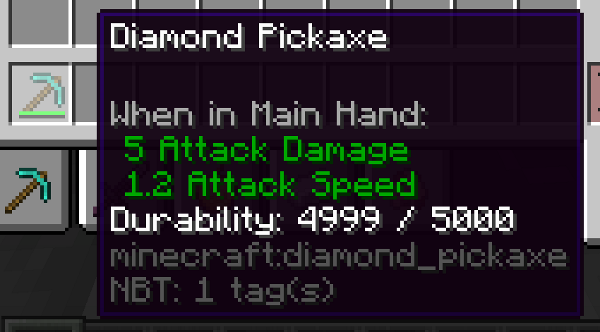 Sample
Versions
Files
Relations
Project Relations
More like this
Similar Mods
Suggestions use data such as tags, dependencies, dependents, descriptions, titles, and more to rank how much they overlap with this mod.
On ModDex
Community snapshot
By the numbers
Statistics
Want to reach Minecraft players?
We're looking for a server hosting partner to feature here and other parts of the site. Interested? Send us a message!
Get in touchGet it on
Available Platforms
On ModDex
Community snapshot
By the numbers