
Community listing page, reviews here may not be monitored by the author.
Customizable Armor HUD

No reviews yet
A really detailed Armor HUD that you can infinitely configure and edit. Has a compact config, a customizable and clear HUD and supports fabric and will support quilt.
Community voices
Reviews
No reviews yet. Be the first to review this project!
Get it on
Available Platforms
Compatibility
Supported Environments
Runs entirely on the client. Works on vanilla servers.
About
Project Details
For authors
Embed Badge
If you're the author of this project, you can embed a live badge anywhere that supports HTML or Markdown. It updates automatically whenever ratings change.
Use HTML for any page that supports it, or Markdown for README files and Markdown-based descriptions.
Identifiers
Platform IDs
Resources
External Links
About
Description
Customizable Armor HUD
The Most Detailed Armor HUD So Far. Has A Custom Config (Settings Menu) And Features Absolutely Everything.
Most armour HUDs give you a Armor HUD that you usually can’t really change. This one is the exact opposite! It has 2 HUD modes. One being vanilla (Insipired by “uku’s armor hud”) which shows your armor at the side of your hotbar. It actually looks really vanilla since it has the exact same design with the hotbar slot. The other one looks more aestethic (in my opinion) and basically shows your armor durability. Move it wherever you like Press J to toggle a GUI that lets you just pick up and drag the HUD so you can place it the place you like. This is really useful since you can change the position and just make it sit at the position you prefer. How to use:
• Drag with the mouse, or nudge with the arrow keys, one pixel at a time • Type exact X and Y coordinates if you want them precise • Right click a piece to hand it back to the automatic layout
How To Use
• Mod Menu Installed: Go to settings, Open Mod Menu, Click on the mod's icon and you can customize it there. Also click "J" to open another customizing menu.
• No Mod Menu: Go to settings/controls, find "Customizable Armor HUD" there, bind "Open Settings" to a key, and click that key to open settings.
Vanilla and Normal Mode
Yes, there are 2 modes of the HUD as I said before. Vanilla draws real hotbar slots, cut from the game's own hotbar texture, so they match whatever resource pack you use unless it breaks the HUD’s texture. They tile seamlessly into one strip along the bottom. Normal is a clean column of icons with the numbers beside them, pinned to any of eight anchor points.
Both of them be Horizontal or Vertical. But I don’t suggest to use Vanilla Mode Vertical and Normal Mode Horizontal since It just doesn’t easily fit at any place with those settings.
View it how you want
• You can use the Durability Percentage or Value (Number of the Durability) to view your Durability in the Armor HUD. You also can use a fraction which makes you see both the current and the maximum durability of the armor. • Colour sweeps from green to red as the piece loses durability. • A low-durability warning before something breaks
Highly Customizable Settings The mod uses a custom made config menu since the config mods were a little unnecesary because I really didn’t thinked that you should need a dependency for a simple menu like this. You can use it with Mod Menu which I really reccomend you to do. Or you just can bind a key under Options → Controls. So no config library is required. nothing but Fabric API and Mod Menu is needed.
Versions
I tried to just use a single mod file for a lot of versions. But I had to use a lot of different files. Here are the versions that the mod supports: 1.20.1 · 1.20.2 · 1.20.3-1.20.4 · 1.20.6 · 1.21-1.21.1 · 1.21.2-1.21.4 · 1.21.5 · 1.21.6-1.21.8 · 1.21.9-1.21.11 · 26.1-26.2
Requirements
• Fabric API - required • Mod Menu - optional, only for the settings button in its list highly recommended. Client-side only. So you just need to download it to use it. No need to download it to the server. Also you need any fabric loader version between 0.15.0-0.19.3 to launch the game. New Versions There Will Be A Quilt Version Soon. I Also May Make A Neoforge Version. Also The Mod Will Get Updated With New Features And Releases Of New Versions.
Copyright
© 2026 Tncnd. All rights reserved. You may download and use this mod for personal use only. You may not redistribute, modify, decompile, or use its code or assets without explicit permission from the author.
Screenshots
Gallery
-
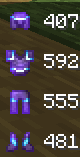 Normal Mode HUD This is the normal HUD.
 -
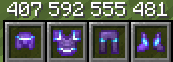 Vanilla HUD The Vanilla Mode HUD!
 -
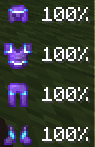 Percent Mode Normal HUD The Percent Mode HUD
 -
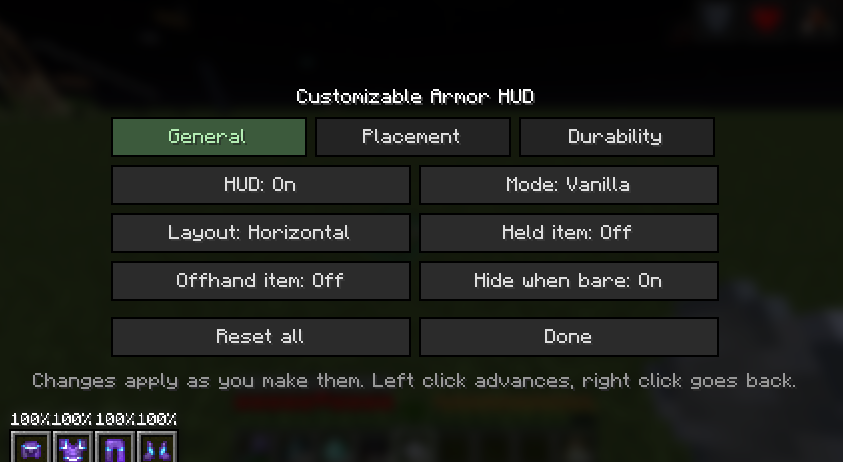 Config The Config (Settings Menu)
 -
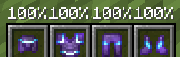 Percentage Vanilla HUD The Percentrage Vanilla HUD!
 -
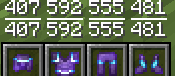 Fraction Vanilla HUD The Fraction Mode Vanilla HUD!
 -
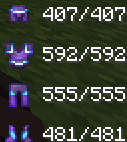 Normal Mode HUD Fraction Mode Normal HUD But fraction style!
Versions
Files
Relations
Project Relations
More like this
Similar Mods
Suggestions use data such as tags, dependencies, dependents, descriptions, titles, and more to rank how much they overlap with this mod.
On ModDex
Community snapshot
By the numbers
Statistics

Want to reach Minecraft players?
We're looking for a server hosting partner to feature here and other parts of the site. Interested? Send us a message!
Get in touchGet it on
Available Platforms
On ModDex
Community snapshot
By the numbers
Statistics
Resources