Community listing page, reviews may not be monitored by the author.
Death Detective

No reviews yet
A client-side Fabric mod that automatically records your deaths with location, cause, inventory snapshots, screenshots and a searchable death archive.

Community voices
Reviews
No reviews yet. Be the first to review this project!
Get it on
Available Platforms
About
Project Details
For authors
Embed Badge
If you're the author of this project, you can embed a live badge anywhere that supports HTML or Markdown. It updates automatically whenever ratings change.
Use HTML for any page that supports it, or Markdown for README files and Markdown-based descriptions.
Identifiers
Platform IDs
Resources
External Links
About
Description
# 💀 Death Detective
**Every death tells a story. Death Detective keeps the evidence.**
Death Detective is a lightweight **client-side Fabric mod** that automatically records useful information whenever you die in Minecraft.
Instead of trying to remember what happened, where you were or what you had with you, Death Detective creates a detailed death record including your inventory, death cause, server context and an optional screenshot.
No server installation is required.
---
## ✨ Features
Death Detective can automatically record:
- 💀 **Death cause**
- 📍 **Death location**
- 🎒 **Inventory snapshot**
- 📸 **Automatic death screenshot**
- 🌐 **Server information**
- 🗺️ **Detected server area / context**
- 🕒 **Previous deaths in a persistent archive**
Each death is stored as its own record so you can review it later.
---
## 📸 Automatic Death Screenshots
Death Detective can automatically capture a screenshot when you die.
The screenshot is linked directly to the corresponding death record and can be viewed later from the Death Detective archive.
This makes it much easier to remember exactly what happened at the moment of death.
---
## 🎒 Inventory Snapshots
Your inventory is recorded when a death is detected.
Inside the death archive, the saved inventory is displayed visually so you can quickly check what you were carrying before you died.
---
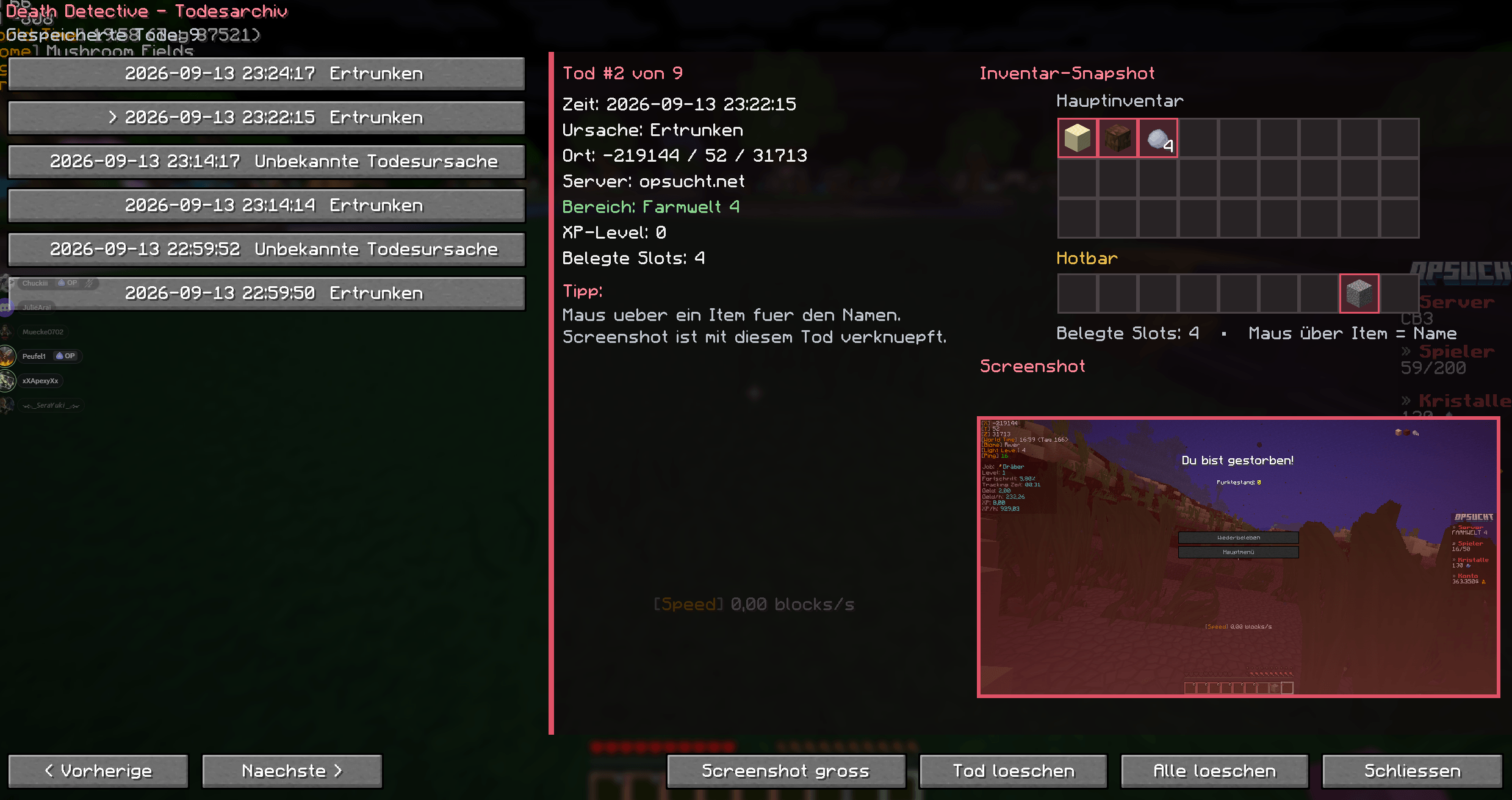
## 🔎 Death Archive
Death Detective includes its own in-game archive for previous deaths.
From the archive you can:
- View previous death records
- Check the death cause
- View server information
- Inspect the saved inventory
- Open the linked screenshot
- Delete individual death records
- Clear the complete archive
Associated screenshots are also removed when the corresponding records are deleted.
---
## 🌐 Server Context Detection
Death Detective can save additional context about where a death happened.
Depending on the server, it can detect information such as:
- Server address
- Server or area names
- Farm worlds
- Realms
- Shards
- Instances
- Channels
- Lobbies
- Other server-defined areas
Detection depends on information exposed by the server and may vary between servers.
---
## ⚡ Fast Respawn Protection
Some multiplayer servers respawn players almost instantly.
Death Detective includes additional detection logic designed to avoid duplicate records during fast or unusual respawn sequences.
This helps keep the archive clean even on servers with custom death and respawn systems.
---
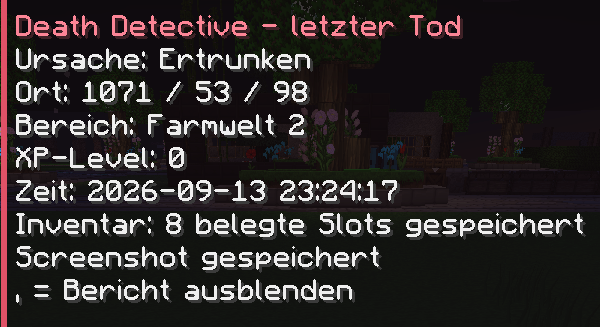
## 🖥️ Death HUD
The most recent death report can be shown directly in-game.
The HUD can be:
- Shown or hidden
- Repositioned
- Moved more quickly using Shift
- Reset to its default position
The selected HUD position is saved automatically.
---
## 🎮 Keybindings
Death Detective includes configurable Minecraft keybindings for:
- Show / hide last death report
- Open death archive
- HUD move mode
- Reset HUD position
- Move HUD left
- Move HUD right
- Move HUD up
- Move HUD down
- Faster HUD movement
All bindings can be changed through Minecraft's normal controls menu.
---
## 💻 Client-Side Only
Death Detective runs entirely on your Minecraft client.
✅ Works on multiplayer servers
✅ No server-side installation required
✅ Does not modify server gameplay
✅ No server permissions required
Simply install it on your client and start playing.
---
## 📦 Requirements
- **Minecraft:** 1.21.11
- **Mod Loader:** Fabric
- **Fabric Loader:** 0.18.0 or newer
- **Fabric API:** 0.141.3 or newer
- **Java:** 21 or newer
---
## 🌍 Languages
- 🇬🇧 English
- 🇩🇪 Deutsch
---
## 📜 License
All Rights Reserved
---
Developed by **ClipCraftStudios**
---
# 🇩🇪 Deutsch
## 💀 Death Detective
**Jeder Tod hinterlässt Spuren. Death Detective sichert sie.**
Death Detective ist eine leichte **clientseitige Fabric-Mod**, die automatisch wichtige Informationen speichert, wenn du in Minecraft stirbst.
Statt später rätseln zu müssen, was passiert ist, wo du warst oder welche Items du dabei hattest, erstellt Death Detective einen ausführlichen Todesbericht.
---
## ✨ Funktionen
Death Detective kann automatisch speichern:
- 💀 **Todesursache**
- 📍 **Todesposition**
- 🎒 **Inventar-Snapshot**
- 📸 **Automatischen Todes-Screenshot**
- 🌐 **Serverinformationen**
- 🗺️ **Erkannten Server-/Bereichskontext**
- 🕒 **Vergangene Todesfälle in einem dauerhaften Archiv**
Jeder Tod wird als eigener Eintrag gespeichert und kann später erneut angesehen werden.
---
## 📸 Automatische Todes-Screenshots
Death Detective kann beim Tod automatisch einen Screenshot erstellen.
Der Screenshot wird direkt mit dem jeweiligen Todesbericht verknüpft und kann später im Todesarchiv angezeigt werden.
So kannst du auch im Nachhinein nachvollziehen, was genau im Moment des Todes passiert ist.
---
## 🎒 Inventar-Snapshots
Beim Tod wird dein Inventar gespeichert.
Im Todesarchiv wird dieses Inventar visuell dargestellt, sodass du schnell sehen kannst, welche Gegenstände du bei dir hattest.
---
## 🔎 Todesarchiv
Death Detective besitzt ein eigenes Archiv für vergangene Todesfälle.
Dort kannst du:
- Vergangene Todesfälle ansehen
- Die Todesursache prüfen
- Serverinformationen ansehen
- Das gespeicherte Inventar betrachten
- Den zugehörigen Screenshot öffnen
- Einzelne Todesfälle löschen
- Das komplette Archiv leeren
Beim Löschen werden auch die zugehörigen Death-Detective-Screenshots entfernt.
---
## 🌐 Server-Kontext-Erkennung
Death Detective kann zusätzliche Informationen darüber speichern, wo ein Tod stattgefunden hat.
Je nach Server können beispielsweise erkannt werden:
- Serveradresse
- Server- oder Bereichsnamen
- Farmwelten
- Realms
- Shards
- Instanzen
- Channels
- Lobbys
- Weitere serverdefinierte Bereiche
Welche Informationen erkannt werden können, hängt vom jeweiligen Server ab.
---
## ⚡ Schutz bei schnellem Respawn
Einige Multiplayer-Server lassen Spieler nach einem Tod nahezu sofort wieder erscheinen.
Death Detective besitzt zusätzliche Erkennungslogik, um doppelte Todesberichte bei schnellen oder ungewöhnlichen Respawn-Abläufen zu vermeiden.
Dadurch bleibt das Archiv auch auf Servern mit eigenen Todessystemen sauber.
---
## 🖥️ Todes-HUD
Der letzte Todesbericht kann direkt im Spiel angezeigt werden.
Das HUD kann:
- Ein- und ausgeblendet werden
- Verschoben werden
- Mit Shift schneller bewegt werden
- Auf die Standardposition zurückgesetzt werden
Die HUD-Position wird automatisch gespeichert.
---
## 🎮 Tastenbelegung
Death Detective besitzt frei konfigurierbare Minecraft-Tasten für:
- Letzten Todesbericht ein-/ausblenden
- Todesarchiv öffnen
- HUD-Verschiebemodus
- HUD-Position zurücksetzen
- HUD nach links bewegen
- HUD nach rechts bewegen
- HUD nach oben bewegen
- HUD nach unten bewegen
- HUD schneller verschieben
Alle Tasten können über die normale Minecraft-Tastenbelegung geändert werden.
---
## 💻 Nur clientseitig
Death Detective läuft vollständig auf deinem Minecraft-Client.
✅ Funktioniert auf Multiplayer-Servern
✅ Keine Installation auf dem Server notwendig
✅ Verändert keine Server-Spielmechaniken
✅ Keine zusätzlichen Serverrechte erforderlich
Einfach auf dem eigenen Client installieren und loslegen.
---
## 📦 Voraussetzungen
- **Minecraft:** 1.21.11
- **Mod Loader:** Fabric
- **Fabric Loader:** 0.18.0 oder neuer
- **Fabric API:** 0.141.3 oder neuer
- **Java:** 21 oder neuer
---
## 🌍 Sprachen
- 🇬🇧 English
- 🇩🇪 Deutsch
---
## 📜 Lizenz
All Rights Reserved
---
Entwickelt von **ClipCraftStudios**
Screenshots
Gallery
-
 Overview.png Overview.png
 -
 Menu.png Menu.png
Versions
Files
Relations
Project Relations
More like this
Similar Mods
Suggestions use data such as tags, dependencies, dependents, descriptions, titles, and more to rank how much they overlap with this mod.
On ModDex
Community snapshot
By the numbers
Statistics

Get it on
Available Platforms
On ModDex
Community snapshot
By the numbers
Statistics
Resources