Community listing page, reviews may not be monitored by the author.
Death Location Helper

No reviews yet
Never lose your items again: see where you died in chat and follow an on-screen arrow straight back to your death point. - client side

Community voices
Reviews
No reviews yet. Be the first to review this project!
Get it on
Available Platforms
About
Project Details
For authors
Embed Badge
If you're the author of this project, you can embed a live badge anywhere that supports HTML or Markdown. It updates automatically whenever ratings change.
Use HTML for any page that supports it, or Markdown for README files and Markdown-based descriptions.
Identifiers
Platform IDs
Resources
External Links
About
Description
## Get your stuff back
You fall into a ravine deep in a cave system, respawn in your bed, and... where was that? Somewhere north? Your diamonds have five minutes before they despawn, and you have no idea where to go.
**Death Location Helper** remembers the exact spot where you died and guides you back with a simple arrow on your screen.
## Features
- **Death message in chat** - "You died at X 120, Y -42, Z 885 (Overworld)" with a **[Copy]** button that puts the coordinates on your clipboard. Only you see it.
- **Coordinates on the death screen** - see where it happened before you even press Respawn.
- **Arrow back to your items** - after respawning, a red arrow at the top of the screen points toward your death point, with the distance ("Death point: 312 m") and how far up or down it is.
- **Turns with you** - the arrow updates as you walk and look around, like a compass.
- **Clears itself** - when you reach the spot, the arrow disappears with a short "You reached your death point" message.
- **Other dimensions** - died in the Nether while you're in the Overworld? It tells you "Death point is in the Nether" instead of pointing the wrong way.
- **Remembers after quitting** - the death point is saved per world and per server, so it's still there if you log out.
- **Show/hide with O** - hide the arrow when you don't need it, bring it back later.
## Controls
| Key | Action |
|---|---|
| O | Show / hide the death arrow |
| Click [Copy] in chat | Copy the coordinates |
Change the key in Options > Controls > Key Binds. The key works even if another mod uses the same key.
## Settings
The file `config/deathlocationhelper.properties` is created on first launch. Edit it with a text editor while the game is closed:
- `enabled` - mod on or off (default: true)
- `chatMessage` - post coordinates in chat on death (default: true)
- `showArrow` - show the arrow after respawning (default: true)
- `showOnDeathScreen` - coordinates on the death screen (default: true)
- `clearDistance` - arrow disappears within this many blocks (default: 4)
- `hideAfterMinutes` - auto-hide after X minutes, 0 = never (default: 0)
- `offsetY` - distance of the arrow from the top of the screen (default: 4)
- `rememberAfterRestart` - keep the death point after quitting (default: true)
## Works on servers
This is a **client-side only** mod. It saves your own position at the moment you die - the same coordinates you could read on the F3 screen - so it works on any server, even when the server hides death coordinates. Nothing is installed on the server and nothing is sent to other players.
## Requirements
- Minecraft 1.21 / 1.21.1
- Fabric Loader 0.16 or newer
- Fabric API
- Java 21
## Installation
1. Install Fabric Loader for Minecraft 1.21.1.
2. Put **Fabric API** and **Death Location Helper** in your `mods` folder.
3. Start the game. (Hopefully you won't need it soon.)
## Modpacks
You are welcome to include this mod in any modpack. No need to ask.
## Also by this author
- **Status Effect Timers** - your potion effects as a clean list with countdowns
- **Item Pickup Notifier** - see everything you pick up at the side of the screen
- **Smooth Zoom** - hold a key to zoom, scroll to change the zoom level
- **Item Container Preview** - see Shulker Box contents in the tooltip
- **Clean Tooltip Enchants** - color-coded enchantments with (MAX) tags
- **Smart Torch Placer** - place torches with one key, optional Auto-Light for mining
- **Smart Crop Harvest** - right-click ripe crops to harvest and replant
- **Floating Damage Indicators** - damage, heal and crit numbers above mobs
- **Smart Tool Safety** - durability warnings and tool break protection
- **Smart Chest Organizer** - sort buttons and quick deposit for chests
- **Dynamic Armor HUD** - armor, held item and arrow durability on screen
- **Smart Auto-Trash** - quickly trash or auto-throw junk items
- **Dynamic Item Glow** - rarity colors and glow for items
## Honest limitations
- Only your **last** death is remembered. Dying again replaces it.
- The arrow points to where you died, not to the exact items - items can roll, fall into lava or be picked up by someone else.
- Items still despawn after the normal 5 minutes (while the area is loaded). The mod can't stop that.
- On servers whose name/address changes (e.g. a different IP for the same server), the saved point may not be found.
- The settings are in a config file; there is no in-game settings screen yet.
## About the images
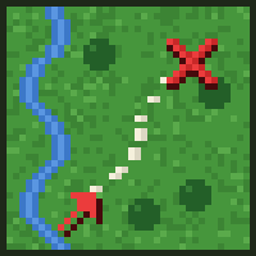
The project logo is an illustration created with AI assistance; it is not an in-game screenshot. The screenshots in the gallery are real, unedited in-game captures.
Screenshots
Gallery
-
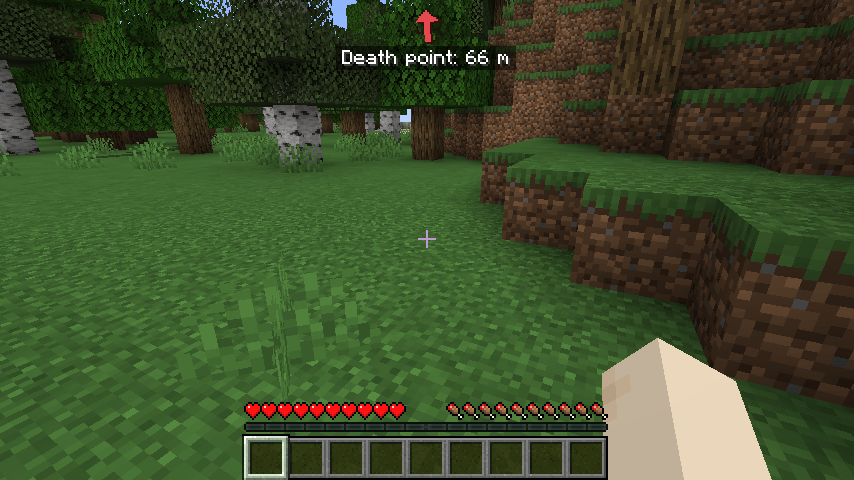 2026-11-06_20.42.43.png 2026-11-06_20.42.43.png
-
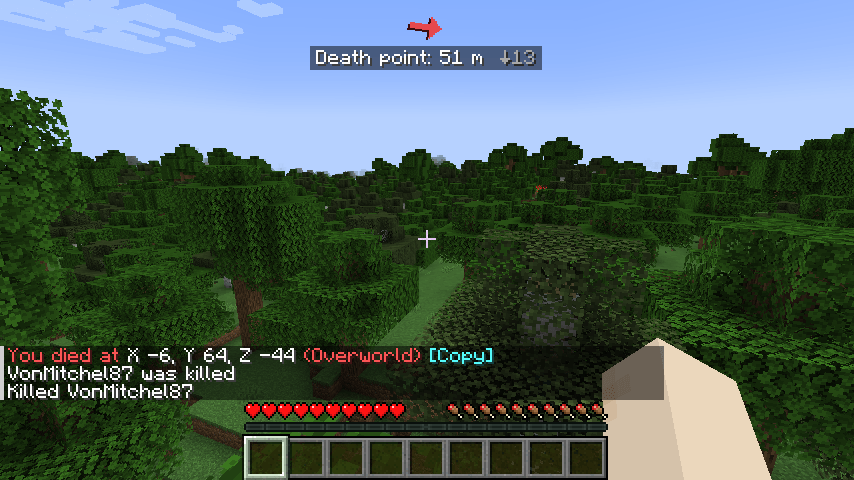 2026-11-06_20.43.01.png 2026-11-06_20.43.01.png
Versions
Files
Relations
Project Relations
More like this
Similar Mods
Suggestions use data such as tags, dependencies, dependents, descriptions, titles, and more to rank how much they overlap with this mod.
On ModDex
Community snapshot
By the numbers
Statistics

Get it on
Available Platforms
On ModDex
Community snapshot
By the numbers
Statistics
Resources