Community listing page, reviews may not be monitored by the author.
Death Reminder

No reviews yet
Saves your last death location and guides you back with a compact HUD, directional arrow, and live distance. Client-side Fabric mod with persistent markers for each world or server.

Community voices
Reviews
No reviews yet. Be the first to review this project!
Get it on
Available Platforms
About
Project Details
For authors
Embed Badge
If you're the author of this project, you can embed a live badge anywhere that supports HTML or Markdown. It updates automatically whenever ratings change.
Use HTML for any page that supports it, or Markdown for README files and Markdown-based descriptions.
Identifiers
Platform IDs
Resources
External Links
About
Description
Death Reminder — English
Find your way back to your last death.
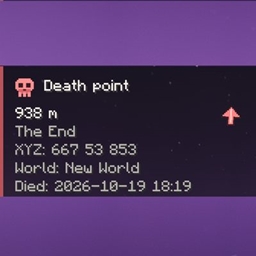
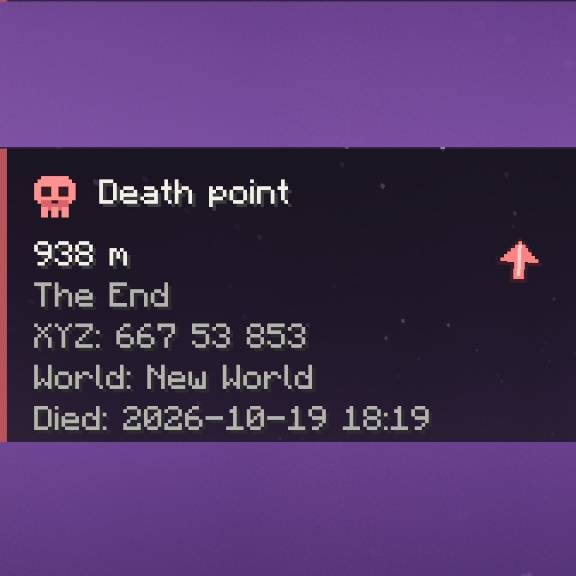
Death Reminder is a client-side Fabric mod that saves your last death location and helps you return with a compact HUD, a directional arrow, and live distance. Keep track of your destination while exploring, without opening a map.
Features
- Automatic death tracking: saves your coordinates, dimension, time, and world or server name.
- Directional navigation: the arrow rotates relative to your camera, and the distance updates as you move.
- Compact HUD: the panel sits in the top-left corner by default. Hide it whenever you want.
- Detailed information: hold a key to see coordinates, dimension, world or server, and the time of death.
- Persistent markers: death locations remain available after restarting Minecraft, with separate records for each world or server address.
- Dimension awareness: when the death is in another dimension, the panel shows which dimension to enter instead of a misleading distance or arrow. Custom dimension identifiers are supported.
- Automatic arrival detection: by default, the marker clears within 5 blocks of the location. Arrival uses 3D distance, so standing directly above a cave will not clear a marker far below you.
- Death-screen coordinates: see your saved coordinates and dimension on the standard death screen when there is enough room.
Controls
| Default key | Action |
|---|---|
| G | Hide or show the marker without deleting the saved location |
| Hold H | Show details, even when the main marker is hidden |
| Delete | Clear the saved location after confirmation |
All three keys can be changed in Minecraft's keybind settings under Death Reminder.
Installation
- Install Fabric Loader for your Minecraft version.
- Install Fabric API for the same Minecraft version.
- Download the matching Death Reminder JAR and place it in your client's
modsfolder.
Supported Minecraft versions: 1.20.1, 1.21.1, 26.1, 26.2, and 26.3. Each version has its own JAR; choose the one that matches your game.
Client-side only. Use it in singleplayer or install it locally for multiplayer. No Death Reminder installation on the server, operator permissions, or server commands are required.
Settings and languages
Adjust HUD position, scale, displayed information, horizontal or 3D distance, and automatic marker removal in config/deathreminder/config.json. Close Minecraft before editing this file.
Available languages: English, Russian, and Simplified Chinese. The mod follows Minecraft's selected language.
How death locations work
One last death is stored for each world or server address. A new death replaces that context's previous location; other worlds and servers keep their own records. Multiple worlds behind one proxy address share that address's record.
In another dimension, enter the indicated dimension before following the arrow. Nether 1:8 coordinate conversion is not included in this release.
Death Reminder provides navigation to the saved location. Dropped items still follow Minecraft's normal despawn rules. There is no death history, teleportation, or item recovery in this release.
Death Reminder — Русский
Найди дорогу к месту своей последней смерти.
Death Reminder — клиентский мод для Fabric, который сохраняет место последней смерти и помогает вернуться к нему. Компактная панель показывает расстояние и стрелку направления, позволяя ориентироваться без открытия карты.
Возможности
- Автоматическое сохранение: координаты, измерение, время и название мира или сервера фиксируются при смерти.
- Навигация: стрелка поворачивается относительно взгляда камеры, а расстояние обновляется при движении.
- Компактная панель: по умолчанию находится слева сверху. Её можно скрыть в любой момент.
- Подробная информация: удерживай клавишу, чтобы увидеть координаты, измерение, мир или сервер и время смерти.
- Сохранение между запусками: точки остаются после перезапуска Minecraft. Для каждого мира или адреса сервера хранится отдельная запись.
- Учёт измерений: если смерть произошла в другом измерении, панель подскажет, куда перейти, вместо неверного расстояния и стрелки. Поддерживаются идентификаторы пользовательских измерений.
- Определение прибытия: по умолчанию метка удаляется при приближении на 5 блоков. Проверка учитывает высоту: стоя над пещерой, ты не потеряешь метку далеко внизу.
- Координаты на экране смерти: сохранённые координаты и измерение отображаются на стандартном экране смерти, если хватает места.
Управление
| Клавиша по умолчанию | Действие |
|---|---|
| G | Скрыть или вернуть панель, сохранив точку |
| Удерживать H | Показать подробности, даже если основная панель скрыта |
| Delete | Удалить сохранённую точку после подтверждения |
Все три клавиши можно переназначить в настройках управления Minecraft, в категории Death Reminder.
Установка
- Установи Fabric Loader для своей версии Minecraft.
- Установи Fabric API для той же версии игры.
- Скачай подходящий JAR Death Reminder и положи его в клиентскую папку
mods.
Поддерживаемые версии Minecraft: 1.20.1, 1.21.1, 26.1, 26.2 и 26.3. Для каждой версии подготовлен отдельный JAR — выбери подходящий своей игре.
Мод устанавливается только на клиент. Он подходит для одиночной игры и локального использования в мультиплеере. Установка Death Reminder на сервер, права оператора и серверные команды для работы не нужны.
Настройки и языки
Положение и масштаб панели, отображаемые сведения, горизонтальное или трёхмерное расстояние и автоматическое удаление метки настраиваются в config/deathreminder/config.json. Перед редактированием файла закрой Minecraft.
Доступны русский, английский и упрощённый китайский. Мод использует выбранный язык Minecraft.
Как работают точки смерти
Для каждого мира или адреса сервера сохраняется одна последняя смерть. Новая смерть заменяет предыдущую запись этого мира или сервера, сохраняя записи остальных. Несколько миров за одним прокси-адресом используют общую запись адреса.
Если точка находится в другом измерении, сначала перейди в указанное измерение. Пересчёта координат Незера 1:8 в этом выпуске нет.
Death Reminder помогает найти сохранённое место. Выпавшие вещи исчезают по обычным правилам Minecraft. Истории смертей, телепортации и восстановления предметов в этом выпуске нет.
Screenshots
Gallery
-
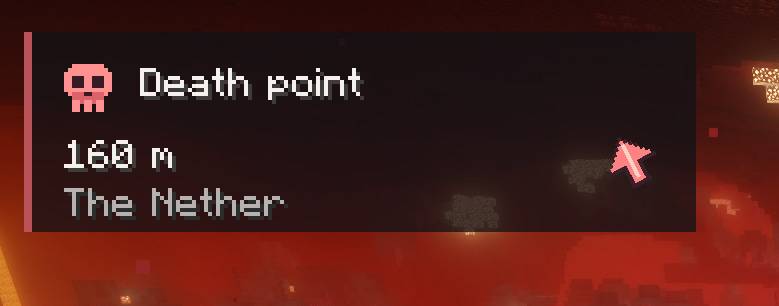 photo_2026-10-19_18-55-28.jpg photo_2026-10-19_18-55-28.jpg
 -
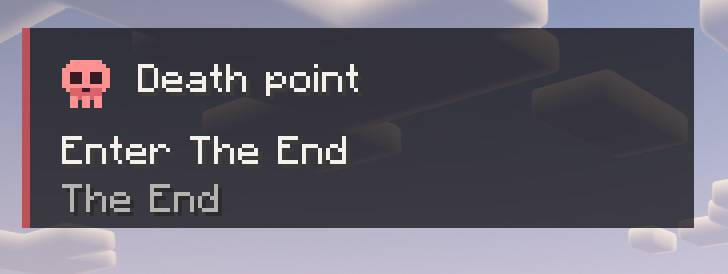 photo_2026-10-19_18-55-34.jpg photo_2026-10-19_18-55-34.jpg
 -
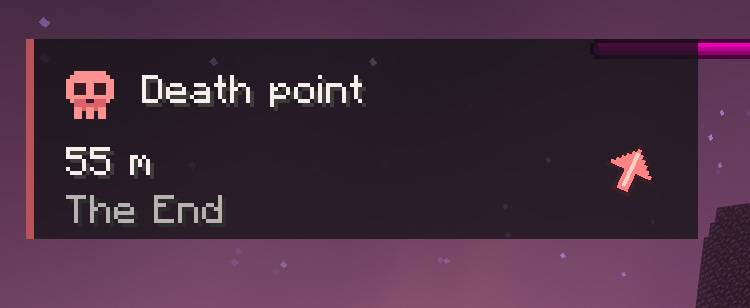 photo_2026-10-19_18-55-31.jpg photo_2026-10-19_18-55-31.jpg
 -
 Death Reminder.jpg Death Reminder.jpg
Versions
Files
Relations
Project Relations
More like this
Similar Mods
Suggestions use data such as tags, dependencies, dependents, descriptions, titles, and more to rank how much they overlap with this mod.
On ModDex
Community snapshot
By the numbers
Statistics

Get it on
Available Platforms
On ModDex
Community snapshot
By the numbers
Statistics
Resources