
Community listing page, reviews may not be monitored by the author.
DeathPing

No reviews yet
DeathPing is a Fabric client-side mod that automatically sends your coordinates to chat when you leave a server, helping friends locate and rescue you in critical moments like death.

Community voices
Reviews
No reviews yet. Be the first to review this project!
Get it on
Available Platforms
Compatibility
Supported Environments
Runs entirely on the client. Works on vanilla servers.
About
Project Details
For authors
Embed Badge
If you're the author of this project, you can embed a live badge anywhere that supports HTML or Markdown. It updates automatically whenever ratings change.
Use HTML for any page that supports it, or Markdown for README files and Markdown-based descriptions.
Identifiers
Platform IDs
About
Description
DeathPing Mod
DeathPing is a Minecraft Fabric mod that automatically sends your coordinates to chat or a private message when you die, press a keybind, or disconnect from a server. Customize the message format and behavior through an in-game configuration screen.
Overview
- Mod ID: deathping
- Type: Client-side utility mod
- Supported Version: Minecraft 1.21
- Features:
- Sends coordinates on death, keybind press (default: ESCAPE), or disconnection.
- Supports private messaging with a configurable recipient.
- Customizable message formats using placeholders (e.g., {x}, {y}, {z}, {player}, {dimension}, {death_cause}).
- Accessible configuration screen via ModMenu (optional).
Installation
- Ensure you have Fabric Loader and Fabric API installed for your Minecraft version.
- Download the latest version of DeathPing
- Place the
.jarfile in your Minecraftmodsfolder. - (Optional) Install ModMenu for an in-game configuration screen.
- Launch Minecraft and enjoy!
Configuration
- Access: Open the configuration screen by pressing
O(default keybind) or through ModMenu if installed. - Options:
- Use Private Message: Toggle to send coordinates privately (default: false).
- Private Message Recipient: Enter the username to send private messages to (required if private messaging is enabled).
- Keybind Message Format: Customize the message sent on keybind press (default: "[DeathPing] {player}'s coords: X: {x}, Y: {y}, Z: {z} in {dimension}").
- Death Message Format: Customize the message sent on death (default: "[DeathPing] {player} died at X: {x}, Y: {y}, Z: {z} in {dimension} ({death_cause})").
- Disconnect Message Format: Customize the message sent on disconnect (default: "[DeathPing] {player} disconnected at X: {x}, Y: {y}, Z: {z} in {dimension}").
Usage
- Send Coordinates: Press
ESCAPE(default) to manually send your current coordinates. - Death Detection: Automatically sends coordinates when you die, including the death cause.
- Disconnect Notification: Sends coordinates when you disconnect from a server via the "Disconnect" button.
- Messages are sent to chat unless private messaging is enabled with a recipient.
Keybinds
- Send Coordinates:
ESCAPE(customizable via controls menu). - Open Config Screen:
O(customizable via controls menu).
Building from Source
- Clone the repository:
git clone [insert repository URL]. - Set up the project with Gradle:
./gradlew genSources. - Build the mod:
./gradlew build. - Find the
.jarfile in thebuild/libsfolder.
Dependencies
- Fabric Loader
- Fabric API
- Cloth Config API (for configuration)
- ModMenu (optional, for configuration screen)
Contributing
Feel free to submit issues or pull requests on the GitHub repository. Contributions are welcome!
License
This mod is licensed under the MIT License. See the LICENSE file for details.
Screenshots
Gallery
-
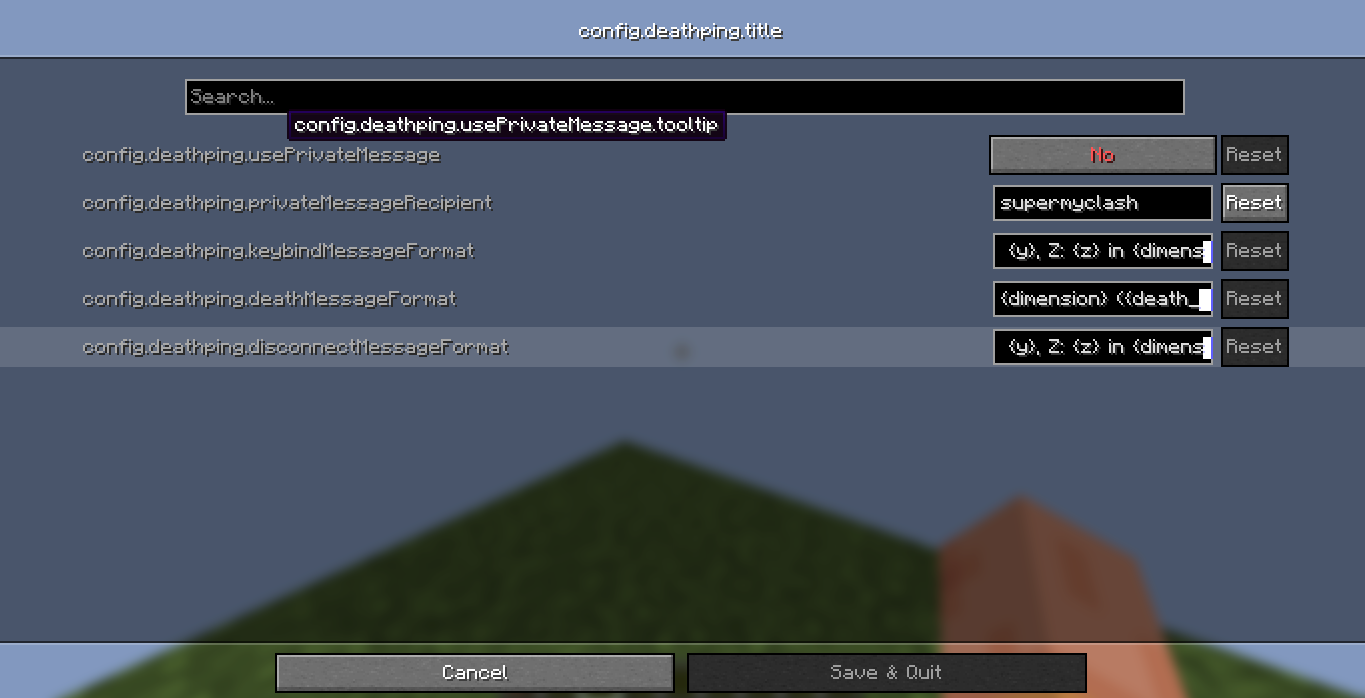 config menu setting up the /msg and editing message
 -
 example message exmaple message of x y z and the dimension
Versions
Files
Relations
Project Relations
More like this
Similar Mods
Suggestions use data such as tags, dependencies, dependents, descriptions, titles, and more to rank how much they overlap with this mod.
On ModDex
Community snapshot
By the numbers
Statistics


Get it on
Available Platforms
On ModDex
Community snapshot
By the numbers