Community listing page, reviews here may not be monitored by the author.
Debug Utils


No reviews yet
Enables various debugging features of minecraft
Community voices
Reviews
No reviews yet. Be the first to review this project!
Get it on
Available Platforms
Compatibility
Supported Environments
Runs entirely on the server. Also works in singleplayer.
Must be installed on both the client and the server.
Varies by version.
About
Project Details
For authors
Embed Badge
If you're the author of this project, you can embed a live badge anywhere that supports HTML or Markdown. It updates automatically whenever ratings change.
Use HTML for any page that supports it, or Markdown for README files and Markdown-based descriptions.
Identifiers
Platform IDs


About
Description






🔎 Debug Utils
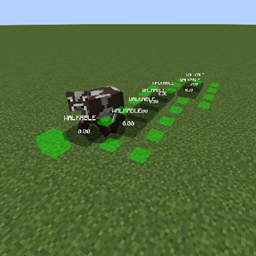
Mojang has various debugging tools implemented in minecraft that are removed for the release jar. This mod adds them back which might be useful for various cases. You will need this mod on both the client and the server.
Debugging features include for example:
Entity Pathing: Showing a mobs pathfinding
Entity Brains: Showing the brain states of mobs
Entity Goals: Showing a mobs goal tasks
> 1.21.9
As of 1.21.9 the debugging features are no longer stripped for the release jar and can be accessed by the user. The process to do so though involves the use of jvm arguments meaning you cannot change it in game. To accomodate that now this mod allows you to toggle the features in game without restarting it.
How to use
Use the command /debugutils <feature> <on | off> to turn a debugging feature on/off.
To turn all currently active features off use /debugutils off.
If you are on 1.21.9 the command has now been split between debugutils and debugutils_client.debugutils_client toggles all features that do not require data from the server.
NOTICE: This page is discontinued. For further updates see here
For the forge version see here
Mojang has various debugging tools implemented in minecraft that are removed for the release jar.
This mod adds them back which might be useful for various cases. You will need this mod on both the client and the server.
Use the command /debug_utils <feature> to turn a debugging feature on/off
Included debugging features are:
POI debugging: Logs adding/removing of POI blocks.
Block Updates: Displays blocks affected by a change in block states
Structure Generations: Displays the bounding box of newly generated structures
Entity Pathing: Will show the pathings of entities
Entity Goals: Will show various information about an entities ai. Active ones are highlighted.
Raids: Will highlight the center of a raid
Entity Brains: Similar to goals will display brain activities of entities.
Bees: Displaying information about bees. E.g. if it has a hive or not
Game Event + Listener: Highlights game info events and the adding of listeners for it.
Listeners are e.g. sculk/warden/allays
And game infos are events which triggers them.
Bee Hives: Shows information about a bee hive
Water: Shows water level of nearby water blocks
Heightmap: Displays the heightmap
Collision: Shows nearby block collisions
Light: Shows the sky light value of blocks. Places with direct sky light are not displayed.
Solid Faces: Shows the solid faces of nearby blocks. A face is solid if it fills the whole plane.
Chunk: Shows nearby chunk data. E.g. if the chunk is entity ticking or not
Spawn Chunk: Shows entity ticking and lazy spawn chunks
For questions or help join my discord:

If you like my work, consider supporting me via patreon:



🔎 Debug Utils
Mojang has various debugging tools implemented in minecraft that are removed for the release jar. This mod adds them back which might be useful for various cases. You will need this mod on both the client and the server.
Debugging features include for example:
Entity Pathing: Showing a mobs pathfinding
Entity Brains: Showing the brain states of mobs
Entity Goals: Showing a mobs goal tasks
> 1.21.9
As of 1.21.9 the debugging features are no longer stripped for the release jar and can be accessed by the user. The process to do so though involves the use of jvm arguments meaning you cannot change it in game. To accomodate that now this mod allows you to toggle the features in game without restarting it.
How to use
Use the command /debugutils <feature> <on | off> to turn a debugging feature on/off.
To turn all currently active features off use /debugutils off.
If you are on 1.21.9 the command has now been split between debugutils and debugutils_client.
debugutils_client toggles all features that do not require data from the server.
Screenshots
Gallery
Versions
Files
Relations
Project Relations
More like this
Similar Mods
Suggestions use data such as tags, dependencies, dependents, descriptions, titles, and more to rank how much they overlap with this mod.
On ModDex
Community snapshot
By the numbers
Statistics
Want to reach Minecraft players?
We're looking for a server hosting partner to feature here and other parts of the site. Interested? Send us a message!
Get in touchGet it on
Available Platforms
On ModDex
Community snapshot
By the numbers