
Community listing page, reviews here may not be monitored by the author.
Dev1lroot's Status Hud


No reviews yet
A mod that brings damage indicator, equipment durability, in-game time display, and many other useful game information into a fully customizable HUD
Community voices
Reviews
No reviews yet. Be the first to review this project!
Get it on
Available Platforms
Compatibility
Supported Environments
Runs entirely on the client. Works on vanilla servers.
About
Project Details
For authors
Embed Badge
If you're the author of this project, you can embed a live badge anywhere that supports HTML or Markdown. It updates automatically whenever ratings change.
Use HTML for any page that supports it, or Markdown for README files and Markdown-based descriptions.
Identifiers
Platform IDs
About
Description
Dev1lroot's Status HUD is a lightweight client-side mod for Minecraft (NeoForge) that enhances the in-game HUD with clean and useful real-time indicators. It is designed to give you essential gameplay information at a glance without cluttering your screen or breaking immersion.
Features
Damage Indicator Displays the health of the entity you are currently looking at, including a visual bar and icon. Inspired by the classic Damage Indicators mod.
Durability Indicator Shows durability of your equipped armor, main-hand tools, and shield, helping you avoid unexpected breaks during combat or exploration.
Status Indicator Displays whatever you want, in config file you can specify any custom text and some in-game variables like coordinates, player name, real time spent in game, in-game daylight cycle time and more. Supports ARGB color codes via &AARRGGBB; tabs and line-breaks via \n perfect for streamers and time management.
Configuration
All features are fully configurable:
- Enable or disable each indicator independently
- Adjust behavior via config file
- Designed to be minimal, flexible, and unobtrusive
General Options
| Option | Type | Default | Description |
|---|---|---|---|
bEnableDamageIndicator |
Boolean | true |
Enables or disables the damage indicator on the HUD. |
bEnableDurabilityIndicator |
Boolean | true |
Enables or disables the display of all durability indicators together. |
bEnableArmorDurabilityIndicator |
Boolean | true |
Enables or disables the display of the currently equipped armor's remaining durability. |
bEnableShieldDurabilityIndicator |
Boolean | true |
Enables or disables the display of the currently equipped shield's remaining durability. |
bEnableToolDurabilityIndicator |
Boolean | true |
Enables or disables the display of the currently equipped tool's remaining durability. |
bEnableStatusIndicator |
Boolean | true |
Enables or disables the display of the upper status line on the HUD. |
Damage Indicator
| Option | Type | Default | Description |
|---|---|---|---|
fDamageIndicatorRaycastDistance |
Float | 30.0 |
Sets the maximum distance (in blocks) at which the damage indicator can detect entities. Vanilla distance is 3. |
Status Indicator Format
| Option | Type | Default | Description |
|---|---|---|---|
sStatusIndicatorFormat |
String | $sGameTime24 \| &FF00FF00;$sPlayerName&FFFFFFFF; \| $sPlayTime \| &FFFFFF00;$sTargetsChunkPosition |
Custom format for the upper HUD line. Supports new lines (\n), ARGB color codes (&AARRGGBB;) and variables: • $sGameTime24 → in-game time (24h) • $sGameTime12 → in-game time (12h) • $sPlayerName → player’s name • $sPlayTime → real time played in world • $sTargetsChunkPosition → position the block you are looking at in chunk coordinates |
Durability Indicator Format
| Option | Type | Default | Description |
|---|---|---|---|
sDurabilityIndicatorFormat |
String | $iCurrentDurability/$iMaxDurability ($fCurrentDurabilityPercent%) |
Custom format for armor, shield, and tool durability. Supports variables: • $iCurrentDurability → current durability • $iMaxDurability → maximum durability • $fCurrentDurabilityPercent → durability percentage |
Inspiration
This mod is originally inspired by classic mods like Damage Indicators and Armor Status HUD, bringing their core functionality to modern Minecraft versions.
At the same time, StatusHUD is planned to evolve into a unified solution that combines the functionality of many different HUD-related mods into a single cohesive and consistent project.
StatusHUD is a lightweight client-side mod for Minecraft (NeoForge) that enhances the in-game HUD with clean and useful real-time indicators. It is designed to give you essential gameplay information at a glance without cluttering your screen or breaking immersion.
Features
-
Damage Indicator Displays the health of the entity you are currently looking at, including a visual bar and icon. Inspired by the classic Damage Indicators mod.
-
Durability Indicator Shows durability of your equipped armor, main-hand tools, and shield, helping you avoid unexpected breaks during combat or exploration.
-
Status Indicator Displays whatever you want, in config file you can specify any custom text and some in-game variables like coordinates, player name, real time spent in game, in-game daylight cycle time and more. Supports ARGB color codes via &AARRGGBB; tabs and line-breaks via \n perfect for streamers and time management.
Configuration
All features are fully configurable:
- Enable or disable each indicator independently
- Adjust behavior via config file
- Designed to be minimal, flexible, and unobtrusive
General Options
| Option | Type | Default | Description |
|---|---|---|---|
bEnableDamageIndicator |
Boolean | true |
Enables or disables the damage indicator on the HUD. |
bEnableDurabilityIndicator |
Boolean | true |
Enables or disables the display of all durability indicators together. |
bEnableArmorDurabilityIndicator |
Boolean | true |
Enables or disables the display of the currently equipped armor's remaining durability. |
bEnableShieldDurabilityIndicator |
Boolean | true |
Enables or disables the display of the currently equipped shield's remaining durability. |
bEnableToolDurabilityIndicator |
Boolean | true |
Enables or disables the display of the currently equipped tool's remaining durability. |
bEnableStatusIndicator |
Boolean | true |
Enables or disables the display of the upper status line on the HUD. |
Damage Indicator
| Option | Type | Default | Description |
|---|---|---|---|
fDamageIndicatorRaycastDistance |
Float | 30.0 |
Sets the maximum distance (in blocks) at which the damage indicator can detect entities. Vanilla distance is 3. |
Status Indicator Format
| Option | Type | Default | Description |
|---|---|---|---|
sStatusIndicatorFormat |
String | $sGameTime24 | &FF00FF00;$sPlayerName&FFFFFFFF; | $sPlayTime | &FFFFFF00;$sTargetsChunkPosition |
Custom format for the upper HUD line. Supports new lines (\n), ARGB color codes (&AARRGGBB;) and variables: • $sGameTime24 → in-game time (24h) • $sGameTime12 → in-game time (12h) • $sPlayerName → player’s name • $sPlayTime → real time played in world • $sTargetsChunkPosition → position the block you are looking at in chunk coordinates |
Durability Indicator Format
| Option | Type | Default | Description |
|---|---|---|---|
sDurabilityIndicatorFormat |
String | $iCurrentDurability/$iMaxDurability ($fCurrentDurabilityPercent%) |
Custom format for armor, shield, and tool durability. Supports variables: • $iCurrentDurability → current durability • $iMaxDurability → maximum durability • $fCurrentDurabilityPercent → durability percentage |
Inspiration
This mod is originally inspired by classic mods like Damage Indicators and Armor Status HUD, bringing their core functionality to modern Minecraft versions.
At the same time, StatusHUD is planned to evolve into a unified solution that combines the functionality of many different HUD-related mods into a single cohesive and consistent project.
Screenshots
Gallery
-
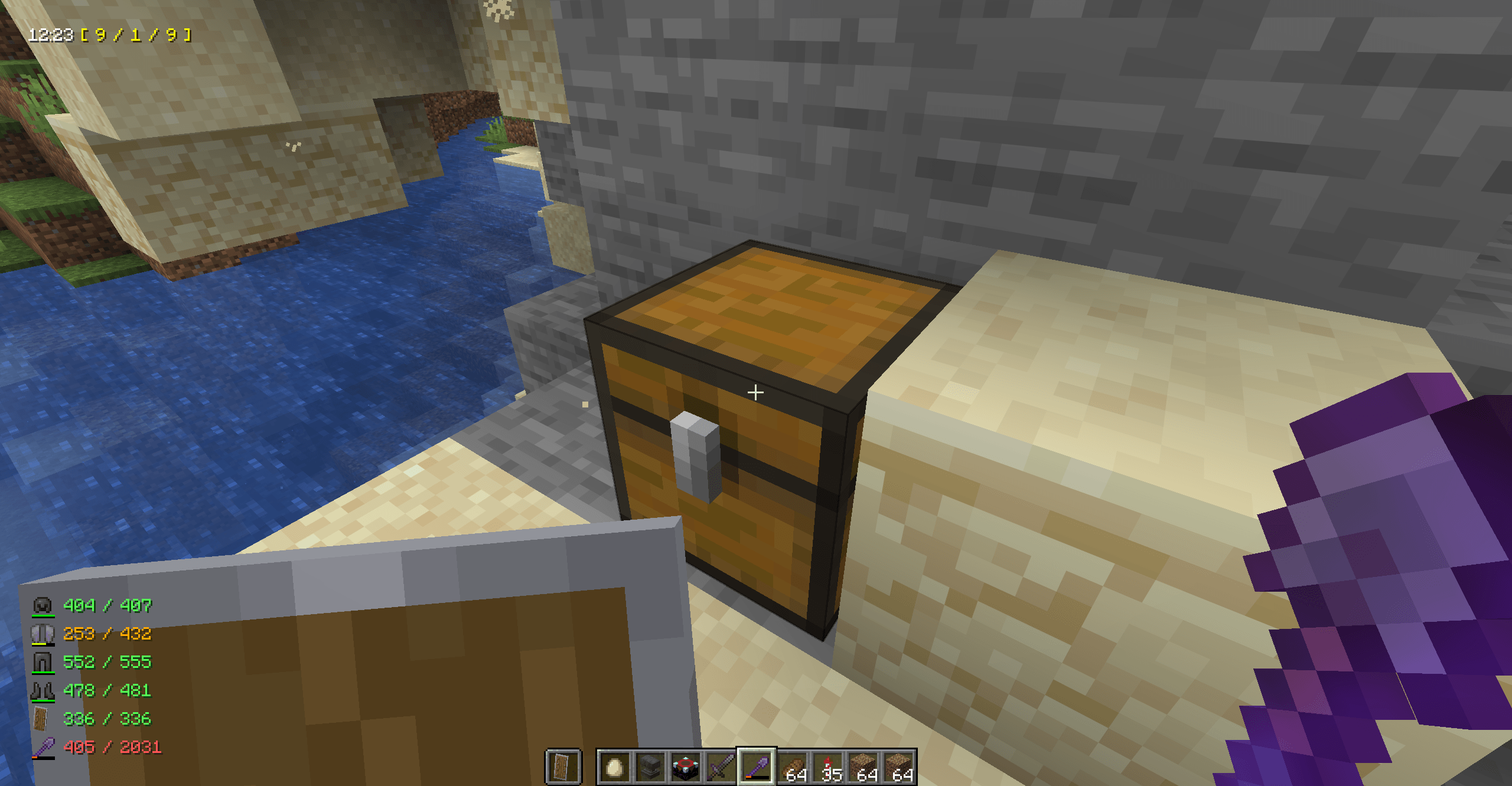 2026-03-27_22.24.31.png 2026-03-27_22.24.31.png
 -
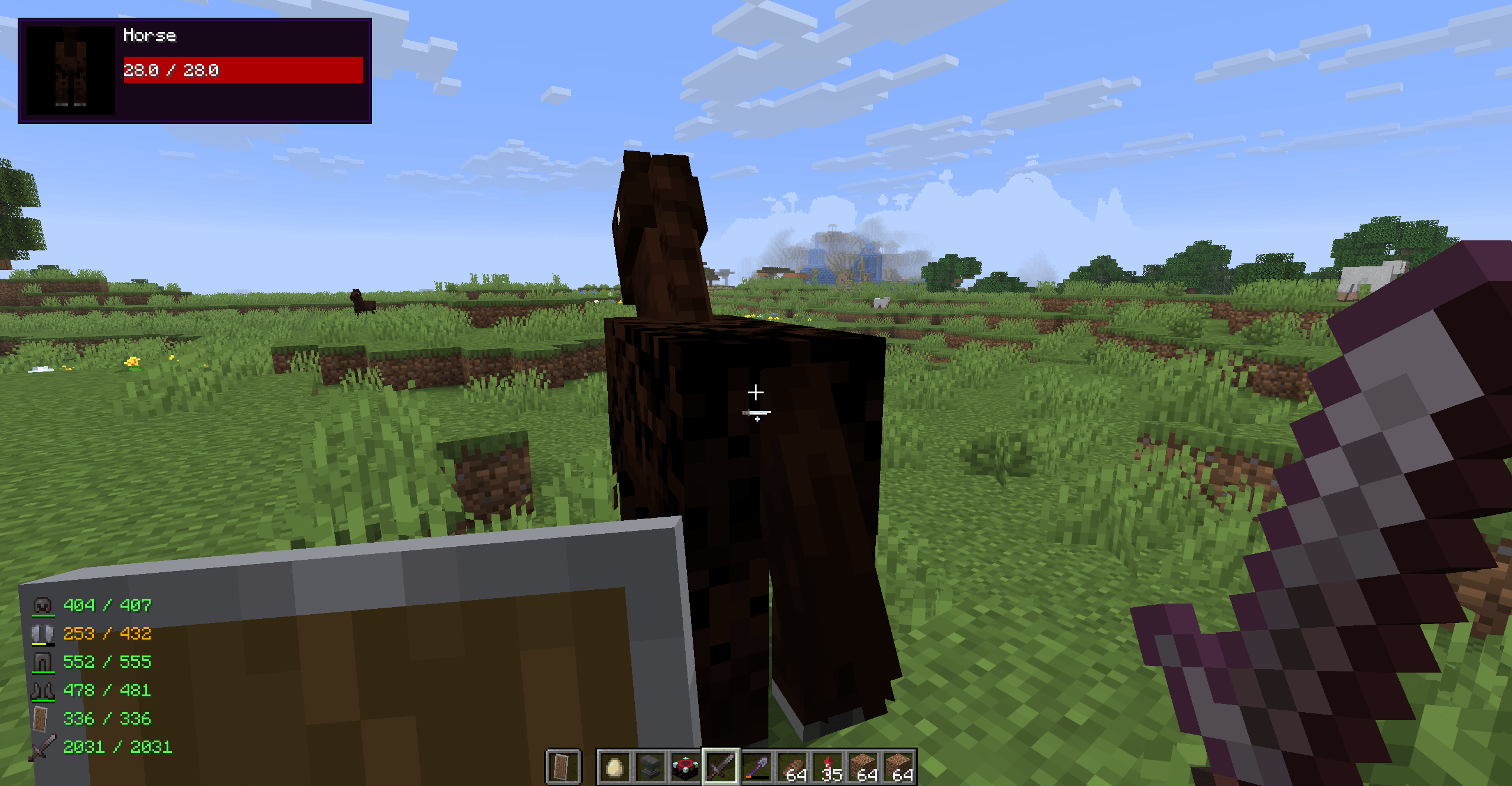 2026-03-27_22.24.44.png 2026-03-27_22.24.44.png
-
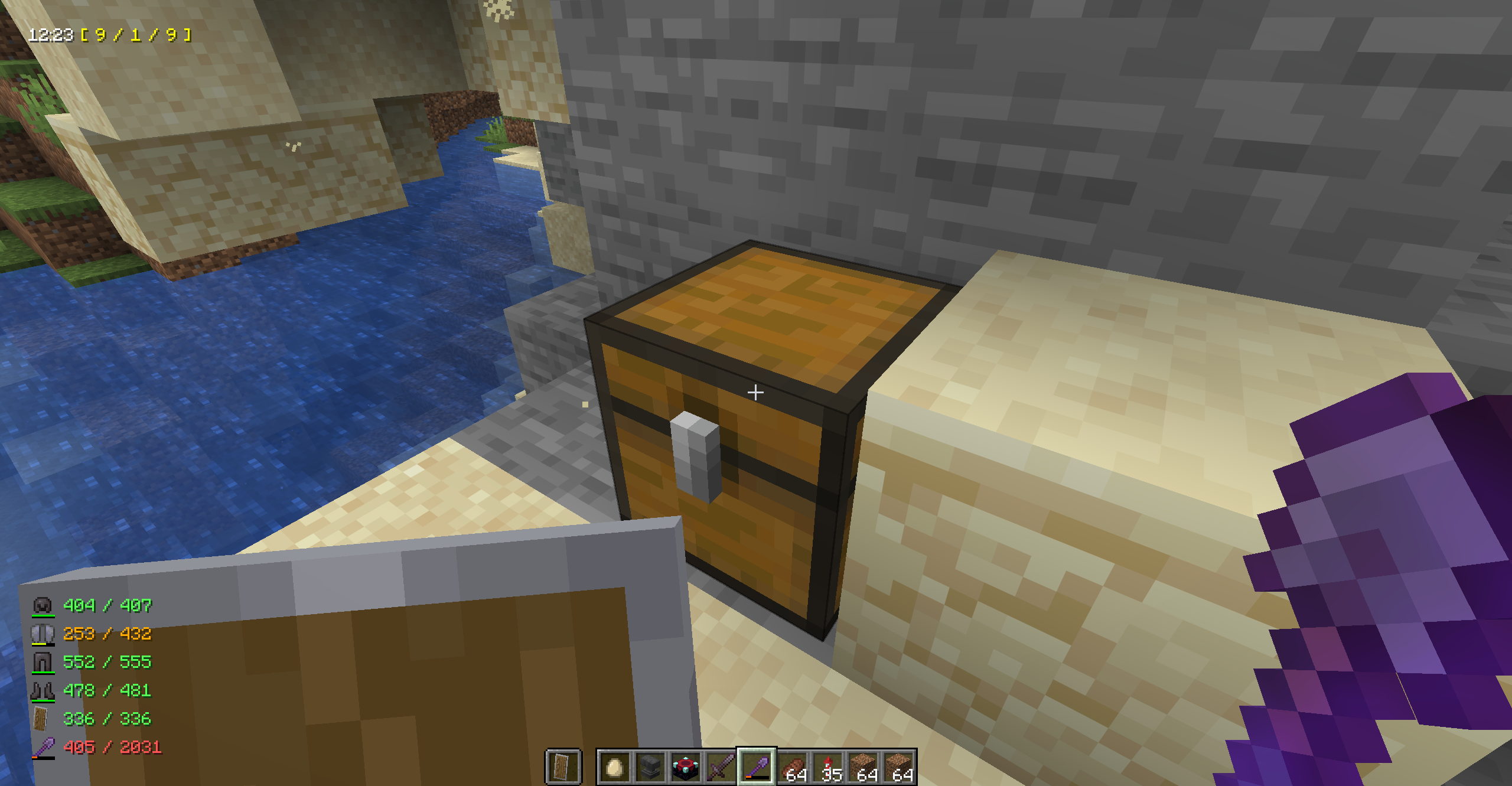 Example of Time and Coordinates Indicator
 -
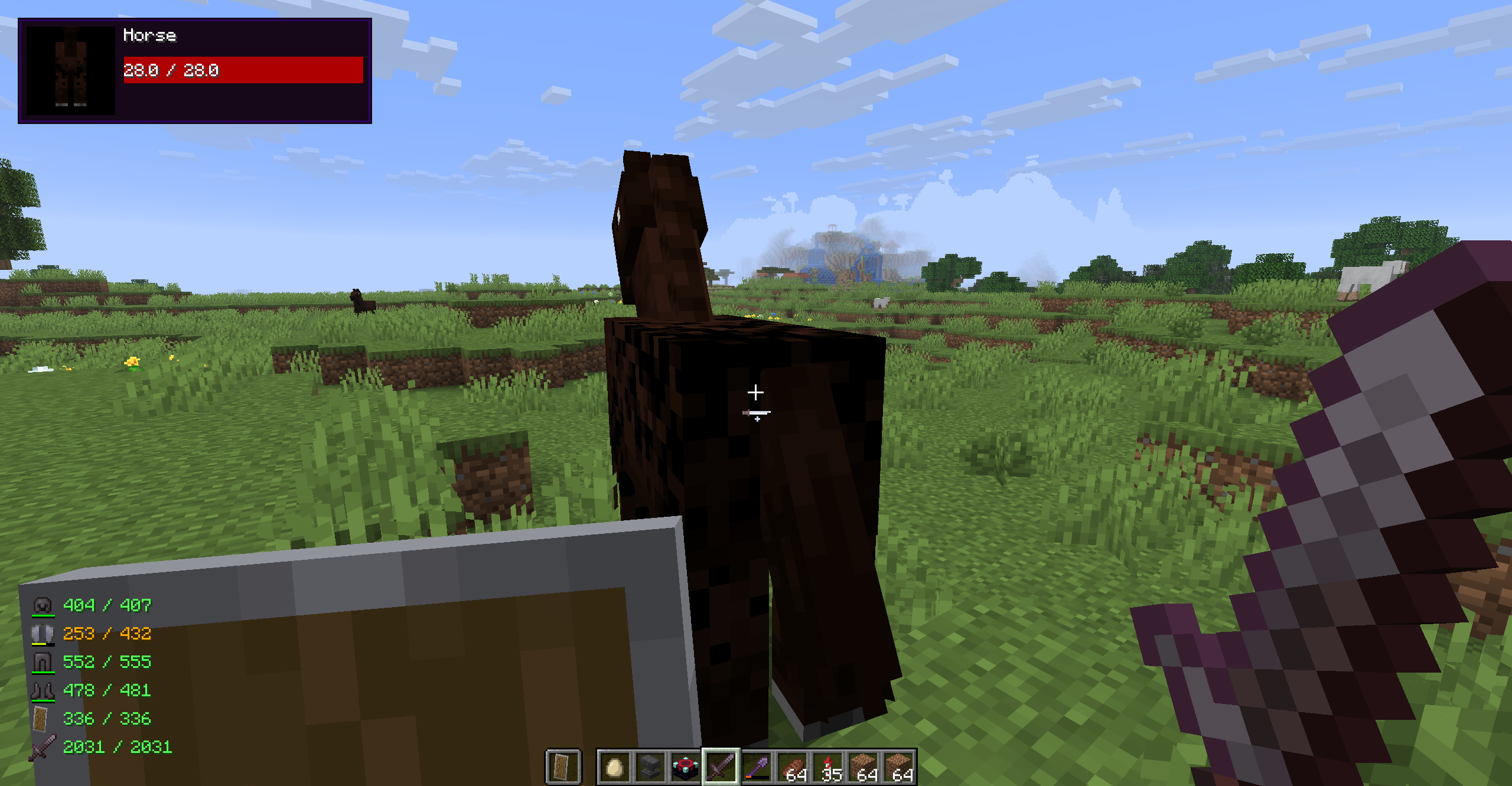 Example of Damage and Durability Indicators
Versions
Files
Relations
Project Relations
More like this
Similar Mods
Suggestions use data such as tags, dependencies, dependents, descriptions, titles, and more to rank how much they overlap with this mod.
On ModDex
Community snapshot
By the numbers
Statistics
Want to reach Minecraft players?
We're looking for a server hosting partner to feature here and other parts of the site. Interested? Send us a message!
Get in touchGet it on
Available Platforms
On ModDex
Community snapshot
By the numbers