Community listing page, reviews here may not be monitored by the author.
DiscordPresence


No reviews yet
Take control of your Discord Rich Presence (RPC) from in game. Click the live Discord card to edit text, images and buttons, use 26 real time placeholders, and set a custom Discord status per server. Client side only. Fabric, NeoForge and Forge.

Community voices
Reviews
No reviews yet. Be the first to review this project!
Get it on
Available Platforms
Compatibility
Supported Environments
Runs entirely on the client. Works on vanilla servers.
About
Project Details
For authors
Embed Badge
If you're the author of this project, you can embed a live badge anywhere that supports HTML or Markdown. It updates automatically whenever ratings change.
Use HTML for any page that supports it, or Markdown for README files and Markdown-based descriptions.
Identifiers
Platform IDs
Resources
External Links
About
Description
Custom Discord Rich Presence for Minecraft
DiscordPresence puts what you're doing in Minecraft on your Discord profile, and lets you decide exactly what it says. Press F6 (or the Config button in the mod list) and your real Discord card shows up on screen. Click the text to change it. Click an image to swap it. Click a button to add a link. What you see is what your friends see, and it updates as you type.
It's client side, so there's nothing to install on the server. It works in singleplayer, on any multiplayer server and in every menu, on Fabric, NeoForge and Forge from Minecraft 1.20.1 to 26.2.

Click the card, change anything
Most Discord RPC mods hand you a config file or a menu full of text boxes. This one shows you the actual card. The details line, the state line, the big and small images with their hover text, the timer, and up to two clickable buttons (your stream, your server, your Discord) are all edited right where they sit on the card.

Your own pictures on your Discord status
Press Upload Image… in the image editor, or just drag a PNG, JPG or GIF onto the game window, and it shows on Discord with the next update. No bot, no Discord developer portal, nothing to set up.
Discord can only show pictures that are online, so the mod puts yours on catbox.moe, a free image host, and asks once before the first upload. Big photos get shrunk and their location data stripped, tiny pixel art gets scaled up so it stays crisp, and GIFs stay animated. Rather host it yourself? Paste a link to any image instead. You can also drop pictures into config/discordrpc/images/ and pick them from the list.
Want your own skin instead of Steve? The Your Skin row puts your face or a 3D head of your current skin on the card. It follows skin changes, and a shared config shows each player their own skin.

26 live placeholders
Type them into any text field and they fill in as you play. Exploring {world} and {biome}, Day {day} turn into "Exploring Cherry Valley" and "Cherry Grove, Day 42" on your profile.
{player} {world} {dimension} {biome} {x} {y} {z} {health} {max_health} {hunger} {armor} {xp_level} {gamemode} {difficulty} {held_item} {time} {day} {weather} {server} {server_ip} {online} {max_players} {ping} {fps} {version} {modcount}

It changes as you play
- Menus, singleplayer and multiplayer each get their own presence, and the mod switches between them on its own.
- Dimension overrides change just the lines you pick in the Nether, the End or any modded dimension. Everything else carries over from the profile.
- Server profiles give any server its own name, image and lines, matched by address (
hypixel.net, your SMP, anything). - Menu overrides let the title screen, server list, world list and options screen each say something different.


Privacy, AFK and sharing
One click hides your server IP or your coordinates from the card. AFK detection swaps your status after an idle time you choose. If Discord starts late or restarts, the mod reconnects on its own, and it works with the Flatpak and Snap builds of Discord on Linux. Profiles export and import as JSON, so you can keep a setup for later or hand it to a friend.

Discord not showing your Minecraft status?
Discord shows the activity of whichever app connected to it first. Launchers with their own Discord status (the Modrinth App, GDLauncher, XMCL) grab that connection before any mod can, so your custom presence gets accepted but never shown. DiscordPresence spots this and tells you in chat how to fix it: turn the launcher's Discord integration off, fully quit the launcher (check the system tray), and launch again.
Two more things to check: Discord's Activity Privacy setting "Share your detected activities with others" has to be on, and the Discord desktop app has to be running. The browser version of Discord can't show rich presence from mods.
Supported versions
| Minecraft | Loader |
|---|---|
| 26.2 | NeoForge, Fabric |
| 26.1.x | NeoForge, Fabric |
| 1.21.11 | NeoForge |
| 1.21.1 | NeoForge |
| 1.20.1 to 1.20.4 | Forge |
Every version needs ZambieLib, and the Fabric builds also need Fabric API. Your launcher installs both for you with the mod. Mod Menu is optional on Fabric and adds a Configure button.

FAQ
How do I show Minecraft on my Discord status? Install DiscordPresence, keep the Discord desktop app open and start the game. Your status shows up right away. Press F6 to change what it says.
Can I make a fully custom Discord status for Minecraft? Yes. Every line, both images, the hover text, the timer and two buttons are yours to set, with live placeholders for things like your biome, coordinates and health.
Is it client side? Yes, fully. Servers never see it, and you don't need permission from a server to use it.
Does it work on Hypixel and other servers? Yes, on any server. You can give each server its own presence too.
Can I put my own picture on my Discord status? Yes. Press Upload Image… in the image editor or drag the picture onto the game window. You don't need your own bot or a Discord developer account.
Can it show my skin instead of Steve? Yes. Click an image on the card and pick Face or 3D Head under Your Skin.
Will it work in my modpack? It doesn't touch gameplay, so it fits into any modpack on a supported version. Modpack makers can ship a config with a ready made presence for their pack.
How is this different from other Discord RPC mods? You edit the actual Discord card instead of a config file, and you get per server profiles, dimension overrides, live placeholders and your own images without editing JSON or setting up a bot.
Where do I report a bug? On the issue tracker, or ask in my Discord.

Want to host your own server? My servers are hosted with BisectHosting. Use my link and promo code ATK to get 25% off your first month.
Join my Discord! discord.gg/CzyVaqb
Custom Discord Rich Presence for Minecraft
DiscordPresence puts what you're doing in Minecraft on your Discord profile, and lets you decide exactly what it says. Press F6 (or the Config button in the mod list) and your real Discord card shows up on screen. Click the text to change it. Click an image to swap it. Click a button to add a link. What you see is what your friends see, and it updates as you type.
It's client side, so there's nothing to install on the server. It works in singleplayer, on any multiplayer server and in every menu, on Fabric, NeoForge and Forge from Minecraft 1.20.1 to 26.2.
Click the card, change anything
Most Discord RPC mods hand you a config file or a menu full of text boxes. This one shows you the actual card. The details line, the state line, the big and small images with their hover text, the timer, and up to two clickable buttons (your stream, your server, your Discord) are all edited right where they sit on the card.
Your own pictures on your Discord status
Press Upload Image... in the image editor, or just drag a PNG, JPG or GIF onto the game window, and it shows on Discord with the next update. No bot, no Discord developer portal, nothing to set up.
Discord can only show pictures that are online, so the mod puts yours on catbox.moe, a free image host, and asks once before the first upload. Big photos get shrunk and their location data stripped, tiny pixel art gets scaled up so it stays crisp, and GIFs stay animated. Rather host it yourself? Paste a link to any image instead. You can also drop pictures into config/discordrpc/images/ and pick them from the list.
Want your own skin instead of Steve? The Your Skin row puts your face or a 3D head of your current skin on the card. It follows skin changes, and a shared config shows each player their own skin.
26 live placeholders
Type them into any text field and they fill in as you play. Exploring {world} and {biome}, Day {day} turn into "Exploring Cherry Valley" and "Cherry Grove, Day 42" on your profile.
{player} {world} {dimension} {biome} {x} {y} {z} {health} {max_health} {hunger} {armor} {xp_level} {gamemode} {difficulty} {held_item} {time} {day} {weather} {server} {server_ip} {online} {max_players} {ping} {fps} {version} {modcount}
It changes as you play
- Menus, singleplayer and multiplayer each get their own presence, and the mod switches between them on its own.
- Dimension overrides change just the lines you pick in the Nether, the End or any modded dimension. Everything else carries over from the profile.
- Server profiles give any server its own name, image and lines, matched by address (
hypixel.net, your SMP, anything). - Menu overrides let the title screen, server list, world list and options screen each say something different.
Privacy, AFK and sharing
One click hides your server IP or your coordinates from the card. AFK detection swaps your status after an idle time you choose. If Discord starts late or restarts, the mod reconnects on its own, and it works with the Flatpak and Snap builds of Discord on Linux. Profiles export and import as JSON, so you can keep a setup for later or hand it to a friend.
Discord not showing your Minecraft status?
Discord shows the activity of whichever app connected to it first. Launchers with their own Discord status (the Modrinth App, GDLauncher, XMCL) grab that connection before any mod can, so your custom presence gets accepted but never shown. DiscordPresence spots this and tells you in chat how to fix it: turn the launcher's Discord integration off, fully quit the launcher (check the system tray), and launch again.
Two more things to check: Discord's Activity Privacy setting "Share your detected activities with others" has to be on, and the Discord desktop app has to be running. The browser version of Discord can't show rich presence from mods.
Supported versions
| Minecraft | Loader |
|---|---|
| 26.2 | NeoForge, Fabric |
| 26.1.x | NeoForge, Fabric |
| 1.21.11 | NeoForge |
| 1.21.1 | NeoForge |
| 1.20.1 to 1.20.4 | Forge |
Every version needs ZambieLib, and the Fabric builds also need Fabric API. Your launcher installs both for you with the mod. Mod Menu is optional on Fabric and adds a Configure button.
FAQ
How do I show Minecraft on my Discord status? Install DiscordPresence, keep the Discord desktop app open and start the game. Your status shows up right away. Press F6 to change what it says.
Can I make a fully custom Discord status for Minecraft? Yes. Every line, both images, the hover text, the timer and two buttons are yours to set, with live placeholders for things like your biome, coordinates and health.
Is it client side? Yes, fully. Servers never see it, and you don't need permission from a server to use it.
Does it work on Hypixel and other servers? Yes, on any server. You can give each server its own presence too.
Can I put my own picture on my Discord status? Yes. Press Upload Image... in the image editor or drag the picture onto the game window. You don't need your own bot or a Discord developer account.
Can it show my skin instead of Steve? Yes. Click an image on the card and pick Face or 3D Head under Your Skin.
Will it work in my modpack? It doesn't touch gameplay, so it fits into any modpack on a supported version. Modpack makers can ship a config with a ready made presence for their pack.
How is this different from other Discord RPC mods? You edit the actual Discord card instead of a config file, and you get per server profiles, dimension overrides, live placeholders and your own images without editing JSON or setting up a bot.
Where do I report a bug? On the issue tracker, or ask in my Discord.

Want to host your own server? My servers are hosted with BisectHosting. Use my link and promo code ATK to get 25% off your first month.
Join my Discord! discord.gg/CzyVaqb
Screenshots
Gallery
-
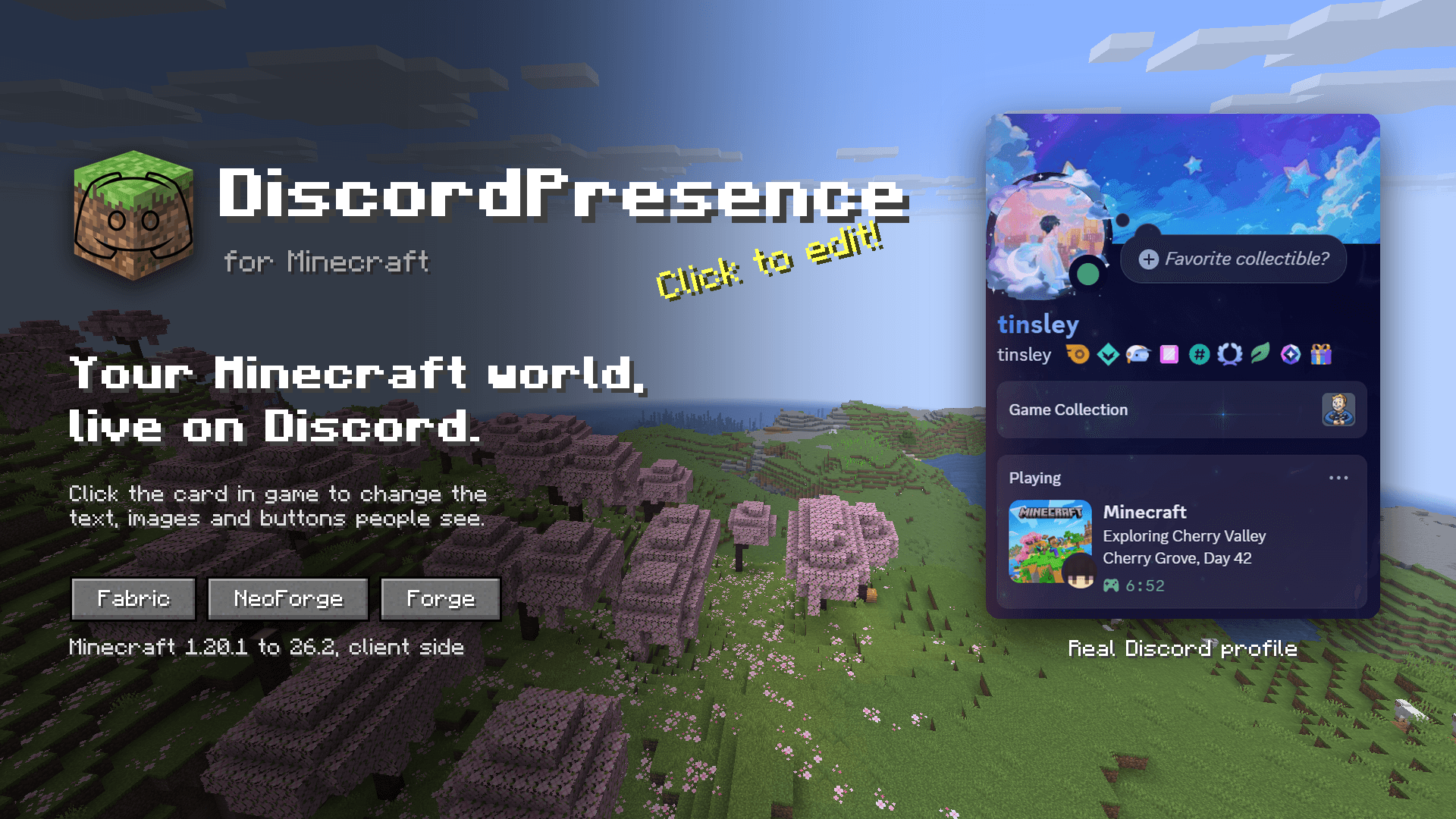 Discord Rich Presence for Minecraft A real Discord profile showing a custom Minecraft status set with DiscordPresence: world name, biome, day count, your skin and game art.
 -
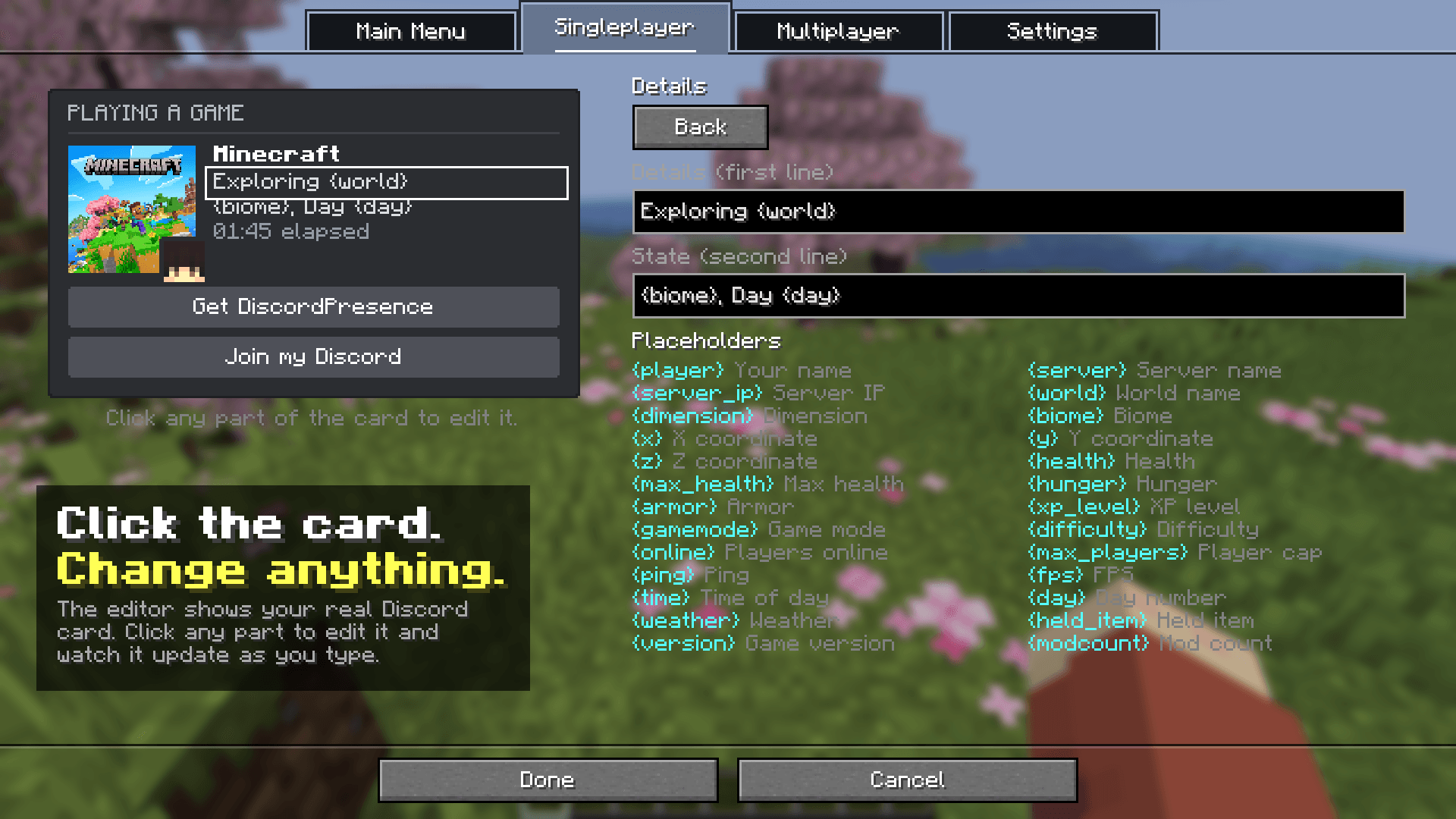 Click to edit your Discord status The in game editor shows the actual Discord card. Click the text, images or buttons to change them and watch the preview update as you type.
 -
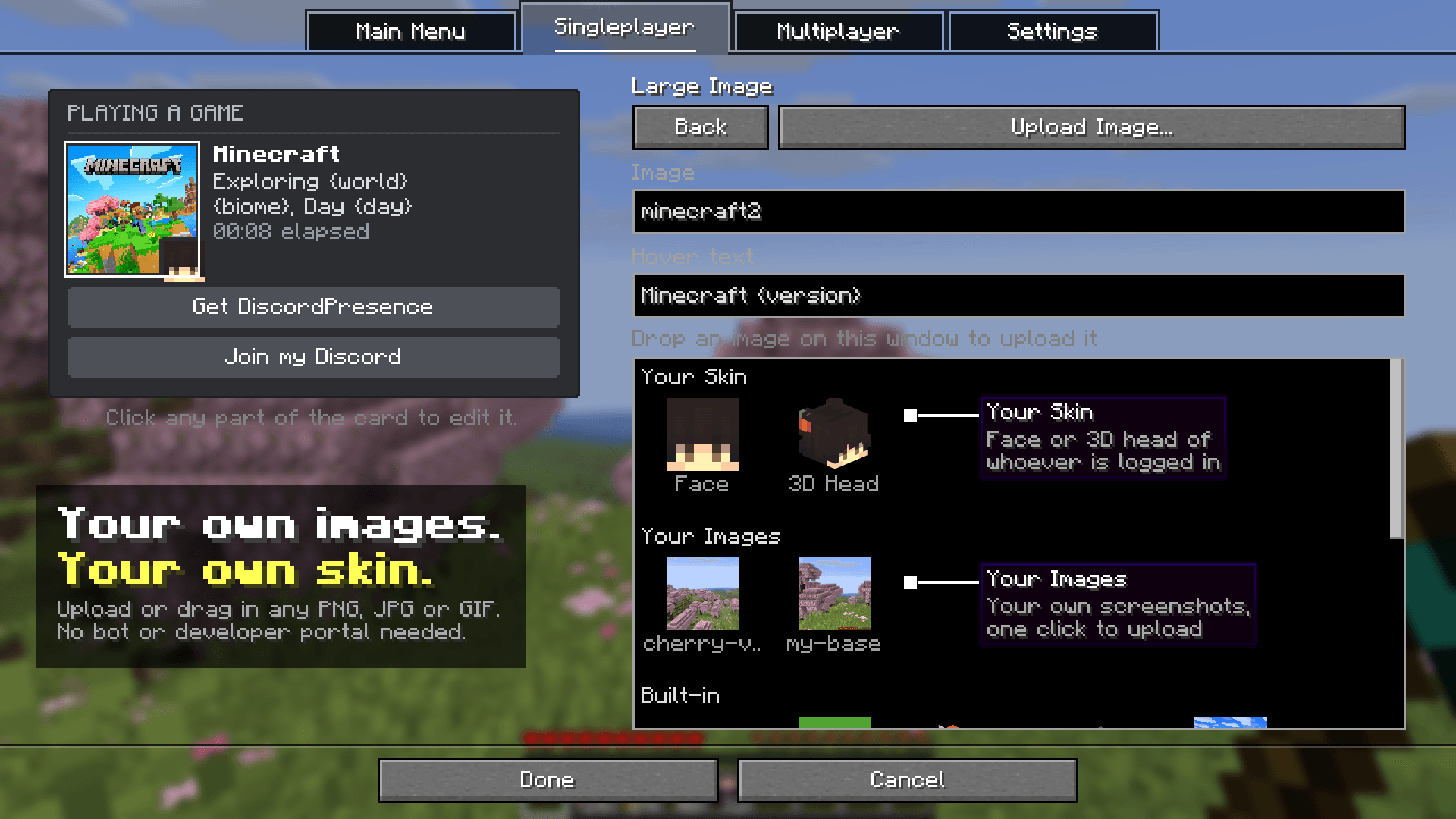 Custom images and your Minecraft skin Upload or drag in any PNG, JPG or GIF, use your own screenshots, or put your Minecraft skin face or 3D head on your Discord status. No bot needed.
 -
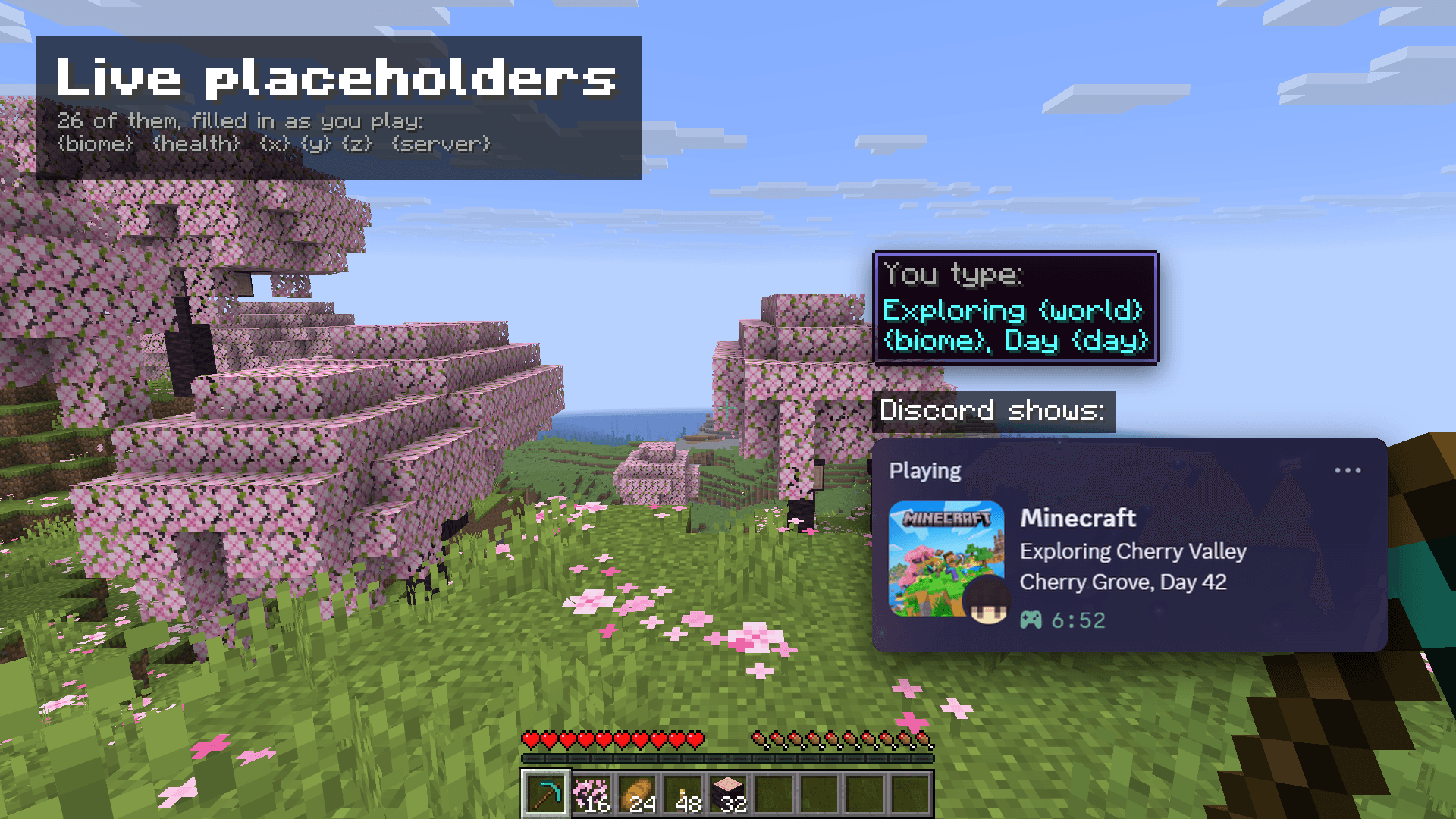 26 live placeholders Placeholders like {world}, {biome}, {day}, {health} and {x} {y} {z} fill in live, so your Discord Rich Presence shows what you are doing right now.
 -
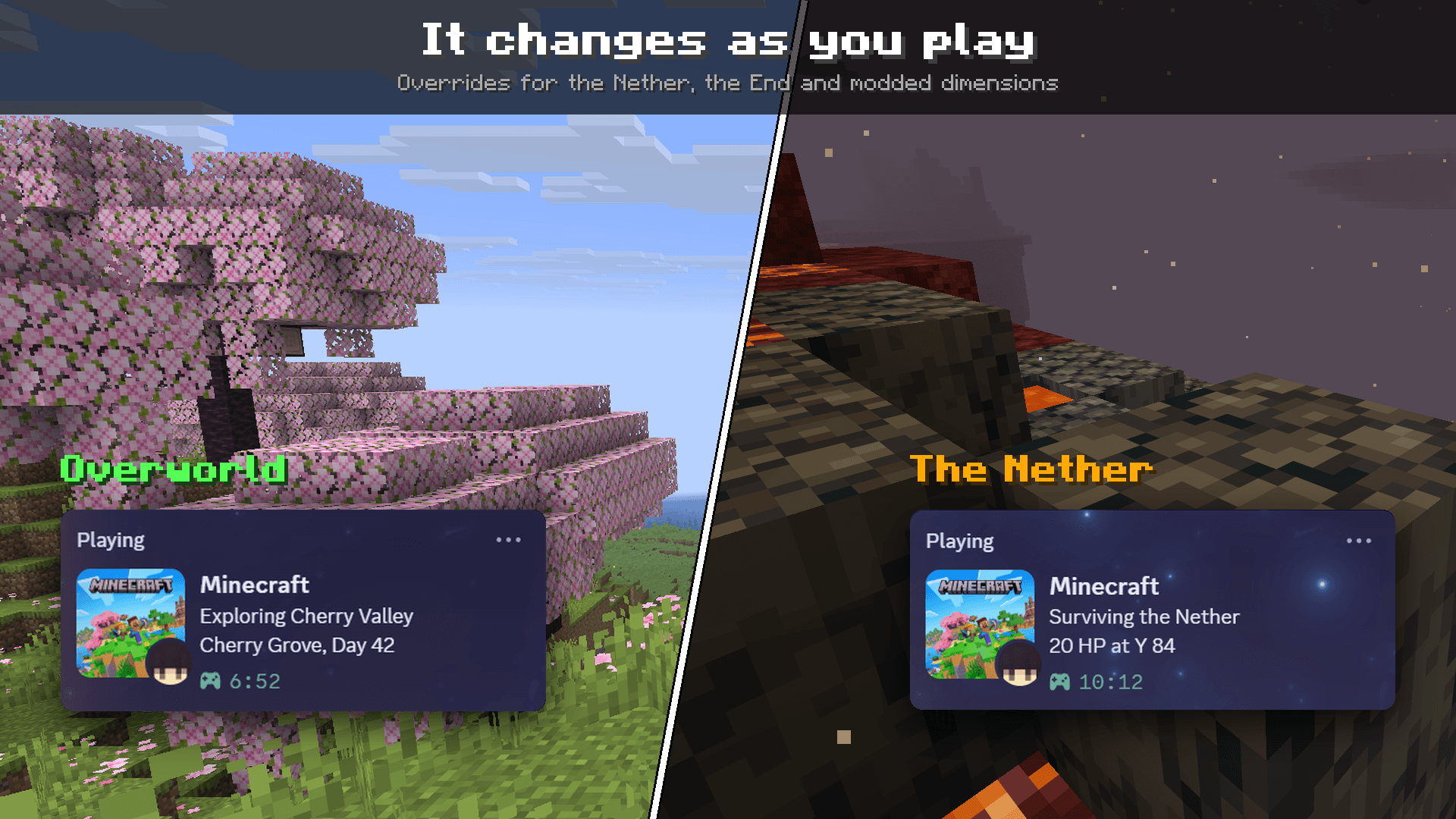 Changes on its own in the Nether and End Dimension overrides swap your Discord status automatically in the Overworld, the Nether, the End and modded dimensions. Both cards are real Discord screenshots taken in those spots.
 -
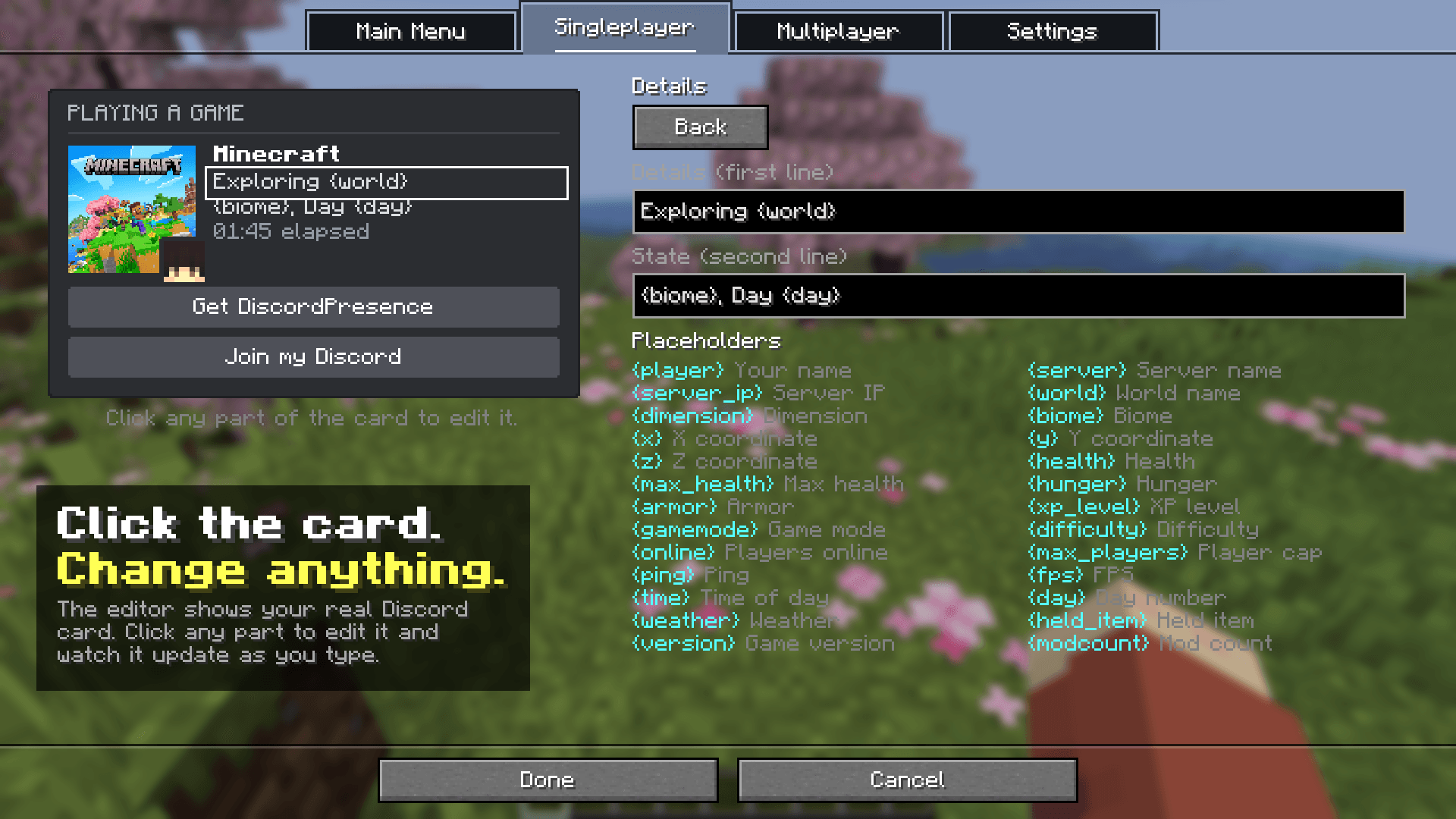 image-1790984439546.png image-1790984439546.png
 -
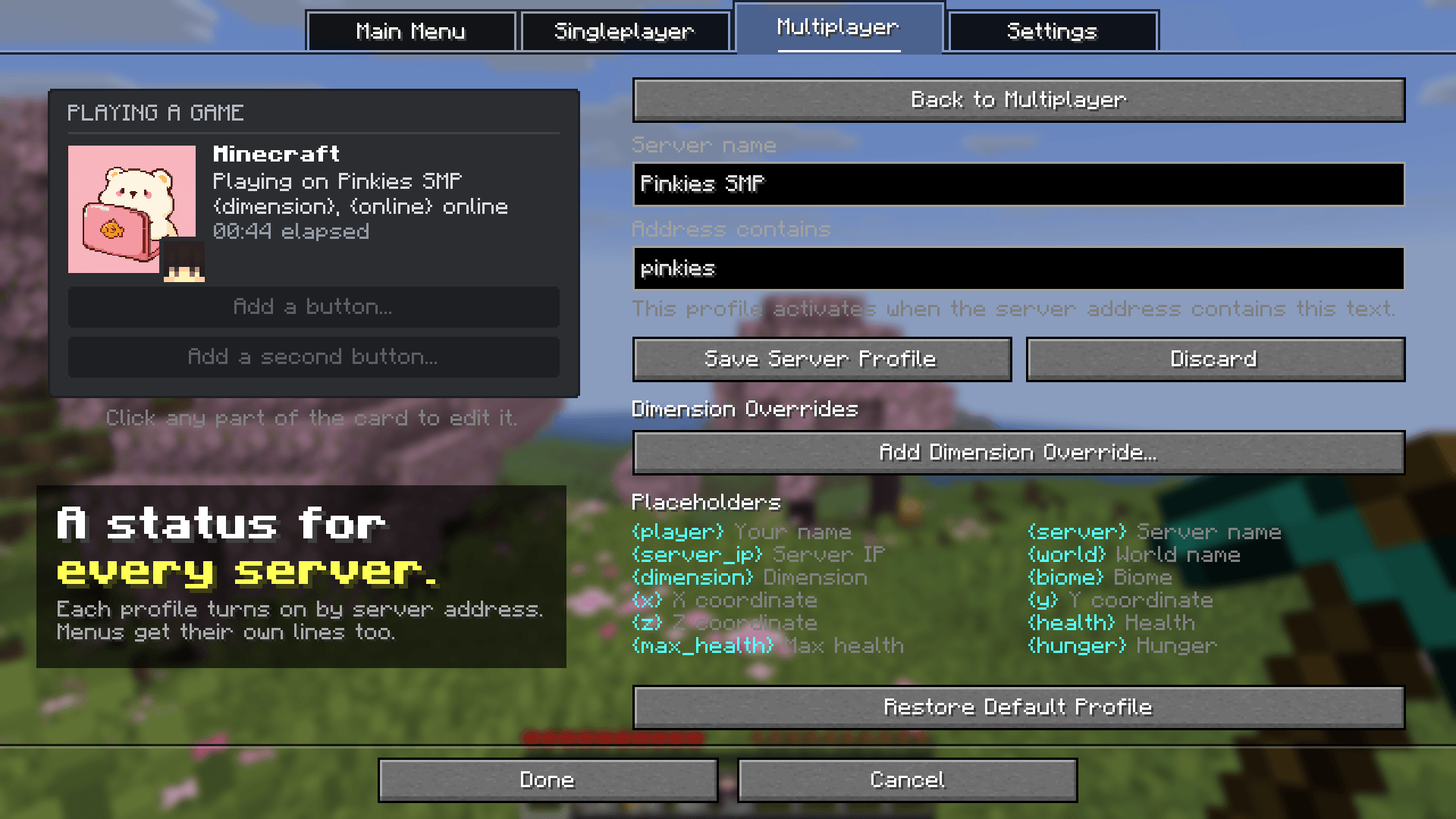 Per server Discord status Give every multiplayer server its own Discord Rich Presence, matched by address, plus custom lines for the title screen, server list and other menus.
 -
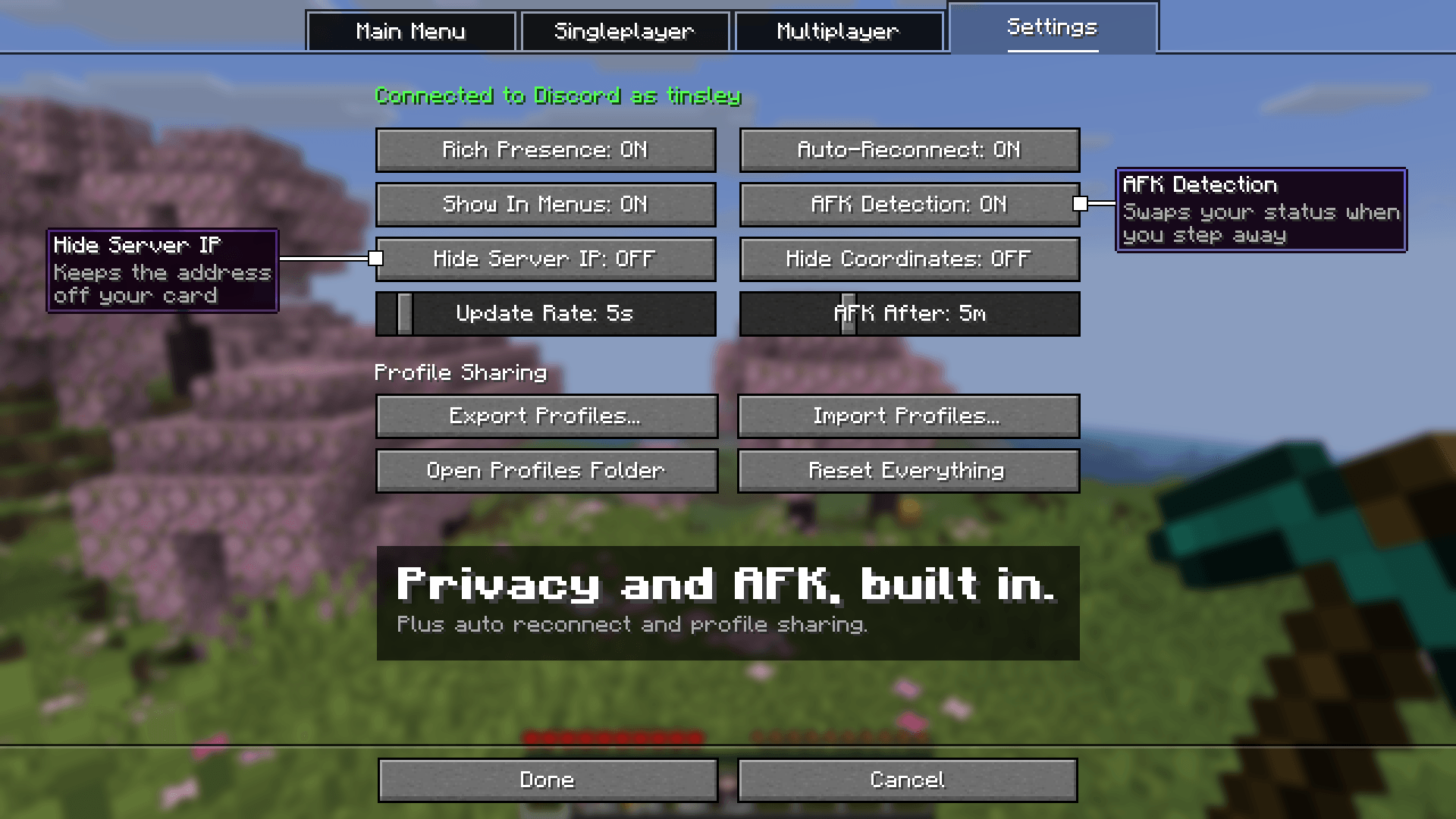 Privacy, AFK and auto reconnect Hide your server IP or coordinates, show an AFK status after a timeout you choose, reconnect when Discord restarts, and share profiles as JSON.
 -
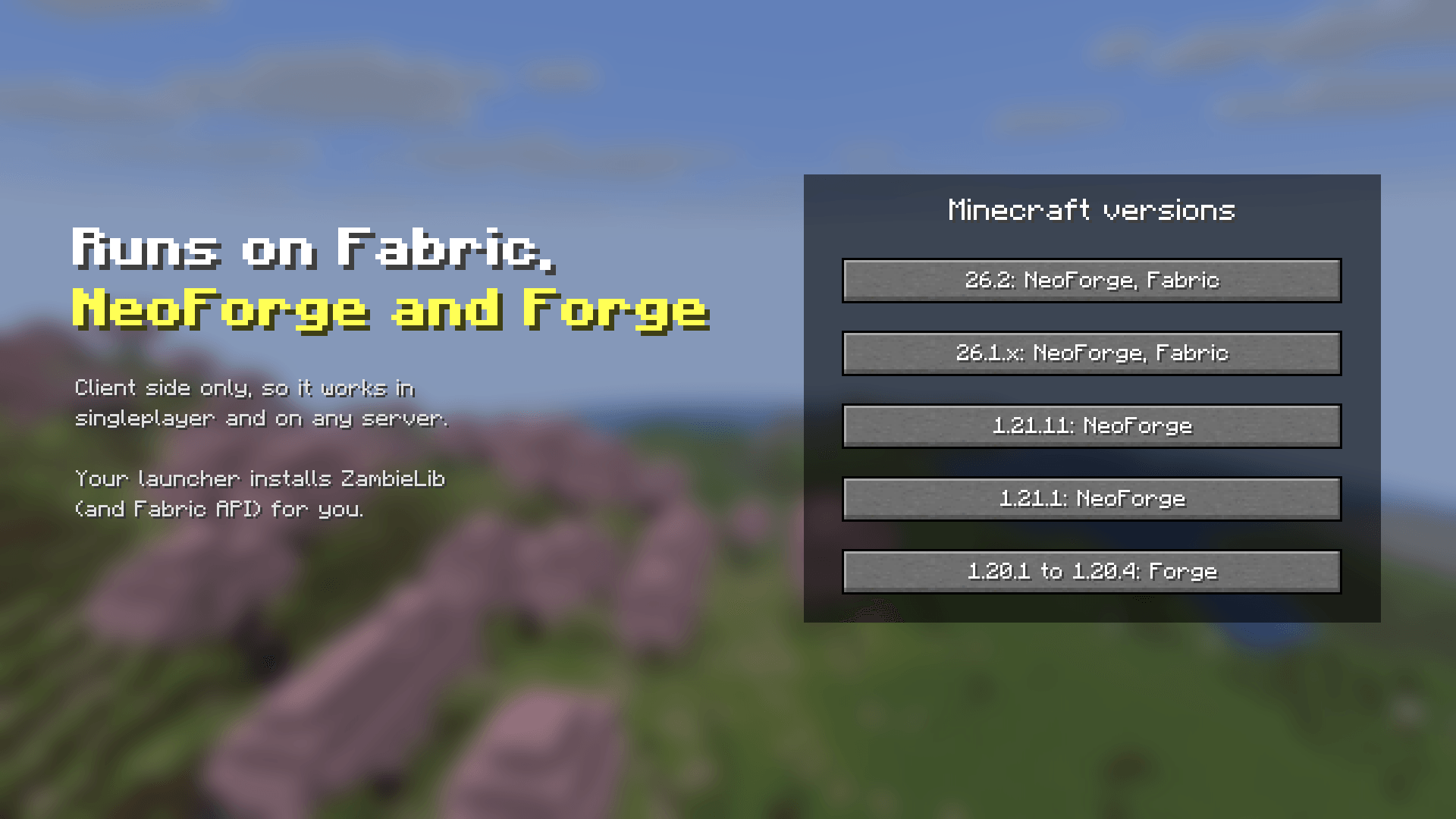 Fabric, NeoForge and Forge, 1.20.1 to 26.2 DiscordPresence runs client side on Fabric, NeoForge and Forge for Minecraft 1.20.1 to 26.2 and works on any server.
-
Discord Rich Presence for Minecraft A real Discord profile showing a custom Minecraft status set with DiscordPresence: world name, biome, day count, your skin and game art.
-
Click to edit your Discord status The in game editor shows the actual Discord card. Click the text, images or buttons to change them and watch the preview update as you type.
-
Custom images and your Minecraft skin Upload or drag in any PNG, JPG or GIF, use your own screenshots, or put your Minecraft skin face or 3D head on your Discord status. No bot needed.
-
26 live placeholders Placeholders like {world}, {biome}, {day}, {health} and {x} {y} {z} fill in live, so your Discord Rich Presence shows what you are doing right now.
-
Changes on its own in the Nether and End Dimension overrides swap your Discord status automatically in the Overworld, the Nether, the End and modded dimensions. Both cards are real Discord screenshots taken in those spots.
-
Per server Discord status Give every multiplayer server its own Discord Rich Presence, matched by address, plus custom lines for the title screen, server list and other menus.
-
Privacy, AFK and auto reconnect Hide your server IP or coordinates, show an AFK status after a timeout you choose, reconnect when Discord restarts, and share profiles as JSON.
-
Fabric, NeoForge and Forge, 1.20.1 to 26.2 DiscordPresence runs client side on Fabric, NeoForge and Forge for Minecraft 1.20.1 to 26.2 and works on any server.
Versions
Files
Relations
Project Relations
More like this
Similar Mods
Suggestions use data such as tags, dependencies, dependents, descriptions, titles, and more to rank how much they overlap with this mod.
On ModDex
Community snapshot
By the numbers
Statistics
 (opens in a new tab)
Get it on
Available Platforms
On ModDex
Community snapshot
By the numbers
Statistics
Resources