
Community listing page, reviews here may not be monitored by the author.
Discord Presence

No reviews yet
Customizable communcation between minecraft chat + advancements and discord.
Community voices
Reviews
No reviews yet. Be the first to review this project!
Get it on
Available Platforms
About
Project Details
For authors
Embed Badge
If you're the author of this project, you can embed a live badge anywhere that supports HTML or Markdown. It updates automatically whenever ratings change.
Use HTML for any page that supports it, or Markdown for README files and Markdown-based descriptions.
Identifiers
Platform IDs
Resources
External Links
About
Description
See your Minecraft server come alive in Discord. Posts a message when a player joins, then keeps it live — an online reaction while they play, a death marker when they fall, advancement embeds, and two-way chat between Discord and the game. Pure NeoForge + JDK, zero external libraries.
Works on any NeoForge 1.21.1 server — and in singleplayer.
Features
- 📨 Join messages — posted to a Discord channel via webhook. The first time a player joins, it opens a persistent per-player thread; later joins post into it.
- 🟢 Live online status — a bot adds an online reaction while the player is connected, and removes it on logout.
- 💀 Death markers — a death reaction, plus an optional rich death report embed (cause, score / location / dimension / XP, and a held-and-worn gear image).
- 🏆 Advancements — earned advancements post into the player's thread as a coloured embed (filterable by namespace).
- 💬 Two-way chat — in-game chat relays to Discord under each player's name (into their thread); Discord replies and thread messages relay back into the game. Targeted, not a firehose — only replies to a player's message or posts in their thread come through.
- 🕯️ Whispers into the darkness — chat when no one's listening on Discord and the game whispers a random grey flavour line ("Steve whispers into the void, is anyone there?"). Turns off once Discord replies, re-arms after a quiet spell. ~2,000 combinations.
- 👋 Disconnect reports (optional) — post a stats embed when a player leaves while alive.
- 🕓 Last seen online (for bundling mods) — track configured Discord users and query their presence, e.g. "Brennan was last seen online 5 minutes ago."
Why a webhook and a bot?
Discord webhooks can post but can't react — only a bot can. So Discord Presence posts with the webhook and uses the bot to add reactions, create per-player threads, post advancement embeds, and open a gateway connection to read replies for two-way chat. All with zero external dependencies — just the JDK and NeoForge's Gson.
Setup
Everything lives in config/discordpresence-server.toml (created on first server start). The mod stays off until you set a webhook URL.
- Webhook — Server Settings → Integrations → Webhooks → New Webhook → copy the URL into
webhookUrl. - Bot (for reactions / threads) — create an app at the Discord Developer Portal, copy the bot token into
botToken, and invite it with View Channel, Read Message History, Add Reactions, Create Public Threads, Send Messages in Threads. - Two-way chat (optional) — enable the Message Content privileged intent.
Full config reference and setup walkthrough: GitHub README.
Bundling
Discord Presence ships blank — no secrets in the jar — so it's safe to bundle. Another mod can point it at a central feed at runtime via a DiscordCredentialsProvider. It's bundled into Dungeon Train.
License
PolyForm Shield 1.0.0 — © Brennan Hatton.
Screenshots
Gallery
-
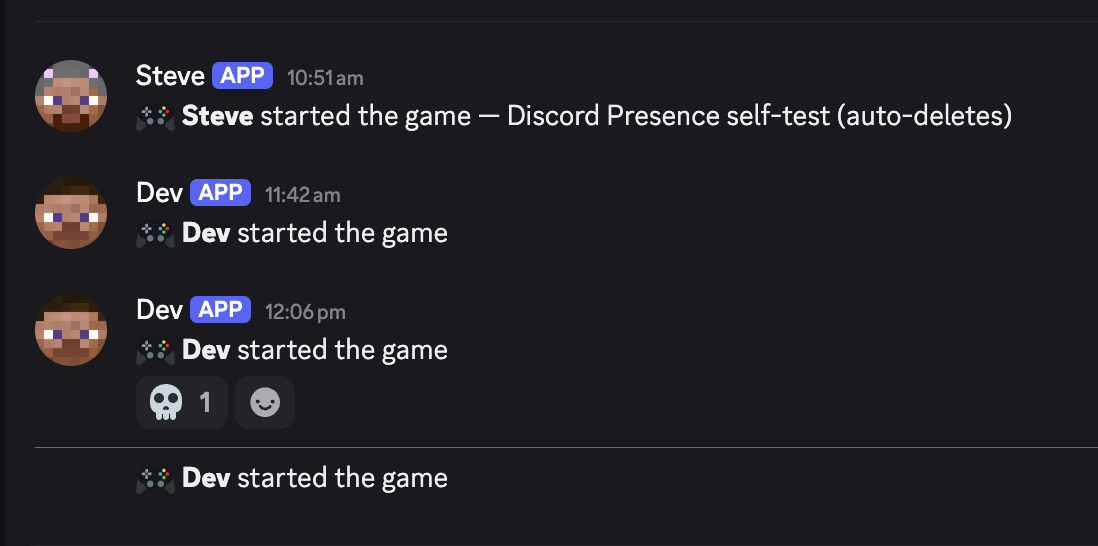 Screenshot 2026-06-13 at 1.03.20â¯pm.png Screenshot 2026-06-13 at 1.03.20â¯pm.png
Versions
Files
Relations
Project Relations
More like this
Similar Mods
Suggestions use data such as tags, dependencies, dependents, descriptions, titles, and more to rank how much they overlap with this mod.
On ModDex
Community snapshot
By the numbers
Statistics
Want to reach Minecraft players?
We're looking for a server hosting partner to feature here and other parts of the site. Interested? Send us a message!
Get in touchGet it on
Available Platforms
On ModDex
Community snapshot
By the numbers
Statistics
Resources