
Community listing page, reviews here may not be monitored by the author.
Simple Discord Rich Presence (Forge / Fabric)


No reviews yet
Simple Discord Rich Presence
Community voices
Reviews
No reviews yet. Be the first to review this project!
Get it on
Available Platforms
Compatibility
Supported Environments
Runs entirely on the client. Works on vanilla servers.
Must be installed on both the client and the server.
Varies by version.
About
Project Details
For authors
Embed Badge
If you're the author of this project, you can embed a live badge anywhere that supports HTML or Markdown. It updates automatically whenever ratings change.
Use HTML for any page that supports it, or Markdown for README files and Markdown-based descriptions.
Identifiers
Platform IDs
About
Description


What is SDRP?
SDRP is a simple Discord Rich Presence client for Minecraft that allows you to display your current Minecraft status on Discord.
How do I use SDRP?
- Simply download the mod from CurseForge and put it in your mods folder. This is a client-side only mod so you don't need to install it on your server.
- You will then need to create an application on Discord. You can do this by going to the Discord Developer Portal and clicking "New Application". Give it a name and click "Create".
- Attach an image to your app on the
General Informationtab. This will be the image that is displayed on Discord when the status is not playing Minecraft. - Go to the
Rich Presencetab and add a new image. This will be the image that is displayed on Discord when the status is playing Minecraft.
- Attach an image to your app on the
- Once you have made your application, you will need to attach images with the correct names for the mod to work.
- We've attached example images in the
imagesfolder. These have the correct names for the mod to work out of the box. - A correct configuration will look like this:
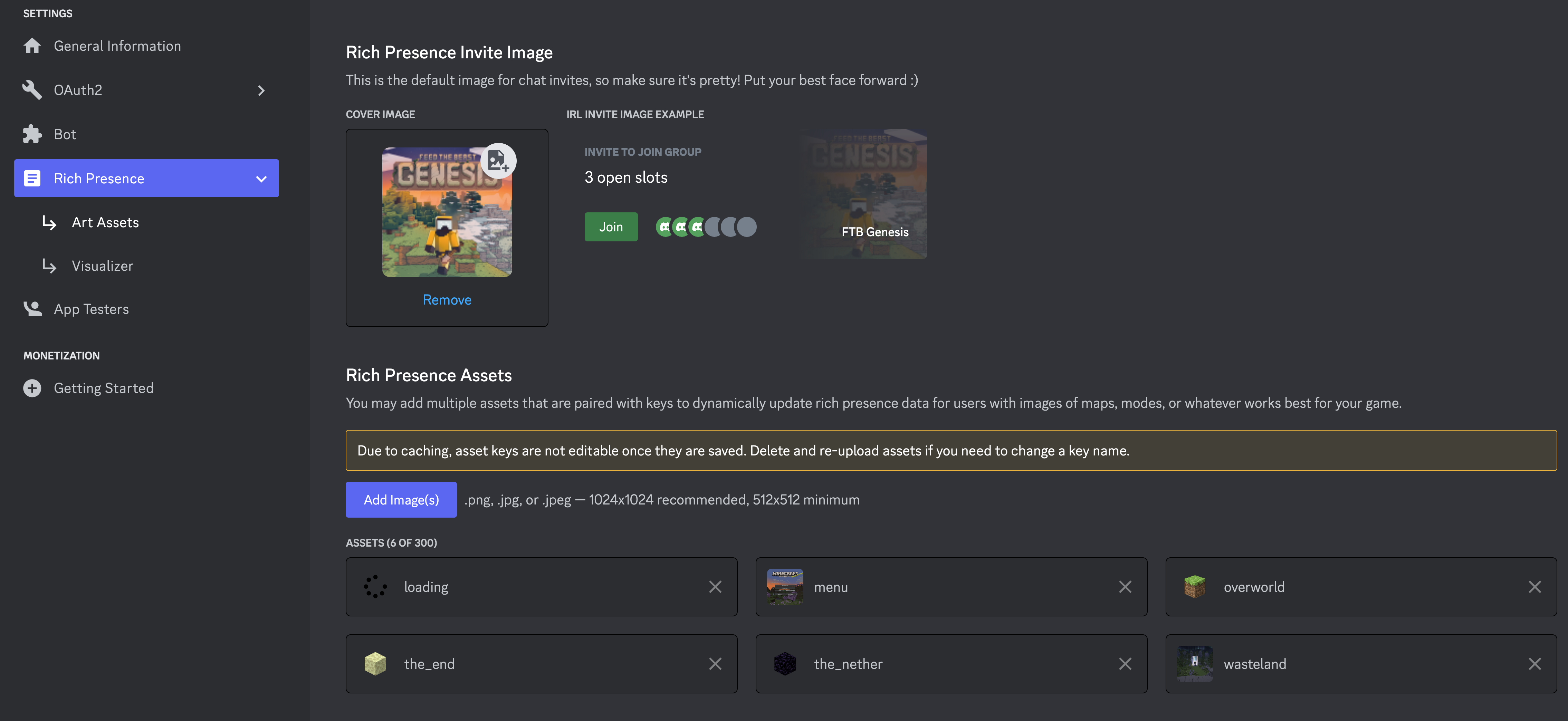
- If you want to setup your own images, you can follow the next section.
- We've attached example images in the
Caveats
We always will attempt to use an image called loading and an image called menu for when the game is loading or is on the main menu respectively. If you do not have these images, the mod will simply fail to display an image for these states.
menuWhen the main menu is showingloadingWhen the game is loading
Using custom images
If you are not using the KubeJS integration then you will need to follow the our convention for naming images and language keys. The convention is as follows:
- Name:
sdrp.[DIMENSION_NAME](Language key) - Image Key:
sdrp.[DIMENSION_NAME].in - Image Name:
[DIMESNION_NAME]
So for this to work, you'd need to have an image added to your Discord apps rich presents settings under the name of the dimension you want to support.
If I wanted to support the end and the overworld for example. Their names are as follows minecraft:overworld, minecraft:the_end. We ignore the minecraft: part and name the images the_end and overworld. We then add a language key to the language Json for both the Image Key and Name:
{
  "sdrp.overworld": "Overworld",
  "sdrp.overworld.in": "In the Overworld"
}
What we support out of the box
Dimensions
We omit the modid from the dimension name and use the name instead. So minecraft:overworld becomes overworld.
overworldthe_netherthe_endcompact_worlddungeonspatial_storageothersideparadise_lostmining
Not all of these dimensions have example images with-in the images folder
Languages
{
  "sdrp.logo": "Pack Logo",
  "sdrp.mainmenu": "Main Menu",
  "sdrp.overworld.in": "In Overworld",
  "sdrp.overworld": "Overworld",
  "sdrp.the_nether.in": "In Nether",
  "sdrp.the_nether": "Nether",
  "sdrp.the_end.in": "In The End",
  "sdrp.the_end": "The End",
  "sdrp.compact_world.in": "In Compact World",
  "sdrp.compact_world": "Compact World",
  "sdrp.dungeon.in": "In Dungeon World",
  "sdrp.dungeon": "Dungeon World",
  "sdrp.spatial_storage.in": "In Spatial Storage",
  "sdrp.spatial_storage": "Spatial Storage",
  "sdrp.otherside.in": "In Otherside",
  "sdrp.otherside": "Otherside",
  "sdrp.paradise_lost.in": "In Paradise Lost",
  "sdrp.paradise_lost": "Paradise Lost",
  "sdrp.mining": "Mining Dimension",
  "sdrp.mining.in": "In Mining dimension"
}
Config
{
  "clientId": 1000000000,   // Your Discord application ID
  "enabled": true,          // Whether or not the mod is enabled
  "screenEvent": false,     // Disables the `menu` and `loading` images
  "clientJoinEvent": false, // Disables the level join events which will prevent the mod from showing the level you are in
  "logState": false,        // Enables developer logging of the state json being sent to Discord
}
Simple Discord Rich Presence
Config:
clientId: "Your Discord App ID"
enable: "If you wish to disable Discord Rich Presence, set this to false."
screenEvent: If set to false, it disables the build in screenEvent, which is used to tell when we are on the main menu."
clientJoinEvent: If set to false, it disables the build in clientJoinEvent, which is used to tell when the player is joining a world and changing Dimension."
KubeJS Integration
Functions:
SDRP.setState( String message, String imageName, String imageKey )
message: message to show under the packname aka "In Overworld" or "In Nether", can be passed a string with the text to show or a lang key.
imageName: the text to show when hovering over the small image aka "Overworld" or "Nether", can be passed a string with the text to show or a lang key.
imageKey : the name Rich Present Art Asset to show, like loading, overworld, menu and so on.

SDRP.getCurrentState()
Gets the current state the client is set to.

Examples:
Update state on dimension change and joining world.
kubejs/startup_script/sdrp.js
onForgeEvent(
  "net.minecraftforge.event.entity.EntityJoinWorldEvent",
  (event) => {
    if (event.getEntity().type === "entity.minecraft.player") {
      if (event.getWorld().isClientSide()) {
        const dimPath = event.getWorld().dimension().location().getPath();
          SDRP.setState(`sdrp.${dimPath}.in`, `sdrp.${dimPath}`, "dimPath");
      }
    }
  }
);
Image keys for if you are using your own Rich Presence Application. (Images used on the default Rich Presence Application can be found HERE)
logo
loading
menu
For dimensions, the key will be the registry name path of the dimension like:
overworld
the_nether
the_end
yamda_dim
For the message (stuff like "In Overworld") is done via lang keys "sdrp..in"
For imageName (stuff like "Overworld" when hovering over the small image) is done via lang keys "sdrp."
Lang keys can be modified and added via data packs and using mods like KubeJS
Screenshots
Gallery
Versions
Files
Relations
Project Relations
More like this
Similar Mods
Suggestions use data such as tags, dependencies, dependents, descriptions, titles, and more to rank how much they overlap with this mod.
- Spire of Echoes (Unofficial DLC for NightfallCraft - The Casket of Reveries)
- Phase's Discord Rich Presence
- ZenithX
- Simple Discord RPC
- Simple Discord Link Bot
- Simple Discord Webhook Leave/Join Notification
- Simple Discord Auth
- Simple Voice Chat Discord Bridge
- DMF
- DVC Bedrock GUI Addon
- Cobblemon Spawn Notification Discord Integration
- Just Enough Discord Integration
On ModDex
Community snapshot
By the numbers
Statistics
Want to reach Minecraft players?
We're looking for a server hosting partner to feature here and other parts of the site. Interested? Send us a message!
Get in touchGet it on
Available Platforms
On ModDex
Community snapshot
By the numbers