
Community listing page, reviews here may not be monitored by the author.
DonutSMP Shard Displayer


No reviews yet
Displays DonutSMP player shard counts above their heads in real time. Fully client-side Fabric mod with customizable label appearance.
Community voices
Reviews
No reviews yet. Be the first to review this project!
Get it on
Available Platforms
Compatibility
Supported Environments
Runs entirely on the client. Works on vanilla servers.
About
Project Details
For authors
Embed Badge
If you're the author of this project, you can embed a live badge anywhere that supports HTML or Markdown. It updates automatically whenever ratings change.
Use HTML for any page that supports it, or Markdown for README files and Markdown-based descriptions.
Identifiers
Platform IDs
Resources
External Links
About
Description
Shard Displayer
Displays DonutSMP player shard counts above their heads in real time, fetched from donutstats.net. Fully client-side Fabric mod with customizable label appearance.
🎯 Features
Automatic shard parsing from donutstats.net for all visible players
In-game label above players showing ✦ 12.5K (auto‑formatted with K, M, B, T suffixes)
Fully customizable display:
- Text color and scale
- Vertical offset above the player
- Background toggle
- Show/hide your own shards
- Debug mode – shows loading states (loading, err, waiting) to troubleshoot issues
- Smart caching: fast updates (every 15s) while active, relaxed (every 3min) in the background
- No API keys required – all data is taken from the public stats page
📋 Commands
All commands start with /shardslabel (tab completion works).
Command Description
/shardslabel on / off ==== Enable / disable shard labels
/shardslabel toggle ==== Toggle visibility
/shardslabel self on / off ==== Show / hide your own shard count
/shardslabel background on / off ==== Enable / disable background behind the label
/shardslabel scale <30..200> ==== Set text size in percent (default 70)
/shardslabel y <offset> ==== Vertical offset (range -100 to 100, default 25)
/shardslabel color <#RRGGBB> ==== Text color in HEX, e.g. #FFAA00
/shardslabel debug on / off ==== Enable debug mode
/shardslabel clearcache ==== Clear the stats cache
/shardslabel reload ==== Reload config from file
⚙️ Configuration
Settings are stored in config/shards.properties and created automatically on first launch.
📦 Installation
Install Fabric Loader for Minecraft 1.21.10 / 1.21.11
Download Fabric API and place it in your mods folder
Download the latest Shard Displayer jar and put it in mods as well
Shard Displayer
Displays DonutSMP player shard counts above their heads in real time, fetched from donutstats.net. Fully client-side Fabric mod with customizable label appearance.
🎯 Features
Automatic shard parsing from donutstats.net for all visible players
In-game label above players showing ✦ 12.5K (auto‑formatted with K, M, B, T suffixes)
Fully customizable display:
- Text color and scale
- Vertical offset above the player
- Background toggle
- Show/hide your own shards
- Debug mode – shows loading states (loading, err, waiting) to troubleshoot issues
- Smart caching: fast updates (every 15s) while active, relaxed (every 3min) in the background
- No API keys required – all data is taken from the public stats page
📋 Commands
All commands start with /shardslabel (tab completion works).
Command Description
/shardslabel on / off ==== Enable / disable shard labels
/shardslabel toggle ==== Toggle visibility
/shardslabel self on / off ==== Show / hide your own shard count
/shardslabel background on / off ==== Enable / disable background behind the label
/shardslabel scale <30..200> ==== Set text size in percent (default 70)
/shardslabel y ==== Vertical offset (range -100 to 100, default 25)
/shardslabel color <#RRGGBB> ==== Text color in HEX, e.g. #FFAA00
/shardslabel debug on / off ==== Enable debug mode
/shardslabel clearcache ==== Clear the stats cache
/shardslabel reload ==== Reload config from file
⚙️ Configuration
Settings are stored in config/shards.properties and created automatically on first launch.
📦 Installation
Install Fabric Loader for Minecraft 1.21.10 / 1.21.11
Download Fabric API and place it in your mods folder
Download the latest Shard Displayer jar and put it in mods as well
Screenshots
Gallery
-
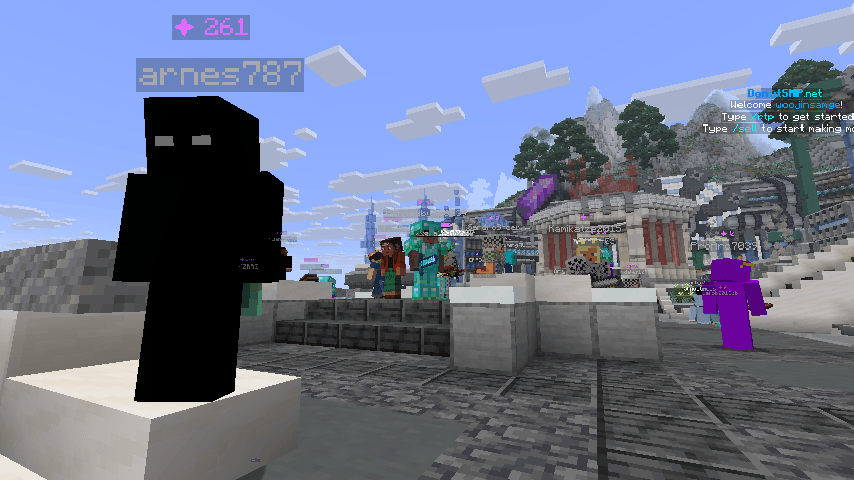 DonutSMP Shard Displayer Example DonutSMP Shard Displayer Example
 -
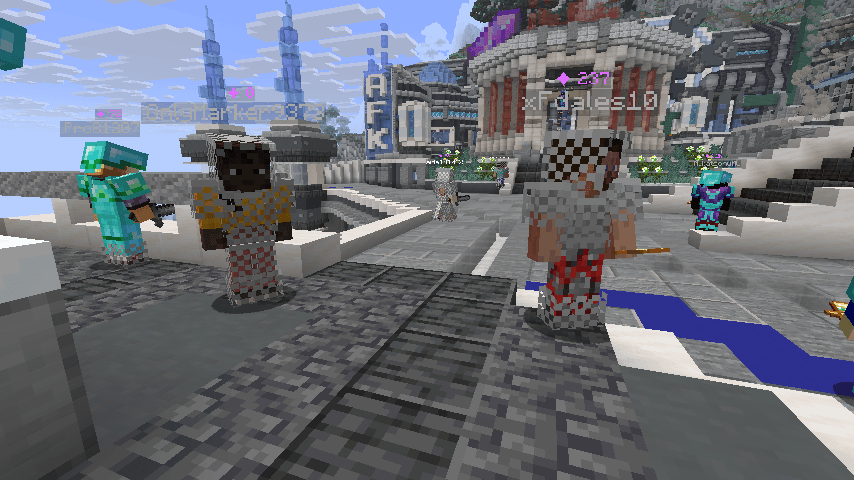 DonutSMP Shard Displayer Example DonutSMP Shard Displayer Example
-
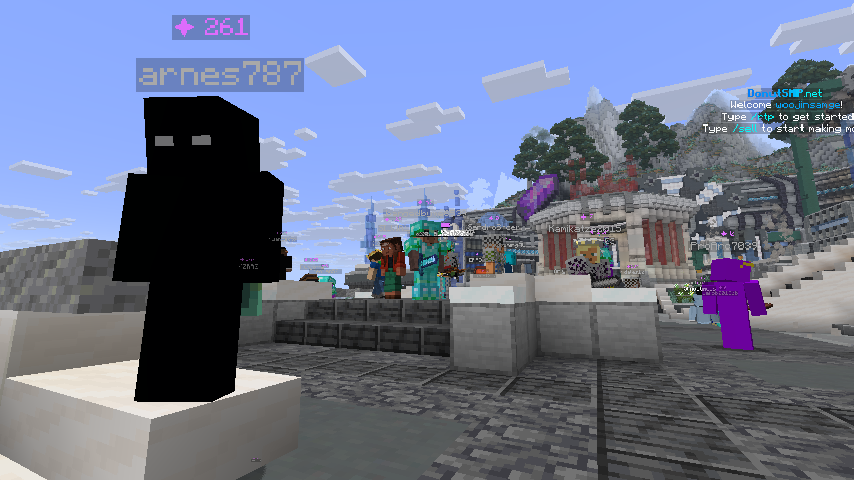 DonutSMP Shard Displayer Example
 -
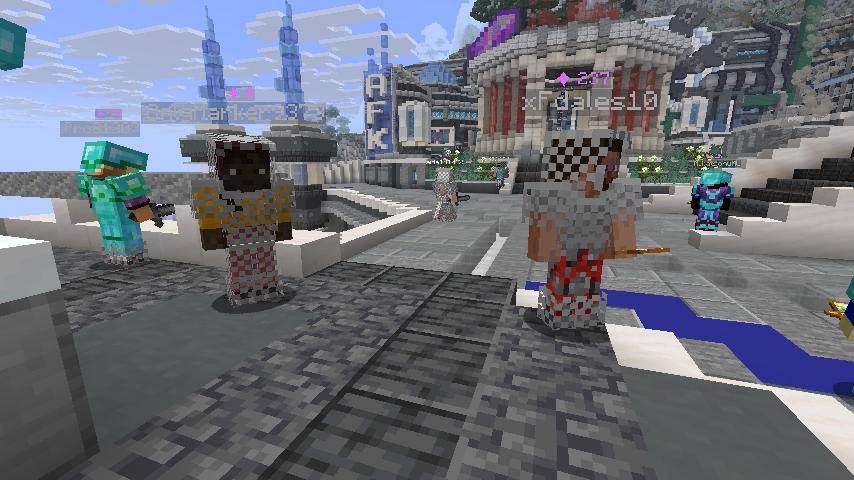 DonutSMP Shard Displayer Example
Versions
Files
Relations
Project Relations
More like this
Similar Mods
Suggestions use data such as tags, dependencies, dependents, descriptions, titles, and more to rank how much they overlap with this mod.
On ModDex
Community snapshot
By the numbers
Statistics
Want to reach Minecraft players?
We're looking for a server hosting partner to feature here and other parts of the site. Interested? Send us a message!
Get in touchGet it on
Available Platforms
On ModDex
Community snapshot
By the numbers
Statistics
Resources