
Community listing page, reviews may not be monitored by the author.
Dragon Survival Quick Emotes

No reviews yet
A client-side emote radial menu for Dragon Survival.

Community voices
Reviews
No reviews yet. Be the first to review this project!
Get it on
Available Platforms
About
Project Details
For authors
Embed Badge
If you're the author of this project, you can embed a live badge anywhere that supports HTML or Markdown. It updates automatically whenever ratings change.
Use HTML for any page that supports it, or Markdown for README files and Markdown-based descriptions.
Identifiers
Platform IDs
Resources
External Links
About
Description
Dragon Survival Quick Emotes
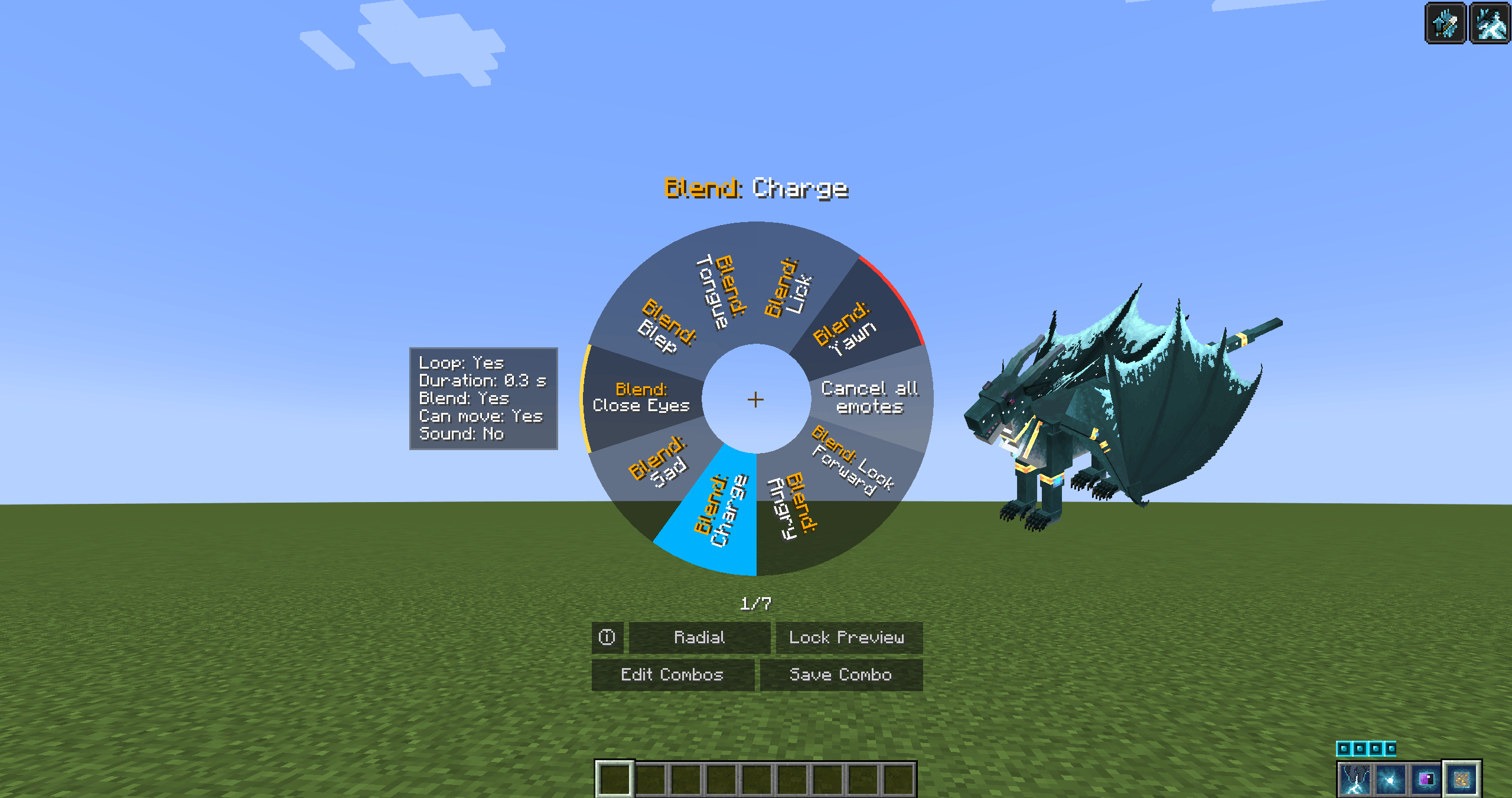
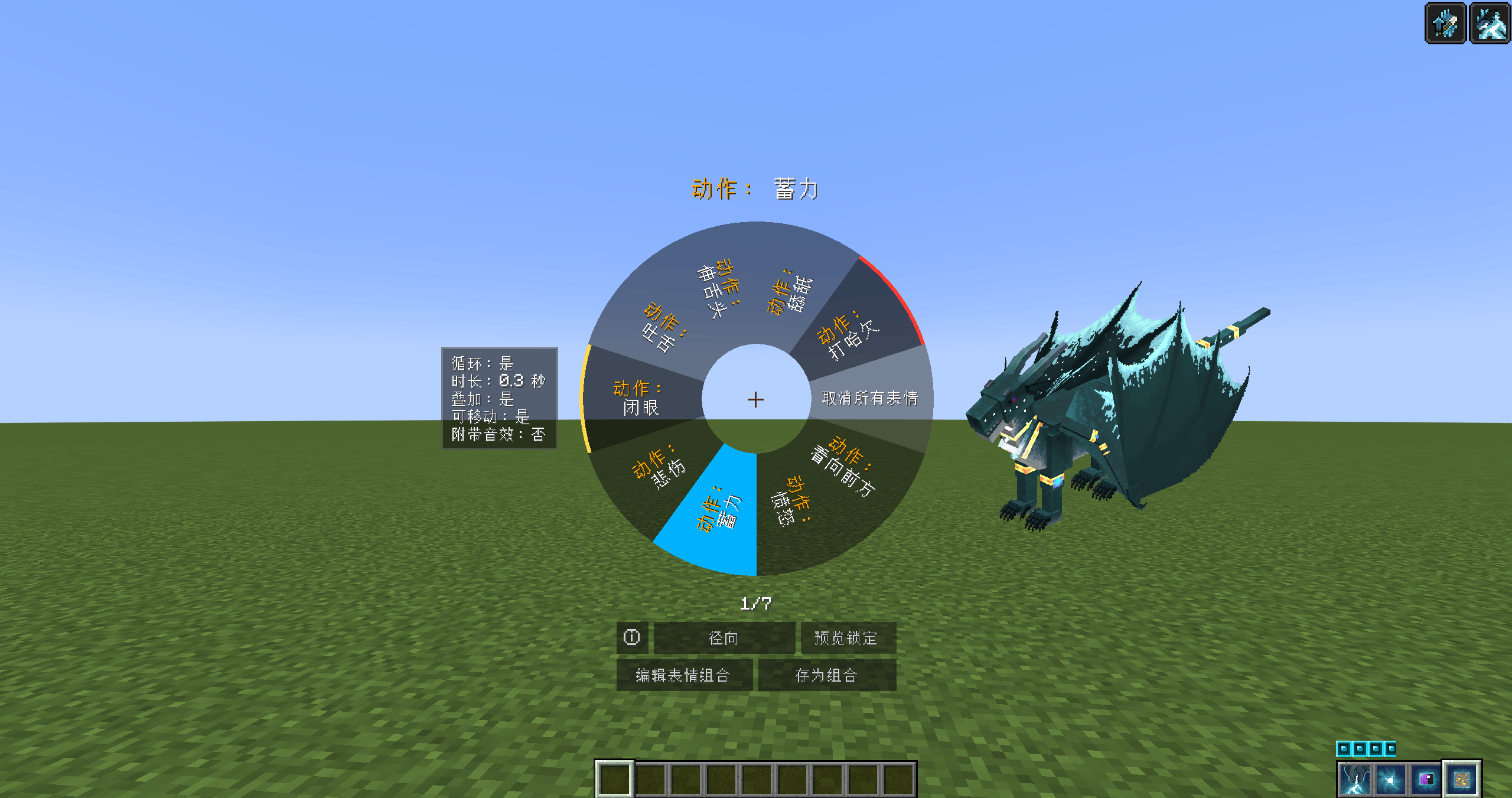
Adds a quick emote wheel to Dragon Survival. Hold the hotkey to open the wheel, choose an emote, and release to apply it quickly.
Dragon Survival's emote system is very powerful, but every activation normally involves a rather cumbersome sequence of actions, and the lack of emote previews can cause misunderstandings when trying different emotes. This mod condenses the entire flow into a single wheel and integrates frequently used emote combos, the complete emote list, dragon model preview, and combo editing into one interface.
Features
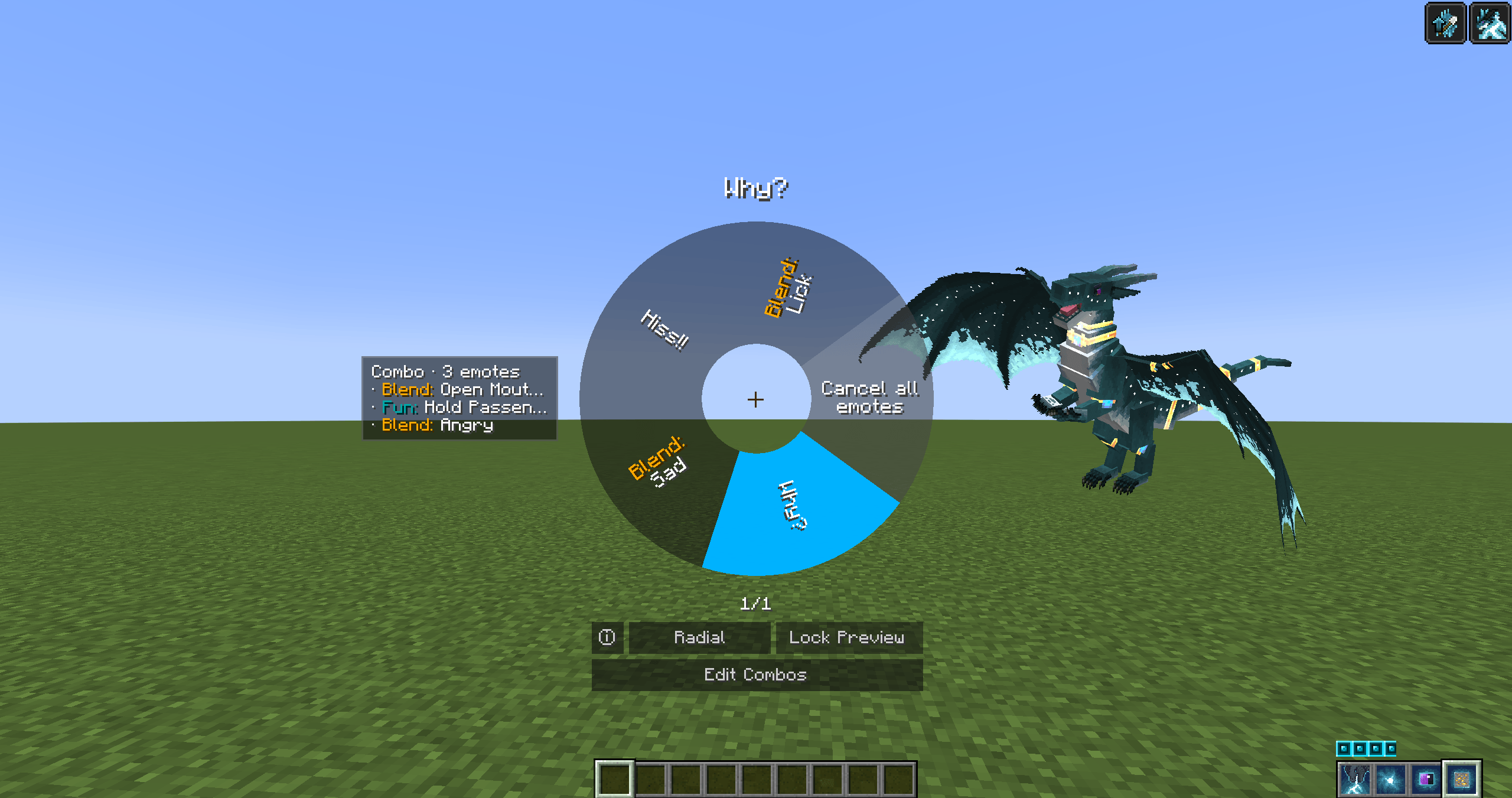
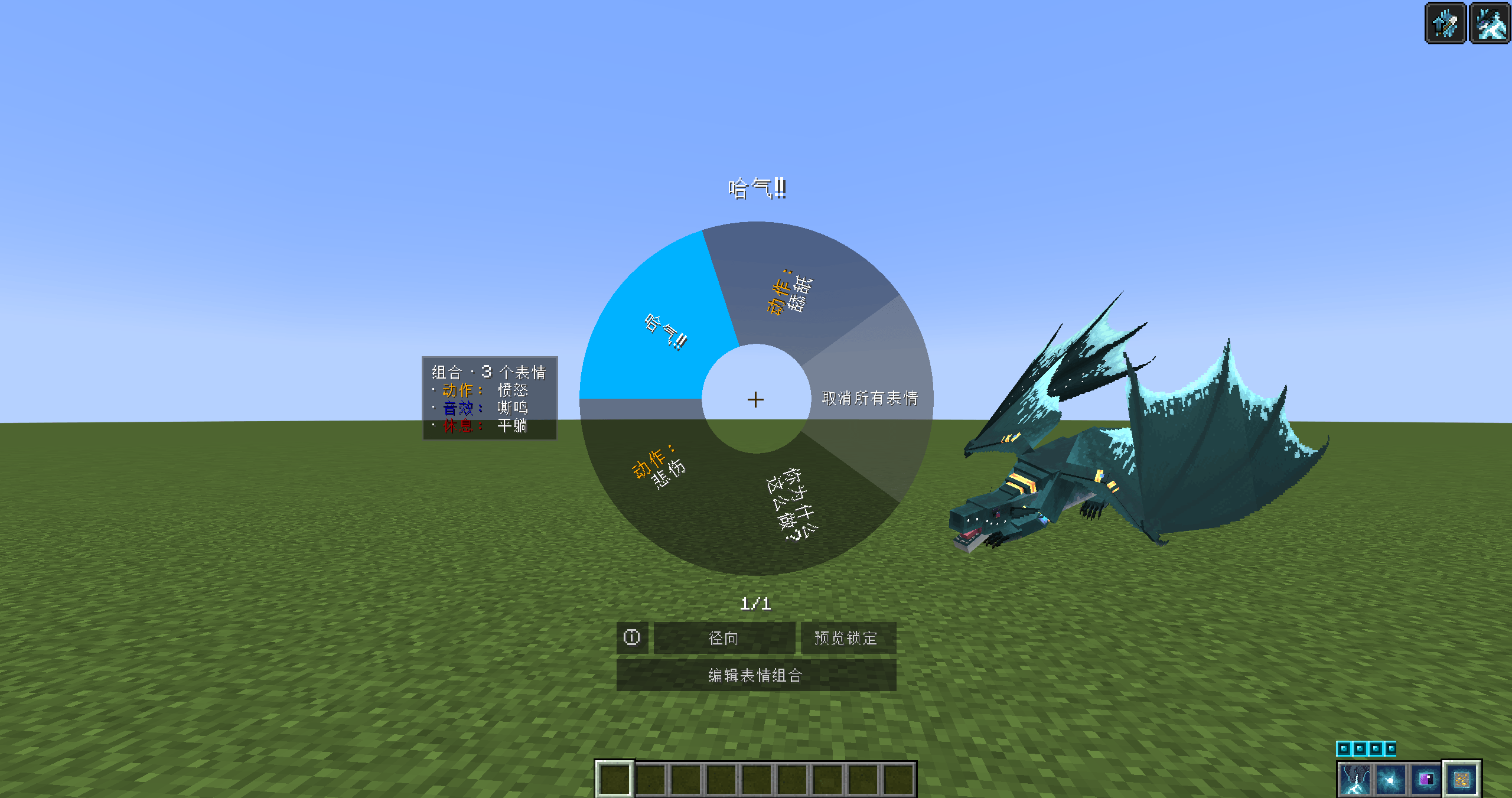
- Two-wheel design: a Quick Wheel for opening custom combos quickly (you can also quickly open a specific emote by making it a single-emote combo), and a Full Wheel that lists every emote available to the current body.
- Hold to open, release to apply: point at a sector and release to apply it; repeat on the same sector to turn it off. Left-clicking a sector to toggle it is also supported.
- Per-species combos: each dragon species has its own dedicated combo list, saved locally.
- Force loop: right-click a sector to keep the target looping — even one-shot emotes can loop.
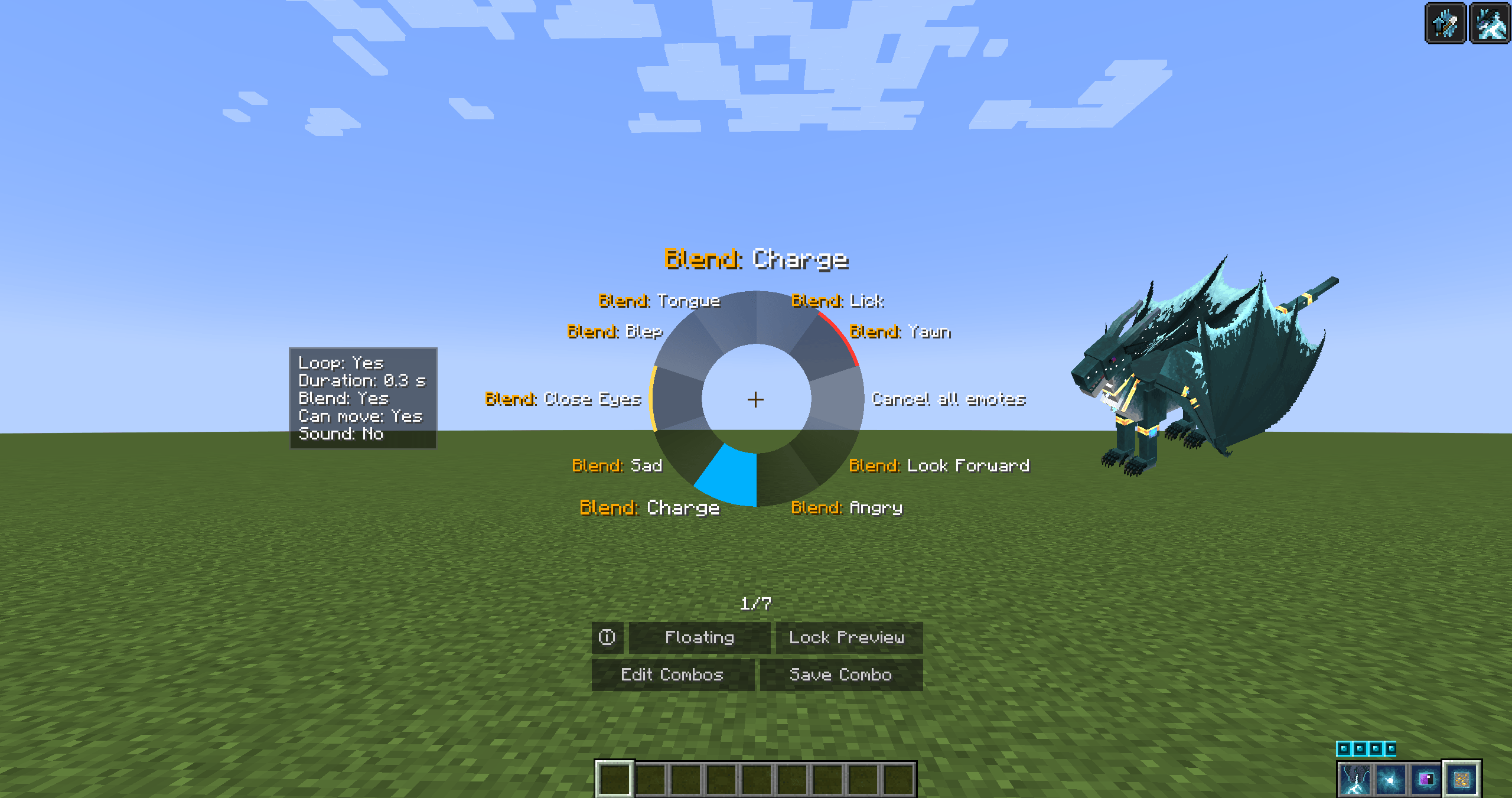
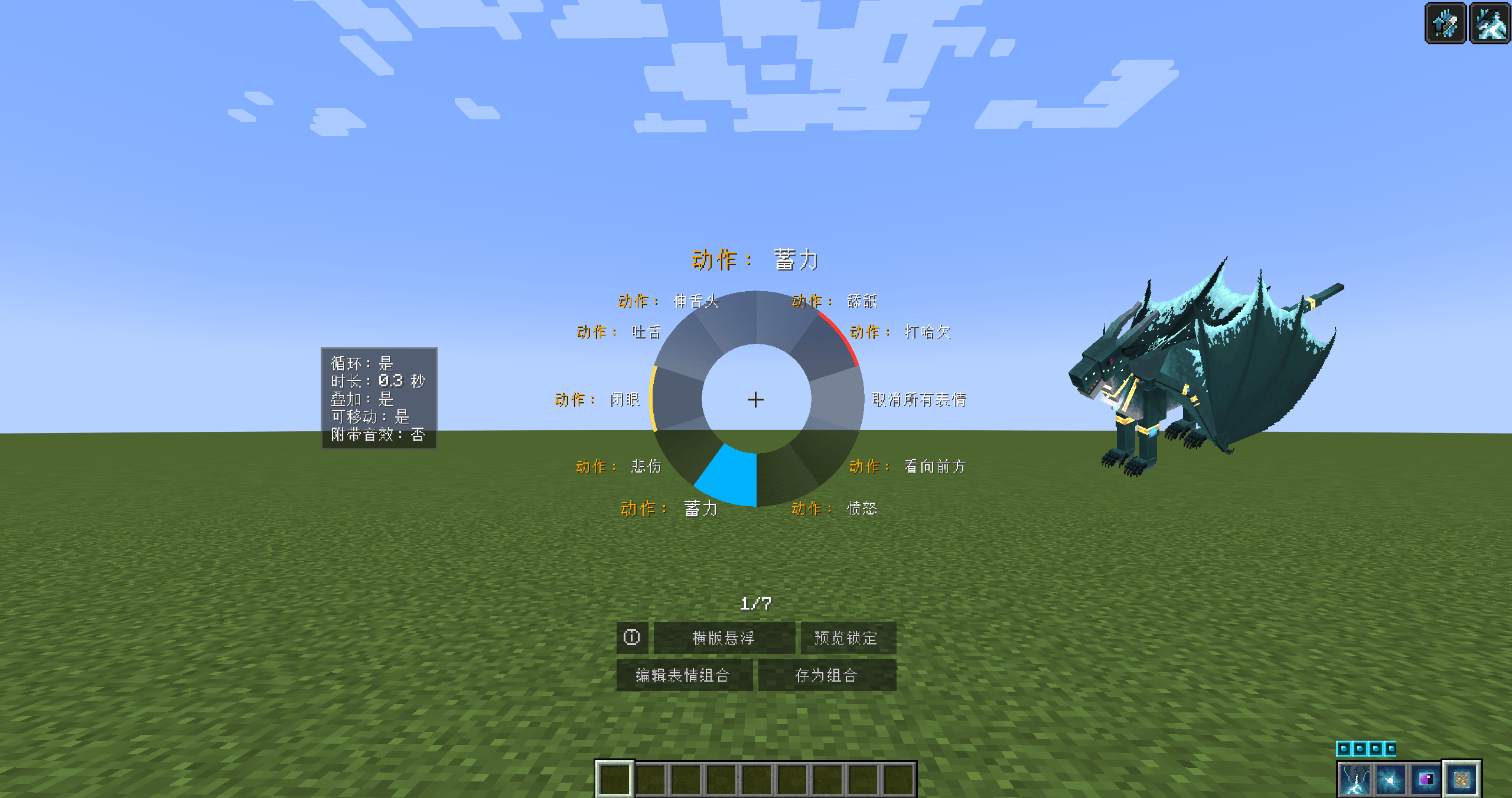
- Indicator lights: located on the outer rim of the wheel to show the current emote status. Yellow: in use; orange: partially in use; red: force-looping.
- Live dragon model preview: renders the player's current dragon model in the interface for previewing emotes or combos.
- Save as combo in one click: in the Full Wheel, save the currently playing emotes directly as a new combo.
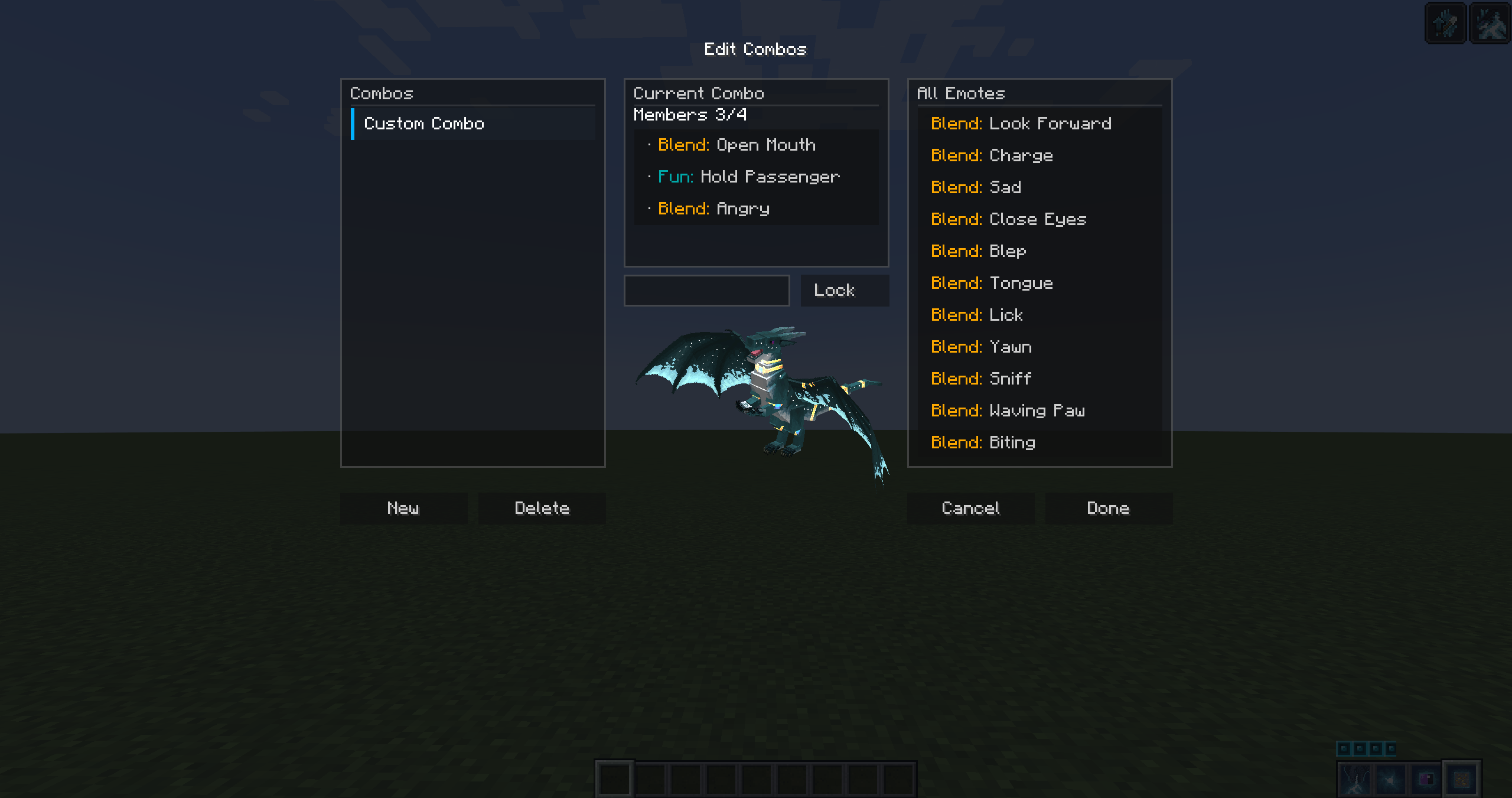
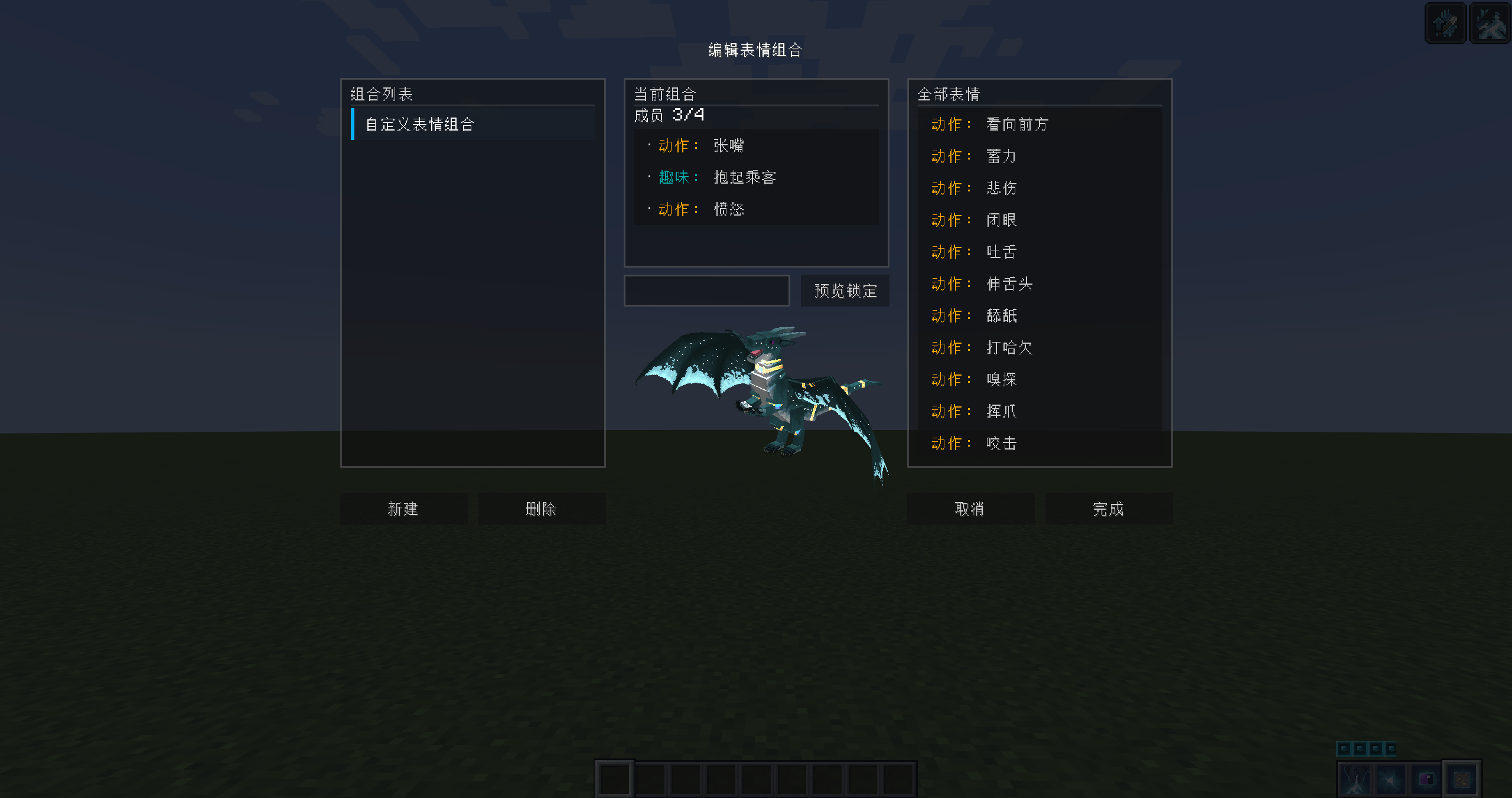
- Combo editor: a three-column layout for editing combos; unnamed single-emote combos automatically use the emote's name.
- Two wheel styles: two different wheel styles are provided — radial and horizontal floating; compatible with custom font mods such as Modern UI.
- Fully configurable: wheel radius, size multiplier, emotes per page, and more.
- Client-side only: only needs to be installed on the client; the server does not need it.
Usage
Two Wheels
- Hold the Quick Wheel key (default
Z): opens the custom combo wheel. - Hold the Full Wheel key (default
X): opens all emotes of the current body. - Hold the Modifier (default
Left Ctrl) + the Quick Wheel key to open the Full Wheel directly. - All keys can be rebound in Controls.
After opening the wheel, move the mouse to the target sector and release to apply; left-click to toggle directly; right-click to start force-looping. Use the mouse wheel to flip pages. The "Cancel all emotes" sector stops all emotes.
Combo Editor
- Left column: combo list; middle column: current combo; right column: all emotes available to the current body.
- Click an emote in the right column to add it to the combo; click a member in the middle column to remove it.
- The same rules as the original apply (up to 4 emotes per combo).
- Unnamed single-emote combos use that emote's name.
Dragon Model Preview
- Left-drag to rotate, right-drag to pan.
- Use the mouse wheel to zoom in the combo editor.
Requirements
| Dependency | Version |
|---|---|
| Minecraft | 1.21.1 |
| NeoForge | 21.1.186+ |
| Dragon Survival | 2.0.54+ |
| GeckoLib | 4.6+ |
Installation
- Install NeoForge for Minecraft 1.21.1.
- Install Dragon Survival and GeckoLib.
- Place the jar into the
modsfolder. - Launch the game and make sure your character is a dragon.
Note: This mod is client-side only; the server does not need it installed.
Notes
- Combo data is stored per species under
ds_quickemotes/emote_combos/in the game directory, making it easy to back up or migrate between different setups.
License
Open source under the MIT License.
Declaration
This mod was developed with the assistance of Deepseek AI.
中文说明
龙之生存快速表情(Dragon Survival Quick Emotes)
为 龙之生存 添加了一个快速表情轮盘,按住快捷键呼出轮盘,选择表情后松手就能快速应用表情。
龙之生存的表情系统非常强大,但每次启用表情都要经过一套比较繁琐的操作,无法预览表情导致尝试各种表情时可能造成误会。本模组把整套流程压缩成一个轮盘,并把常用表情组合、完整表情列表、龙模型预览和组合编辑整合在同一套界面里。
主要功能
- 双轮盘设计:分别为快捷轮盘和完整轮盘,快捷轮盘用于快速打开自定义组合(当然,你也可以快速打开某个特定表情,将其制成单表情组合即可),完整轮盘则列出当前身体的全部表情。
- 按住打开、松手生效:指向扇区后松开即应用;对同一扇区再次操作则关闭。同时也提供了左键扇区开关功能。
- 按龙种保存组合:每个龙种对应一份专属组合列表,分别保存于本地。
- 强制循环:右键扇区使目标持续循环,一次性表情也能循环播放。
- 指示灯:位于轮盘外沿,用于显示当前表情使用状态,黄色:使用中,橙色:部分使用中,红色:强制循环中。
- 实时龙模型预览:在界面中渲染玩家当前的龙模型,方便预览表情或组合。
- 一键存为组合:在完整轮盘中把当前正在播放的表情直接存成新组合。
- 组合编辑器:三栏布局,用于编辑组合,未命名的单表情组合自动使用表情名。
- 两种轮盘样式:提供了两种不同的轮盘样式:径向和横版悬浮;兼容 Modern UI 等自定义字体mod。
- 完整可配置:轮盘半径、大小倍率、每页表情数等等。
- 纯客户端模组:仅需在客户端安装即可,服务器无需安装。
使用方法
双轮盘
- 按住快捷轮盘键(默认
Z):打开自定义组合轮盘。 - 按住完整轮盘键(默认
X):打开当前身体全部表情。 - 按住修饰键(默认
左 Ctrl) + 快捷轮盘键,也可直接打开完整轮盘。 - 所有键位均可在「控制」中重新绑定。
打开轮盘后,鼠标移到目标扇区并松开即可应用;左键点击可直接开关;右键点击可开启强制循环。鼠标滚轮翻页。「取消所有表情」扇区可停止全部表情。
组合编辑器
- 左栏:组合列表;中栏:当前组合;右栏:当前身体可用的全部表情。
- 点击右栏表情加入组合,点击中栏成员移除。
- 添加规则与原版一致(一组最多4个表情)。
- 未命名的单表情组合会沿用该表情的名称。
龙模型预览
- 左键拖拽旋转,右键拖拽平移。
- 组合编辑界面下可使用滚轮缩放
运行要求
| 依赖 | 版本 |
|---|---|
| Minecraft | 1.21.1 |
| NeoForge | 21.1.186+ |
| Dragon Survival | 2.0.54+ |
| GeckoLib | 4.6+ |
安装方法
- 为 Minecraft 1.21.1 安装 NeoForge。
- 安装 Dragon Survival 与 GeckoLib。
- 将 jar 放入
mods文件夹。 - 启动游戏,并确保角色是龙。
注意: 本模组为纯客户端模组,服务器无需安装。
说明
- 组合数据按龙种保存在游戏目录的
ds_quickemotes/emote_combos/下,方便备份或在不同配置间迁移。
开源协议
以 MIT 协议 开源。
声明
本模组借助 Deepseek AI 辅助完成。
Screenshots
Gallery
-
 PixPin_2026-10-19_14-16-37.png PixPin_2026-10-19_14-16-37.png
 -
 PixPin_2026-10-19_02-19-16.png PixPin_2026-10-19_02-19-16.png
 -
 PixPin_2026-10-19_02-24-26.png PixPin_2026-10-19_02-24-26.png
 -
 PixPin_2026-10-19_14-20-14.png PixPin_2026-10-19_14-20-14.png
 -
 PixPin_2026-10-19_14-17-15.png PixPin_2026-10-19_14-17-15.png
 -
 PixPin_2026-10-19_02-19-50.png PixPin_2026-10-19_02-19-50.png
 -
 PixPin_2026-10-19_14-21-44.png PixPin_2026-10-19_14-21-44.png
 -
 PixPin_2026-10-19_02-23-30.png PixPin_2026-10-19_02-23-30.png
Versions
Files
Relations
Project Relations
More like this
Similar Mods
Suggestions use data such as tags, dependencies, dependents, descriptions, titles, and more to rank how much they overlap with this mod.
- Small Griffin - Dragon Survival Addon
- Sculk Dragon Utils
- Ayame PaperDoll Dragon Survival Compat Fork
- Dragon Survival TACZ Compat
- Dragontoggle
- Dragon Survival
- Dragon Survival: IAF Integration
- Dragon Survival Compatibility
- Dragon Survival: Alternate Altar Recipes
- Dragon Survival x Punchy! Compatability mod
- Star Dragon(Dragon Survival Addon)
- Megarrian Typhus Dragons - Dragon Survival Addon
On ModDex
Community snapshot
By the numbers
Statistics

Get it on
Available Platforms
On ModDex
Community snapshot
By the numbers
Statistics
Resources