Community listing page, reviews here may not be monitored by the author.
Drawing board


No reviews yet
Drawing Board is a mod for creating and sharing pixel art in-game. Draw on custom drawing paper, display finished artwork above your character, store it in an art album, or place it on any side of a block, including the top and bottom.
Community voices
Reviews
No reviews yet. Be the first to review this project!
Get it on
Available Platforms
Compatibility
Supported Environments
Must be installed on both the client and the server.
About
Project Details
For authors
Embed Badge
If you're the author of this project, you can embed a live badge anywhere that supports HTML or Markdown. It updates automatically whenever ratings change.
Use HTML for any page that supports it, or Markdown for README files and Markdown-based descriptions.
Identifiers
Platform IDs
Resources
External Links
About
Description
# Drawing Board
Drawing Board is a mod for creating and sharing pixel art in-game. Draw on custom drawing paper, display finished artwork above your character, store it in an art album, or place it on any side of a block, including the top and bottom.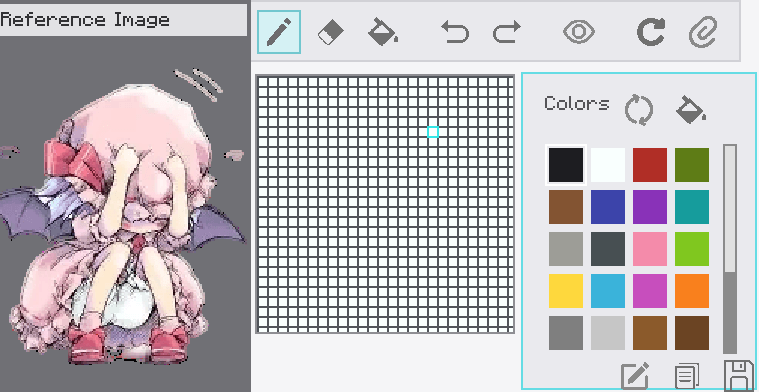
## Crafting
- **Drawing Paper:** place two paper items horizontally in a crafting grid.
- **Art Album:** place one paper in the center and leather in all eight surrounding slots.
## Drawing Paper
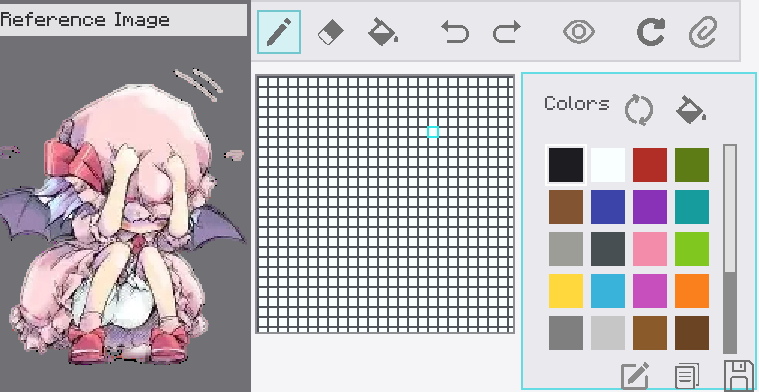
1. Hold drawing paper in your main hand.
2. Press **Shift + Right-click** to open the editor.
3. Draw with the pencil, fill tool, or eraser.
4. Use the color palette to select, add, reorder, or remove colors.
5. Click **Save**. The first save asks for a name and turns the paper into a finished artwork.
Finished artwork keeps its name and can stack with identical artwork up to 16 items.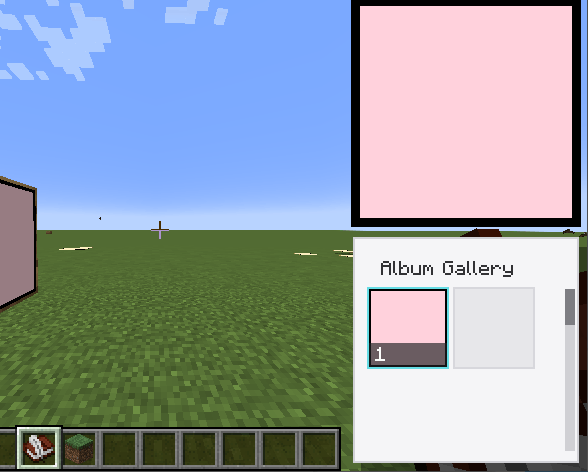
## Displaying And Placing Artwork
- Hold finished artwork and **left-click** to display it.
- In first person, it appears in the lower-right HUD with an entrance and exit animation.
- In third person, it appears above the player's head.
- **Right-click a block face** to place the artwork on that surface.
- Artwork can be placed on the north, south, east, west, top, or bottom face of a block.
- A placed artwork can be broken and collected again.
- **Shift + Right-click** finished artwork in the world to edit it. Editing cancels its active display.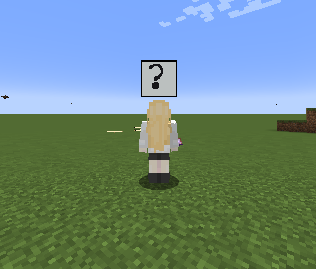
## Art Album
- Hold the album and **Shift + Right-click** to open its chest-style storage screen.
- Hold the album and **Right-click** to open the gallery.
- Left-click an artwork in the gallery to display it above the album for three seconds.
- The gallery has a scrollbar for browsing stored artwork.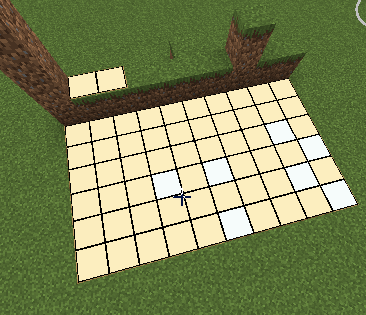
##Controls
- **Left-click a tool icon:** select the pencil, eraser, fill tool, undo, redo, grid visibility, clear, or reference image tool.
- **Right-click the pencil or eraser icon:** open its size slider.
- **Left-click a color:** select it.
- **Right-click a color:** open its delete menu.
- **Hold and drag a color:** change its palette order.
- **Ctrl + Mouse wheel:** zoom the canvas.
- **Shift + Mouse wheel:** move the canvas horizontally.
- **Mouse wheel:** move the canvas vertically.
- **Right-drag on the canvas:** move the canvas freely.
- **Reference image:** import a PNG or JPG, then drag it with the left mouse button and zoom it with the mouse wheel.
- **Save:** save the artwork and close the editor.
- **Rename:** change the name of an existing artwork.
- **Copy:** create a copy without opening the naming dialog.
- **Esc:** close the editor. If there are unsaved changes, confirmation is required.
Drawing Board
Drawing Board is a mod for creating and sharing pixel art in-game. Draw on custom drawing paper, display finished artwork above your character, store it in an art album, or place it on any side of a block, including the top and bottom.
Crafting
- Drawing Paper: place two paper items horizontally in a crafting grid.
- Art Album: place one paper in the center and leather in all eight surrounding slots.
Drawing Paper
- Hold drawing paper in your main hand.
- Press Shift + Right-click to open the editor.
- Draw with the pencil, fill tool, or eraser.
- Use the color palette to select, add, reorder, or remove colors.
- Click Save. The first save asks for a name and turns the paper into a finished artwork.
Finished artwork keeps its name and can stack with identical artwork up to 16 items.
Displaying And Placing Artwork
- Hold finished artwork and left-click to display it. - In first person, it appears in the lower-right HUD with an entrance and exit animation. - In third person, it appears above the player's head.
- Right-click a block face to place the artwork on that surface.
- Artwork can be placed on the north, south, east, west, top, or bottom face of a block.
- A placed artwork can be broken and collected again.
- Shift + Right-click finished artwork in the world to edit it. Editing cancels its active display.
Art Album
- Hold the album and Shift + Right-click to open its chest-style storage screen.
- Hold the album and Right-click to open the gallery.
- Left-click an artwork in the gallery to display it above the album for three seconds.
- The gallery has a scrollbar for browsing stored artwork.
Controls
- Left-click a tool icon: select the pencil, eraser, fill tool, undo, redo, grid visibility, clear, or reference image tool.
- Right-click the pencil or eraser icon: open its size slider.
- Left-click a color: select it.
- Right-click a color: open its delete menu.
- Hold and drag a color: change its palette order.
- Ctrl + Mouse wheel: zoom the canvas.
- Shift + Mouse wheel: move the canvas horizontally.
- Mouse wheel: move the canvas vertically.
- Right-drag on the canvas: move the canvas freely.
- Reference image: import a PNG or JPG, then drag it with the left mouse button and zoom it with the mouse wheel.
- Save: save the artwork and close the editor.
- Rename: change the name of an existing artwork.
- Copy: create a copy without opening the naming dialog.
- Esc: close the editor. If there are unsaved changes, confirmation is required.
Screenshots
Gallery
Versions
Files
Relations
Project Relations
More like this
Similar Mods
Suggestions use data such as tags, dependencies, dependents, descriptions, titles, and more to rank how much they overlap with this mod.
On ModDex
Community snapshot
By the numbers
Statistics
Want to reach Minecraft players?
We're looking for a server hosting partner to feature here and other parts of the site. Interested? Send us a message!
Get in touchGet it on
Available Platforms
On ModDex
Community snapshot
By the numbers
Statistics
Resources