
Community listing page, reviews here may not be monitored by the author.
DUATAR: Private Trade


No reviews yet
A secure, server-authoritative private trading system for Minecraft. Players can send timed trade requests and safely exchange items with each other.
Community voices
Reviews
No reviews yet. Be the first to review this project!
Get it on
Available Platforms
Compatibility
Supported Environments
Must be installed on both the client and the server.
About
Project Details
For authors
Embed Badge
If you're the author of this project, you can embed a live badge anywhere that supports HTML or Markdown. It updates automatically whenever ratings change.
Use HTML for any page that supports it, or Markdown for README files and Markdown-based descriptions.
Identifiers
Platform IDs
Resources
External Links
About
Description
DUATAR: Private Trade
DUATAR: Private Trade allows players on the same server to trade items from anywhere using a mutual confirmation system.
Features
- Send private trade requests using player names
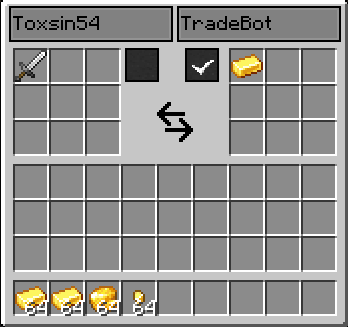
- 9 trade slots for each player
- View the other player’s offer in real time
- Mutual ready/confirmation system
- Ready status automatically resets when an offer changes
- 30-second trade request timeout
- Items are returned to their owners if the trade is cancelled
- Players cannot take items directly from the other player’s offer
- Server-managed trade transactions
How to Use
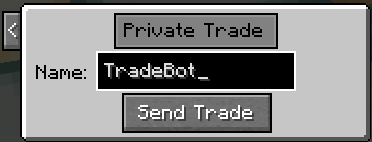
- Press R by default to open the trade request menu.
- Enter the exact Minecraft username of the player you want to trade with.
- Click Send Trade.
- The receiving player can accept the request with ✓ or decline it with X.
- When the request is accepted, both players are taken to the trade screen.
- Place the items you want to offer into your 9 trade slots.
- Review the other player’s offer and select your confirmation box when ready.
- The trade is automatically completed when both players are ready.
If either player changes their offer, the ready statuses are reset and both players must confirm the updated trade again. This prevents unnoticed last-second offer changes.
Closing the trade screen or pressing Esc cancels the transaction. If the trade has not been completed, the items you offered are returned to your inventory.
Tip: You can change the trade key from Minecraft’s Options → Controls menu.
Requirements
- Minecraft: 26.1.2
- Mod Loader: NeoForge 26.1.2.95 or newer
- Required Dependency: MCreator Link
- The mod must be installed on both the server and all connecting clients.
DUATAR: Private Trade DUATAR: Private Trade allows players on the same server to trade items from anywhere using a mutual confirmation system. Features
- Send private trade requests using player names
- 9 trade slots for each player
- View the other player’s offer in real time
- Mutual ready/confirmation system
- Ready status automatically resets when an offer changes
- 30-second trade request timeout
- Items are returned to their owners if the trade is cancelled
- Players cannot take items directly from the other player’s offer
- Server-managed trade transactions How to Use
- Press R by default to open the trade request menu.
- Enter the exact Minecraft username of the player you want to trade with.
- Click Send Trade.
- The receiving player can accept the request with ✓ or decline it with X.
- When the request is accepted, both players are taken to the trade screen.
- Place the items you want to offer into your 9 trade slots.
- Review the other player’s offer and select your confirmation box when ready.
- The trade is automatically completed when both players are ready. If either player changes their offer, the ready statuses are reset and both players must confirm the updated trade again. This prevents unnoticed last-second offer changes. Closing the trade screen or pressing Esc cancels the transaction. If the trade has not been completed, the items you offered are returned to your inventory. Tip: You can change the trade key from Minecraft’s Options → Controls menu.
Requirements
- Minecraft: 26.1.2
- Mod Loader: NeoForge 26.1.2.95 or newer
- Required Dependency: MCreator Link
- The mod must be installed on both the server and all connecting clients.
Screenshots
Gallery
-
 11-private_trade.png 11-private_trade.png
 -
 13.png 13.png
-
-
 Private Trade
Versions
Files
Relations
Project Relations
More like this
Similar Mods
Suggestions use data such as tags, dependencies, dependents, descriptions, titles, and more to rank how much they overlap with this mod.
On ModDex
Community snapshot
By the numbers
Statistics
Want to reach Minecraft players?
We're looking for a server hosting partner to feature here and other parts of the site. Interested? Send us a message!
Get in touchGet it on
Available Platforms
On ModDex
Community snapshot
By the numbers
Statistics
Resources