
Community listing page, reviews may not be monitored by the author.
Dungeon Config

No reviews yet
Config library with visuals inspired by MC Dungeons along with complete customizability of your config screen.

Community voices
Reviews
No reviews yet. Be the first to review this project!
Get it on
Available Platforms
About
Project Details
For authors
Embed Badge
If you're the author of this project, you can embed a live badge anywhere that supports HTML or Markdown. It updates automatically whenever ratings change.
Use HTML for any page that supports it, or Markdown for README files and Markdown-based descriptions.
Identifiers
Platform IDs
About
Description

A config library for Fabric and NeoForge mods, with a Minecraft Dungeons style settings screen built in.
You declare your options in code. Dungeon Config then takes care of:
- A commented JSON5 file at
config/<modid>/<modid>.json5, written in your order with your comments above each value. - A full settings screen with tabs, sections, search, sliders, dropdowns, registry pickers, tooltips, unsaved-change prompts and restart notices. You don't write any GUI code.
- A spot on the shared "Dungeon Configs" page. Players reach it from a title screen button, Ctrl + K, or the Config button that Dungeon Config adds for you in Mod Menu and NeoForge's Mods list.
- Optional server → client sync per option, without ever overwriting the player's own saved value.
- NeoForge-style restart semantics (
worldRestart()/gameRestart()). - Drop-in stand-ins for NeoForge's
ModConfigSpec, Cloth Config'sAutoConfigand NightConfig'sCommentedFileConfig, so porting an existing config is mostly an import change, and players' old config files are imported automatically. - Per-mod screen theming: background pictures, GIFs or videos, menu music, fonts and colours. Players can override all of it.
1. Adding it to your build
Dungeon Config isn't on a public maven yet. Publish it to your local maven:
cd DungeonConfig-26.1.2   # or DungeonConfig-1.21.1
./gradlew publishToMavenLocal
That publishes three artifacts:
| Artifact | Use it in |
|---|---|
com.frikinjay:DungeonConfig-26.1.x-common:<version> |
common |
com.frikinjay:DungeonConfig-26.1.x-fabric:<version> |
fabric |
com.frikinjay:DungeonConfig-26.1.x-neoforge:<version> |
neoforge |
On 1.21.1 the prefix is DungeonConfig-1.21.1-.
Add mavenLocal() to your repositories, then:
26.1.2 :
// common/build.gradle
compileOnly "com.frikinjay:DungeonConfig-26.1.x-common:1.26.10.2"

// fabric/build.gradle
implementation "com.frikinjay:DungeonConfig-26.1.x-fabric:1.26.10.2"
include "com.frikinjay:DungeonConfig-26.1.x-fabric:1.26.10.2"      // jar-in-jar

// neoforge/build.gradle
implementation "com.frikinjay:DungeonConfig-26.1.x-neoforge:1.26.10.2"
include "com.frikinjay:DungeonConfig-26.1.x-neoforge:1.26.10.2"    // jar-in-jar
1.21.1 : use the same lines with modCompileOnly / modImplementation instead of compileOnly / implementation.
Bundle it or require it?
- Bundle it (
include): players install nothing extra. If several mods bundle it, or a player also installs it on its own, the loader picks the newest copy. - Require it: drop the
includelines and list it as a required dependency.
Declare the dependency either way:
// fabric.mod.json
"depends": { "dungeonconfig": ">=1.26.10.2" }
# neoforge.mods.toml
[[dependencies.yourmodid]]
modId = "dungeonconfig"
type = "required"
versionRange = "[1.26.10.2,)"
ordering = "NONE"
side = "BOTH"2. Your first config
public final class MyConfig {
    public static final DungeonConfig CONFIG = DungeonConfig.builder("mymod")
            .displayName("My Mod")              // optional, defaults to the name in your mod metadata
            .build();

    public static final ConfigEntry<Boolean> PARTICLES =
            CONFIG.addBoolean("particlesEnabled", "Visuals", true, "Show custom particles");

    public static final ConfigEntry<Integer> AURA_RADIUS =
            CONFIG.addInt("auraRadius", "Gameplay", 16, 1, 64, "Radius of the aura in blocks");

    public static final ConfigEntry<Double> SPEED =
            CONFIG.addDouble("speed", "Gameplay", 1.0, 0.1, 10.0, "Movement speed multiplier")
                  .withUnit("x").withStep(0.05);

    public static final ConfigEntry<String> GREETING =
            CONFIG.addString("greeting", "General", "Welcome!", "Message shown on join");

    public static void init() {
        CONFIG.load();   // after every entry exists: reads the file, creating it with defaults
    }
}
Call MyConfig.init() from your common mod initialiser, then read values anywhere:
if (MyConfig.PARTICLES.get()) spawnParticles(MyConfig.AURA_RADIUS.get());The file on disk ends up looking like this:
// My Mod configuration
// This file uses JSON5 syntax (https://json5.org/)
{
  // Show custom particles
  "particlesEnabled": true,

  // Radius of the aura in blocks
  "auraRadius": 16,
  ...
}
If a player hand-edits it into something invalid, the broken file is kept as .bad-<date> and a clean one is written. Out-of-range numbers are clamped on load.
The add* helpers
| Method | Screen control |
|---|---|
addBoolean(name, category, default, comment) |
Toggle |
addInt(name, category, default, min, max, comment) |
Slider |
addLong(name, category, default, min, max, comment) |
Slider |
addDouble(name, category, default, min, max, comment) |
Slider |
addString(name, category, default, comment) |
Text box |
For anything else (enums, lists, custom types), construct the entry yourself and add it:
public enum Mode { FAST, FANCY, OFF }

public static final ConfigEntry<Mode> MODE = CONFIG.add(
        new ConfigEntry<>("renderMode", "Rendering mode", "Visuals", Mode.FANCY, Mode.class));   // dropdown

public static final ConfigEntry<String> ICON = CONFIG.add(
        new ConfigEntry<>("iconItem", "Item shown as the icon", "General", "minecraft:diamond", String.class)
                .withRegistry(BuiltInRegistries.ITEM));                                           // searchable item picker
Lists and custom POJOs are supported too. Lists are edited as comma-separated text on the screen, and custom types are stored as JSON through Gson. The ModConfigSpec route below is the easiest way to define lists.
3. Entry options
Every option chains off the entry and returns it, so you can set them inline.
Display
| Option | Effect |
|---|---|
.withSection("Homes") |
Sub-heading inside the tab |
.withLabel("Nice Name") |
Display name when there's no lang key |
.withChoices(a, b, c) |
Show as a dropdown limited to these values |
.withUnit("%") |
Unit after the number. Names ending in Percent, Seconds, Minutes or Fps get one automatically. |
.withStep(0.5) |
Slider notch / arrow-key increment |
.withValueName(0, "Default") |
Show a value by a name, for values with a special meaning (call it once per value) |
Validation
| Option | Effect |
|---|---|
.withValidator(obj -> ...) |
Reject values that fail the check |
.withRegistry(registry) |
Searchable registry-id picker on a string entry |
.withRegistry(registry, allowed) |
Picker limited to these objects or ids |
.withRegistryFilter(predicate) |
Picker limited to objects matching the predicate |
Lists
| Option | Effect |
|---|---|
.withElementType(Class) |
Element type for list items, so 1 stays an Integer and doesn't become a Double |
.withElementValidator(...) |
Check each list element |
.withSizeValidator(...) |
Check the list as a whole |
.withMinEntries(n), .withMaxEntries(n) |
List size limits |
.withListAllowEmpty(bool) |
Whether an empty list is valid |
.withElementSupplier(...) |
Default value for new list elements |
Sync and restart
| Option | Effect |
|---|---|
.synced() |
The server's value is used while connected (see §5) |
.syncedOr(value) |
Like synced(), but uses value on servers that don't send one |
.serverOwned() |
Data that belongs to the server (see §5): synced, never read from or written to the file, and locked on the screen while on a remote server |
.withRestart(RestartType.WORLD | GAME) |
Hold the old value until rejoin / restart (see §6) |
Reading and writing values
| Method | Returns / does |
|---|---|
get() / getValue() |
The value in effect right now: the server's value when synced, the held value when a restart is pending. Safe from any thread. |
getLocalValue() |
The player's own saved value, ignoring the server and restart holds |
getServerValue(), isServerControlled() |
Inspect sync state |
isServerOwned(), isLocked() |
Whether the option belongs to the server, and whether the screen must not change it right now |
isRestartPending() |
true when a saved change is waiting for a rejoin or restart |
set(v) / setValue(v) |
Change the local value if it passes validation |
setClamped(n) |
Set a number, clamped to the range |
resetToDefault(), isDefault(), getDefault() |
Defaults |
Changes made with set aren't written to disk until you call CONFIG.save().
4. The DungeonConfig object
Builder options
| Builder option | Effect |
|---|---|
.displayName(name) |
Name on the screen and the Dungeon Configs page |
.fileName(name) |
Config file name, if not <modid> |
.spec(spec) |
Use a NeoForge-style ModConfigSpec (§7) |
.appearanceCategory("Interface") |
Tab for the background and music settings. Default: Appearance. |
.defaultBackground(...), .defaultMusic(...), .defaultColors(...) |
Default screen media (§9) |
.defaultBackgroundBlur(int), .defaultBackgroundDim(int), .defaultBackgroundFps(int), .defaultMusicVolume(int) |
Defaults for those appearance settings |
.noAppearance() |
Leave out the background and music settings entirely |
.noFireflies() |
Turn off the ambient particle effect on your screen |
Runtime methods
| Method | What it does |
|---|---|
load(), reload(), save() |
File I/O |
onSaved(runnable) |
Callback after the screen (or save()) writes the file. Use it to rebuild caches. |
setOrder(list) |
Reorder entries in the file and on the screen |
remove(name) |
Drop an entry, for options that come and go while the game runs (one set per item in a list, say). Entries can also be added with add(...) after load(); the screen picks up both changes when it saves. |
entries(), entry(name), categories() |
Introspection |
revision() |
A number that changes whenever entries are added, removed, reordered or get new server values. An open screen rebuilds when it changes. |
onServerValues(runnable) |
Callback on the client after server values arrive and after they are cleared on leave |
hasServerValues() |
Whether server values are currently held |
syncFilter((player, json) -> ...) |
Adjust the values sent to one player, for example to leave out data they may not see |
syncedValuesFor(player) |
The values that player would be sent |
directory() |
config/<modid>, for your own extra files |
DungeonConfigs.get(modId) and DungeonConfigs.all() give you any registered config.
5. Server sync
Mark the options that must match between server and client. Gameplay rules are the typical case: stack sizes, collision, damage numbers.
// Server's value while connected; false on servers that don't have the mod
public static final ConfigEntry<Boolean> BIG_STACKS =
        CONFIG.addBoolean("bigStacksEnabled", "Gameplay", true, "Stacks of 64").syncedOr(false);

// Server's value while connected; the player's own on servers without the mod
public static final ConfigEntry<Integer> RADIUS =
        CONFIG.addInt("radius", "Gameplay", 8, 1, 64, "Effect radius").synced();
How sync behaves:
- When values are sent: on join, and again whenever a singleplayer or LAN host saves.
- What types are sent: enums, lists and custom types round-trip properly.
- The player's own value is never overwritten. It's kept separately and comes back in singleplayer and on other servers. The screen shows a badge on server-controlled options so players know why their change isn't in effect.
- The handshake is optional on both sides. Vanilla clients and clients without the mod can still join, and the reverse also works.
Server-owned options
Some options are data the server keeps for itself, such as one set of options per entry of a server-side list. Mark them
.serverOwned(). They are left out of the config file (the mod stores them itself), they are synced, and on a remote server
the client holds the server's values and the screen shows them read-only. To create and drop them on the client as the
server's list changes, listen for server values:
CONFIG.onServerValues(() -> {
    if (!CONFIG.hasServerValues()) RULES.set(new ArrayList<>()); // the player left
    MyRules.matchList();                                         // add or remove one option set per entry
});
Options added from the listener pick up the values the server already sent. Use syncFilter to send each player only
what they may see.
6. Restart semantics
This matches NeoForge's ModConfigSpec. Some options can't safely change mid-session, for example anything read once at world load or registry time.
public static final ConfigEntry<Integer> ORE_VEINS =
        CONFIG.addInt("oreVeins", "World", 8, 0, 32, "Veins per chunk")
.withRestart(RestartType.WORLD); // or RestartType.GAMEWORLD:get()keeps returning the value from when the world was entered until the player leaves it, even after the screen saves a new one.GAME: the value is held until the game restarts.- What the player sees: the screen marks these options and shows a Restart Needed dialog after saving one.
- Checking it yourself:
isRestartPending()andgetLocalValue()let you see the pending value.
7. NeoForge-style ModConfigSpec
If you're porting from NeoForge, or just like the spec builder:
public final class MyConfig {
    private static final ModConfigSpec.Builder BUILDER = new ModConfigSpec.Builder();

    static { BUILDER.push("Combat"); }

    public static final ModConfigSpec.DoubleValue CRIT = BUILDER
            .comment("Critical hit damage multiplier")
            .defineInRange("critMultiplier", 1.5, 1.0, 5.0);

    public static final ModConfigSpec.EnumValue<Mode> MODE = BUILDER
            .comment("Rendering mode")
            .defineEnum("mode", Mode.FANCY);

    public static final ModConfigSpec.ConfigValue<List<String>> BLOCKS = BUILDER
            .comment("Blocks the effect ignores")
            .worldRestart()
            .defineListAllowEmpty("ignoredBlocks", List.of("minecraft:bedrock"), o -> o instanceof String);

    static { BUILDER.pop(); }

    public static final ModConfigSpec SPEC = BUILDER.build();
    public static final DungeonConfig CONFIG = DungeonConfig.builder("mymod").spec(SPEC).build();
}
Supported builder methods:
push/pop(a pushed path becomes the screen category)comment,translationdefine,defineInRange(int / long / double /Comparable)defineInList,defineEnum(enum constants with bodies are fine)defineList,defineListAllowEmptyworldRestart(),gameRestart()
Values are read with .get(), as in NeoForge. The spec's entries are ordinary ConfigEntrys, so every option from §3 works on them too.
8. Moving over from NeoForge, Cloth Config or NightConfig
Dungeon Config can stand in for the three config libraries mods most often use. In each case the code barely changes, and the values players already saved are imported the first time the game runs with Dungeon Config.
From a NeoForge / Forge ModConfigSpec
Swap net.neoforged.neoforge.common.ModConfigSpec (or Forge's ForgeConfigSpec) for com.frikinjay.dungeonconfig.api.ModConfigSpec, hand the spec to the builder (§7), and point it at the old TOML file:
public static final DungeonConfig CONFIG = DungeonConfig.builder("mymod")
        .spec(SPEC)
        .migrateFrom("mymod-common.toml")                      // config/mymod-common.toml
        .migrateKey("general.blacklist", "blacklistItems")     // only for keys you renamed
        .build();
Drop the container.registerConfig(...) call: Dungeon Config owns the file now.
From Cloth Config (AutoConfig)
Change the imports and keep the class:
| Cloth Config | Dungeon Config |
|---|---|
me.shedaniel.autoconfig.AutoConfig |
com.frikinjay.dungeonconfig.compat.cloth.AutoConfig |
me.shedaniel.autoconfig.ConfigData / ConfigHolder |
com.frikinjay.dungeonconfig.compat.cloth.ConfigData / ConfigHolder |
me.shedaniel.autoconfig.annotation.Config / ConfigEntry |
com.frikinjay.dungeonconfig.compat.cloth.Config / ConfigEntry |
me.shedaniel.autoconfig.serializer.JanksonConfigSerializer (Gson, Toml4j) |
com.frikinjay.dungeonconfig.compat.cloth.JanksonConfigSerializer (Gson, Toml4j) |
Jankson's @Comment |
com.frikinjay.dungeonconfig.compat.cloth.Comment |
@Config(name = "mymod")
public class MyConfig implements ConfigData {
    @Comment("Show custom particles")
    public boolean particles = true;

    @ConfigEntry.BoundedDiscrete(min = 1, max = 64)
    public int auraRadius = 16;

    @ConfigEntry.Gui.CollapsibleObject
    public Combat combat = new Combat();

    public static class Combat {
        public List<String> immuneMobs = List.of("minecraft:wither");
    }
}

AutoConfig.register(MyConfig.class, JanksonConfigSerializer::new);
MyConfig config = AutoConfig.getConfigHolder(MyConfig.class).getConfig();- Each field becomes an entry named after the field. Nested objects become sections,
@ConfigEntry.Categorypicks the tab,@BoundedDiscretemakes a slider,@Gui.RequiresRestarta game-restart option and@Gui.Excludedleaves a field out. - The object stays current.
getConfig()always returns the same object, and its fields are refreshed after every load, every screen save and every server sync.holder.save()writes your field changes back. - Save and load listeners run after the change. Their return value is ignored.
- The old file is imported once. The serializer names it:
config/<name>.json5(Jankson),.json(Gson) or.toml(Toml4j). It's then renamed to<name>.json5.migrated. - Picking the mod id. It comes from
@Config(modId = "..."), else fromnamewhen that's a loaded mod id, else from the part ofnamebefore the first-. A second@Configclass of the same mod gets its own tab and prefixed keys. - No GUI code needed. The Mod Menu / NeoForge Config button and
AutoConfig.getConfigScreen(...)open the Dungeon Config screen.
From NightConfig (CommentedFileConfig + ConfigSpec)
Replace com.electronwill.nightconfig.core.* and com.electronwill.nightconfig.core.file.* with com.frikinjay.dungeonconfig.compat.nightconfig.*:
CommentedFileConfig config = CommentedFileConfig.builder(configDir.resolve("mymod-common.toml"))
        .autosave()
        .build();
config.load();

ConfigSpec spec = new ConfigSpec();
spec.defineInRange("general.maxMana", 100, 10, 500);
spec.defineList("general.blockedItems", List.of("minecraft:tnt"), o -> o instanceof String);
spec.correct(config);
config.setComment("general.maxMana", "Largest mana pool");

int maxMana = config.getInt("general.maxMana");- Each path becomes an entry of the same name. The first segment is the tab and the middle ones the section. Spec ranges become sliders,
defineInListand enums become dropdowns, and the spec's checks also run on the screen. - The path you give the builder is only the old file. Values are saved in
config/<modid>/<modid>.json5, and the old TOML or JSON is imported on first load, then renamed to.migrated. - Picking the mod id. It comes from the file name (
mymod-common.tomlgivesmymodwhen that mod is loaded), or set it with.modId("mymod"). A second file of the same mod shares its config, with its keys prefixed (client.formymod-client.toml). - Ignored builder options.
sync(),autoreload(),writingMode(...)and the like are accepted but do nothing: Dungeon Config always writes atomically.
Importing any old file by hand
DungeonConfig.migrateFrom(...) / migrateKey(...) (also on the builder) work for any config, whatever library made it.
- Supported files: TOML, JSON5 and JSON, nested or flat.
- When it runs: during
load(), and only if the Dungeon Config file doesn't exist yet. - How values are matched: a renamed key first, then the same dotted path, then the same last key name (ignoring case,
_and-). - Afterwards: each file that was read is renamed to
<name>.migrated.
9. Names, descriptions and screen theming
Lang keys
The screen looks these up in your own lang file:
"mymod.config.title": "My Mod Settings",
"mymod.config.category.gameplay": "Gameplay",
"mymod.config.section.homes": "Homes",
"mymod.config.option.auraRadius": "Aura Radius",
"mymod.config.option.auraRadius.desc": "How far the aura reaches, in blocks."
Fallbacks when a key is missing:
auraRadiusbecomes "Aura Radius".- The description falls back to the entry's comment.
- Categories and sections show as written.
Inside a description, %s is replaced with config/<modid>.
Default media in your jar
assets/<modid>/dungeonconfig/bg/            png, jpg, gif, mp4, webm…
assets/<modid>/dungeonconfig/bgmusic/       ogg, wav (other formats need FFmpeg)
assets/<modid>/dungeonconfig/fonts/         title.ttf, heading.ttf, body.ttf, value.ttf (.otf works too)
assets/<modid>/dungeonconfig/colors.json5   colour scheme
How the background and music are chosen:
- With the player's setting left empty, a random file comes from
config/<modid>/bg(orbgmusic). - If that folder is empty, a random file comes from your jar.
- If your jar has none either, Dungeon Config's own media is used.
You can change that default from the builder:
- Pin one file with
.defaultBackground("intro.mp4")or.defaultMusic("theme.ogg"). - Turn it off with
"none". - Use a link with
.defaultColors(url)(or the background/music equivalents). The file downloads in the background, so it never blocks the render thread.
Players can override everything through their config folder, and resource packs can replace your bundled files.
FFmpeg: videos and non-ogg/wav audio need FFmpeg. The screen offers to download a checksum-verified build into config/dungeonconfig/bin, shared by every mod, so you don't need to ship it.
10. Opening the screen yourself
Minecraft.getInstance().setScreen(new DungeonConfigScreen(parent, MyConfig.CONFIG));   // your settings
Minecraft.getInstance().setScreen(DungeonConfigScreen.list(parent));                  // the Dungeon Configs page
Mod Menu and NeoForge's Mods list need no registration. Dungeon Config adds a Config button for every mod with a config, unless that mod registers its own screen.
11. Things worth knowing
- Keep entries in static fields and call
load()once, after they all exist. Building a secondDungeonConfigfor the same mod id throws. get()is cheap and thread-safe. Call it where you need the value rather than caching it, so live changes, sync and restart holds all apply.- Use
onSavedfor anything derived from config values: lookup sets, parsed registries and the like. - Downloads are SSRF-safe. Links to backgrounds, music and colours can't reach private, loopback or link-local addresses, including through redirects or DNS rebinding.
- Every public class has javadoc with usage examples, so your IDE's quick docs are a good second reference to this page.
Screenshots
Gallery
-
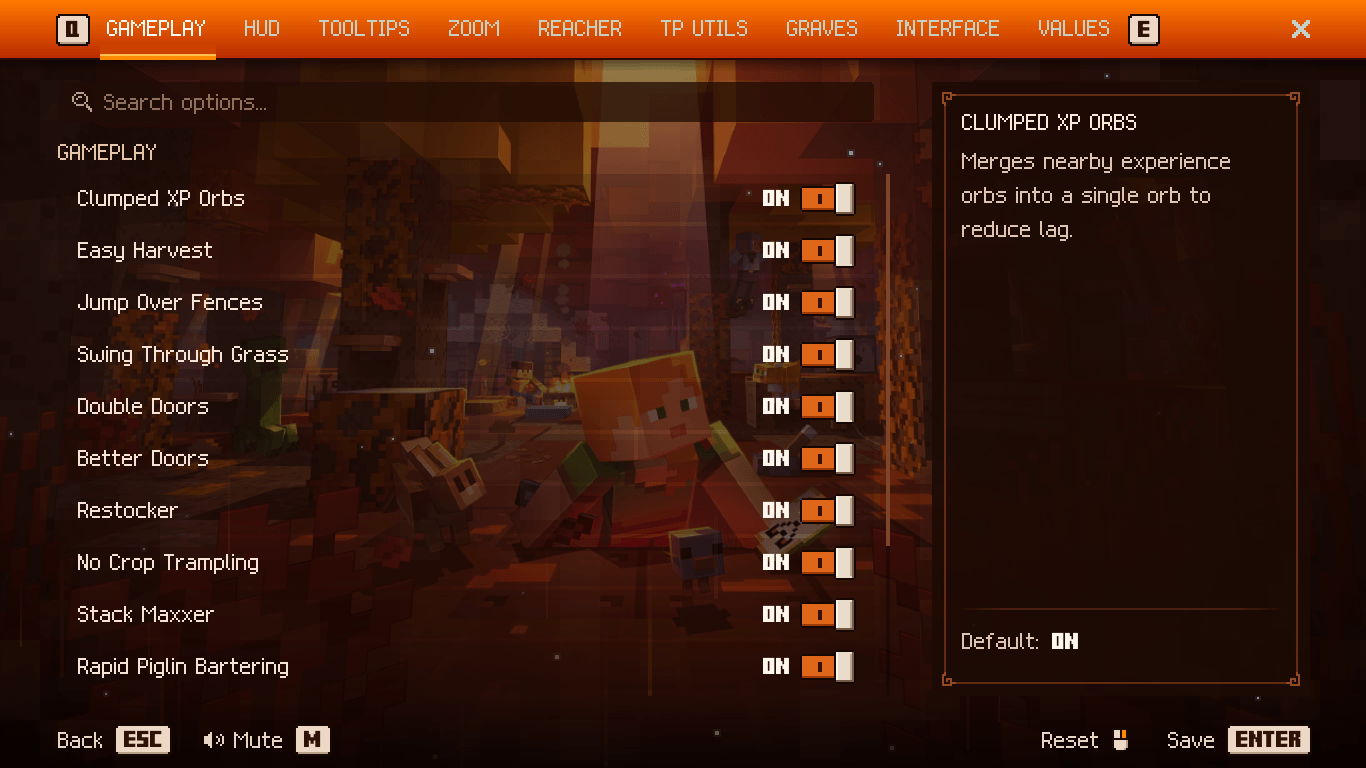 Sanctums setting's using Dungeon Config
 -
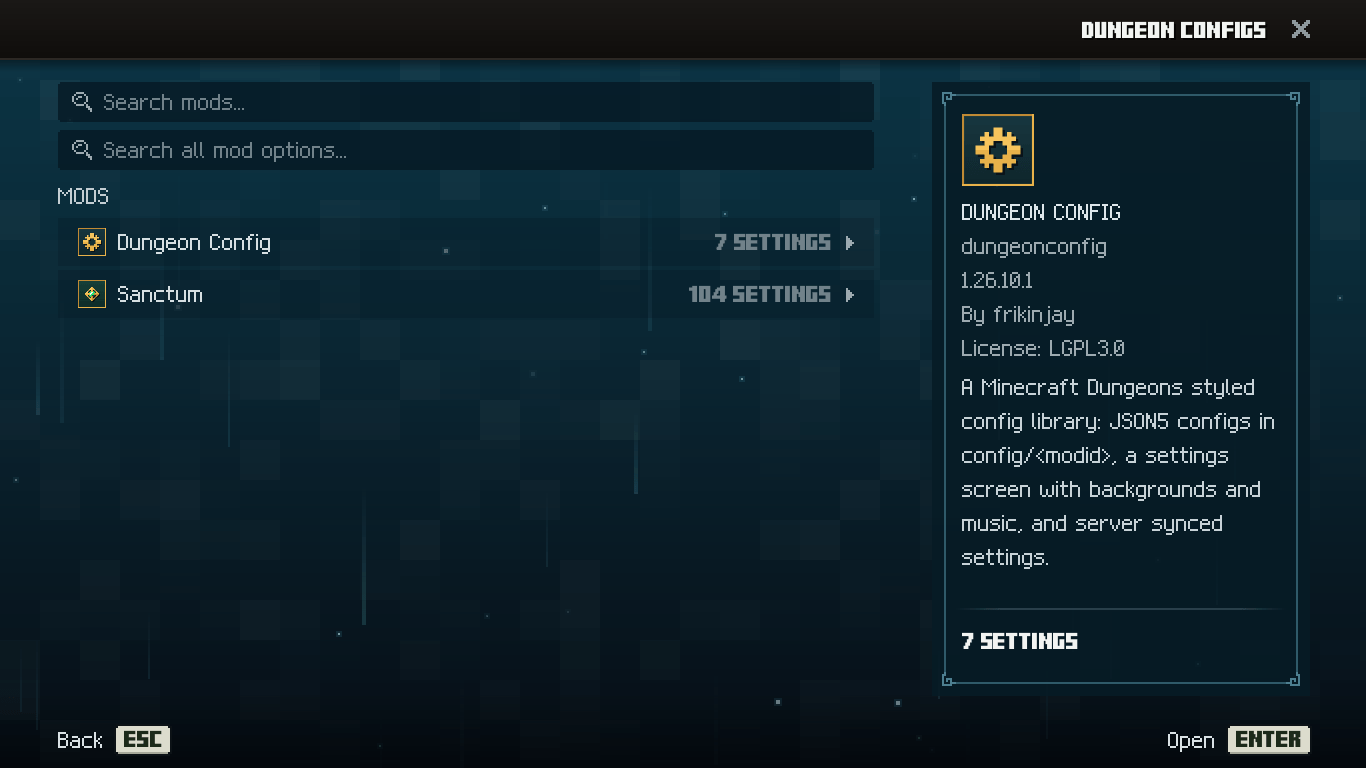 Dungeon Config's main menu
Versions
Files
Relations
Project Relations
More like this
Similar Mods
Suggestions use data such as tags, dependencies, dependents, descriptions, titles, and more to rank how much they overlap with this mod.
On ModDex
Community snapshot
By the numbers
Statistics

Get it on
Available Platforms
On ModDex
Community snapshot
By the numbers